
Caikit





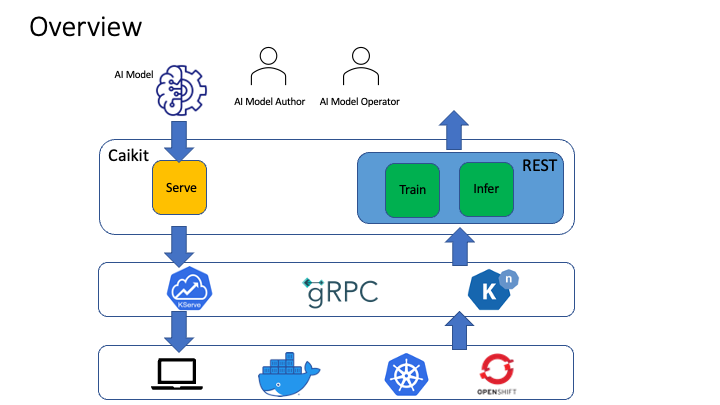
Caikit is an AI toolkit that enables users to manage models through a set of developer friendly APIs. It provides a consistent format for creating and using AI models against a wide variety of data domains and tasks.
Capabilities
Caikit streamlines the management of AI models for application usage by letting AI model authors focus on solving well known problems with novel technology. With a set of model implementations based on Caikit, you can:
- Run training jobs to create models from your data
- Run model inference using data APIs that represent data as structures rather than tensors
- Implement the right training techniques to fit the model, from static regexes to multi-GPU distribution
- Merge models from diverse AI communities into a common API (e.g.
transformers,tensorflow,sklearn, etc...) - Update applications to newer models for a given task without client-side changes
What Differentiates Caikit from Other AI Model Runtimes?
Developers who write applications that consume AI models are not necessarily AI experts who understand the intricate details of the AI models that they use. Some would like to treat AI as a "black box function" where they give it input and it returns the output. This is similar in cloud computing whereby some users would like to deploy their applications to the cloud without detailed knowledge of the cloud infrastructure. The value for them is in their application and that is what is of most interest to them.
Caikit provides an abstraction layer for application developers where they can consume AI models through APIs independent of understanding the data form of the model. In other words, the input and output to the model is in a format which is easily programmable and does not require data transformations. This facilitates the model and the application to evolve independently of each other.
When deploying a small handful of models, this benefit is minimal. The benefits are generally realized when consuming 10s or hundreds of AI models, or maintaining an application over time as AI technology evolves. Caikit simplifies the scaling and maintenance of such integrations compared to other runtimes. This is because other runtimes require an AI centric view of the model (for example, the common interface of “tensor in, tensor out”) which means having to code different data transformations into the application for each model. Additionally, the data form of the model may change from version to version.
Getting Started
There are 2 key things to define upfront when using Caikit to manage your AI model. They are as follows:
The module defines the entry points for Caikit to manage your model. In other words, it tells Caikit how to load, infer and train your model. An example is the text sentiment module. The data model defines the input and outputs of the model task. An example is the text sentiment data model.
The model is served by a gRPC server which can run as is or in any container runtime, including Knative and KServe. Here is an example of the text sentiment server code for gRPC. This references the module configuration here. This configuration specifies the module(s), which wrap the model(s), to serve.
There is an example of a client here which is a simple Python CLI which calls the model and queries it for sentiment analysis on 2 different pieces of text. The client also references the module configuration.
Check out the full Text Sentiment example to understand how to load and infer a model using Caikit. If you want to get started with developing and integrating your AI model algorithm using Caikit, checkout the GitHub template. In the template repository when you click on the green Use this template button, it generates a repository in your GitHub account with a simple customized module which is wrapped to be served by the Caikit runtime. This template is designed to be extended for module implementations.
User Profiles
There are 2 user profiles who leverage Caikit:
- AI Model Author:
- Model Authors build and train AI models for data analysis
- They bring data and tuning params to a pre-existing model architecture and create a new concrete model using APIs provided by Caikit
- Examples of model authors are machine learning engineers, data scientists, and AI developers
- AI Model Operator:
- Model operators use an existing AI model to perform a specific function within the context of an application
- They take trained models, deploy them, and then infer the models in applications through APIs provided by Caikit
- Examples of operators are cloud and embedded application developers whose applications need analysis of unstructured data
Documentation
Get going with Getting Started or jump into more details with the Python API docs.
Contributing
Check out our contributing guide to learn how to contribute to Caikit.
Code of Conduct
Participation in the Caikit community is governed by the Code of Conduct.
2 maintainers


Metadata
2 maintainers
Release files for caikit 0.29.1
For a detailed explanation of source distributions (sdists) and built distributions (wheels), please see the package formats documentation.
Source distribution (sdist)
| File | Size | Uploaded | Provenance | |
|---|---|---|---|---|
| caikit-0.29.1.tar.gz | 288.7 kB | Without provenance | Details |
Built distribution (wheel)
| File | Interpreter | ABI | Platform | Reset |
|---|---|---|---|---|
| caikit-0.29.1-py3-none-any.whl | Python 3 | none | any | Details |
Total release size: 736.8 kB
Release files / caikit-0.29.1.tar.gz
| Download URL | caikit-0.29.1.tar.gz |
|---|---|
| Size | 288.7 kB |
| Tags | Source |
|
SHA-256 checksum How to use checksums |
5e462a3031b0796aa0da33f697a59a67d5862cb7f5ca095ff65be3a40b7027c7
|
|
BLAKE2b-256 checksum How to use checksums |
3bc6078f4f76d34e5e9dcc33491fd91c4064d788488f02e7dd48f593b42011b7
|
| Upload date | |
|
Uploaded using Trusted Publishing? What is trusted publishing? |
No |
| Uploaded via |
uv/0.10.10 {"installer":{"name":"uv","version":"0.10.10","subcommand":["publish"]},"python":null,"implementation":{"name":null,"version":null},"distro":{"name":"Ubuntu","version":"24.04","id":"noble","libc":null},"system":{"name":null,"release":null},"cpu":null,"openssl_version":null,"setuptools_version":null,"rustc_version":null,"ci":true}
|
Release files / caikit-0.29.1-py3-none-any.whl
| Download URL | caikit-0.29.1-py3-none-any.whl |
|---|---|
| Size | 448.1 kB |
| Tags | Python 3 |
|
SHA-256 checksum How to use checksums |
cfc8c8813900cb2b54155a7271a08d1ed1e088ab6b417b41852274000291012e
|
|
BLAKE2b-256 checksum How to use checksums |
79007d7d1215c1eb80e1d00ce82c305ae4cbb0ce258ac37feee4132629132797
|
| Upload date | |
|
Uploaded using Trusted Publishing? What is trusted publishing? |
No |
| Uploaded via |
uv/0.10.10 {"installer":{"name":"uv","version":"0.10.10","subcommand":["publish"]},"python":null,"implementation":{"name":null,"version":null},"distro":{"name":"Ubuntu","version":"24.04","id":"noble","libc":null},"system":{"name":null,"release":null},"cpu":null,"openssl_version":null,"setuptools_version":null,"rustc_version":null,"ci":true}
|
Security for caikit 0.29.1
Provenance
Provenance describes where a file came from. On PyPI, provenance is shared via attestations, which provide a verifiable record of the build or publishing details. View details, limitations and caveats.
No provenance found
None of the files in this release were uploaded with provenance metadata.
A note on package security
PyPI is a repository for distributing packages, not a service for auditing them. While third-party security researchers and our staff do their best to detect and remove malicious packages, PyPI cannot guarantee the quality, security or suitability of any given package.














