
Calendar Data Visualisation
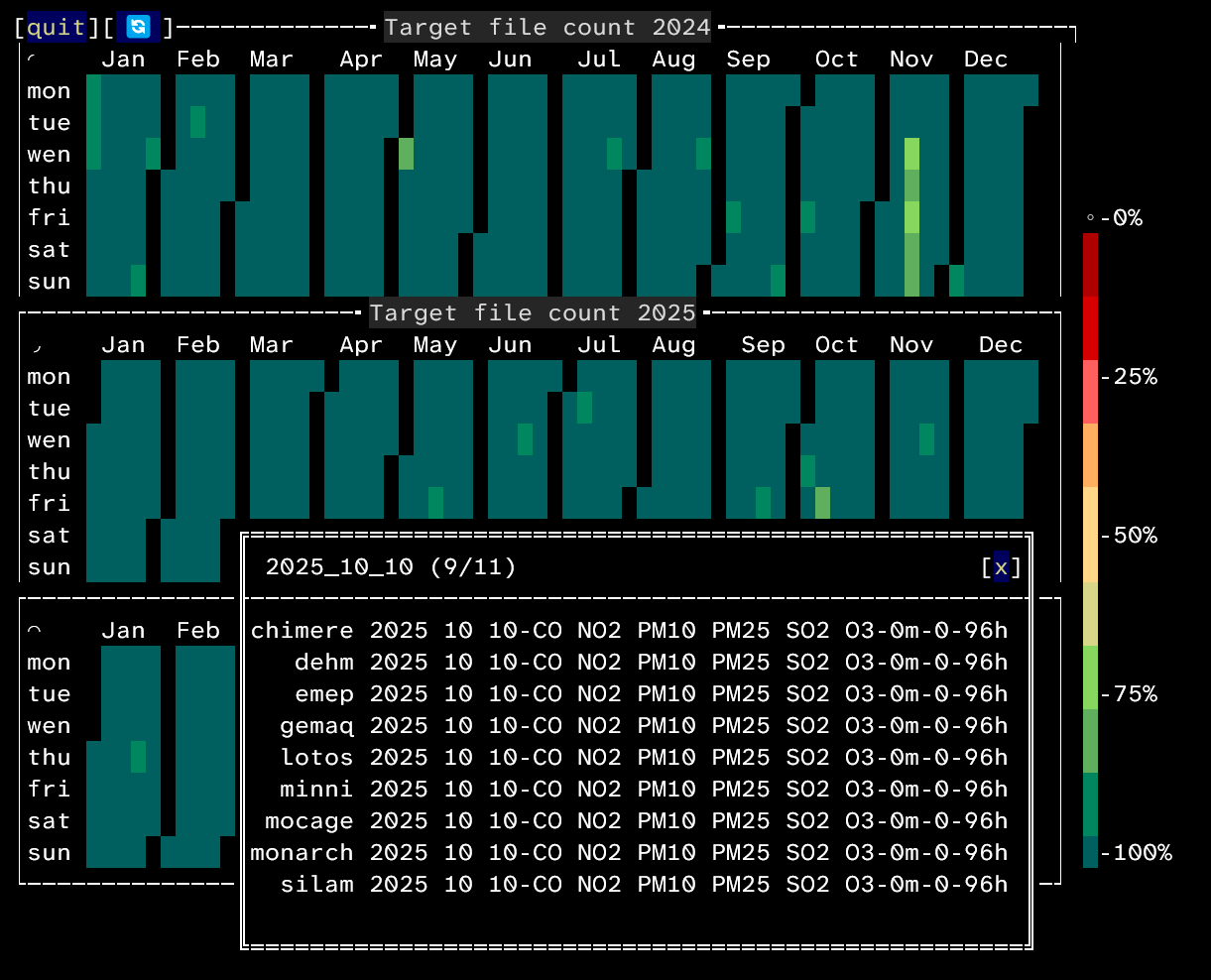
Terminal interface to visualise calendar data.
Install
This package is available on pypi. Install with your prefered package manager.
pip install calendardataviz
# or
uv add calendardataviz
Usage
In your project, create a script that implements the InspectorABC class
make it return RichString class instances then call the start_app
function. You can read our demos in available in the demos folder.
Here is a presentation of the different classes and functions:
RichString
A class used to define a background and foreground color along side a string.
class RichString(ttk.TTkString):
    """String class offering the possiblity to define a
    background and foreground color along a string.

    In practice, is an easy to use interface for the
    TermTk.TTkString class, and only override its init method.
    """

    def __init__(
        self,
        text: str,
        bg_color: str | tuple[int, int, int] | tuple[float, float, float] = "#000000",
        fg_color: str | tuple[int, int, int] | tuple[float, float, float] = "#ffffff",
    ) -> None:
        """
        Args:
            text: Text.
            bg_color: Background color, either as an hexadecimal value
                such as `#ff00ff` or as a tuple of values, `(255, 0, 255)`.
            fg_color: Foreground color, in the same format as bg_color.
        """
InspectorABC
Abstract base class you need to implement. It has 3 method to override:
color_for_datewich returns the color for a given date.as_color_barwich returns values for a color bar of a given size.popup_contentwich returns content for the popup displayed when the user clicks on a date.
Described in more details in the script template available bellow.
start_app
Entry point for the app, starts the Terminal User Interface.
def start_app(
    inspector_cls: type[InspectorABC],
    years: Sequence[int],
    nb_processes: int = 1,
    target_nb_files: int | None = None,
    root_dir: Path | None = None,
) -> None:
    """Library entry point, instantiates and starts the terminal interface.
    If target_nb_files and root_dir are given, also spawns a file count
    widget, wich displays informations about the file count and the
    completion percentage (nb of files in root dir / target_nb_files).

    Args:
        inspector_cls: Your project's implementatino of the
            `calendardataviz.InspectorABC`. This is the class
            used by the app to get information for each dates.
        years: A sequence of years. A calendar will be displayed
            for each year.
        nb_processes: Number of multiprocessing processes to use.
            If your inspector's `color_for_date` method is not
            instantaneous, helps speed up the calendar's initialisation.
        target_nb_files: If given with `root_dir`, will spawn a
            file count widget.
        root_dir: If given with `target_nb_files`, will spawn a
            file count widget.
    """
Script template
Here is a script template you can copy to start your own implementation
of the InspectorABC class.
"""Demonstration of a rainbow calendar.
Shows how to implement an `InspectorABC`
class and run the Terminal User Interface
to interact with it.
"""

import datetime as dt
from typing import override

from calendardataviz import InspectorABC, RichString, start_app


class YourInspector(InspectorABC):
    name = "my inspector"

    @override
    def color_for_date(self, date: dt.date) -> RichString:
        """Returns the color for a given date.

        Args:
            date: date.

        Returns:
            RichString: The text and color associated
                to the given date.
        """
        pass

    @override
    def as_color_bar(self, size: int) -> list[RichString]:
        """Returns values for a color bar of the given size.

        Args:
            size: Size of the colorbar to generate.

        Returns:
            list[RichString]: A list of length "size"
                containing one character TTkStrings, one
                for each cell of the color bar.
        """
        pass

    @override
    def popup_content(self, date: dt.date) -> tuple[str, str]:
        """Return the information displayed when a date is selected.

        Args:
            date: Date selected.

        Returns:
            str: The pop-up window title.
            str: The pop-up window content.
        """
        pass


if __name__ == "__main__":
    start_app(
        inspector_cls=YourInspector,
        years=[2024, 2025, 2026],
        nb_processes=1,
    )
Contribution
Please contribute by proposing a merger request.
You can install the project in development mode like so:
git clone https://github.com/meteofrance/calendardataviz.git
cd calendardataviz
uv sync --all-extras
To format then test your code:
uvx ruff format
uvx ruff check --fix
uv run pytest -s
Once your code is formated and tested, you can create a merge request of your branch into the main branch.
1 maintainer

Download files
Download the file for your platform. If you're not sure which to choose, learn more about installing packages.
Source Distribution
Built Distribution
Filter files by name, interpreter, ABI, and platform.
If you're not sure about the file name format, learn more about wheel file names.
Copy a direct link to the current filters
File details
Details for the file calendardataviz-0.1.2.tar.gz.
File metadata
- Download URL: calendardataviz-0.1.2.tar.gz
- Upload date:
- Size: 18.9 kB
- Tags: Source
- Uploaded using Trusted Publishing? Yes
- Uploaded via:
twine/7.0.0 CPython/3.13.14
File hashes
| Algorithm | Hash digest | |
|---|---|---|
| SHA256 |
aa55a18edb493e6fa7b19653e2a226204a19b60edf7bb552adfd955b3a52fe36
|
|
| MD5 |
6bc3840614478353ff7a715c9780c402
|
|
| BLAKE2b-256 |
4c84090fd4f8a5765ef671e616c7704b8675020041abf3e7a5b54a96c512777c
|
Provenance
The following attestation bundles were made for calendardataviz-0.1.2.tar.gz:
Publisher:
release.yml on meteofrance/calendardataviz
-
Statement:
-
Statement type:
https://in-toto.io/Statement/v1 -
Predicate type:
https://docs.pypi.org/attestations/publish/v1 -
Subject name:
calendardataviz-0.1.2.tar.gz -
Subject digest:
aa55a18edb493e6fa7b19653e2a226204a19b60edf7bb552adfd955b3a52fe36 - Sigstore transparency entry: 2515783481
- Sigstore integration time:
-
Permalink:
meteofrance/calendardataviz@2afa67e5eb2c729595715b243a866c3b97b02383 -
Branch / Tag:
refs/tags/v0.1.2 - Owner: https://github.com/meteofrance
-
Access:
public
-
Token Issuer:
https://token.actions.githubusercontent.com -
Runner Environment:
github-hosted -
Publication workflow:
release.yml@2afa67e5eb2c729595715b243a866c3b97b02383 -
Trigger Event:
push
-
Statement type:
File details
Details for the file calendardataviz-0.1.2-py3-none-any.whl.
File metadata
- Download URL: calendardataviz-0.1.2-py3-none-any.whl
- Upload date:
- Size: 19.9 kB
- Tags: Python 3
- Uploaded using Trusted Publishing? Yes
- Uploaded via:
twine/7.0.0 CPython/3.13.14
File hashes
| Algorithm | Hash digest | |
|---|---|---|
| SHA256 |
980fcb5df92905cde6cff550d9759f3c3fd6fb6621a9f948aa00d68b8b55c89d
|
|
| MD5 |
5dbc06911cb4e73d80d246b128cf6655
|
|
| BLAKE2b-256 |
9647a93f95d0828b2908916ab05ba453799cc5314a3c721f83106387d13a7195
|
Provenance
The following attestation bundles were made for calendardataviz-0.1.2-py3-none-any.whl:
Publisher:
release.yml on meteofrance/calendardataviz
-
Statement:
-
Statement type:
https://in-toto.io/Statement/v1 -
Predicate type:
https://docs.pypi.org/attestations/publish/v1 -
Subject name:
calendardataviz-0.1.2-py3-none-any.whl -
Subject digest:
980fcb5df92905cde6cff550d9759f3c3fd6fb6621a9f948aa00d68b8b55c89d - Sigstore transparency entry: 2515783507
- Sigstore integration time:
-
Permalink:
meteofrance/calendardataviz@2afa67e5eb2c729595715b243a866c3b97b02383 -
Branch / Tag:
refs/tags/v0.1.2 - Owner: https://github.com/meteofrance
-
Access:
public
-
Token Issuer:
https://token.actions.githubusercontent.com -
Runner Environment:
github-hosted -
Publication workflow:
release.yml@2afa67e5eb2c729595715b243a866c3b97b02383 -
Trigger Event:
push
-
Statement type:














