
Calendarium
A date picker widget for Tkinter. Day, month and year in three spinboxes,
validated as you type, with the result as a datetime.date. One Python file,
standard library only: copy it into your project and use it.
- No dependencies —
tkinteranddatetime, nothing to install. - One file —
calendarium.py, nothing else to carry around. - Keyboard first — the user types the date; no pop-up calendar to click through.
- Digits only — letters and signs are refused as they are typed.
- A date or
None— never a half-valid value: 31 February isNone. - tk or ttk —
Calendariumfor the classic look,TtkCalendariumto follow the ttk theme. - Any language, any order — your own labels; day-month-year, month-day-year or year-month-day.
<<DateChanged>>— a virtual event whenever the date changes.
Requirements
Python 3.6 or later, with Tk. On Debian and Ubuntu Tk is a separate package:
sudo apt install python3-tk
Installation
pip install calendarium
Or copy calendarium.py next to your code: it is one file with no
dependencies, so that is all it takes, also on a machine without pip.
Usage
import tkinter as tk
from calendarium import Calendarium

root = tk.Tk()

start_date = Calendarium(root, "Start Date")
start_date.pack(padx=8, pady=8)   # or .grid(row=0, column=0, sticky=tk.W)
start_date.set_today()

def on_save():
    if not start_date.is_valid:
        start_date.set_focus()
        return
    print(start_date.get_iso())   # "2026-09-27"

tk.Button(root, text="Save", command=on_save).pack(pady=8)
root.mainloop()
Use either grid or pack on the same parent, not both.
The same with ttk, Italian labels and the year first:
from calendarium import TtkCalendarium

start_date = TtkCalendarium(root, "Data inizio",
                            labels=("Giorno", "Mese", "Anno"), order="ymd")
Date format: European, American, ISO
The order argument decides the order of the three fields on screen:
order |
fields on screen | used in |
|---|---|---|
"dmy" (default) |
Day · Month · Year | Europe and most of the world |
"mdy" |
Month · Day · Year | United States |
"ymd" |
Year · Month · Day | ISO 8601, China, Japan, Korea |
european = Calendarium(root, "Start Date")                # 27 · 9 · 2026
american = Calendarium(root, "Start Date", order="mdy")   # 9 · 27 · 2026
iso      = Calendarium(root, "Start Date", order="ymd")   # 2026 · 9 · 27
What changes is only what the user sees. The date itself is the same:
get_date() returns the same datetime.date and get_iso() the same
"2026-09-27" whatever the order, so the rest of your program does not need
to know which format the user chose.
labels names the fields in your language. They are always given as day,
month, year, whatever the order on screen:
Calendarium(root, "Data inizio", labels=("Giorno", "Mese", "Anno"))
Calendarium(root, "Start Date", order="mdy")              # Month · Day · Year
The order is fixed when the widget is built. To let the user switch format
while the program runs, build the widget again in the new order and copy the
three fields across (day, month, year are StringVars): the demo does
exactly this, with its Date format choice.
Constructor
Calendarium(parent, name, *, base_bg_color=None,
            year_from=datetime.MINYEAR, year_to=datetime.MAXYEAR,
            labels=("Day", "Month", "Year"), order="dmy", **kwargs)

TtkCalendarium(parent, name, *,
               year_from=datetime.MINYEAR, year_to=datetime.MAXYEAR,
               labels=("Day", "Month", "Year"), order="dmy", **kwargs)
| argument | meaning |
|---|---|
parent |
the parent widget |
name |
the caption of the frame, e.g. "Start Date"; "" for none |
base_bg_color |
Calendarium only: background, as "#f0f0ed" or (240, 240, 237); an invalid colour falls back to the theme. With ttk, colours belong to the style |
year_from, year_to |
the range of years accepted; outside it the date is not valid |
labels |
the captions of the three fields, always given as day, month, year — whatever the order on screen |
order |
"dmy" (default), "mdy" or "ymd": the order of the fields on screen |
**kwargs |
passed on to tk.LabelFrame or ttk.LabelFrame |
A wrong order or a labels that is not three texts raises ValueError.
Methods
| method | what it does |
|---|---|
set_today() |
set today's date |
set_date(date) |
set a datetime.date |
set_from_datetime(value) |
set from a datetime.datetime (the time is dropped) or a date |
set_days_ago(n) |
today minus n days |
set_days_ahead(n) |
today plus n days |
is_valid |
True if the three fields make a real date in range |
get_date() |
the datetime.date, or None if not valid |
get_iso() |
the date as "YYYY-MM-DD", ready to store, or None |
get_timestamp() |
the date with the current time of day, or None |
set_state(state) |
tk.NORMAL or tk.DISABLED, for all three spinboxes |
set_focus() |
put the keyboard on the day |
is_valid is a property: write it without parentheses.
if not start_date.is_valid: is right. With parentheses Python raises
TypeError: 'bool' object is not callable.
The three fields are also available as StringVars: day, month, year.
Following changes
from calendarium import DATE_CHANGED   # "<<DateChanged>>"

start_date.bind(DATE_CHANGED, on_date_changed)
The event is generated when the date changes by typing, by the arrows or by
a set_ method, and also when it becomes invalid: check is_valid in the
handler. set_date writes three fields but generates one event, when Tk is
idle. It arrives even if the widget has not been displayed yet.
Demo
python3 examples/demo.py
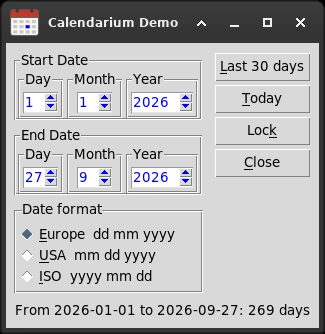
The period between two dates, recalculated as you type. The Date format choice switches the fields between European, American and ISO order, keeping what you typed; Lock disables them. For a quick look at the two classes side by side:
python3 calendarium.py
Tests
Standard library unittest. From the root of the repository:
python3 -m unittest discover -s tests -v
Tk needs a display. Without one, run them under xvfb-run -a, otherwise they
are skipped.
Repository layout
calendarium.py      the widget: the one file to copy
examples/demo.py    a small application that uses it
tests/              unit tests
tools/              build tools, they need Pillow: make_icon.py draws the demo
                    icon, make_social_preview.py the GitHub social preview
docs/               the screenshots and the social preview
License
MIT, see LICENSE.
Author: Giuseppe Costanzi (1966bc).
Calendarium is primitive, but it works and it's light.
1 maintainer

Metadata
1 maintainer
Release files for calendarium 2.5
For a detailed explanation of source distributions (sdists) and built distributions (wheels), please see the package formats documentation.
Source distribution (sdist)
| File | Size | Uploaded | |
|---|---|---|---|
| calendarium-2.5.tar.gz | 11.5 kB | Details |
Built distribution (wheel)
| File | Interpreter | ABI | Platform | Reset |
|---|---|---|---|---|
| calendarium-2.5-py3-none-any.whl | Python 3 | none | any | Details |
Total release size: 20.2 kB
Release files / calendarium-2.5.tar.gz
| Download URL | calendarium-2.5.tar.gz |
|---|---|
| Size | 11.5 kB |
| Tags | Source |
|
SHA-256 checksum How to use checksums |
1bd5415ec31570c276ac3b1245cb549340520510957a635041856108d335fdd5
|
|
BLAKE2b-256 checksum How to use checksums |
0d123371179adc92f138fdfb89532de25c24e530bade35fa41750a8e7f008b4c
|
| Upload date | |
|
Uploaded using Trusted Publishing? What is trusted publishing? |
No |
| Uploaded via |
twine/7.0.0 CPython/3.11.2
|
Release files / calendarium-2.5-py3-none-any.whl
| Download URL | calendarium-2.5-py3-none-any.whl |
|---|---|
| Size | 8.7 kB |
| Tags | Python 3 |
|
SHA-256 checksum How to use checksums |
ebaa165894d0d1b0c1d1e1af0cc0b2877dc9dab156d6f1d39088ded41bc6eff0
|
|
BLAKE2b-256 checksum How to use checksums |
b624f037412786711cd9a774ffc823ce03177d375210db87097619e58155b898
|
| Upload date | |
|
Uploaded using Trusted Publishing? What is trusted publishing? |
No |
| Uploaded via |
twine/7.0.0 CPython/3.11.2
|













