
calflops: A FLOPs and Params Calculation Tool for Neural Networks
Note: This is a fork of MrYxJ/calculate-flops.pytorch. All credit for the original work goes to the original author.



English | 中文
Introduction
This tool (calflops2) is designed to compute the theoretical FLOPs (floating-point operations), MACs (multiply-add operations), and Parameters for a wide variety of neural networks, including Linear, CNN, RNN, GCN, and Transformers (such as BERT, LLaMA, and other Large Language Models). It also supports any custom model implemented in PyTorch that uses torch.nn.functional.*.
This tool provides a detailed breakdown of FLOPs and parameters for each submodule, making it convenient for users to understand the performance characteristics of their models.
Additionally, calflops has a tool on Hugging Face Spaces that provides an easy way to calculate FLOPs for models on the 🤗 Hugging Face Hub. You can try it here: https://huggingface.co/spaces/andrijdavid/calculate-model-flops

For LLMs, this is one of the easiest tools for calculating FLOPs, especially for models on the Hugging Face platform. You can use calflops.calculate_flops_hf(model_name) with a model name from the Hugging Face Hub to calculate FLOPs without downloading the entire model weights. This is achieved by loading the model on the meta device (with empty weights).

from calflops import calculate_flops_hf

model_name = "meta-llama/Llama-2-7b"
access_token = "..." # your application token for using llama2
flops, macs, params = calculate_flops_hf(model_name=model_name, access_token=access_token) # default input shape: (1, 128)
print("%s FLOPs:%s  MACs:%s  Params:%s \n" %(model_name, flops, macs, params))
If a model cannot be instantiated on the meta device, you can use calflops.calculate_flops() and provide the corresponding tokenizer via the transformer_tokenizer parameter. The tool will then automatically create the necessary inputs. Alternatively, you can construct and pass the input data directly for models that require multiple inputs.
The implementation of this package is inspired by the ptflops, deepspeed, and hf accelerate libraries. Thanks to the creators of these excellent libraries. This package builds upon them and introduces several improvements for FLOPs calculation.
What's New
- Support for recent
transformersversions: The tool has been updated to support recent versions of thetransformerslibrary, ensuring compatibility with the latest models and features. - Support for models with empty weights:
calflopsnow supports calculating FLOPs for models initialized with empty weights on themetadevice. This allows for calculating FLOPs for large models without needing to download the full model weights, saving time and resources.
How to install
Install the latest version
From PyPI:
pip install --upgrade calflops2
You can also download the latest calflops-*-py3-none-any.whl file from https://pypi.org/project/calflops2/ and install it with pip:
pip install calflops-*-py3-none-any.whl
How to use calflops
Example
CNN Model
If the model has a single input, you can specify the input size with the input_shape parameter. The tool will automatically generate a random tensor of that shape to perform the calculation:
from calflops import calculate_flops
from torchvision import models

model = models.alexnet()
batch_size = 1
input_shape = (batch_size, 3, 224, 224)
flops, macs, params = calculate_flops(model=model,
                                      input_shape=input_shape,
                                      output_as_string=True,
                                      output_precision=4)
print("Alexnet FLOPs:%s   MACs:%s   Params:%s \n" %(flops, macs, params))
# Alexnet FLOPs: 4.2892 GFLOPS   MACs: 2.1426 GMACs   Params: 61.1008 M
If the model has multiple inputs, use the args or kwargs parameters, as shown in the Transformer Model example below.
Calculate Hugging Face Model By Model Name(Online)
You don't need to download the full model weights locally. You can calculate FLOPs for any open-source large model on the Hugging Face Hub just by using its model name.

from calflops import calculate_flops_hf

batch_size, max_seq_length = 1, 128
model_name = "baichuan-inc/Baichuan-13B-Chat"

flops, macs, params = calculate_flops_hf(model_name=model_name, input_shape=(batch_size, max_seq_length))
print("%s FLOPs:%s  MACs:%s  Params:%s \n" %(model_name, flops, macs, params))
You can also use the model's URL from the Hugging Face Hub to calculate its FLOPs.

from calflops import calculate_flops_hf

batch_size, max_seq_length = 1, 128
model_name = "https://huggingface.co/THUDM/glm-4-9b-chat" # THUDM/glm-4-9b-chat
flops, macs, params = calculate_flops_hf(model_name=model_name, input_shape=(batch_size, max_seq_length))
print("%s FLOPs:%s  MACs:%s  Params:%s \n" %(model_name, flops, macs, params))
------------------------------------- Calculate Flops Results -------------------------------------
Notations:
number of parameters (Params), number of multiply-accumulate operations(MACs),
number of floating-point operations (FLOPs), floating-point operations per second (FLOPS),
fwd FLOPs (model forward propagation FLOPs), bwd FLOPs (model backward propagation FLOPs),
default model backpropagation takes 2.00 times as much computation as forward propagation.

Total Training Params:                                                  9.4 B
fwd MACs:                                                               1.12 TMACs
fwd FLOPs:                                                              2.25 TFLOPS
fwd+bwd MACs:                                                           3.37 TMACs
fwd+bwd FLOPs:                                                          6.74 TFLOPS

-------------------------------- Detailed Calculated FLOPs Results --------------------------------
Each module caculated is listed after its name in the following order:
params, percentage of total params, MACs, percentage of total MACs, FLOPS, percentage of total FLOPs

Note: 1. A module can have torch.nn.module or torch.nn.functional to compute logits (e.g. CrossEntropyLoss).
 They are not counted as submodules in calflops and not to be printed out. However they make up the difference between a parent's MACs and the sum of its submodules'.
2. Number of floating-point operations is a theoretical estimation, thus FLOPS computed using that could be larger than the maximum system throughput.

ChatGLMForConditionalGeneration(
  9.4 B = 100% Params, 1.12 TMACs = 100% MACs, 2.25 TFLOPS = 50% FLOPs
  (transformer): ChatGLMModel(
    9.4 B = 100% Params, 1.12 TMACs = 100% MACs, 2.25 TFLOPS = 50% FLOPs
    (embedding): Embedding(
      620.76 M = 6.6% Params, 0 MACs = 0% MACs, 0 FLOPS = 0% FLOPs
      (word_embeddings): Embedding(620.76 M = 6.6% Params, 0 MACs = 0% MACs, 0 FLOPS = 0% FLOPs, 151552, 4096)
    )
    (rotary_pos_emb): RotaryEmbedding(0 = 0% Params, 0 MACs = 0% MACs, 0 FLOPS = 0% FLOPs)
    (encoder): GLMTransformer(
      8.16 B = 86.79% Params, 1.04 TMACs = 92.93% MACs, 2.09 TFLOPS = 46.46% FLOPs
      (layers): ModuleList(
        (0-39): 40 x GLMBlock(
          203.96 M = 2.17% Params, 26.11 GMACs = 2.32% MACs, 52.21 GFLOPS = 1.16% FLOPs
          (input_layernorm): RMSNorm(4.1 K = 0% Params, 0 MACs = 0% MACs, 0 FLOPS = 0% FLOPs)
          (self_attention): SelfAttention(
            35.66 M = 0.38% Params, 4.56 GMACs = 0.41% MACs, 9.13 GFLOPS = 0.2% FLOPs
            (query_key_value): Linear(18.88 M = 0.2% Params, 2.42 GMACs = 0.22% MACs, 4.83 GFLOPS = 0.11% FLOPs, in_features=4096, out_features=4608, bias=True)
            (core_attention): CoreAttention(
              0 = 0% Params, 0 MACs = 0% MACs, 0 FLOPS = 0% FLOPs
              (attention_dropout): Dropout(0 = 0% Params, 0 MACs = 0% MACs, 0 FLOPS = 0% FLOPs, p=0.0, inplace=False)
            )
            (dense): Linear(16.78 M = 0.18% Params, 2.15 GMACs = 0.19% MACs, 4.29 GFLOPS = 0.1% FLOPs, in_features=4096, out_features=4096, bias=False)
          )
          (post_attention_layernorm): RMSNorm(4.1 K = 0% Params, 0 MACs = 0% MACs, 0 FLOPS = 0% FLOPs)
          (mlp): MLP(
            168.3 M = 1.79% Params, 21.54 GMACs = 1.92% MACs, 43.09 GFLOPS = 0.96% FLOPs
            (dense_h_to_4h): Linear(112.2 M = 1.19% Params, 14.36 GMACs = 1.28% MACs, 28.72 GFLOPS = 0.64% FLOPs, in_features=4096, out_features=27392, bias=False)
            (dense_4h_to_h): Linear(56.1 M = 0.6% Params, 7.18 GMACs = 0.64% MACs, 14.36 GFLOPS = 0.32% FLOPs, in_features=13696, out_features=4096, bias=False)
          )
        )
      )
      (final_layernorm): RMSNorm(4.1 K = 0% Params, 0 MACs = 0% MACs, 0 FLOPS = 0% FLOPs)
    )
    (output_layer): Linear(620.76 M = 6.6% Params, 79.46 GMACs = 7.07% MACs, 158.91 GFLOPS = 3.54% FLOPs, in_features=4096, out_features=151552, bias=False)
  )
)
Some models require an access token for use. You can provide it using the access_token parameter to calculate FLOPs for these models.

from calflops import calculate_flops_hf

batch_size, max_seq_length = 1, 128
model_name = "meta-llama/Llama-2-7b"
access_token = "" # your application for using llama2

flops, macs, params = calculate_flops_hf(model_name=model_name,
                                         access_token=access_token,
                                         input_shape=(batch_size, max_seq_length))
print("%s FLOPs:%s  MACs:%s  Params:%s \n" %(model_name, flops, macs, params))
Transformer Model (Local)
For Transformer models, if you want to use the input_shape parameter for automatic input generation, you must also provide the corresponding tokenizer using the transformer_tokenizer parameter.
# Transformers Model, such as bert.
from calflops import calculate_flops
from transformers import AutoModel, AutoTokenizer

batch_size, max_seq_length = 1, 128
model_name = "hfl/chinese-roberta-wwm-ext/"
model_save = "../pretrain_models/" + model_name
model = AutoModel.from_pretrained(model_save)
tokenizer = AutoTokenizer.from_pretrained(model_save)

flops, macs, params = calculate_flops(model=model,
                                      input_shape=(batch_size,max_seq_length),
                                      transformer_tokenizer=tokenizer)
print("Bert(hfl/chinese-roberta-wwm-ext) FLOPs:%s   MACs:%s   Params:%s \n" %(flops, macs, params))
# Bert(hfl/chinese-roberta-wwm-ext) FLOPs:67.1 GFLOPS   MACs:33.52 GMACs   Params:102.27 M
If you prefer to use your own specific data for FLOPs calculation, you can pass it using the args or kwargs parameters. In this case, do not use the input_shape parameter. Here is an example. Note that this is more verbose than using the transformer_tokenizer parameter.
# Transformers Model, such as bert.
import torch
from calflops import calculate_flops
from transformers import AutoModel, AutoTokenizer


batch_size, max_seq_length = 1, 128
model_name = "hfl/chinese-roberta-wwm-ext/"
model_save = "/code/yexiaoju/generate_tags/models/pretrain_models/" + model_name
model = AutoModel.from_pretrained(model_save)
tokenizer = AutoTokenizer.from_pretrained(model_save)

text = ""
inputs = tokenizer(text,
                   add_special_tokens=True,
                   return_attention_mask=True,
                   padding=True,
                   truncation="longest_first",
                   max_length=max_seq_length)

if len(inputs["input_ids"]) < max_seq_length:
    apply_num = max_seq_length-len(inputs["input_ids"])
    inputs["input_ids"].extend([0]*apply_num)
    inputs["token_type_ids"].extend([0]*apply_num)
    inputs["attention_mask"].extend([0]*apply_num)

inputs["input_ids"] = torch.tensor([inputs["input_ids"]])
inputs["token_type_ids"] = torch.tensor([inputs["token_type_ids"]])
inputs["attention_mask"] = torch.tensor([inputs["attention_mask"]])

flops, macs, params = calculate_flops(model=model,
                                      kwargs = inputs,
                                      print_results=False)
print("Bert(hfl/chinese-roberta-wwm-ext) FLOPs:%s   MACs:%s   Params:%s \n" %(flops, macs, params))
# Bert(hfl/chinese-roberta-wwm-ext) FLOPs:22.36 GFLOPS   MACs:11.17 GMACs   Params:102.27 M
Large Language Model
Online
from calflops import calculate_flops_hf

batch_size, max_seq_length = 1, 128
model_name = "meta-llama/Llama-2-7b"
access_token = "" # your application for using llama

flops, macs, params = calculate_flops_hf(model_name=model_name,
                                         access_token=access_token,
                                         input_shape=(batch_size, max_seq_length))
print("%s FLOPs:%s  MACs:%s  Params:%s \n" %(model_name, flops, macs, params))
Local
Note that the tokenizer must correspond to the LLM, as different models may have different tokenization processes.
#Large Languase Model, such as llama2-7b.
from calflops import calculate_flops
from transformers import LlamaTokenizer, LlamaForCausalLM

batch_size, max_seq_length = 1, 128
model_name = "llama2_hf_7B"
model_save = "../model/" + model_name
model = LlamaForCausalLM.from_pretrained(model_save)
tokenizer = LlamaTokenizer.from_pretrained(model_save)
flops, macs, params = calculate_flops(model=model,
                                      input_shape=(batch_size, max_seq_length),
                                      transformer_tokenizer=tokenizer)
print("Llama2(7B) FLOPs:%s   MACs:%s   Params:%s \n" %(flops, macs, params))
# Llama2(7B) FLOPs:1.7 TFLOPS   MACs:850.00 GMACs   Params:6.74 B
Show each submodule result of FLOPs、MACs、Params
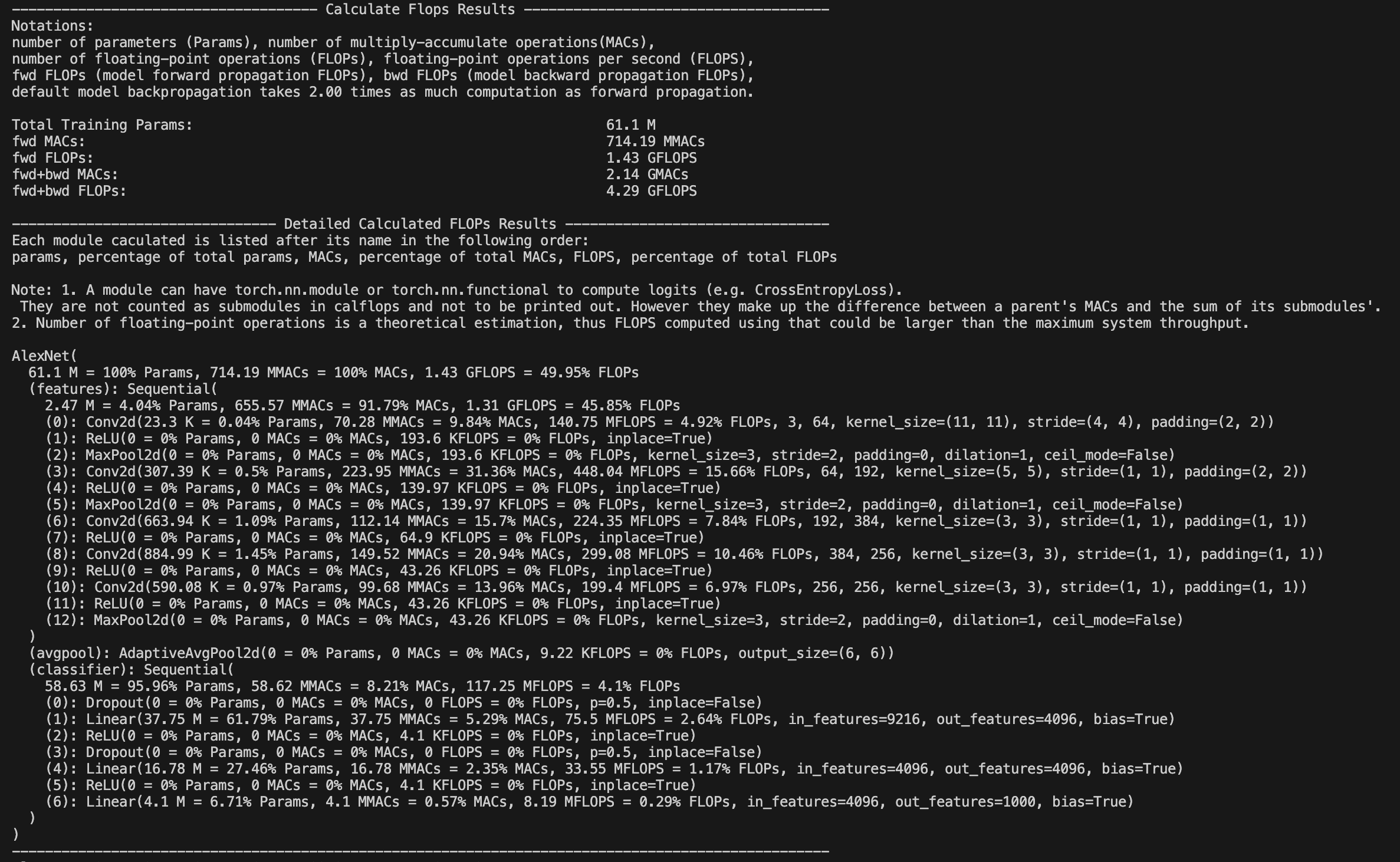
calflops provides a detailed breakdown of the model's FLOPs. By default (print_results=True), the FLOPs of the model will be printed to the console or Jupyter interface.
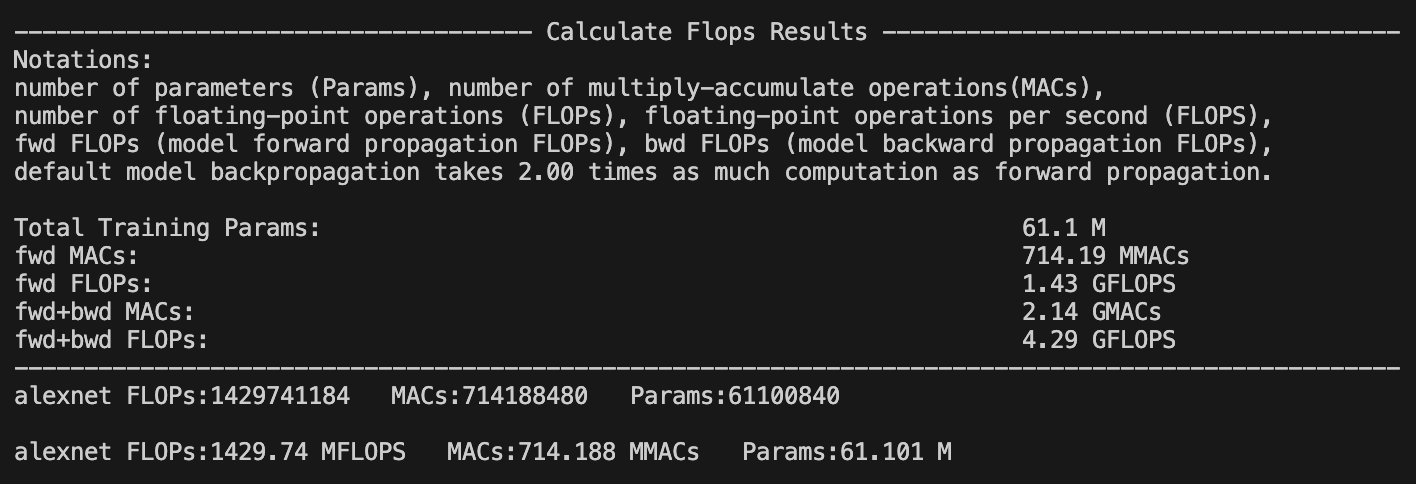
Additionally, with print_detailed=True (the default), calflops displays the FLOPs, MACs, and Parameters for each submodule, along with their proportion of the total. This helps identify the most computationally expensive parts of the model.
More use introduction
How to make output format more elegant
You can use the `output_as_string`, `output_precision`, and `output_unit` parameters to control the format of the output. You can specify whether the output is a raw value or a string, the precision of the output, and the units (e.g., "TFLOPs", "GFLOPs", "MFLOPs").How do deal with model has multiple inputs
`calflops` supports models with multiple inputs. You can use the `args` or `kwargs` parameters to pass multiple inputs to the model.How to calculate the results of FLOPS include forward and backward pass of the model
You can use the `include_backPropagation` parameter to specify whether to include the backpropagation computation in the FLOPs calculation. The default is `False`, which means only the forward pass is included.The compute_bp_factor parameter determines the ratio of the backpropagation computation to the forward pass computation. The default is 2.0, based on the findings in this paper: https://epochai.org/blog/backward-forward-FLOP-ratio
How to calculate FLOPs for only part of the model module
You can use the `ignore_modules` parameter to specify a list of modules to ignore during the FLOPs calculation. By default, all modules are included.How to calculate FLOPs of the generate function in LLM
You just need to assign "generate" to the `forward_mode` parameter.API of the calflops
calflops.calculate_flops()
from calflops import calculate_flops

def calculate_flops(model,
                    input_shape=None,
                    transformer_tokenizer=None,
                    args=[],
                    kwargs={},
                    forward_mode="forward",
                    include_backPropagation=False,
                    compute_bp_factor=2.0,
                    print_results=True,
                    print_detailed=True,
                    output_as_string=True,
                    output_precision=2,
                    output_unit=None,
                    ignore_modules=None):

    """Returns the total floating-point operations, MACs, and parameters of a model.

    Args:
        model ([torch.nn.Module]): The input model must be a PyTorch model.
        input_shape (tuple, optional): Input shape to the model. If args and kwargs are empty, the model takes a tensor with this shape as the only positional argument. Defaults to [].
        transformer_tokenizer (None, optional): A Transformers Tokenizer must be provided if the model is a transformer and args and kwargs are empty. Defaults to None.
        args (list, optional): List of positional arguments for the model. For example, for BERT, this would be `[input_ids, token_type_ids, attention_mask]`. Defaults to [].
        kwargs (dict, optional): Dictionary of keyword arguments for the model. For example, for BERT, this would be `{'input_ids': ..., 'token_type_ids': ..., 'attention_mask': ...}`. Defaults to {}.
        forward_mode (str, optional): Determines the model's inference mode. Defaults to 'forward'. Use 'generate' if the model uses `model.generate()` for inference.
        include_backPropagation (bool, optional): If `True`, includes the FLOPs from backpropagation in the calculation.
        compute_bp_factor (float, optional): The ratio of backpropagation FLOPs to forward propagation FLOPs. Defaults to 2.0.
        print_results (bool, optional): Whether to print the model profile. Defaults to True.
        print_detailed (bool, optional): Whether to print the detailed model profile. Defaults to True.
        output_as_string (bool, optional): If `True`, returns the output as a formatted string. Defaults to True.
        output_precision (int, optional): Number of decimal places for the output string. Defaults to 2.
        output_unit (str, optional): The unit for the output value (e.g., 'T', 'G', 'M', 'K'). If `None`, the unit is determined automatically.
        ignore_modules (list, optional): A list of modules to ignore during profiling. Defaults to None.
    """
calflops.calculate_flops_hf()
def calculate_flops_hf(model_name,
                       input_shape=None,
                       library_name="transformers",
                       trust_remote_code=True,
                       access_token="",
                       forward_mode="forward",
                       include_backPropagation=False,
                       compute_bp_factor=2.0,
                       print_results=True,
                       print_detailed=True,
                       output_as_string=True,
                       output_precision=2,
                       output_unit=None,
                       ignore_modules=None):

    """Returns the total floating-point operations, MACs, and parameters of a model.

    Args:
        model_name (str): The model name on the Hugging Face Hub (e.g., "meta-llama/Llama-2-7b", "baichuan-inc/Baichuan-13B-Chat").
        input_shape (tuple, optional): Input shape to the model. If args and kwargs are empty, the model takes a tensor with this shape as the only positional argument. Defaults to [].
        trust_remote_code (bool, optional): Whether to trust the code in the remote library for the model structure.
        access_token (str, optional): An access token for models that require one (e.g., meta-llama/Llama-2-7b).
        forward_mode (str, optional): Determines the model's inference mode. Defaults to 'forward'. Use 'generate' if the model uses `model.generate()` for inference.
        include_backPropagation (bool, optional): If `True`, includes the FLOPs from backpropagation in the calculation.
        compute_bp_factor (float, optional): The ratio of backpropagation FLOPs to forward propagation FLOPs. Defaults to 2.0.
        print_results (bool, optional): Whether to print the model profile. Defaults to True.
        print_detailed (bool, optional): Whether to print the detailed model profile. Defaults to True.
        output_as_string (bool, optional): If `True`, returns the output as a formatted string. Defaults to True.
        output_precision (int, optional): Number of decimal places for the output string. Defaults to 2.
        output_unit (str, optional): The unit for the output value (e.g., 'T', 'G', 'M', 'K'). If `None`, the unit is determined automatically.
        ignore_modules (list, optional): A list of modules to ignore during profiling. Defaults to None.

    Example:
    .. code-block:: python
        from calflops import calculate_flops_hf

        batch_size = 1
        max_seq_length = 128
        model_name = "baichuan-inc/Baichuan-13B-Chat"
        flops, macs, params = calculate_flops_hf(model_name=model_name,
                                                input_shape=(batch_size, max_seq_length))
        print("%s FLOPs:%s  MACs:%s  Params:%s \n" %(model_name, flops, macs, params))

    Returns:
        The number of floating-point operations, multiply-accumulate operations (MACs), and parameters in the model.
    """
calflops.generate_transformer_input()
def generate_transformer_input(model_tokenizer, input_shape, device):
    """Automatically generates data in the format of a transformer model's input.

    Args:
        input_shape (tuple): The input shape for the transformer model: (batch_size, seq_len).
        model_tokenizer (transformers.PreTrainedTokenizer): The tokenizer for the transformer model.
        device (torch.device): The device to place the tensors on.

    Returns:
        dict: A dictionary containing the input data for the transformer model, including 'input_ids', 'attention_mask', 'token_type_ids', etc.
    """
Common model calculate flops
Large Language Model
Input data format: batch_size=1, seq_len=128
-
fwd FLOPs: The FLOPs of the model forward propagation
-
bwd + fwd FLOPs: The FLOPs of model forward and backward propagation
Note that fwd + bwd does not include the computation for model parameter activation recomputation. If you want to include activation recomputation, you can simply multiply the fwd FLOPs by 4 (according to the paper: https://arxiv.org/pdf/2205.05198.pdf). In calflops, you can easily set compute_bp_factor=3 to include activation recomputation in the result.
| Model | Input Shape | Params(B) | Params(Total) | fwd FLOPs(G) | fwd MACs(G) | fwd + bwd FLOPs(G) | fwd + bwd MACs(G) |
|---|---|---|---|---|---|---|---|
| bloom-1b7 | (1,128) | 1.72B | 1722408960 | 310.92 | 155.42 | 932.76 | 466.27 |
| bloom-7b1 | (1,128) | 7.07B | 7069016064 | 1550.39 | 775.11 | 4651.18 | 2325.32 |
| bloomz-1b7 | (1,128) | 1.72B | 1722408960 | 310.92 | 155.42 | 932.76 | 466.27 |
| baichuan-7B | (1,128) | 7B | 7000559616 | 1733.62 | 866.78 | 5200.85 | 2600.33 |
| chatglm-6b | (1,128) | 6.17B | 6173286400 | 1587.66 | 793.75 | 4762.97 | 2381.24 |
| chatglm2-6b | (1,128) | 6.24B | 6243584000 | 1537.68 | 768.8 | 4613.03 | 2306.4 |
| Qwen-7B | (1,128) | 7.72B | 7721324544 | 1825.83 | 912.88 | 5477.48 | 2738.65 |
| llama-7b | (1,128) | 6.74B | 6738415616 | 1700.06 | 850 | 5100.19 | 2550 |
| llama2-7b | (1,128) | 6.74B | 6738415616 | 1700.06 | 850 | 5100.19 | 2550 |
| llama2-7b-chat | (1,128) | 6.74B | 6738415616 | 1700.06 | 850 | 5100.19 | 2550 |
| chinese-llama-7b | (1,128) | 6.89B | 6885486592 | 1718.89 | 859.41 | 5156.67 | 2578.24 |
| chinese-llama-plus-7b | (1,128) | 6.89B | 6885486592 | 1718.89 | 859.41 | 5156.67 | 2578.24 |
| EleutherAI/pythia-1.4b | (1,128) | 1.31B | 1311625216 | 312.54 | 156.23 | 937.61 | 468.69 |
| EleutherAI/pythia-12b | (1,128) | 11.59B | 11586549760 | 2911.47 | 1455.59 | 8734,41 | 4366.77 |
| moss-moon-003-sft | (1,128) | 16.72B | 16717980160 | 4124.93 | 2062.39 | 12374.8 | 6187.17 |
| moss-moon-003-sft-plugin | (1,128) | 16.06B | 16060416000 | 3956.62 | 1978.24 | 11869.9 | 5934.71 |
We can draw some simple and interesting conclusions from the table above:
-
The chatglm2-6b in the model of the same scale, the model parameters are smaller, and FLOPs is also smaller, which has certain advantages in speed performance.
-
The parameters of the llama1-7b, llama2-7b, and llama2-7b-chat models did not change at all, and FLOPs remained consistent. The structure of the model that conforms to the 7b described by meta in its llama2 report has not changed, the main difference is the increase of training data tokens.
-
Similarly, it can be seen from the table that the chinese-llama-7b and chinese-llama-plus-7b data are also in line with cui's report, just more chinese data tokens are added for training, and the model structure and parameters do not change.
-
...
More model FLOPs would be updated successively, see github calculate-flops.pytorch
Bert
Input data format: batch_size=1, seq_len=128
| Model | Input Shape | Params(M) | Params(Total) | fwd FLOPs(G) | fwd MACs(G) | fwd + bwd FLOPs(G) | fwd + bwd MACs(G) |
|---|---|---|---|---|---|---|---|
| hfl/chinese-roberta-wwm-ext | (1,128) | 102.27M | 102267648 | 22.363 | 11.174 | 67.089 | 33.523 |
| ...... |
You can use calflops to calculate the more different transformer models based bert, look forward to updating in this form.
Benchmark
torchvision
Input data format: batch_size = 1, actually input_shape = (1, 3, 224, 224)
Note: The FLOPs in the table only takes into account the computation of forward propagation of the model, Total refers to the total numerical representation without unit abbreviations.
| Model | Input Resolution | Params(M) | Params(Total) | FLOPs(G) | FLOPs(Total) | Macs(G) | Macs(Total) |
|---|---|---|---|---|---|---|---|
| alexnet | 224x224 | 61.10 | 61100840 | 1.43 | 1429740000 | 741.19 | 7418800000 |
| vgg11 | 224x224 | 132.86 | 132863000 | 15.24 | 15239200000 | 7.61 | 7609090000 |
| vgg13 | 224x224 | 133.05 | 133048000 | 22.65 | 22647600000 | 11.31 | 11308500000 |
| vgg16 | 224x224 | 138.36 | 138358000 | 30.97 | 30973800000 | 15.47 | 15470300000 |
| vgg19 | 224x224 | 143.67 | 143667000 | 39.30 | 39300000000 | 19.63 | 19632100000 |
| vgg11_bn | 224x224 | 132.87 | 132869000 | 15.25 | 15254000000 | 7.61 | 7609090000 |
| vgg13_bn | 224x224 | 133.05 | 133054000 | 22.67 | 22672100000 | 11.31 | 11308500000 |
| vgg16_bn | 224x224 | 138.37 | 138366000 | 31.00 | 31000900000 | 15.47 | 15470300000 |
| vgg19_bn | 224x224 | 143.68 | 143678000 | 39.33 | 39329700000 | 19.63 | 19632100000 |
| resnet18 | 224x224 | 11.69 | 11689500 | 3.64 | 3636250000 | 1.81 | 1814070000 |
| resnet34 | 224x224 | 21.80 | 21797700 | 7.34 | 7339390000 | 3.66 | 3663760000 |
| resnet50 | 224x224 | 25.56 | 25557000 | 8.21 | 8211110000 | 4.09 | 4089180000 |
| resnet101 | 224x224 | 44.55 | 44549200 | 15.65 | 15690900000 | 7.80 | 7801410000 |
| resnet152 | 224x224 | 60.19 | 60192800 | 23.09 | 23094300000 | 11.51 | 11513600000 |
| squeezenet1_0 | 224x224 | 1.25 | 1248420 | 1.65 | 1648970000 | 0.82 | 818925000 |
| squeezenet1_1 | 224x224 | 1.24 | 1235500 | 0.71 | 705014000 | 0.35 | 349152000 |
| densenet121 | 224x224 | 7.98 | 7978860 | 5.72 | 5716880000 | 2.83 | 2834160000 |
| densenet169 | 224x224 | 14.15 | 14195000 | 6.78 | 6778370000 | 3.36 | 3359840000 |
| densenet201 | 224x224 | 20.01 | 20013900 | 8.66 | 8658520000 | 4.29 | 4291370000 |
| densenet161 | 224x224 | 28.68 | 28681000 | 15.55 | 1554650000 | 7.73 | 7727900000 |
| inception_v3 | 224x224 | 27.16 | 27161300 | 5.29 | 5692390000 | 2.84 | 2837920000 |
For the original project, please visit: https://github.com/MrYxJ/calculate-flops.pytorch
1 maintainer

Download files
Download the file for your platform. If you're not sure which to choose, learn more about installing packages.
Source Distribution
Built Distribution
Filter files by name, interpreter, ABI, and platform.
If you're not sure about the file name format, learn more about wheel file names.
Copy a direct link to the current filters
File details
Details for the file calflops2-0.1.2.tar.gz.
File metadata
- Download URL: calflops2-0.1.2.tar.gz
- Upload date:
- Size: 36.2 kB
- Tags: Source
- Uploaded using Trusted Publishing? No
- Uploaded via:
twine/6.1.0 CPython/3.13.6
File hashes
| Algorithm | Hash digest | |
|---|---|---|
| SHA256 |
c9a4e3f8de97cf635e29215e346b934453f0c6b6c4b474173f05a1b56a64c027
|
|
| MD5 |
4556b9ce7b243ae0fdd9ee24cc8fa548
|
|
| BLAKE2b-256 |
3c2d6df3919694431347e62bd39aeff9b470623cfb0beaf9f2c23319b59e3ab0
|
File details
Details for the file calflops2-0.1.2-py3-none-any.whl.
File metadata
- Download URL: calflops2-0.1.2-py3-none-any.whl
- Upload date:
- Size: 31.4 kB
- Tags: Python 3
- Uploaded using Trusted Publishing? No
- Uploaded via:
twine/6.1.0 CPython/3.13.6
File hashes
| Algorithm | Hash digest | |
|---|---|---|
| SHA256 |
9e549dd218ecbf9c38a08d2b088cd30b584b4b0c5c8487d695af126d08812fb7
|
|
| MD5 |
135bd42e399c1e35ef926a99fe1a6278
|
|
| BLAKE2b-256 |
4e31c91f9bb97bce84d9c8bafbf43283f6b452d07a554b7f6cbc80ce88eac74d
|














