
Reproducibility simplified.
Verified details
These details have been verified by PyPIProject links
GitHub Statistics
Maintainers

Project description

Documentation | Tutorials | Discussions
Calkit helps you manage and automate research projects like a software engineer.
Define computational environments, steps that process your data, create figures, presentations, and publications, connect to external tools, then iterate quickly and painlessly until your research questions are answered, tracking changes to all files along the way. At the end, deliver your entire project as a self-contained, self-documenting, version-controlled, and single button reproducible "calculation kit" so you and others can easily verify and build upon the results.
Guiding principles
- Quality comes from iteration. Automation reduces the time and effort needed to iterate, thereby increasing iteration and quality.
- Automating a step can and should take roughly the same amount of time as doing it once manually, therefore it's almost always worth it.
- Working in a "quick and dirty" way can easily become not quick when the dirtiness results in mistakes and/or discourages working in small steps.
Features
- A simplified version control interface that unifies Git and DVC (Data Version Control), so all materials can be kept in the same project repository. This way, code doesn't need to be siloed away from other important artifacts like datasets, models, figures, or article PDFs, allowing you to work on all parts of a project without hopping around to different tools.
- Computational environment management with support for many languages and environment managers: Conda, Docker, uv, Julia, Renv, and more. No need to create and update environments on your own. Calkit will handle them as needed.
- An environment-aware build system or pipeline with
a simple declarative syntax and
output caching so you don't need to think about which steps or stages
need to be rerun after changing any part of the project.
Simply call
calkit run. Compose your pipeline from many different kinds of stages, including simple scripts, commands, Jupyter Notebooks, LaTeX, and more. - A complementary self-hostable and GitHub-integrated cloud platform to facilitate backup, collaboration, and sharing throughout the entire research lifecycle.
- Overleaf integration, so analysis, visualization, and writing can all stay in sync (no more manual uploads!)
- Support for running on high performance computing (HPC) systems that use SLURM schedulers.
- Support for running with GitHub Actions.
- Extensions for doing all of the above graphically in JupyterLab and VS Code.
Installation
On Linux, macOS, or Windows Git Bash, install Calkit and uv (if not already installed) with:
curl -LsSf install.calkit.org | sh
Or with Windows Command Prompt or PowerShell:
powershell -ExecutionPolicy ByPass -c "irm install-ps1.calkit.org | iex"
If you already have uv installed, install Calkit with:
uv tool install calkit-python
You can also install with your system Python:
pip install calkit-python
To effectively use Calkit, you'll want to ensure Git is installed and properly configured. You may also want to install Docker, since that is the default method by which LaTeX environments are created. If you want to use the Calkit Cloud for collaboration and backup as a DVC remote, you can set up cloud integration with:
calkit cloud login
If you use AI agents like Claude, Copilot, or Codex, see AI tools to learn how to install agent skills for working with Calkit.
Use without installing
If you want to use Calkit without installing it,
you can use uv's uvx command to run it directly:
uvx calk9 --help
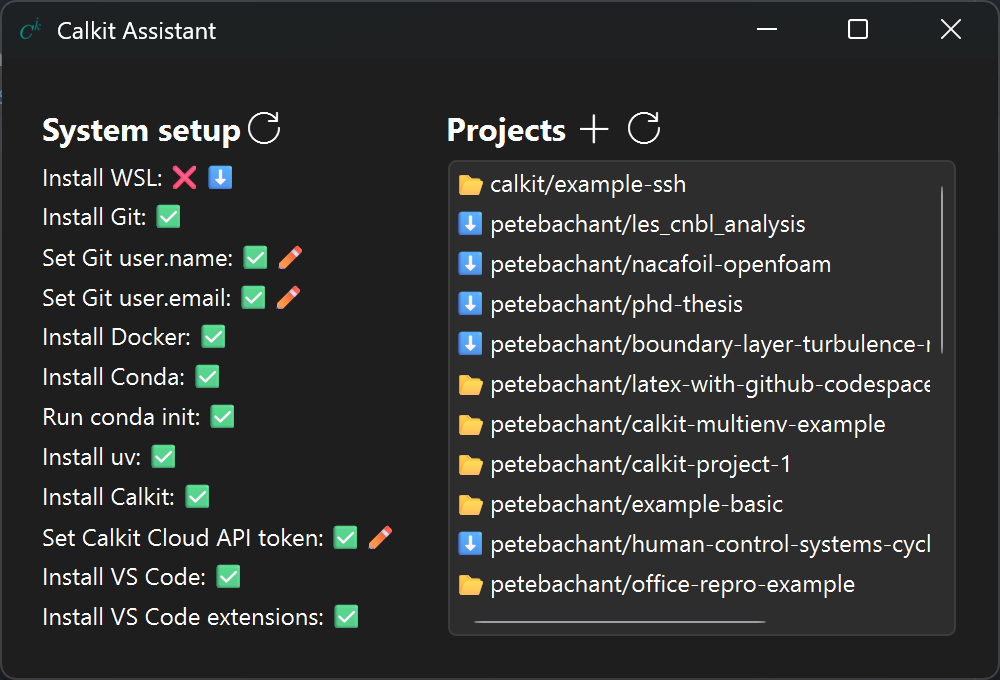
Calkit Assistant
For Windows users, the Calkit Assistant app is the easiest way to get everything set up and ready to work in VS Code, which can then be used as the primary app for working on all scientific or analytical computing projects.
Quickstart
!!! note
ck is an abbreviated alias for the calkit executable.
All calkit commands can be run as ck instead, e.g., ck save -am "...".
From an existing project
If you want to use Calkit with an existing project,
navigate into its working directory and use the xr command to start
executing and recording your scripts, notebooks, LaTeX files, etc.,
as reproducible pipeline stages.
For example:
calkit xr scripts/analyze.py

calkit xr notebooks/plot.ipynb

calkit xr paper/main.tex
Calkit will attempt to detect environments, inputs, and outputs and
save them in calkit.yaml.
If successful,
you'll be able to run the full pipeline with:
calkit run
Next, make a change to e.g., a script and look at the output of
calkit status.
You'll see that the pipeline has a stage that is out-of-date:
---------------------------- Pipeline ----------------------------
analyze:
        changed deps:
                modified:           scripts/analyze.py
This can be fixed with another call to calkit run.
You can save (add and commit) all changes with:
calkit save -am "Add to pipeline"
Fresh from a Calkit project template
Create a new project from the
calkit/example-basic
template with:
calkit new project my-research \
    --title "My research" \
    --template calkit/example-basic \
    --cloud
Note the --cloud flag requires cloud integration
to be set up, but can be omitted if the project doesn't need to be backed up to
the cloud or shared with collaborators.
Cloud integration can also be set up later.
Next, move into the project folder and run the pipeline,
which consists of several stages defined in calkit.yaml:
cd my-research
calkit run
Next, make some edits to a script or LaTeX file and run calkit status to
see what stages are out-of-date.
For example:
---------------------------- Pipeline ----------------------------
build-paper:
        changed deps:
                modified:           paper/paper.tex
Execute calkit run again to bring everything up-to-date.
To back up or save the project, call:
calkit save -am "Run pipeline"
Get involved
We welcome all kinds of contributions! See CONTRIBUTING.md to learn how to get involved.
Project details
Verified details
These details have been verified by PyPIProject links
GitHub Statistics
Maintainers
Release history Release notifications | RSS feed


Download files
Download the file for your platform. If you're not sure which to choose, learn more about installing packages.
Source Distribution
Built Distribution
Filter files by name, interpreter, ABI, and platform.
If you're not sure about the file name format, learn more about wheel file names.
Copy a direct link to the current filters
File details
Details for the file calkit_python-0.40.0.tar.gz.
File metadata
- Download URL: calkit_python-0.40.0.tar.gz
- Upload date:
- Size: 10.4 MB
- Tags: Source
- Uploaded using Trusted Publishing? Yes
- Uploaded via: twine/6.1.0 CPython/3.13.12
File hashes
| Algorithm | Hash digest | |
|---|---|---|
| SHA256 |
281b044080419f6b90fce3b0fd63576534d2f99ff5541cc32430111c07933919
|
|
| MD5 |
33b20c6d53f4cf2f5a18943e13fe2ed6
|
|
| BLAKE2b-256 |
cb0cbcb075d2c11fe689c28637b5f4e68b7ca4f65ebdb85a34a2f36199f792b3
|
Provenance
The following attestation bundles were made for calkit_python-0.40.0.tar.gz:
Publisher:
publish.yml on calkit/calkit
-
Statement:
-
Statement type:
https://in-toto.io/Statement/v1 -
Predicate type:
https://docs.pypi.org/attestations/publish/v1 -
Subject name:
calkit_python-0.40.0.tar.gz -
Subject digest:
281b044080419f6b90fce3b0fd63576534d2f99ff5541cc32430111c07933919 - Sigstore transparency entry: 1543715761
- Sigstore integration time:
-
Permalink:
calkit/calkit@8f7741375978bf8396d6d3723481e99faa8c25c6 -
Branch / Tag:
refs/tags/v0.40.0 - Owner: https://github.com/calkit
-
Access:
public
-
Token Issuer:
https://token.actions.githubusercontent.com -
Runner Environment:
github-hosted -
Publication workflow:
publish.yml@8f7741375978bf8396d6d3723481e99faa8c25c6 -
Trigger Event:
release
-
Statement type:
File details
Details for the file calkit_python-0.40.0-py3-none-any.whl.
File metadata
- Download URL: calkit_python-0.40.0-py3-none-any.whl
- Upload date:
- Size: 485.9 kB
- Tags: Python 3
- Uploaded using Trusted Publishing? Yes
- Uploaded via: twine/6.1.0 CPython/3.13.12
File hashes
| Algorithm | Hash digest | |
|---|---|---|
| SHA256 |
6253239d99c1e6e912bd392b841546a15cd892c7fa5de5055683223d6502dd85
|
|
| MD5 |
3f45049b283c06835f140b4709b0f907
|
|
| BLAKE2b-256 |
38be40dbdd64c00e4a0afdc0b8b936c96a70dee9867ecf6e662baba3cf5a9722
|
Provenance
The following attestation bundles were made for calkit_python-0.40.0-py3-none-any.whl:
Publisher:
publish.yml on calkit/calkit
-
Statement:
-
Statement type:
https://in-toto.io/Statement/v1 -
Predicate type:
https://docs.pypi.org/attestations/publish/v1 -
Subject name:
calkit_python-0.40.0-py3-none-any.whl -
Subject digest:
6253239d99c1e6e912bd392b841546a15cd892c7fa5de5055683223d6502dd85 - Sigstore transparency entry: 1543716075
- Sigstore integration time:
-
Permalink:
calkit/calkit@8f7741375978bf8396d6d3723481e99faa8c25c6 -
Branch / Tag:
refs/tags/v0.40.0 - Owner: https://github.com/calkit
-
Access:
public
-
Token Issuer:
https://token.actions.githubusercontent.com -
Runner Environment:
github-hosted -
Publication workflow:
publish.yml@8f7741375978bf8396d6d3723481e99faa8c25c6 -
Trigger Event:
release
-
Statement type:






