
Callback
Callback phones your voice agent with simulated callers, deliberately makes the call messy, and measures what happened from the recorded audio.
Status: Early release. Not on PyPI yet. Feedback welcome.
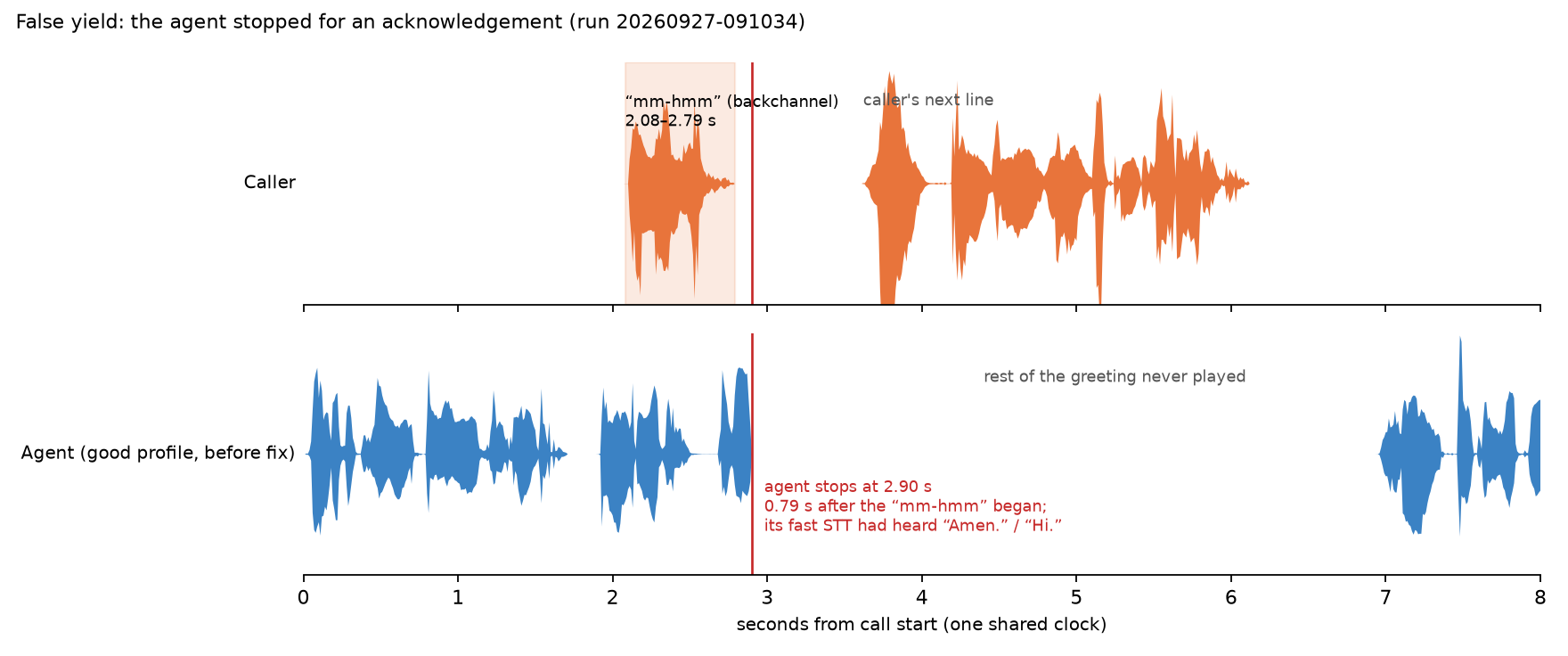
A real test call: the caller says "mm-hmm" (top) and the agent (bottom) stops talking and never finishes its greeting. Callback flags this as a false yield. Listen: before, after the agent was fixed.
Why
Voice agents fail in ways a text test never sees. They answer too slowly. They keep talking when the caller interrupts, or stop dead for a harmless "mm-hmm". They read a booking code back wrong. They confirm something they never saved. None of that shows up in a transcript of what the agent meant to say; it shows up in the audio of the call and in what actually happened afterwards.
What it does today
- Simulated callers. A scripted caller says fixed lines. An AI caller (Gemini's free tier by default) plays a persona with a goal, known facts, patience and language, in its own words.
- Calls that go wrong on purpose. Callers that interrupt, say "mm-hmm" while the agent talks, go silent, change their mind, ask for a human, press keypad tones, or call from a noisy street over a bad line with dropped and delayed audio. Every disturbance is seeded, so the same call can be run again exactly.
- Measurements from the recording. Both sides are recorded on one clock. Callback measures how long the agent takes to answer, how fast it stops when interrupted, how much it talks over the caller, whether it stops for acknowledgements, and whether it checks in on a silent caller.
- Checks on the outcome. After the call, Callback asks your system for the real end state (for example, did the booking move to the right time?). It checks that the agent actually said required facts (a booking code, a party size, a time, a phone number), and that it never said anything a rule forbids.
- Honest about doubt. If Callback's own speech recognition is unsure whether the agent said a fact wrong or the line swallowed a sound, the check goes on a review list for a person instead of failing the agent.
- Two example agents. A restaurant booking agent and a copy with deliberate bugs, so you can see every check pass and fail without building anything.
- A pass/fail exit code for scripts and CI: 0 pass, 1 fail, 2 could not run.
It talks to agents over a WebSocket that carries raw 16 kHz audio, or joins them in a LiveKit room (docs/transports.md).
Quickstart (from source)
Tested on macOS with Apple Silicon. Needs Python 3.12, uv and espeak-ng (used by the local voice).
brew install uv espeak-ng
git clone https://github.com/imshivamb/callback.git
cd callback
uv sync --extra local
uv run callback doctor
doctor should show every CORE and LOCAL MODELS line green. Speech models
download on first use (a few hundred MB, into ~/.cache). The AI caller needs a free
Gemini key in a .env file (GEMINI_API_KEY=...); the steps below don't.
The fastest way to see it work, with no keys and no setup:
uv run callback demo
It starts the bundled buggy agent, calls it twice with chaos (the caller interrupts it,
then says "mm-hmm" while it talks), fails with exit code 1 after about two and a half
minutes, and opens the report on the moment it talked over the caller. --good calls
the good agent instead, which passes.
To test your own agent, start a project in an empty folder:
uv run callback init # callback.yaml and scenarios/example.yaml
Then point the my-agent target in callback.yaml at your agent's WebSocket.
Or try the bundled agents yourself. Start the two example agents, each in its own terminal:
uv run callback agent serve                        # the good agent, port 8765
uv run callback agent serve --buggy --port 8766    # the buggy copy, port 8766
You can also talk to either one yourself in Chrome at http://127.0.0.1:8765 (use headphones).
In a third terminal, run the chaos suite against each agent. Each call takes about a minute of real time.
uv run callback run scenarios/chaos                            # good agent: PASS, exit 0
uv run callback run scenarios/chaos --agent restaurant-buggy   # buggy agent: FAIL, exit 1
Replay a call with the same seed, caller and disturbances:
uv run callback replay backchannel--t1
It re-runs the most recent call with that id and prints identical twice when the
caller's lines and every disturbance matched. Its exit code is the replayed call's
result.
Each run writes .callback/runs/<run id>/report.html: one file that opens offline
and shows the verdict, then every call as two waveforms (caller and agent) on one
time axis, with red pins where something went wrong, chaos markers, a latency bar
per answer, and the audio. It opens on the first failing call; click a pin (or press
N) to hear the moment. Next to it are results.json, junit.xml, and for every
call a stereo recording (call.wav, caller on the left, agent on the right) and an
event log. docs/testing.md walks through all of it.
Example results
The chaos suite against both example agents, from the quickstart above (good agent results, buggy agent results):
| Scenario | What goes wrong | Limit | Good agent | Buggy agent |
|---|---|---|---|---|
barge-in |
The caller cuts in mid-sentence | stops within 0.6 s | 0.53 s | 1.16 s (listen) |
backchannel |
The caller says "mm-hmm" and "okay" while the agent talks | 0 stops | 0 | 6 (listen) |
silent-caller |
The caller goes quiet for 12 s | checks in within 8 s | 5.25 s | never |
rough-line |
Street noise, dropped and delayed audio | completes | completes | completes |
| all four | Time to answer, 95th percentile | 1.5 s | 0.90–0.98 s | 2.21–2.35 s |
The audio clips are described in docs/assets/README.md.
How it decides pass or fail
- Measured from the audio. Timing comes from voice activity detection on the recording, not from the agent's logs. On synthetic calls with known timings it scores within ±50 ms (test).
- Hard checks decide. Only rule-based checks can fail a run: timings, the real end state, required facts, and pattern rules.
- Real targets, even on slow CI. The reply-delay target is 1.5 s. Our own test
workflow runs on GitHub's shared machines, which are slower at speech synthesis, so it
loosens that one limit to 2.0 s (
CALLBACK_CI_LATENCY_LIMIT_S). Any run that does so says it in its results file and report; 2.0 s is not the target (details). - The AI judge is advisory. An optional LLM judge can rate conversation quality and plain-English rules. Its scores are recorded but never fail a run. In one saved call it rated the buggy agent 4–5 out of 5 while the agent read the booking code back wrong (the call).
- Repeated calls, honest ranges. A scenario runs several times; limits apply
across its calls, with 95% confidence ranges. A saved baseline catches a regression
even under the limits: in this test
(results) a 0.4 s
slower agent (p95 0.93 s → 1.31 s, limit 1.5 s) exits 1 against the baseline while
the unchanged agent exits 0. Each run also writes
junit.xml. - Reproducible. Every call is seeded and can be replayed. AI caller lines are recorded on the first run and replayed afterwards without calling the model.
- Local and free by default. Speech recognition, voices and voice activity detection run on your machine. The only network use is the optional AI caller and judge (free tier) and the first model downloads.
Coming next
- Calling agents over real phone numbers.
pip install.
Docs
- docs/testing.md: running, reading results, chaos, replay, the test suite.
- docs/transports.md: connecting to your agent over a WebSocket or a LiveKit room, and what LiveKit adds to the numbers.
- docs/ci-example.md: running Callback in your own CI, with a baseline and a copy-paste GitHub Actions workflow.
- docs/assets/README.md: what each recording and figure shows.
License
Apache-2.0. See LICENSE and NOTICE (the bundled Silero VAD model is MIT-licensed).
1 maintainer

Metadata
1 maintainer
Release files for callback-voice 0.1.0
For a detailed explanation of source distributions (sdists) and built distributions (wheels), please see the package formats documentation.
Source distribution (sdist)
| File | Size | Uploaded | |
|---|---|---|---|
| callback_voice-0.1.0.tar.gz | 2.1 MB | Details |
Built distribution (wheel)
| File | Interpreter | ABI | Platform | Reset |
|---|---|---|---|---|
| callback_voice-0.1.0-py3-none-any.whl | Python 3 | none | any | Details |
Total release size: 4.4 MB
Release files / callback_voice-0.1.0.tar.gz
| Download URL | callback_voice-0.1.0.tar.gz |
|---|---|
| Size | 2.1 MB |
| Tags | Source |
|
SHA-256 checksum How to use checksums |
c654edc5958e6baf77f5da1792b9750a0c8feb9a1bdc07012d9787a71802f9b8
|
|
BLAKE2b-256 checksum How to use checksums |
2f260c125851cc9a415005a18983825425350253a6bd54bf876facca66f93546
|
| Upload date | |
|
Uploaded using Trusted Publishing? What is trusted publishing? |
Yes |
| Uploaded via |
twine/7.0.0 CPython/3.13.14
|
Provenance
Provenance describes where a file came from. On PyPI, provenance is shared via attestations, which provide a verifiable record of the build or publishing details. View details, limitations and caveats.


PyPI Publish Attestation
PyPI verified that this artifact, at this checksum, originated from the publisher listed below.
Signed by GitHub Actions, verified by PyPI on Sep 29, 2026.
Transparency logRelease files / callback_voice-0.1.0-py3-none-any.whl
| Download URL | callback_voice-0.1.0-py3-none-any.whl |
|---|---|
| Size | 2.2 MB |
| Tags | Python 3 |
|
SHA-256 checksum How to use checksums |
f9f72d7e5885b97250dd0f39ba25cf555982aa670603561c024eeabdc1522046
|
|
BLAKE2b-256 checksum How to use checksums |
b7a4a495bcfb0e0fd97e2c6e4fc3a3bb30e1206d7ea1500222ec4bb9544b2412
|
| Upload date | |
|
Uploaded using Trusted Publishing? What is trusted publishing? |
Yes |
| Uploaded via |
twine/7.0.0 CPython/3.13.14
|
Provenance
Provenance describes where a file came from. On PyPI, provenance is shared via attestations, which provide a verifiable record of the build or publishing details. View details, limitations and caveats.
PyPI Publish Attestation
PyPI verified that this artifact, at this checksum, originated from the publisher listed below.
Signed by GitHub Actions, verified by PyPI on Sep 29, 2026.
Transparency log













