
calver-auto-release 🏷️





🏷️ Automatically create GitHub releases using Calendar Versioning (CalVer) on every commit.
This tool is perfect for:
- 📦 Packages where users should always use the latest version
- 🔬 Research software where releases are not tied to specific feature completions
- 🔄 Projects with continuous deployment where each merge to main is a potential release
- 🤖 Automating away the decision of "when should we release?"
By automatically creating a release on every commit to your main branch, you ensure that:
- Users always have access to the latest changes
- Version numbers clearly indicate when changes were made
- Each change is properly documented through commit messages
- The release process is completely automated
[!NOTE] For the best experience, we recommend using squash merges for your Pull Requests. This ensures that:
- Each release corresponds to one logical change
- Release notes are clean and meaningful
- The git history remains linear and easy to understand
Configure this in your GitHub repository settings under "Pull Requests" → "Allow squash merging" and uncheck other merge methods.
ToC
Features
- 📅 Automatic Calendar Versioning (
v{YYYY}.{MM}.{PATCH}) - 🤖 Creates GitHub releases automatically
- 📝 Generates release notes from commit messages
- 🏷️ Supports release skipping with commit message flags
- 🔄 Integrates with GitHub Actions
- 🐍 Can be used as a Python package
- 🖥️ Command-line interface included
- 🧪 Dry-run mode for testing
- 📋 Customizable release notes format
Usage
GitHub Action
Add this to your workflow file (e.g., .github/workflows/release.yml):
[!NOTE] See the
basnijholt/home-assistant-streamdeck-yaml'srelease.ymlworkflow's for a full example, and see it's releases page for the result.
A minimal example:
name: Create Release
on:
  push:
    branches: [main]
jobs:
  release:
    runs-on: ubuntu-latest
    steps:
      - uses: basnijholt/calver-auto-release@v1
        id: release
        with:
          github_token: ${{ secrets.GITHUB_TOKEN }}
And full example including publishing to PyPI:
name: Create Release
on:
  push:
    branches:
      - main
jobs:
  release:
    runs-on: ubuntu-latest
    environment:  # Needed for `pypa/gh-action-pypi-publish`
      name: pypi
      url: https://pypi.org/p/${{ github.repository }}
    permissions:  # Needed for `pypa/gh-action-pypi-publish`
      id-token: write  # for PyPI publishing
    steps:
      # Create release with CalVer
      - uses: basnijholt/calver-auto-release@v1
        id: release
        with:
          github_token: ${{ secrets.GITHUB_TOKEN }}
          # Optional: custom configuration
          skip_patterns: "[skip release],[no-release]"
          footer: "Custom footer text"
          generate_release_notes: true  # Add GitHub's automatic release notes

      # Optional: publish to PyPI
      # Only run if a new version was created
      - name: Build package
        if: steps.release.outputs.version != ''
        run: |
          python -m pip install build
          python -m build

      # Option 1: Publish with official PyPA action
      - name: Publish package distributions to PyPI
        if: steps.release.outputs.version != ''
        uses: pypa/gh-action-pypi-publish@release/v1

      # Option 2: Publish with twine
      # - name: Publish package distributions to PyPI
      #   if: steps.release.outputs.version != ''
      #   env:
      #     TWINE_USERNAME: __token__
      #     TWINE_PASSWORD: ${{ secrets.PYPI_TOKEN }}
      #   run: |
      #     python -m pip install twine
      #     twine upload dist/*
The action creates a new release with CalVer versioning, and you can optionally add your preferred method for publishing to PyPI or any other post-release tasks.
[!IMPORTANT] The
secrets.GITHUB_TOKENvariable is automatically populated (see docs). It is enough when this action only needs to create a tag/release, or when later publish steps run in the same workflow job. However, tags and releases created usingGITHUB_TOKENwill not trigger other workflows that run onpush,create, orreleaseevents. If you need downstream workflows to run when a tag or release is created, you'll need to:
- Create a Personal Access Token (PAT) with
contents: writepermissions at https://github.com/settings/tokens, or create an equivalent GitHub App token.- Add it to your repository secrets (e.g., as
RELEASE_TOKEN).- Pass it as
release_token:- uses: basnijholt/calver-auto-release@v1 with: github_token: ${{ secrets.GITHUB_TOKEN }} release_token: ${{ secrets.RELEASE_TOKEN }}
CLI Usage
# Basic usage
calver-auto-release --repo-path /path/to/repo

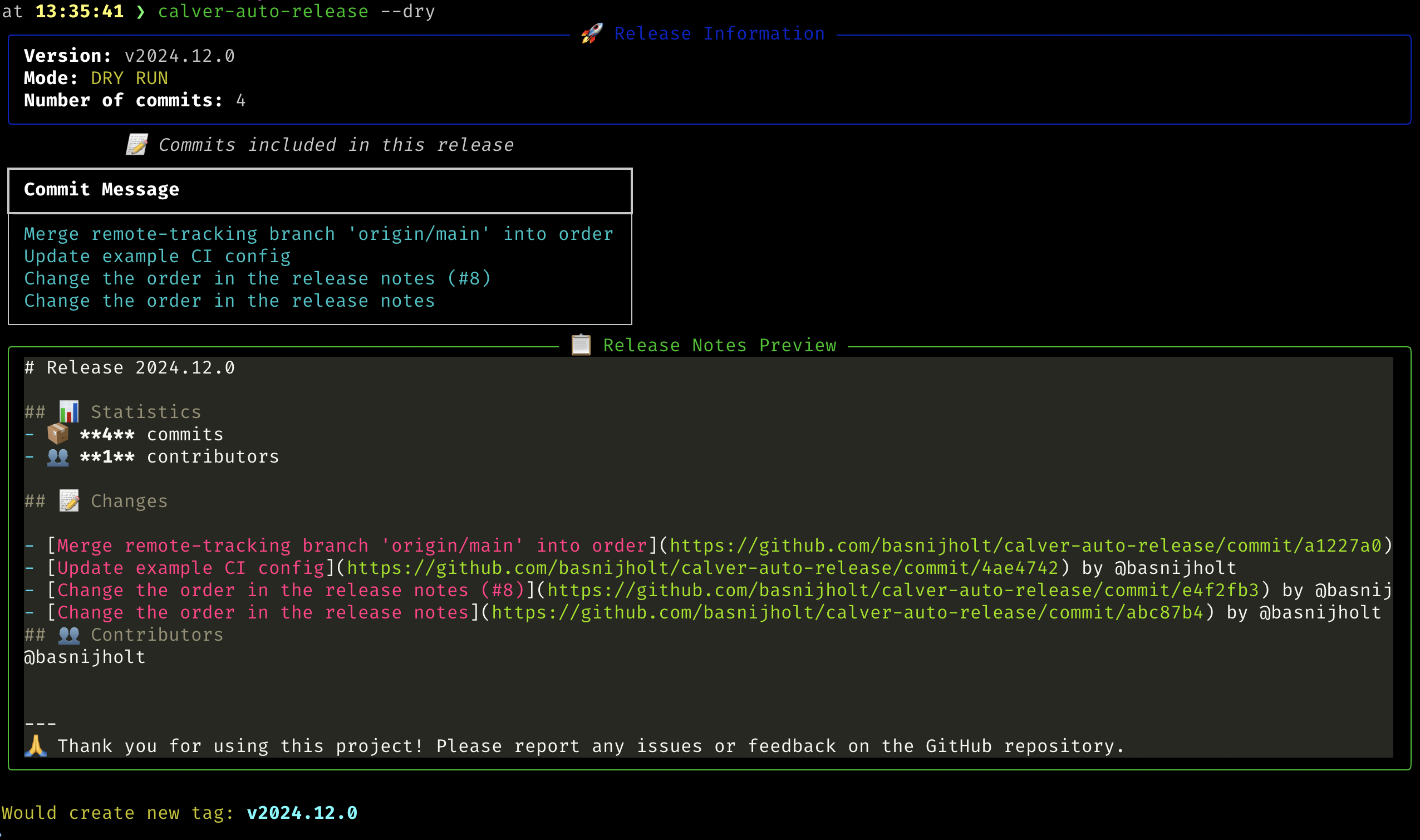
# Dry run (show what would happen without creating the release)
calver-auto-release --repo-path /path/to/repo --dry-run

# Custom skip patterns
calver-auto-release --repo-path /path/to/repo --skip-pattern "[no-release]" --skip-pattern "[skip]"
Python API
from calver_auto_release import create_release

# Basic usage
create_release()  # Uses current directory

# With custom configuration
create_release(
    repo_path="/path/to/repo",
    skip_patterns=["[skip]", "[no-release]"],
    footer="\nCustom footer text",
    dry_run=True,  # Show what would happen without creating the release
)
Release Notes Format
The generated release notes will have this format:
🚀 Release YYYY.MM.PATCH

📝 This release includes the following changes:

- First commit message
- Second commit message
- etc.

🙏 Thank you for using this project! Please report any issues or feedback on the GitHub repository
Requirements
- Git repository with an 'origin' remote configured
- Python 3.10 or higher
- Git command-line tools installed
Installation
Install using pip:
pip install calver-auto-release
Or using uv:
uv pip install calver-auto-release
Configuration
Skip Release Patterns
You can skip creating a release by including these patterns in your commit message:
[skip release][pre-commit.ci]⬆️ Update
Version Format
The version format follows CalVer: YYYY.MM.PATCH
YYYY: Current yearMM: Current monthPATCH: Incremental number, resets when year or month changes
Custom Footer
You can customize the footer text that appears at the end of each release note:
create_release(
    footer="\nCustom footer text for all releases"
)
Or via CLI:
calver-auto-release --footer "Custom footer text"
Or in the GitHub Action:
- uses: basnijholt/calver-auto-release@v1
  with:
    github_token: ${{ secrets.GITHUB_TOKEN }}
    footer: "Custom footer text"
License
MIT License
Contributing
Contributions are welcome! Please feel free to submit a Pull Request.
Development
- Clone the repository
- Install development dependencies:
pip install -e ".[dev]"
- Install pre-commit hooks:
pre-commit install - Run tests:
pytest
1 maintainer

Metadata
1 maintainer
Release files for calver-auto-release 1.0.8
For a detailed explanation of source distributions (sdists) and built distributions (wheels), please see the package formats documentation.
Source distribution (sdist)
| File | Size | Uploaded | |
|---|---|---|---|
| calver_auto_release-1.0.8.tar.gz | 10.4 kB | Details |
Built distribution (wheel)
| File | Interpreter | ABI | Platform | Reset |
|---|---|---|---|---|
| calver_auto_release-1.0.8-py3-none-any.whl | Python 3 | none | any | Details |
Total release size: 31.3 kB
Release files / calver_auto_release-1.0.8.tar.gz
| Download URL | calver_auto_release-1.0.8.tar.gz |
|---|---|
| Size | 10.4 kB |
| Tags | Source |
|
SHA-256 checksum How to use checksums |
73a85237137a6a6c86a74cb0e74d0d5151c0ec18e0f121e0a4d462bec5b9def1
|
|
BLAKE2b-256 checksum How to use checksums |
9beba266abe3d95ff0f918900c8aa4ace4f17c5a09860e80d7e8b489905f3da1
|
| Upload date | |
|
Uploaded using Trusted Publishing? What is trusted publishing? |
Yes |
| Uploaded via |
twine/6.1.0 CPython/3.13.12
|
Provenance
Provenance describes where a file came from. On PyPI, provenance is shared via attestations, which provide a verifiable record of the build or publishing details. View details, limitations and caveats.


PyPI Publish Attestation
PyPI verified that this artifact, at this checksum, originated from the publisher listed below.
Signed by GitHub Actions, verified by PyPI on Jun 15, 2026.
Transparency logRelease files / calver_auto_release-1.0.8-py3-none-any.whl
| Download URL | calver_auto_release-1.0.8-py3-none-any.whl |
|---|---|
| Size | 20.9 kB |
| Tags | Python 3 |
|
SHA-256 checksum How to use checksums |
f50a50173efbbd84dd0247bc7c1beb60db6d657a8b7ae117ecdd7351caed593f
|
|
BLAKE2b-256 checksum How to use checksums |
c77cfd1f960ae0473da81190d8a9af899af1733d200edc033f057f5e0932379c
|
| Upload date | |
|
Uploaded using Trusted Publishing? What is trusted publishing? |
Yes |
| Uploaded via |
twine/6.1.0 CPython/3.13.12
|
Provenance
Provenance describes where a file came from. On PyPI, provenance is shared via attestations, which provide a verifiable record of the build or publishing details. View details, limitations and caveats.
PyPI Publish Attestation
PyPI verified that this artifact, at this checksum, originated from the publisher listed below.
Signed by GitHub Actions, verified by PyPI on Jun 15, 2026.
Transparency log













