
This release is a pre-release and may not be stable for production use.
camfr3 — CAMFR for Python 3
camfr3 is a Python 3 port of CAMFR. It is distributed as camfr3 because the PyPI name camfr belongs to the original author; the module is still imported as import camfr. See NOTICE for attribution and CITATION.cff for how to cite.
Maintainer: I'm Abdelfettah Hadij-ElHouati (@abdelix), and I maintain camfr3 in my free time to keep CAMFR alive: the Python 3 port, a modern build (CMake, pybind11) and fixes. Please report problems in the issue tracker.
Documentation: https://abdelix.com/camfr3/ (tutorial, solver guide, API reference).
Originally written by Peter Bienstman at Ghent University, Belgium, with contributions from the people listed in AUTHORS. History: the original SourceForge project (Python 2), maintained on GitHub by Demis D. John, and ported to Python 3 as camfr3.
Introduction
CAMFR (CAvity Modelling FRamework) is a Python module providing a fast, flexible, full-vectorial Maxwell solver for electromagnetics simulations. Its main focus is on applications in the field of nanophotonics, like
- wavelength-scale microstructures (like photonic crystal devices, optical waveguides)
- lasers (like vertical-cavity surface-emitting lasers)
- light-emitting diodes (like resonant-cavity LEDs)
It is based on a combination of eigenmode expansion (EME) and advanced boundary conditions like perfectly matched layers (PML).
Using an intuitive python scripting interface one can create and solve for the optical modes/fields in various wavelength-scale structures. Additional math and plotting can then be performed via the SciPy stack. The Eigenmode Expansion (EME) method is especially well-suited to solving for very thin layers, or structures in which the X and Y dimensions are very different, where typical methods like FDTD and FEM have trouble with the vastly differing X/Y discretization.
You can find more information, publications and details here.
Features
CAMFR was a research project, started at the photonics group of the Department of Information Technology (INTEC) at Ghent University in Belgium. CAMFR can be used to calculate
- the scattering matrix of a structure
- the field inside a structure, for any given excitation
- band diagrams of an infinite periodic structure
- threshold material gain and resonance wavelength of laser modes
- the response to a current source in an arbitrary cavity
- structures terminated by a semi-infinite repetition of another structure
This functionality is currently available for two types of geometries:
- 2D Cartesian structures
- 3D cylindrical symmetric structures
Additionally, there is code to model the extraction from light emitting diodes, either planar devices, or 3D devices which incorporate 2D periodic structures.
Defining structures is quite straightforward, either layer-by-layer, or using geometric primitive shapes. There are also integrated plotting routines for rapid simulation feedback.
One of the main benefits of the Eigenmode Expansion (EME) method is that very thin (nm) and thick (um) structures can be combined without incurring significant numerical errors, as is often the case for Finite-Difference meshing, in which large differences in the X/Y grids cause calculation problems. Also, once the modes/scattering matrices of a 1D slab or 2D Section have been calculated, extending those regions over an additional dimension does not require large amounts of computational power, as most of the work was in calculating the initial eigenmodes of the structure. This means that repeating structures can be simulated fairly quickly, since the eigenmodes are only calculated once for a repeating section.
Framework/Module Character
CAMFR is utilized as a Python module, although internally it is conceived as a C++ framework, with all the algorithms implemented in terms of abstract waveguides and scatterers. This makes it extremely easy to extend CAMFR to new geometries.
The end user does not deal with this C++ code directly, but rather through bindings to the Python scripting language. This makes the code very clear and flexible, and allows e.g. to seamlessly integrate CAMFR with Python-aware visualistion tools such as matplotlib and numpy.
Examples
Silicon Waveguide Mode Solver
Silicon waveguide, Power, Ex and Ey plotted with matplotlib:
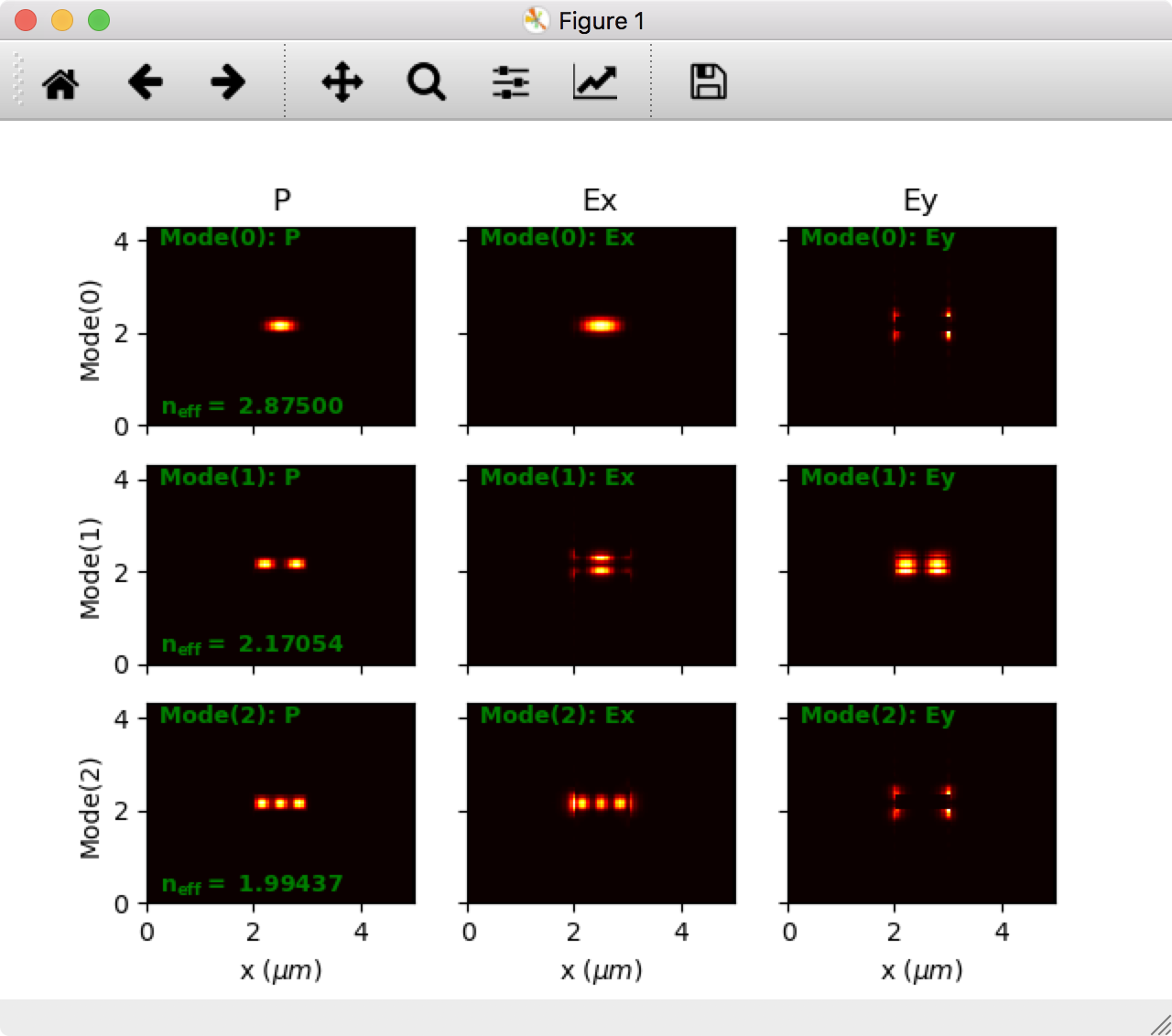
See the file examples/contrib/Example - Silicon-Waveguide ModeSim v2018-01.py for a full working example.
Brief Example
Example of rectangular waveguide construction syntax: We will create a rectangular waveguide of SiO2 cladding and Silicon core, calculate the first 4 modes mode & plot them.
>>> import camfr # import the module
First, create some Materials with some refractive index:
>>> SiO = camfr.Material( 1.45 )    # refractive index of SiO2
>>> Si = camfr.Material( 3.4 )    # refractive index of Silicon
Then, create some 1-D slabs, by calling those Materials with a thickness value, and adding them together from bottom to top in a Slab:
>>> clad = camfr.Slab(  SiO(15.75)  )      # Thicknesses in microns
>>> core = camfr.Slab(  SiO(10.0) + Si(2.5) + SiO(5.0)  )
This created an imaginary "Slab" structure from bottom-to-top. For example core looks like:
        top
--------------------
        SiO
    5.0 um thick
--------------------
        Si
   2.50 um thick
--------------------
        SiO
   10.0 um thick
--------------------
       bottom
Then make a 2-D structure by calling these Slabs with a width value, and adding them together from left to right in a Waveguide:
>>> WG = camfr.Section( clad(3.0) + core(1.0) + clad(4.0) ) # Widths in microns
Which creates this imaginary 2-D Waveguide structure from left-to-right:
                            top
---------------------------------------------------------
|<----- 3.0um------>|<-----1.0um------>|<---- 4.0um---->|
|                   |        SiO       |                |
|                   |    5.0 um thick  |                |
|                   |------------------|                |
|        SiO        |        SiN       |       SiO      |
|      15.75um      |   2.50 um thick  |     15.75um    |
|       thick       |------------------|      thick     |
|                   |        SiO       |                |
|                   |   10.0 um thick  |                |
---------------------------------------------------------
                           bottom
You can then have CAMFR calculate the modes as so:
>>> WG.calc()
And plot the modes like so:
>>> WG.plot()   # plots the fundamental mode with MatPlotLib.
>>> fig = WG.plot(field=['P','Ex','Ey'], mode=[0,1,2])   # plots the Power and fields of 3 modes
See the Examples directory for full examples, as some details are missing here.
Installation
CAMFR runs on Python 3. It has been tested with Python 3.14 and NumPy 2.5 on Linux. The original code base supported Python 2.7 only; PORTING_JOURNAL.md documents every change made for the port.
On Linux (x86_64), install the pre-built wheel from PyPI. Releases are alpha versions for now, so pip needs --pre:
python3 -m pip install --pre camfr3
On other platforms, or to build it yourself, you have to compile the CAMFR library. This requires a C++ and a Fortran compiler, Blitz++, BLAS and LAPACK; pybind11, which generates the Python bindings, is fetched automatically. The build uses CMake through scikit-build-core, so from a clone of the repository:
python3 -m pip install .
See the INSTALL file for the full list of dependencies and further options.
Matplotlib and Pillow are installed as dependencies but only imported when something is plotted, so import camfr stays fast. from camfr import * provides the NumPy namespace but, unlike earlier versions, no Matplotlib names: scripts that call figure(), savefig() and similar directly need from pylab import *.
For development, uv sets up an environment with an editable install: uv sync, then uv run python myScript.py.
CAMFR scripts can be run like any other Python script with python3 myScript.py, or with python3 -i myScript.py to stay in the interpreter afterwards.
Modules shipped inside the package are imported through the package, e.g. from camfr.RCLED import *. The Python 2 installer also made them importable as top-level modules (from RCLED import *).
License and support
All the code is released under the GPL (version 2, see LICENSE; NOTICE lists third-party code). camfr3 is maintained by Abdelfettah Hadij-ElHouati; questions and bug reports go to the issue tracker.
1 maintainer

Metadata
1 maintainer
Release files for camfr3 3.0.0a4
For a detailed explanation of source distributions (sdists) and built distributions (wheels), please see the package formats documentation.
Source distribution (sdist)
| File | Size | Uploaded | |
|---|---|---|---|
| camfr3-3.0.0a4.tar.gz | 1.3 MB | Details |
Built distributions (wheels)
| File | Reset | |||
|---|---|---|---|---|
| camfr3-3.0.0a4-cp314-cp314-manylinux_2_27_x86_64.manylinux_2_28_x86_64.whl | CPython 3.14 | CPython 3.14 | Linux glibc 2.27+ x86-64, Linux glibc 2.28+ x86-64 | Details |
| camfr3-3.0.0a4-cp313-cp313-manylinux_2_27_x86_64.manylinux_2_28_x86_64.whl | CPython 3.13 | CPython 3.13 | Linux glibc 2.27+ x86-64, Linux glibc 2.28+ x86-64 | Details |
| camfr3-3.0.0a4-cp312-cp312-manylinux_2_27_x86_64.manylinux_2_28_x86_64.whl | CPython 3.12 | CPython 3.12 | Linux glibc 2.27+ x86-64, Linux glibc 2.28+ x86-64 | Details |
| camfr3-3.0.0a4-cp311-cp311-manylinux_2_27_x86_64.manylinux_2_28_x86_64.whl | CPython 3.11 | CPython 3.11 | Linux glibc 2.28+ x86-64, Linux glibc 2.27+ x86-64 | Details |
| camfr3-3.0.0a4-cp310-cp310-manylinux_2_27_x86_64.manylinux_2_28_x86_64.whl | CPython 3.10 | CPython 3.10 | Linux glibc 2.27+ x86-64, Linux glibc 2.28+ x86-64 | Details |
Total release size: 69.2 MB
Release files / camfr3-3.0.0a4.tar.gz
| Download URL | camfr3-3.0.0a4.tar.gz |
|---|---|
| Size | 1.3 MB |
| Tags | Source |
|
SHA-256 checksum How to use checksums |
f11ece6e653419f45ce44f4c8f3cc1b4fe78cf06e49ee232b80885c3c5b6e88b
|
|
BLAKE2b-256 checksum How to use checksums |
6cd4c2aeb0b603d2eb3b3086ea191863dd3176f5e1d118260e5b5cafd3c78867
|
| Upload date | |
|
Uploaded using Trusted Publishing? What is trusted publishing? |
Yes |
| Uploaded via |
twine/7.0.0 CPython/3.13.14
|
Provenance
Provenance describes where a file came from. On PyPI, provenance is shared via attestations, which provide a verifiable record of the build or publishing details. View details, limitations and caveats.


PyPI Publish Attestation
PyPI verified that this artifact, at this checksum, originated from the publisher listed below.
Signed by GitHub Actions, verified by PyPI on Oct 1, 2026.
Transparency logRelease files / camfr3-3.0.0a4-cp314-cp314-manylinux_2_27_x86_64.manylinux_2_28_x86_64.whl
| Download URL | camfr3-3.0.0a4-cp314-cp314-manylinux_2_27_x86_64.manylinux_2_28_x86_64.whl |
|---|---|
| Size | 13.6 MB |
| Tags | CPython 3.14 Linux glibc 2.27+ x86-64 Linux glibc 2.28+ x86-64 |
|
SHA-256 checksum How to use checksums |
9bd6681d988044e15e15b072fedcc1ee4d96f855ae435159c92ca5f5ed0b03eb
|
|
BLAKE2b-256 checksum How to use checksums |
2044a660c123e2aa6a263be488b83d62d6085814643a0af0488c48dbccec05f7
|
| Upload date | |
|
Uploaded using Trusted Publishing? What is trusted publishing? |
Yes |
| Uploaded via |
twine/7.0.0 CPython/3.13.14
|
Provenance
Provenance describes where a file came from. On PyPI, provenance is shared via attestations, which provide a verifiable record of the build or publishing details. View details, limitations and caveats.
PyPI Publish Attestation
PyPI verified that this artifact, at this checksum, originated from the publisher listed below.
Signed by GitHub Actions, verified by PyPI on Oct 1, 2026.
Transparency logRelease files / camfr3-3.0.0a4-cp313-cp313-manylinux_2_27_x86_64.manylinux_2_28_x86_64.whl
| Download URL | camfr3-3.0.0a4-cp313-cp313-manylinux_2_27_x86_64.manylinux_2_28_x86_64.whl |
|---|---|
| Size | 13.6 MB |
| Tags | CPython 3.13 Linux glibc 2.27+ x86-64 Linux glibc 2.28+ x86-64 |
|
SHA-256 checksum How to use checksums |
e753c91bd5dc678d35ed5c0f631f92063174c4593632df9a4cc3607ebb1c6611
|
|
BLAKE2b-256 checksum How to use checksums |
53fdc04d8f965b52410327f93276ea36ec5951daaf5f616e70730573a9236052
|
| Upload date | |
|
Uploaded using Trusted Publishing? What is trusted publishing? |
Yes |
| Uploaded via |
twine/7.0.0 CPython/3.13.14
|
Provenance
Provenance describes where a file came from. On PyPI, provenance is shared via attestations, which provide a verifiable record of the build or publishing details. View details, limitations and caveats.
PyPI Publish Attestation
PyPI verified that this artifact, at this checksum, originated from the publisher listed below.
Signed by GitHub Actions, verified by PyPI on Oct 1, 2026.
Transparency logRelease files / camfr3-3.0.0a4-cp312-cp312-manylinux_2_27_x86_64.manylinux_2_28_x86_64.whl
| Download URL | camfr3-3.0.0a4-cp312-cp312-manylinux_2_27_x86_64.manylinux_2_28_x86_64.whl |
|---|---|
| Size | 13.6 MB |
| Tags | CPython 3.12 Linux glibc 2.27+ x86-64 Linux glibc 2.28+ x86-64 |
|
SHA-256 checksum How to use checksums |
7217671afa93288944de333716abebdf1bccc5aca727db7df21cab9c5886c08a
|
|
BLAKE2b-256 checksum How to use checksums |
de64e05235e1ae20b565b48fb47a866b531c165fc68e6e07e0dd268ecef1f6fb
|
| Upload date | |
|
Uploaded using Trusted Publishing? What is trusted publishing? |
Yes |
| Uploaded via |
twine/7.0.0 CPython/3.13.14
|
Provenance
Provenance describes where a file came from. On PyPI, provenance is shared via attestations, which provide a verifiable record of the build or publishing details. View details, limitations and caveats.
PyPI Publish Attestation
PyPI verified that this artifact, at this checksum, originated from the publisher listed below.
Signed by GitHub Actions, verified by PyPI on Oct 1, 2026.
Transparency logRelease files / camfr3-3.0.0a4-cp311-cp311-manylinux_2_27_x86_64.manylinux_2_28_x86_64.whl
| Download URL | camfr3-3.0.0a4-cp311-cp311-manylinux_2_27_x86_64.manylinux_2_28_x86_64.whl |
|---|---|
| Size | 13.6 MB |
| Tags | CPython 3.11 Linux glibc 2.27+ x86-64 Linux glibc 2.28+ x86-64 |
|
SHA-256 checksum How to use checksums |
fc26da83e638df75f323c3e4a4df918ed98ebd9f04b06107461dabf76e0327b8
|
|
BLAKE2b-256 checksum How to use checksums |
41312f027e5c933758e48eaf7a88d5ad3312de03b2aadb2bbc3aca5c197f7f05
|
| Upload date | |
|
Uploaded using Trusted Publishing? What is trusted publishing? |
Yes |
| Uploaded via |
twine/7.0.0 CPython/3.13.14
|
Provenance
Provenance describes where a file came from. On PyPI, provenance is shared via attestations, which provide a verifiable record of the build or publishing details. View details, limitations and caveats.
PyPI Publish Attestation
PyPI verified that this artifact, at this checksum, originated from the publisher listed below.
Signed by GitHub Actions, verified by PyPI on Oct 1, 2026.
Transparency logRelease files / camfr3-3.0.0a4-cp310-cp310-manylinux_2_27_x86_64.manylinux_2_28_x86_64.whl
| Download URL | camfr3-3.0.0a4-cp310-cp310-manylinux_2_27_x86_64.manylinux_2_28_x86_64.whl |
|---|---|
| Size | 13.6 MB |
| Tags | CPython 3.10 Linux glibc 2.27+ x86-64 Linux glibc 2.28+ x86-64 |
|
SHA-256 checksum How to use checksums |
872dc2b392bd22c77535de618aacc20feb4fcafdaa03da1da5dd16291e4c4da1
|
|
BLAKE2b-256 checksum How to use checksums |
6354789d8f296768f122772c479b44c76ee21ef0fe98f7664d031f6c61ef3b2b
|
| Upload date | |
|
Uploaded using Trusted Publishing? What is trusted publishing? |
Yes |
| Uploaded via |
twine/7.0.0 CPython/3.13.14
|
Provenance
Provenance describes where a file came from. On PyPI, provenance is shared via attestations, which provide a verifiable record of the build or publishing details. View details, limitations and caveats.
PyPI Publish Attestation
PyPI verified that this artifact, at this checksum, originated from the publisher listed below.
Signed by GitHub Actions, verified by PyPI on Oct 1, 2026.
Transparency log













