
This release is a pre-release and may not be stable for production use.
What is this?
This Python library wraps around Playwright's API to help automatically generate & inject unique device characteristics (OS, CPU info, navigator, fonts, headers, screen dimensions, viewport size, WebGL, addons, etc.) into Camoufox.
It uses fpgen under the hood to generate fingerprints that mimic the statistical distribution of device characteristics in real-world traffic.
In addition, it will also calculate your target geolocation, timezone, and locale to avoid proxy protection (see demo).
Installation
First, install the camoufox package:
pip install -U camoufox[geoip]
The geoip parameter is optional, but heavily recommended if you are using proxies. It will download an extra dataset to determine the user's longitude, latitude, timezone, country, & locale.
The dataset is GeoIP All-in-One, which merges several IP databases and is rebuilt weekly. Camoufox fetches the newest build and refreshes it once it is a week old.
Next, download the Camoufox browser:
camoufox fetch
fetch also installs fpgen's model, pinned by sha256, into fpgen's package directory. Otherwise the first generated fingerprint installs it. Run fetch as that directory's owner if the browser will run as another user, e.g. while building a Docker image.
To uninstall, run camoufox remove.
Installing multiple Camoufox versions & from other repos
UI Manager
Manage installed browsers, active version, IP geolocation databases, and package info. Basically a Qt front end for the Python CLI tool.
More updates on it will be coming soon.
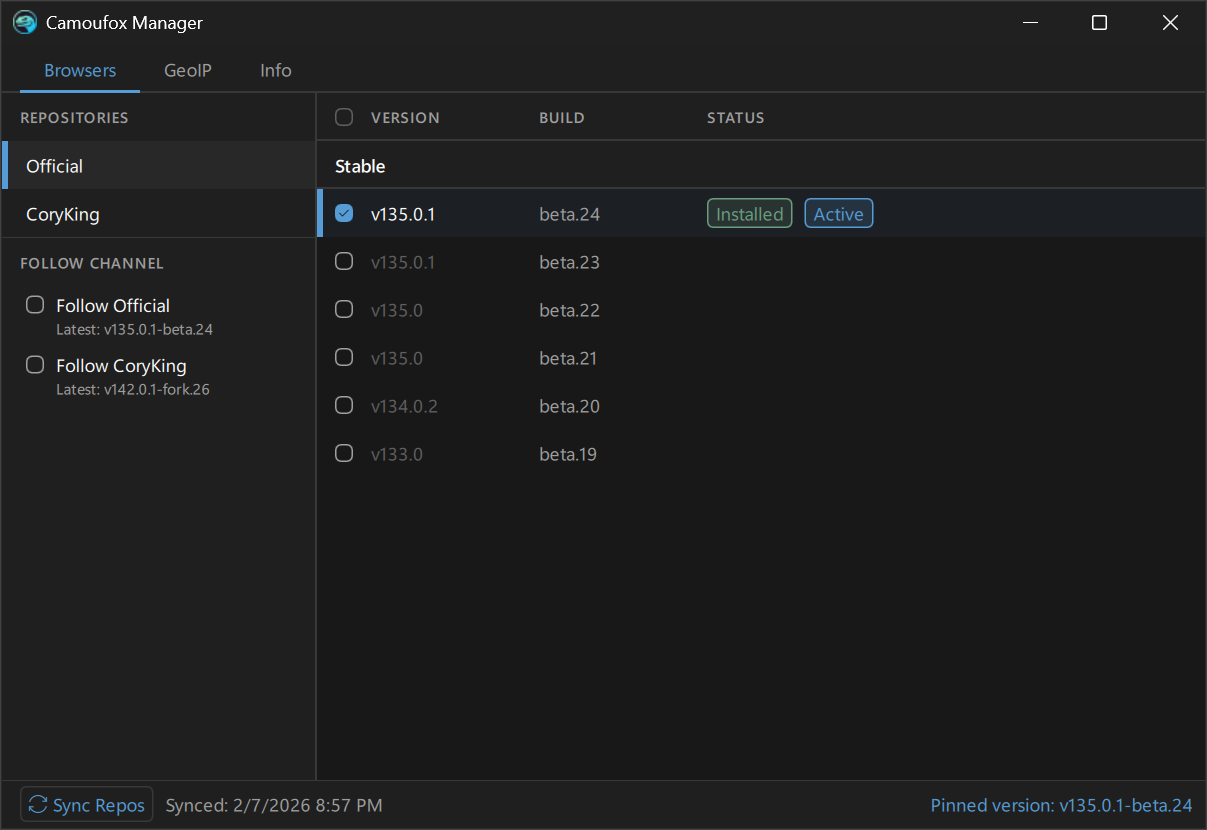
To use the gui, install Camoufox with the [gui] extra:
pip install 'camoufox[gui]'
To launch:
camoufox gui
CLI Manager
Demonstration
https://github.com/user-attachments/assets/992b1830-6b21-4024-9165-728854df1473
See help message
$ python -m camoufox --help

 Usage: python -m camoufox [OPTIONS] COMMAND [ARGS]...

╭─ Options ─────────────────────────────────────────────────────────────────────────────╮
│ --help  Show this message and exit.                                                   │
╰───────────────────────────────────────────────────────────────────────────────────────╯
╭─ Commands ────────────────────────────────────────────────────────────────────────────╮
│ active    Print the current active version                                            │
│ fetch     Install the active version, or a specific version                           │
│ gui       Launch the Camoufox Manager GUI (requires PySide6)                          │
│ list      List Camoufox versions                                                      │
│ path      Print the install directory path                                            │
│ remove    Remove downloaded data. By default, this removes everything.                │
│           Pass --select to pick a browser version to remove.                          │
│ server    Launch a Playwright server                                                  │
│ set       Set the active Camoufox version to use & fetch.                             │
│           By default, this opens an interactive selector for versions and settings.   │
│           You can also pass a specifier to activate directly:                         │
│           Pin version:                                                                │
│               camoufox set official/stable/134.0.2-beta.20                            │
│           Automatically find latest in a channel source:                              │
│               camoufox set official/stable                                            │
│ sync      Sync available versions from remote repositories                            │
│ test      Open the Playwright inspector                                               │
│ version   Display version, package, browser, and storage info                         │
╰───────────────────────────────────────────────────────────────────────────────────────╯
sync
Pull a list of release assets from GitHub.
> camoufox sync
Syncing repositories...
  Official... 24 versions
  CoryKing... 2 versions

Synced 26 versions from 2 repos.
Which browser build is used
Each camoufox release is paired with the one browser build it was built and tested with. By default, camoufox fetch installs exactly that build and every launch uses it. That holds even when other builds are installed, and even when the paired build is a prerelease (a prerelease of this package pairs with a prerelease browser). Upgrading the package therefore never runs a browser it was not tested with. Run camoufox fetch after upgrading to install the new pairing.
Choosing a channel or a build with camoufox set overrides the pairing. The choice is kept, and a launch warns that the build differs from the paired one. camoufox set --release goes back to the paired build.
A development checkout (installed from the repository, not from PyPI) is paired with nothing and follows its channel, official/stable by default.
set
Choose a version channel or pin a specific version, overriding the paired build. Can also be called with a specifier to activate directly.
Interactive selector:
> camoufox set
You can also pass a specifier to pin a specific version or choose a channel to follow directly. Following official/stable pulls the latest stable version from the official repo on camoufox fetch:
> camoufox set official/stable
Follow latest prerelease version from the official repo, if applicable:
> camoufox set official/prerelease
Pin a specific version:
> camoufox set official/stable/134.0.2-beta.20
Go back to the build this release is paired with:
> camoufox set --release
active
Prints the current active version string:
> camoufox active  # A released package uses its paired build by default
official/prerelease/156.0.1-beta.33 (1a2b3c4d) (paired with this release)
> camoufox set coryking/stable/142.0.1-fork.26
Pinned: coryking/stable/142.0.1-fork.26
Run 'camoufox fetch' to install.

> camoufox active  # A specific version is pinned
coryking/stable/142.0.1-fork.26 (not installed)
fetch
Install the browser build this release is paired with, or, after camoufox set, the latest version from the chosen channel. This will also automatically sync repository assets.
> camoufox fetch # Install the paired build (or the latest in the chosen channel)
To download the latest from a different channel, or pin a version:
> camoufox set coryking/stable
> camoufox fetch  # Will download the latest release from CoryKing's repo for now on
Or pass in the identifier to download directly without activating it:
> camoufox fetch official/stable/135.0-beta.25 # Install a specific version
list
List installed or all available Camoufox versions as a tree.
> camoufox list          # show installed versions
> camoufox list all      # show all available versions from synced repos
> camoufox list --path   # show full install paths
remove
By default, removes the entire camoufox data directory.
> camoufox remove
> camoufox remove -y  # skip confirmation prompt
Remove a specific version:
> camoufox remove official/stable/134.0.2-beta.20
Interactively select a version to remove:
> camoufox remove --select
version
Display the Python package version, active browser version, channel, and update status.
> camoufox version
Python Packages
  Camoufox                    v0.5.7
  fpgen                       v1.3.0
  Playwright                  v1.62.0
Browser
  Active                      official/stable/152.0.4-beta.31
  Current browser             v152.0.4-beta.31
  Installed                   Yes
  Latest in official/stable?  Yes
  Last Sync                   2026-03-07 00:23
GeoIP
  Database                    GeoIP AIO by daijro
  Updated                     2026-03-07 00:24
Storage
  Install path                /home/name/.cache/camoufox
  Browser(s) directory size   1.2 GB
  GeoIP database size         116.4 MB
  Config file                 /home/name/.cache/camoufox/config.json
  Repo cache                  /home/name/.cache/camoufox/repo_cache.json
path
Print the install directory path.
> camoufox path
/home/name/.cache/camoufox
test
Open Camoufox with the Playwright inspector for debugging.
> camoufox test
> camoufox test https://example.com
server
Launch a remote Playwright server.
> camoufox server
Usage
All of the latest stable documentation is available at camoufox.com/python.
1 maintainer

Metadata
1 maintainer
Release files for camoufox 0.5.8b2
For a detailed explanation of source distributions (sdists) and built distributions (wheels), please see the package formats documentation.
Source distribution (sdist)
| File | Size | Uploaded | |
|---|---|---|---|
| camoufox-0.5.8b2.tar.gz | 1.4 MB | Details |
Built distribution (wheel)
| File | Interpreter | ABI | Platform | Reset |
|---|---|---|---|---|
| camoufox-0.5.8b2-py3-none-any.whl | Python 3 | none | any | Details |
Total release size: 2.9 MB
Release files / camoufox-0.5.8b2.tar.gz
| Download URL | camoufox-0.5.8b2.tar.gz |
|---|---|
| Size | 1.4 MB |
| Tags | Source |
|
SHA-256 checksum How to use checksums |
3c01c9023b43a8681fc6fdcfb12256e3cf86a8f76e46b45972fcecb37056a3f5
|
|
BLAKE2b-256 checksum How to use checksums |
701ffbbc52de3d4b34dafeb4a31a917dc21b32a8dfba47be7f348136eec3cb60
|
| Upload date | |
|
Uploaded using Trusted Publishing? What is trusted publishing? |
Yes |
| Uploaded via |
twine/7.0.0 CPython/3.13.14
|
Provenance
Provenance describes where a file came from. On PyPI, provenance is shared via attestations, which provide a verifiable record of the build or publishing details. View details, limitations and caveats.


PyPI Publish Attestation
PyPI verified that this artifact, at this checksum, originated from the publisher listed below.
Signed by GitHub Actions, verified by PyPI on Oct 6, 2026.
Transparency logRelease files / camoufox-0.5.8b2-py3-none-any.whl
| Download URL | camoufox-0.5.8b2-py3-none-any.whl |
|---|---|
| Size | 1.5 MB |
| Tags | Python 3 |
|
SHA-256 checksum How to use checksums |
eedce47065285341ab5683321c53f374b990e6578a8208baa49de4d285a01c51
|
|
BLAKE2b-256 checksum How to use checksums |
5eae18aa4be1826e46c427d6e5fe391141bd1d2a66e6761b7261e4918286cda3
|
| Upload date | |
|
Uploaded using Trusted Publishing? What is trusted publishing? |
Yes |
| Uploaded via |
twine/7.0.0 CPython/3.13.14
|
Provenance
Provenance describes where a file came from. On PyPI, provenance is shared via attestations, which provide a verifiable record of the build or publishing details. View details, limitations and caveats.
PyPI Publish Attestation
PyPI verified that this artifact, at this checksum, originated from the publisher listed below.
Signed by GitHub Actions, verified by PyPI on Oct 6, 2026.
Transparency log














