
camsim


Deterministic camera sensor and ISP simulation with image-quality metrics.
camsim models the imaging chain from spectral scene irradiance to a rendered
image and measures image quality with standard metrics. It is built for camera
and ISP engineers, and researchers who need a reproducible, physically grounded
testbed rather than a notebook-only demo. Rendered images and IQ reports can
feed downstream computer-vision or ML experiments.
The pipeline
scene reflectance × illuminant × lens
        │  (spectral, 360–830 nm, explicit units)
        ▼
sensor-plane spectral irradiance      camsim.scene.targets.render
        │
        ▼
RAW frame (uint16 + full metadata)    camsim.Sensor.expose
        │
        ▼
rendered image (float32, [0, 1])      camsim.ISP.process
        │  linear-space stages → tone/OETF (the only non-linear step)
        ▼
image-quality report (JSON-able)      camsim.metrics.measure_all
The sensor and ISP are the reusable core: they depend only on camsim.core, so
externally computed irradiance can enter at the sensor boundary without the
scene or optics helpers. The metrics layer is independent of every simulator
package and operates on arrays plus metadata.
At a glance
| Stage | What it does | Entry point |
|---|---|---|
| Spectral scene | Reflectance × illuminant × lens, rendered to sensor-plane irradiance | camsim.scene.targets.render |
| Sensor | Spectral projection, noise, gain, and ADC to a self-describing RAW frame | camsim.Sensor.expose |
| ISP | Fixed linear-space reconstruction to a display-referred image | camsim.ISP.process |
| Metrics | e-SFR/MTF, SNR, colour difference, and acutance in one report | camsim.metrics.measure_all |
Features
Scene and optics (supporting layer)
- D65, 3000 K, and 4000 K illuminants on a validated 360–830 nm grid, with photometric normalization to lux.
- ColorChecker, slanted-edge, flat-patch, and Siemens-star targets; lens
geometry, f-number, transmittance, and
cos⁴vignetting. - Gaussian, Airy, and box PSFs with exact discrete transfer functions.
Sensor (camsim.Sensor)
- QE, CFA, and IR-cut spectral projection from bundled package data; Bayer, RCCC, and monochrome CFAs.
- Dual conversion gain (LCG/HCG), Poisson shot noise, read/row noise, DSNU, PRNU, dark current with a temperature-doubling model, defects, and PDAF sites.
- Dead pixels have zero mean photoresponse, stuck pixels are pinned to the ADC white code, and hot pixels receive a temperature-dependent dark-current multiplier. The RAW frame carries the defect union, a separate hot-pixel mask, and the PDAF mask; DPC corrects all three defect classes.
- Programmable analog/digital gain, 10-bit ADC with black-level pedestal, analog or digital binning, and optional crosstalk models.
- Every frame records its seeds, mode, gains, temperature, masks, and a stable configuration hash; fixed-pattern maps are deterministic for a preset.
scene.renderandSensor.exposeestimate peak simulation memory before allocating a spectral cube and raise a clear error above the configurable budget (8 GiB default).
ISP (camsim.ISP)
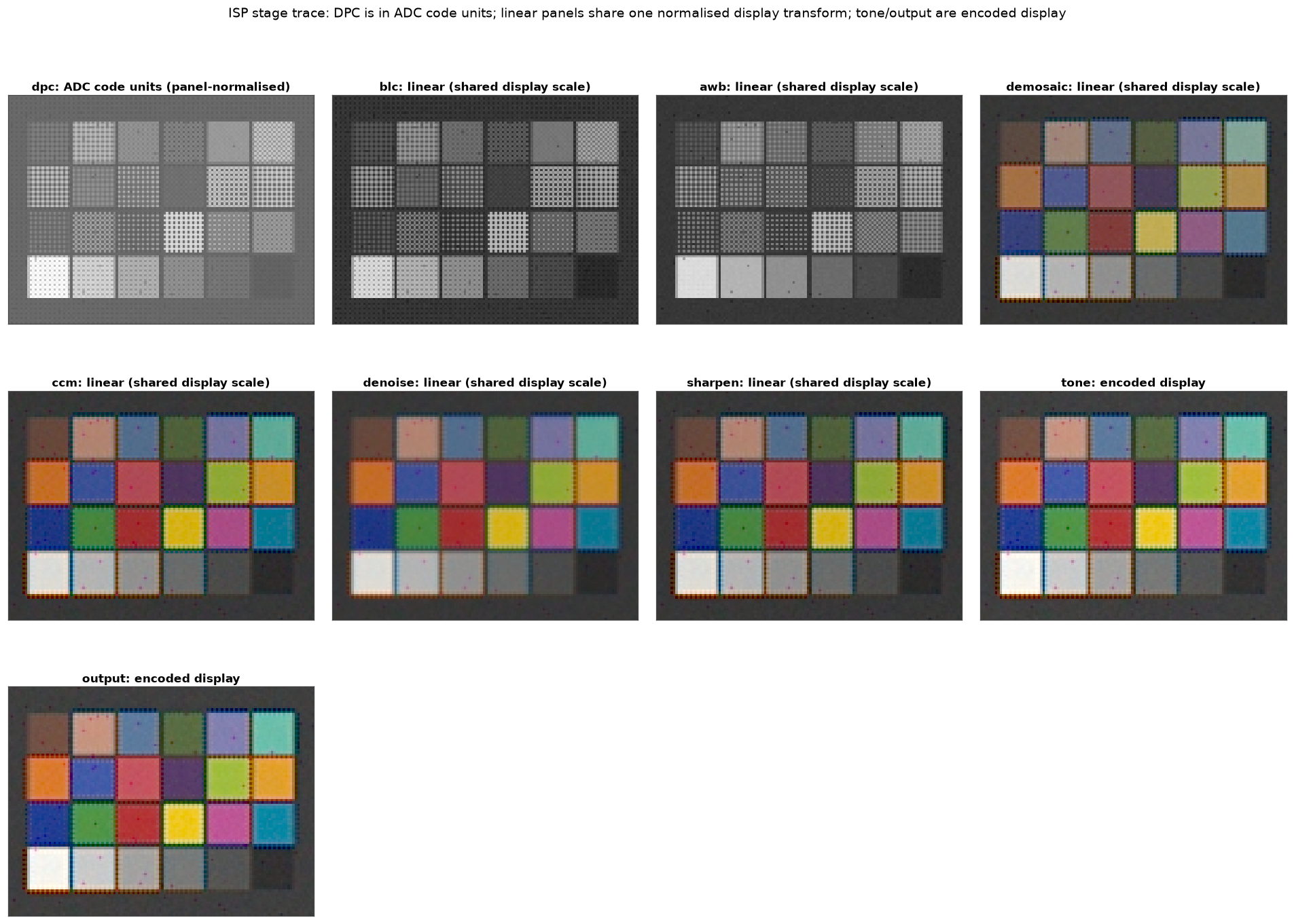
- Fixed stage order: DPC → BLC → LSC → AWB → demosaic → CCM → denoise → sharpen → tone → output.
- Bilinear and Malvar-He-Cutler demosaicing, gray-world or manual white balance, ridge-fitted 3×3 colour matrices, lens-shading correction, edge-preserving denoise, unsharp masking, and sRGB/Display P3 output.
- Every linear stage runs in float32; only the tone curve and output OETF are intentionally non-linear. The colour-correction matrix's non-negativity clamp is the one bounded exception, and it is inactive on in-gamut data. Optional stage traces record each intermediate buffer.
- The default preset's CCM is the identity. It is a neutral baseline, not
a colour-accurate profile: a default ColorChecker render is roughly 40 mean
ΔE2000 at the preset's default exposure (about 11 when well exposed) versus
about 0.9 with a fitted matrix. Fit one with
camsim.isp.ccm.fit_ccmand supply it inccm.matrixfor colour work.
Metrics (camsim.metrics)
- ISO 12233-style e-SFR/MTF from slanted edges, with MTF50/MTF20 crossings in cycles/pixel and cycles/degree.
- Spatial and temporal SNR, per channel and luma; ΔE76 and ΔE2000 colour difference; edge acutance.
- Chart layouts for ColorChecker, flat patches, and slanted edges, plus a
unified
measure_allreport that serializes to JSON.
Validation and reproducibility
- EMVA 1288-style characterization (read noise, DSNU, PRNU, full well,
linearity, dynamic range, dark current) in
camsim.characterization. - Explicit
numpy.random.Generatorobjects, recorded seeds and config hashes, no global RNG; bit-identical within one environment, tolerance-based across platforms. - Analytic invariants, reference-library cross-checks, and committed validation reports. See Validation.
Installation
Python 3.11–3.13 is required.
Install the released package:
pip install camsim
# or
uv add camsim
For development, with uv (recommended):
git clone https://github.com/pengzhao-ai/camsim.git
cd camsim
uv sync --all-extras
pip/venv fallback:
python -m venv .venv
source .venv/bin/activate
python -m pip install --upgrade pip
pip install -e ".[all]"
Core dependencies are NumPy, SciPy, Pydantic v2, Matplotlib, Pillow, and
colour-science. Optional extras are defined in pyproject.toml, and [all]
installs every extra. camsim is available on
PyPI.
Quickstart
This end-to-end example renders a slanted edge, exposes it on the flagship sensor preset, runs the default ISP, and measures MTF and acutance. It runs from the repository root after installation.
import camsim
from camsim.config.io import PRESETS_DIR, load_isp, load_sensor
from camsim.metrics import measure_all
from camsim.scene.charts import slanted_edge_layout
from camsim.scene.targets import render

# 1. Spectral scene at the sensor plane: 256 x 256 pixels, 200 lux, D65.
scene = render(
    "slanted_edge",
    illuminant="D65",
    lux=200.0,
    shape=(256, 256),
    oversampling=2,
    seed=11,
)

# 2. Irradiance -> RAW: 10 ms exposure in low-conversion-gain mode.
sensor = camsim.Sensor(
    load_sensor(PRESETS_DIR / "sensors" / "flagship_phone_50mp.json"),
    seed=1,
)
raw = sensor.expose(scene.irradiance, exposure_s=0.01, mode="LCG", seed=7)

# 3. RAW -> rendered image through the fixed ISP chain.
image = camsim.ISP(load_isp(PRESETS_DIR / "isp" / "default.json")).process(raw)

# 4. Measure the supported metrics for this layout.
report = measure_all(image, slanted_edge_layout(shape=(256, 256)))

print(image.data.shape, image.color_space)
print(f"MTF50: {report.mtf.mtf50_cp:.3f} cycles/pixel")
print(f"acutance: {report.acutance:.3f}")
The scene configuration, exposure, and layout must agree on the sensor shape;
mismatches are rejected rather than silently resampled. For a colour workflow,
render "colorchecker", build the matching layout with
chart_layout_from_scene(scene), and pass it to measure_all; the helper uses
the scene's own painted cells and spectrally computed Lab reference, so the
shape and oversampling cannot drift. The shipped ISP preset has an identity
CCM, so its delta-E is a baseline, not a colour-accuracy claim: fit a matrix
with camsim.isp.ccm.fit_ccm and place it in ccm.matrix. See
ISP stages and Metrics for the full
walkthroughs.
Command-line checks:
camsim info
camsim validate src/camsim/config/presets/sensors/flagship_phone_50mp.json
camsim schema sensor
Gallery
Selected outputs from the pipeline and validation suites. The committed gallery
lives under results/figures/ and is regenerated by the examples with
make figures. These are simulated results, not a calibrated commercial camera.
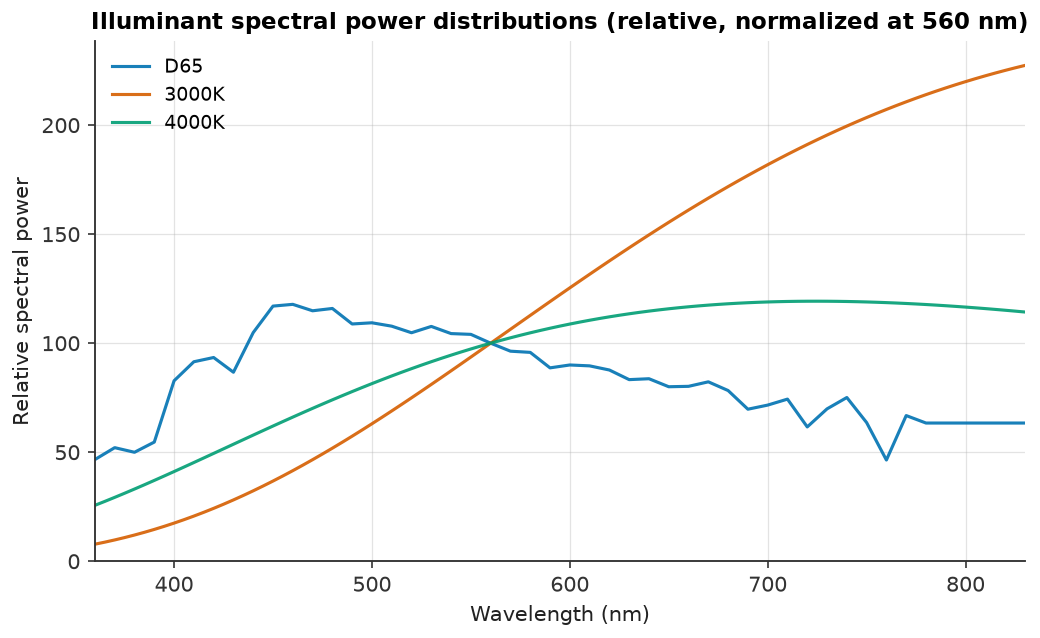 Illuminants. D65 and warm white on the 360–830 nm grid. |
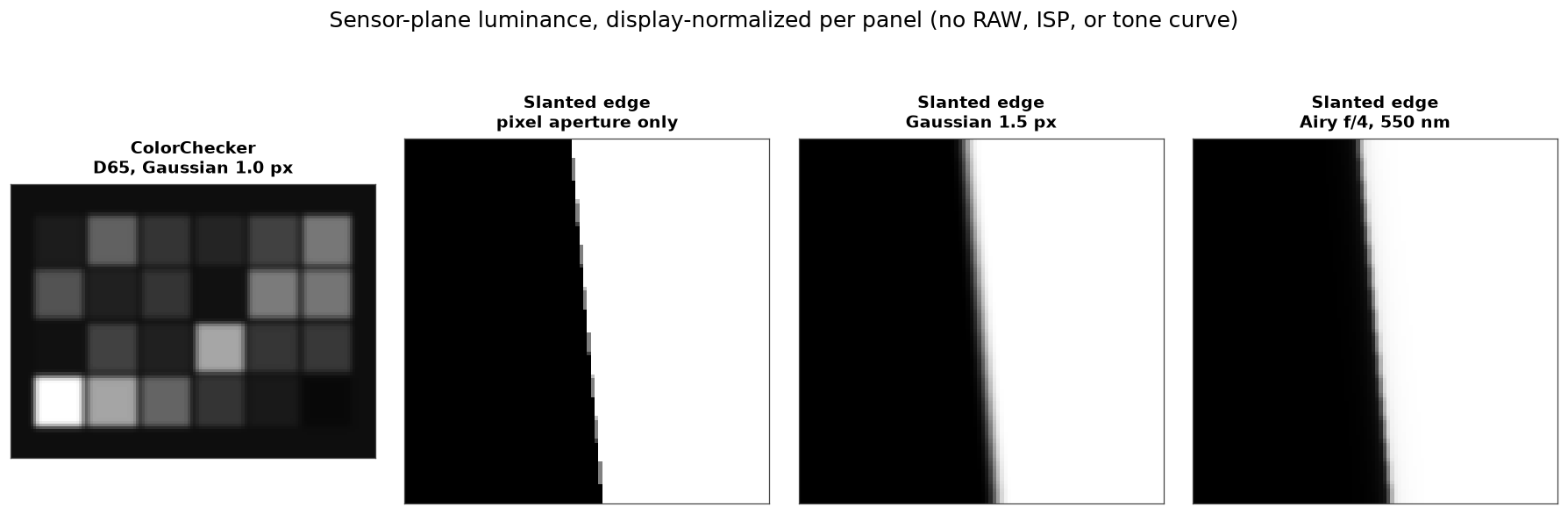 Scene render. ColorChecker and slanted edge at the sensor plane. |
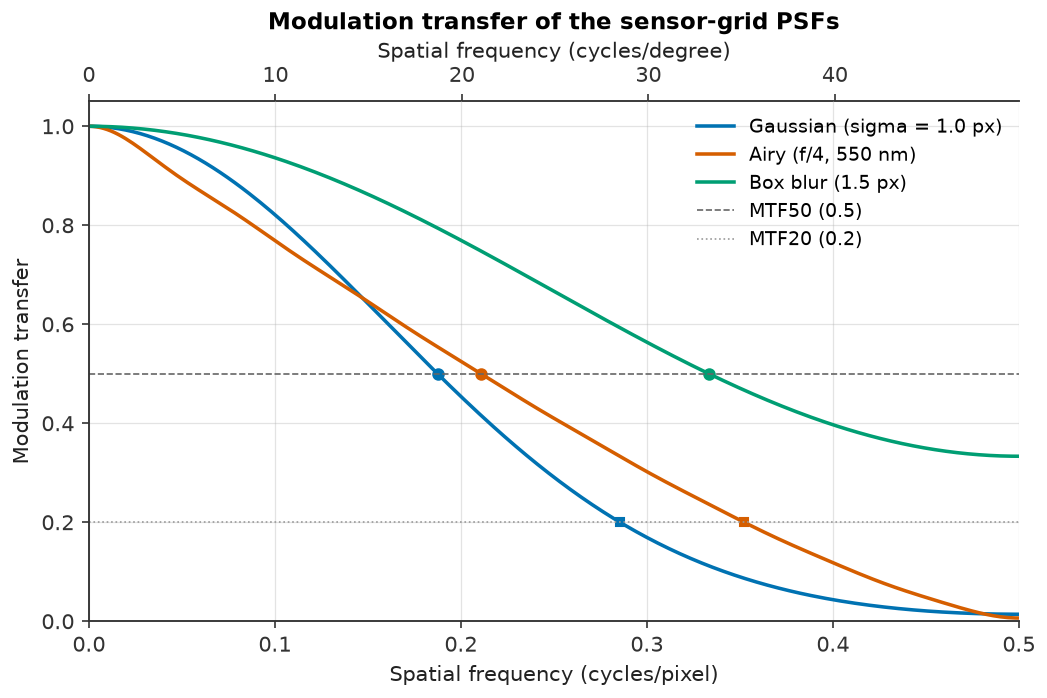 Optics. Gaussian, Airy, and box MTFs with MTF50/MTF20. |
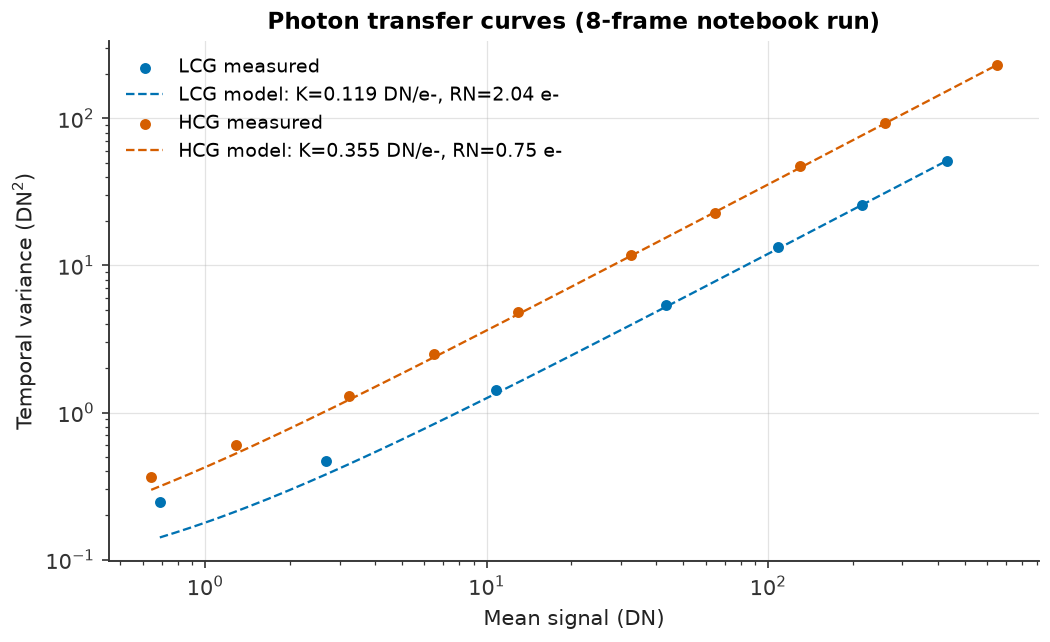 Sensor PTC. Photon-transfer curve and system gain. |
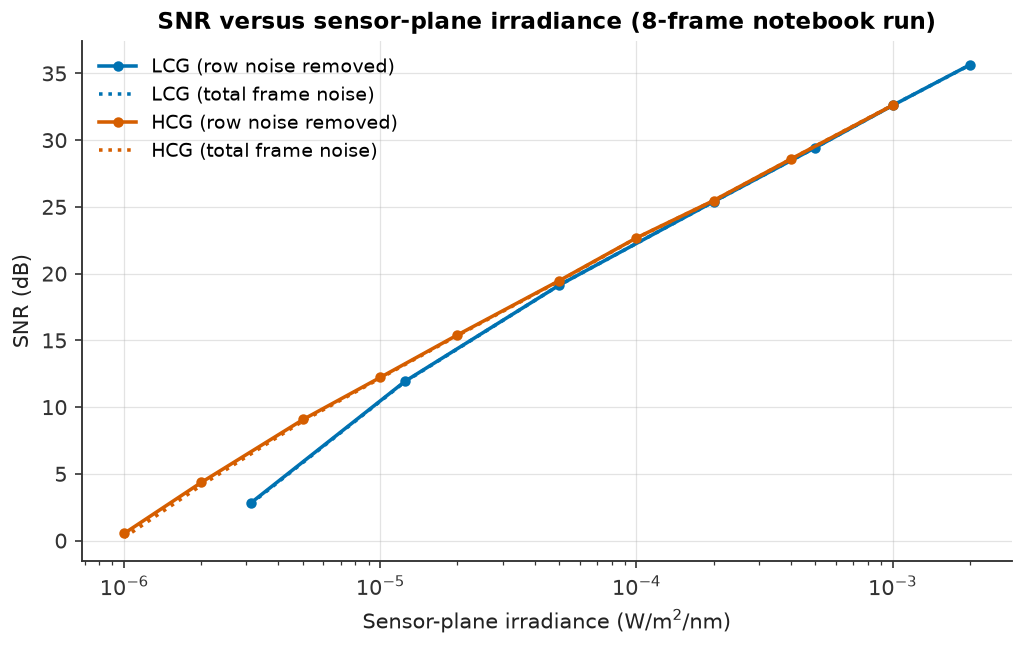 Sensor SNR. Read-noise and shot-noise regimes. |
ISP stages. Each intermediate buffer, stage by stage. |
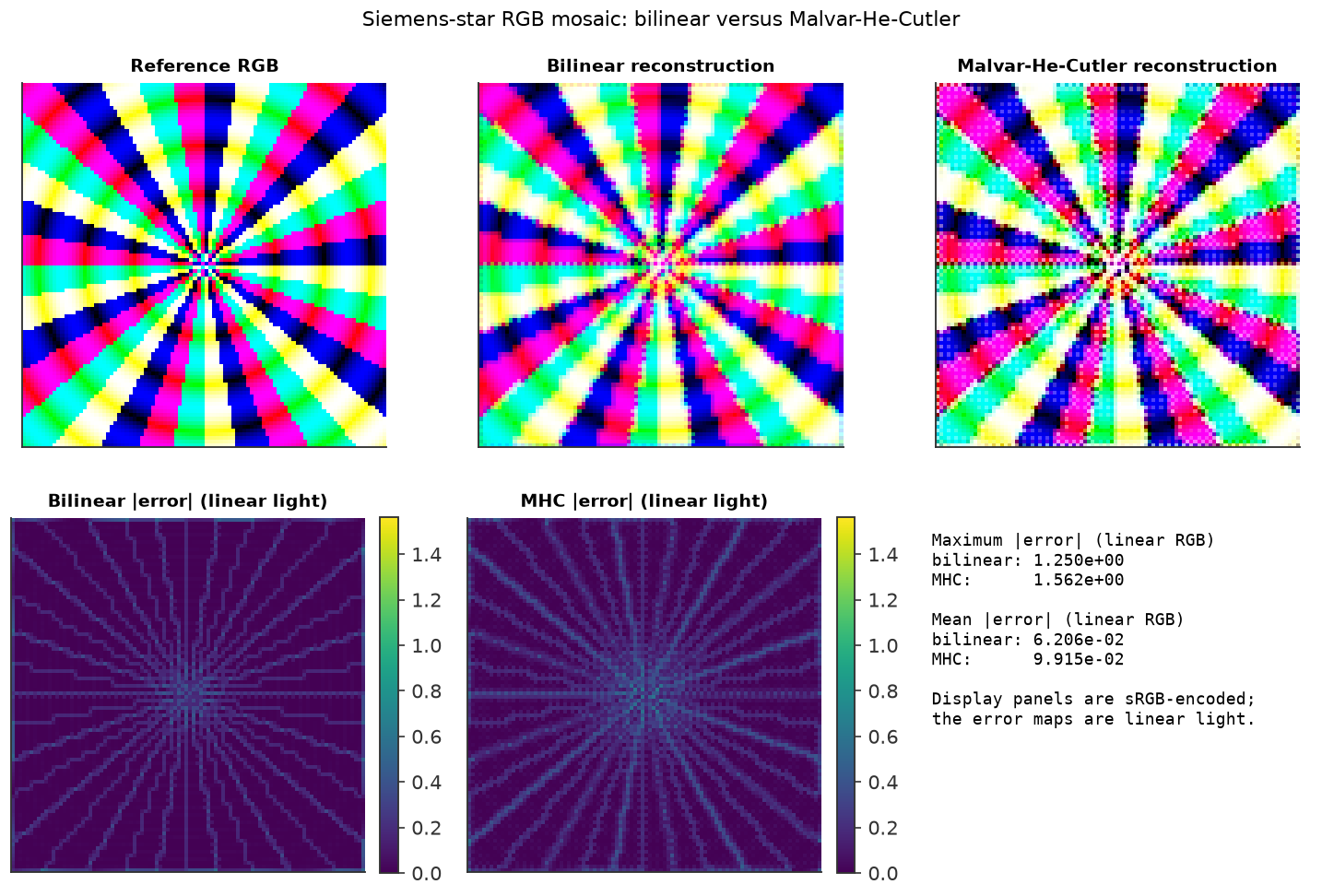 Demosaicing. Bilinear versus Malvar-He-Cutler on a star. |
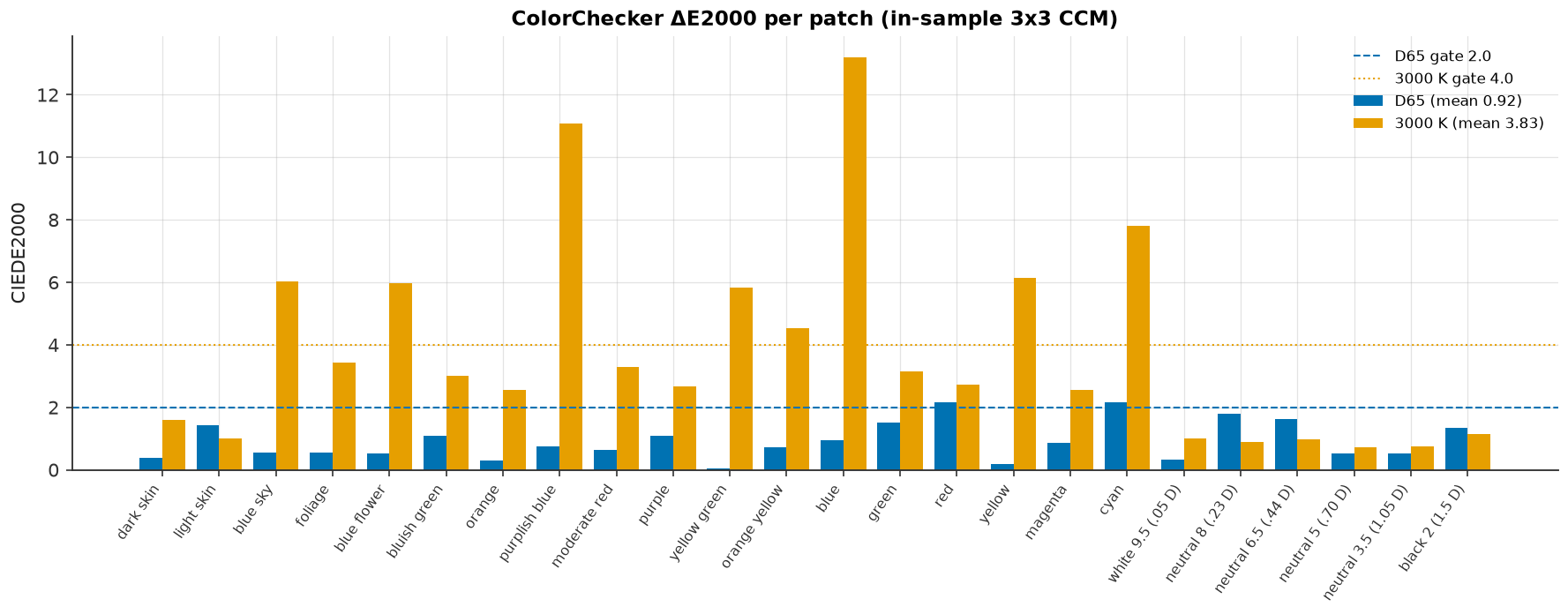 Colour error. Per-patch ΔE2000 under D65 and 3000 K. |
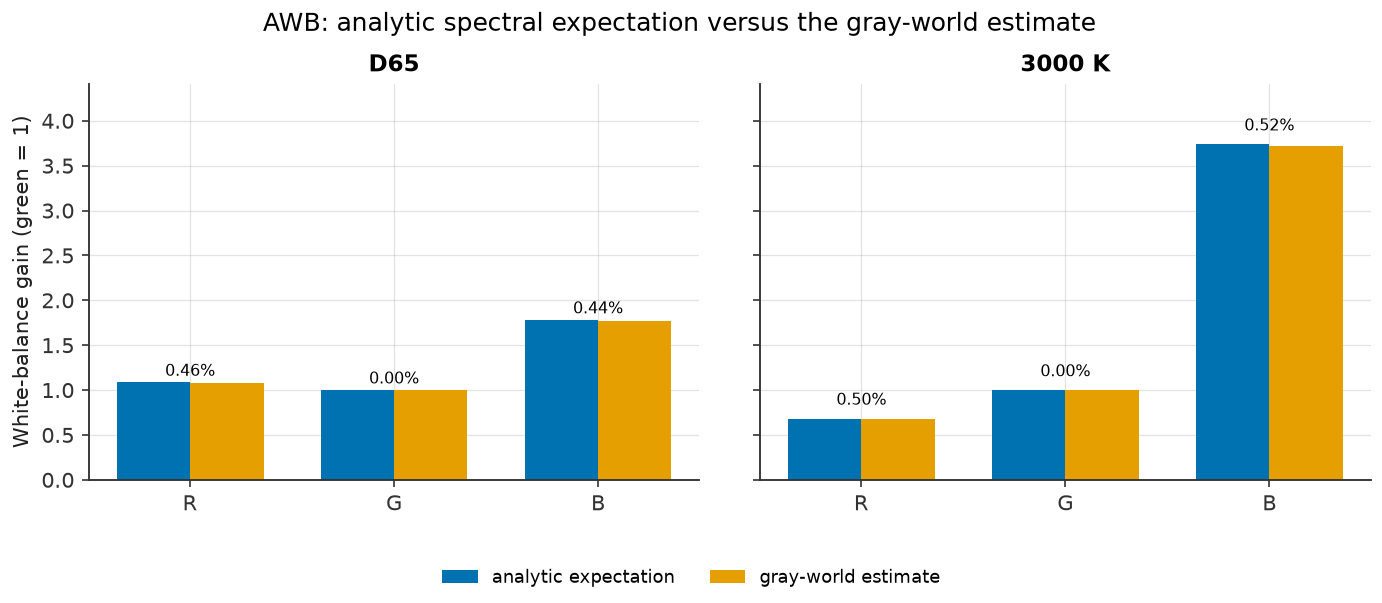 White balance. Measured versus analytic gains. |
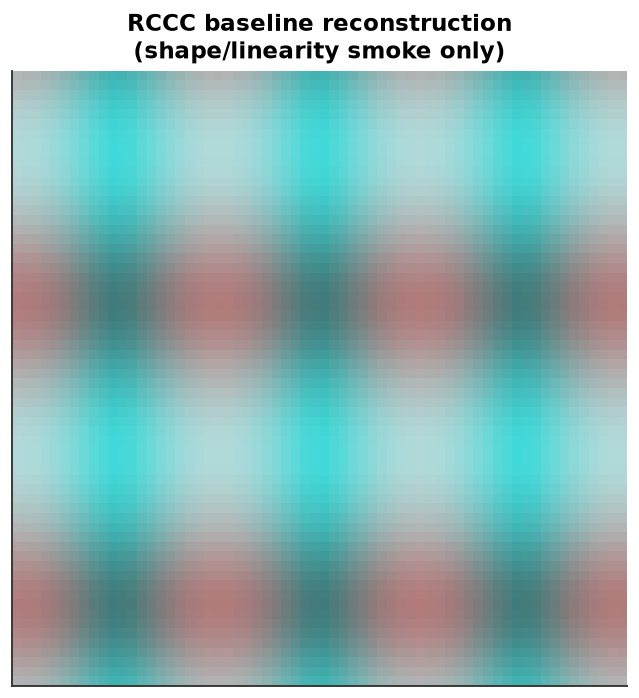 RCCC baseline. Monochrome-plus-red sensor output. |
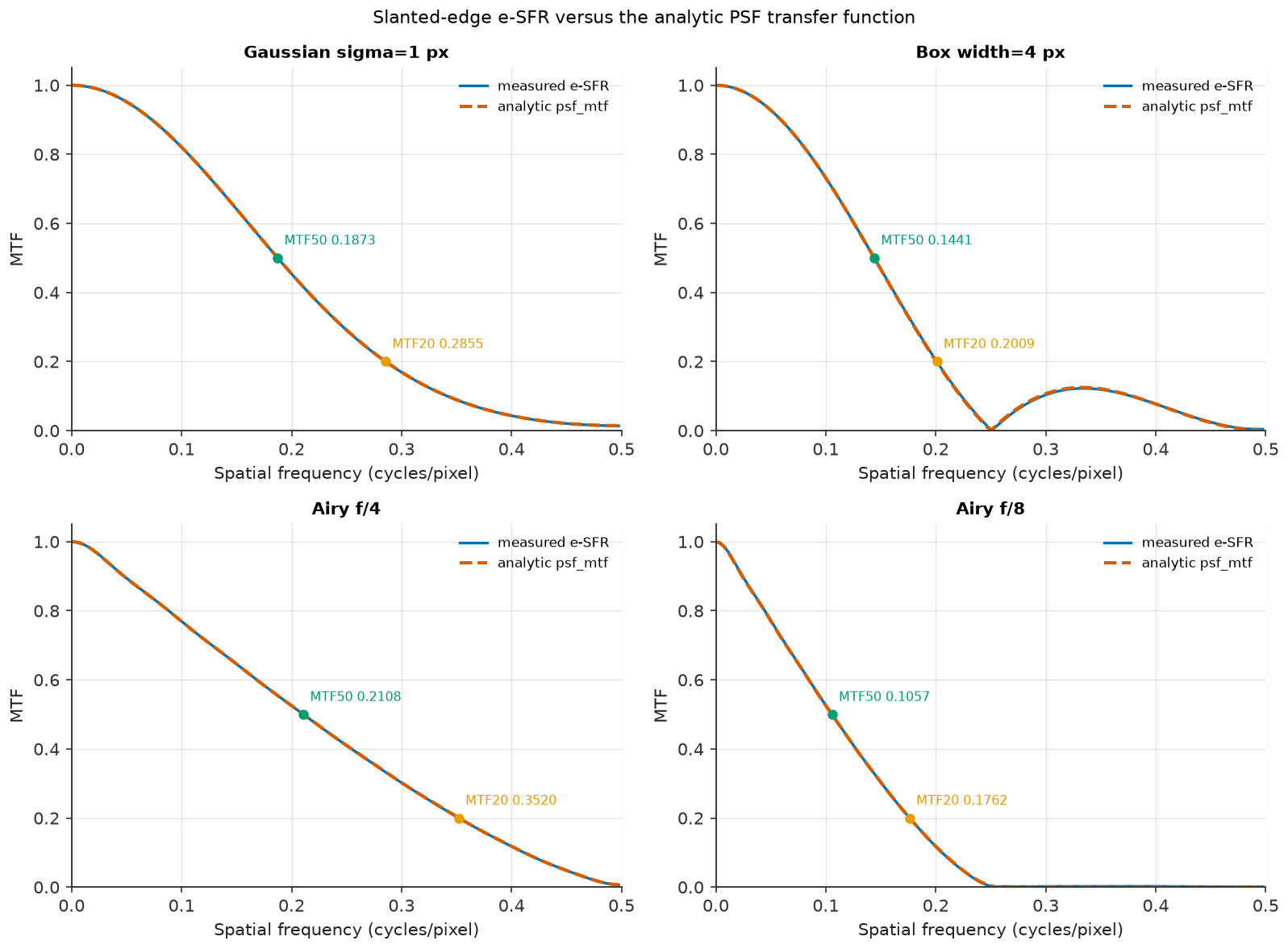 e-SFR. Measured MTF against the analytic reference. |
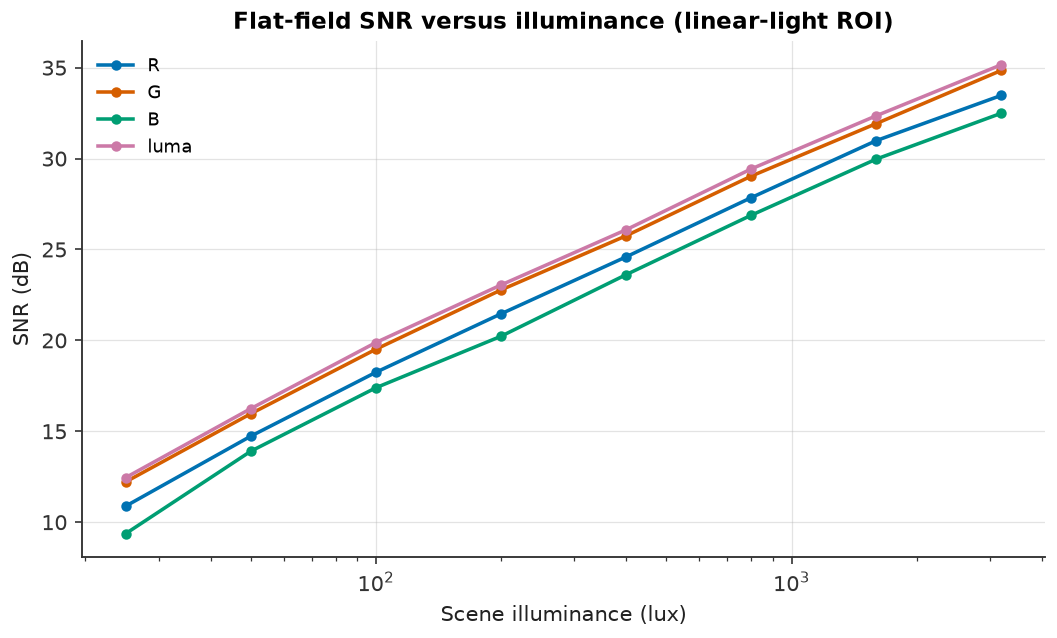 SNR vs lux. Read-noise-limited to shot-noise-limited. |
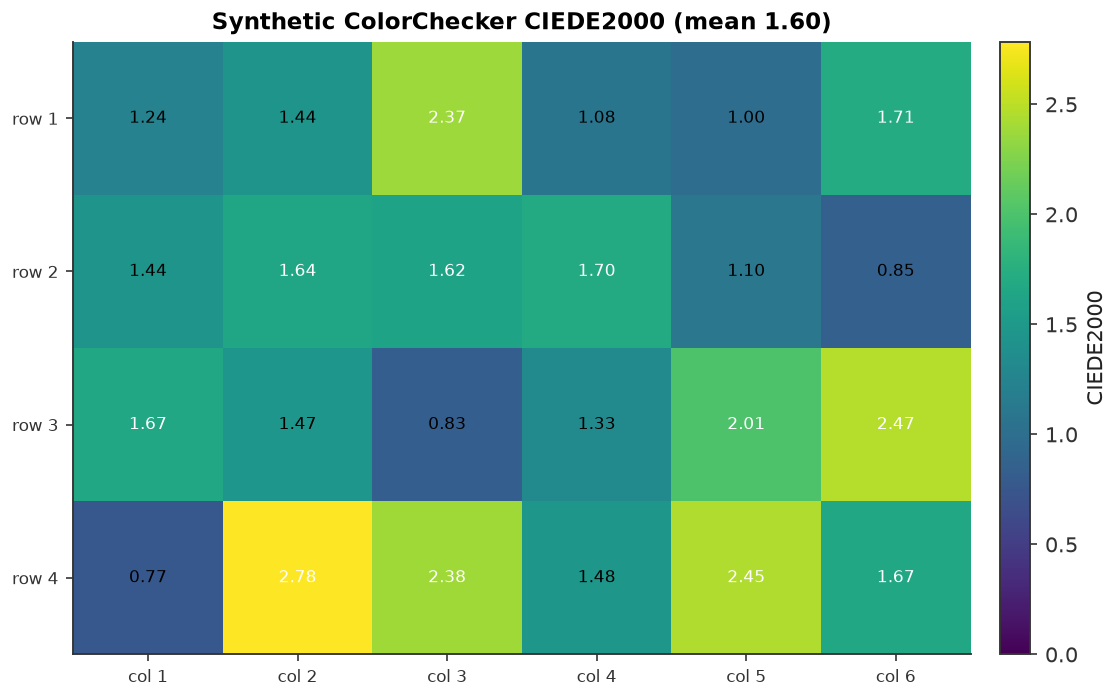 ΔE heatmap. Per-patch colour error across a chart. |
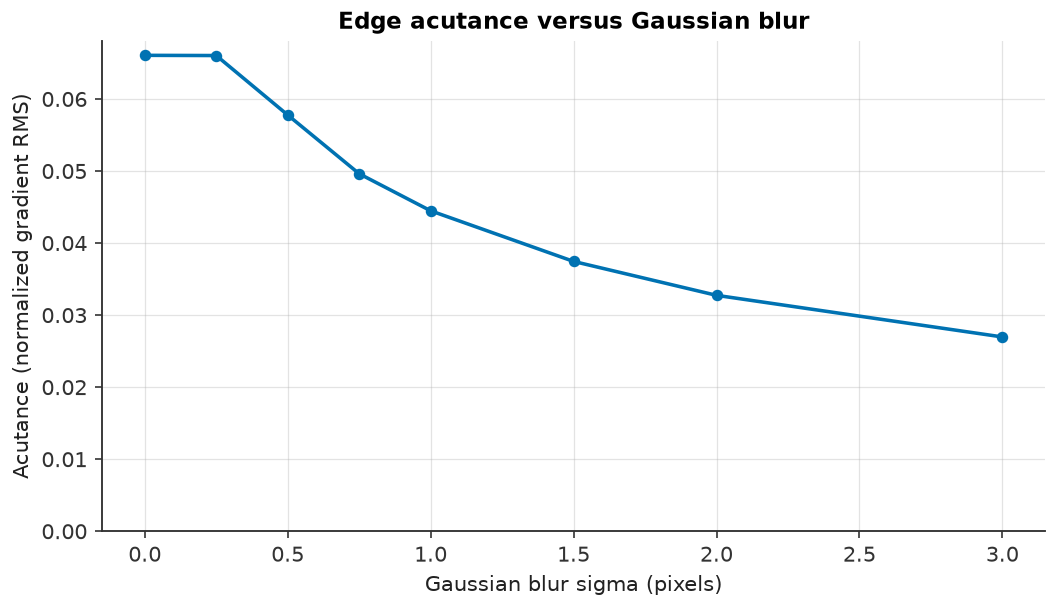 Acutance. Sharpness proxy versus Gaussian blur. |
Validation
The pipeline is validated with analytic invariants (units, energy conservation, linearity, noise variance, clipping), EMVA 1288-style sensor characterization, ISO 12233-style e-SFR/MTF, colour and SNR checks, reference-library cross-checks, and datasheet plausibility. The validation is simulated: it is not a certified ISO 12233 or EMVA 1288 measurement, and the flagship preset is a representative engineering design point, not a measurement of a specific commercial part.
Committed reports, measured values, tolerances, assumptions, and reproduction commands are indexed in Validation. See Datasheet mapping for how public datasheet parameters become preset fields and which values are assumptions.
Documentation
Full documentation: https://pengzhao-ai.github.io/camsim/
- Concepts — the imaging chain, units, linear-space invariant, and determinism contract.
- Architecture — package layout, data contracts, and dependency rules.
- ISP stages — the fixed chain, every stage's role and parameters, traces, and MONO/RCCC behaviour.
- Metrics — chart layouts, e-SFR, SNR, ΔE, acutance, and reports.
- Validation — validation evidence, measured results, coverage policy, and reproduction commands.
- Datasheet mapping — datasheet parameters to validated JSON fields.
- API reference — the public modules and types.
- Release process — versioning and publishing policy.
Development
The Makefile wraps the common contributor commands:
make setup        # uv sync --all-extras
make test         # uv run pytest
make lint         # ruff check + ruff format --check
make format       # ruff check --fix + ruff format
make typecheck    # uv run mypy src
make coverage     # pytest with coverage gate
make docs         # uv run mkdocs build --strict
make build        # uv build (wheel + sdist)
make notebooks    # execute Jupytext notebooks headlessly
make figures      # regenerate the example gallery
make gate         # lint, typecheck, tests, coverage, docs, and build
A single test can be run with
uv run pytest tests/test_package.py::test_import_and_version -v.
Benchmarks for the reference pipeline live in benchmarks/:
uv run python benchmarks/benchmark_pipeline.py
uv run python benchmarks/benchmark_pipeline.py --quick
uv run python benchmarks/benchmark_pipeline.py --large
Timings are machine-specific and are printed, never committed as claims. Single-process spectral simulation is memory-bounded (8 GiB default); full 50 MP spectral cubes are rejected with guidance to reduce the grid or process externally.
Contributing
Read CONTRIBUTING.md before opening a pull request. The project follows the Contributor Covenant, records changes in CHANGELOG.md, and documents third-party material in THIRD_PARTY.md.
Citation
If you use camsim in your work, cite it using the metadata in CITATION.cff.
License
Apache-2.0. See LICENSE.
1 maintainer

Metadata
1 maintainer
Release files for camsim 0.1.2
For a detailed explanation of source distributions (sdists) and built distributions (wheels), please see the package formats documentation.
Source distribution (sdist)
| File | Size | Uploaded | Provenance | Actions |
|---|---|---|---|---|
| camsim-0.1.2.tar.gz | 2.6 MB | Without provenance | Details for camsim-0.1.2.tar.gz |
Built distribution (wheel)
| File | Interpreter | ABI | Platform | Actions Reset |
|---|---|---|---|---|
| camsim-0.1.2-py3-none-any.whl | Python 3 | none | any | Details for camsim-0.1.2-py3-none-any.whl |
Total release size: 3.0 MB
Release files / camsim-0.1.2.tar.gz
| Download URL | camsim-0.1.2.tar.gz |
|---|---|
| Size | 2.6 MB |
| Tags | Source |
|
SHA-256 checksum How to use checksums |
8e7f91007f8077f322c771dcaec3e7a515d7143fb6222f8b9bd387e2fe617fa6
|
|
BLAKE2b-256 checksum How to use checksums |
613dbfcd4814f65305f7f0870d9aab2978fc51dc1cf1d5a59cac542ca0703aca
|
| Upload date | |
|
Uploaded using Trusted Publishing? What is trusted publishing? |
Yes |
| Uploaded via |
uv/0.13.6 {"installer":{"name":"uv","version":"0.13.6","subcommand":["publish"]},"python":null,"implementation":{"name":null,"version":null},"distro":{"name":"Ubuntu","version":"24.04","id":"noble","libc":null},"system":{"name":null,"release":null},"cpu":null,"openssl_version":null,"setuptools_version":null,"rustc_version":null,"ci":true}
|
Release files / camsim-0.1.2-py3-none-any.whl
| Download URL | camsim-0.1.2-py3-none-any.whl |
|---|---|
| Size | 427.9 kB |
| Tags | Python 3 |
|
SHA-256 checksum How to use checksums |
8426ba7429565708c8bb082d1317c7ce8dfb6e8c0648a8338bb7d57e38e25f45
|
|
BLAKE2b-256 checksum How to use checksums |
609972ebd14a2a0c1f51ba4ab78bedeac2199c1b6462e3219a1e2f920397a5f6
|
| Upload date | |
|
Uploaded using Trusted Publishing? What is trusted publishing? |
Yes |
| Uploaded via |
uv/0.13.6 {"installer":{"name":"uv","version":"0.13.6","subcommand":["publish"]},"python":null,"implementation":{"name":null,"version":null},"distro":{"name":"Ubuntu","version":"24.04","id":"noble","libc":null},"system":{"name":null,"release":null},"cpu":null,"openssl_version":null,"setuptools_version":null,"rustc_version":null,"ci":true}
|
Security for camsim 0.1.2
Provenance
Provenance describes where a file came from. On PyPI, provenance is shared via attestations, which provide a verifiable record of the build or publishing details. View details, limitations and caveats.
No provenance found
None of the files in this release were uploaded with provenance metadata.
A note on package security
PyPI is a repository for distributing packages, not a service for auditing them. While third-party security researchers and our staff do their best to detect and remove malicious packages, PyPI cannot guarantee the quality, security or suitability of any given package.
To learn more about protecting yourself from malicious actors, visit our package security documentation.














