
Candela
Manual brightness and color temperature control for Linux — named after the SI unit of luminous intensity.
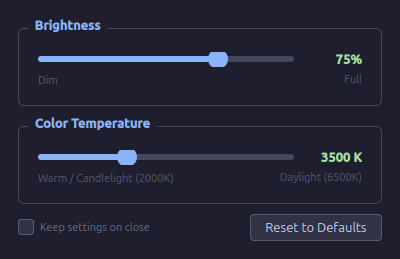
A clean, dark-themed desktop utility for tuning your monitor at night (or any time). Two sliders: one for brightness, one for color temperature in Kelvin. No automatic scheduling, no daemons — just instant manual control when you want it.
Why Candela?
Most Linux tools in this space are either time-based and automatic (Redshift, Gammastep), command-line only (xrandr, sct), or have dated UIs that expose raw R/G/B gamma channels instead of a human-friendly Kelvin temperature slider. Candela aims to be the tool you reach for when you just want to quickly dim your screen and warm the color for late-night use.
Features
- Brightness slider — 10% to 100%
- Color temperature slider — 2000K (warm candlelight) to 6500K (daylight)
- Multi-monitor support — dropdown auto-populated from connected outputs
- Instant apply — changes take effect as you move the slider
- Settings persist after closing, within your X session (until logout/reboot)
- Reset to Defaults button restores 6500K / 100% brightness
- Dark UI — easy on the eyes when you need it most
Requirements
Python: 3.10+
Python packages:
pip install PyQt6
System packages:
sudo apt install redshift        # Debian / Ubuntu / Mint
sudo dnf install redshift        # Fedora
sudo pacman -S redshift          # Arch / Manjaro
redshift handles color temperature. Brightness works without it (software gamma via xrandr).
Note: X11 only. Wayland is not currently supported.
Install
git clone https://github.com/jfblanchard/candela.git
cd candela
pip install PyQt6
python candela.py
Install via pip (coming soon)
pip install candela-ctrl
candela
Build a standalone binary
pip install pyinstaller
pyinstaller --onefile --windowed --name candela candela.py
# Produces: dist/candela  — single executable, no Python required
Contributing
Issues and PRs welcome. If your monitor supports DDC/CI, hardware brightness control (via ddcutil) is the next planned feature — real backlight reduction instead of software gamma.
License
MIT
1 maintainer

Download files
Download the file for your platform. If you're not sure which to choose, learn more about installing packages.
Source Distribution
Built Distribution
Filter files by name, interpreter, ABI, and platform.
If you're not sure about the file name format, learn more about wheel file names.
Copy a direct link to the current filters
File details
Details for the file candela_ctrl-0.1.1.tar.gz.
File metadata
- Download URL: candela_ctrl-0.1.1.tar.gz
- Upload date:
- Size: 6.7 kB
- Tags: Source
- Uploaded using Trusted Publishing? No
- Uploaded via: twine/6.2.0 CPython/3.11.15
File hashes
| Algorithm | Hash digest | |
|---|---|---|
| SHA256 |
bd5351770f1f9c9cc7acb8627156b0b2705bf95e5ce686023dfdfc6436bc7595
|
|
| MD5 |
3c118586095216fbd8e2add453c8007f
|
|
| BLAKE2b-256 |
6e25248ff48c6d56623d071de3c6063d49d6bf3365c164f9063d7858ff84c5e9
|
File details
Details for the file candela_ctrl-0.1.1-py3-none-any.whl.
File metadata
- Download URL: candela_ctrl-0.1.1-py3-none-any.whl
- Upload date:
- Size: 7.1 kB
- Tags: Python 3
- Uploaded using Trusted Publishing? No
- Uploaded via: twine/6.2.0 CPython/3.11.15
File hashes
| Algorithm | Hash digest | |
|---|---|---|
| SHA256 |
6a314fde3f01cc446c216f7293f8305e857e8b9f683500e64c2667a35551533f
|
|
| MD5 |
cd49cae06f84d7050960b4ff7e2deb9e
|
|
| BLAKE2b-256 |
cb42e1cb6c4d0d4da8fe0a5baa9d65bf1e6b106ce2cf6fb5a8d67939eed0e76d
|







