
CanIToolCall





caniuse for tool calling: see whether your model's tool calls survive your inference engine's parser, streaming included.
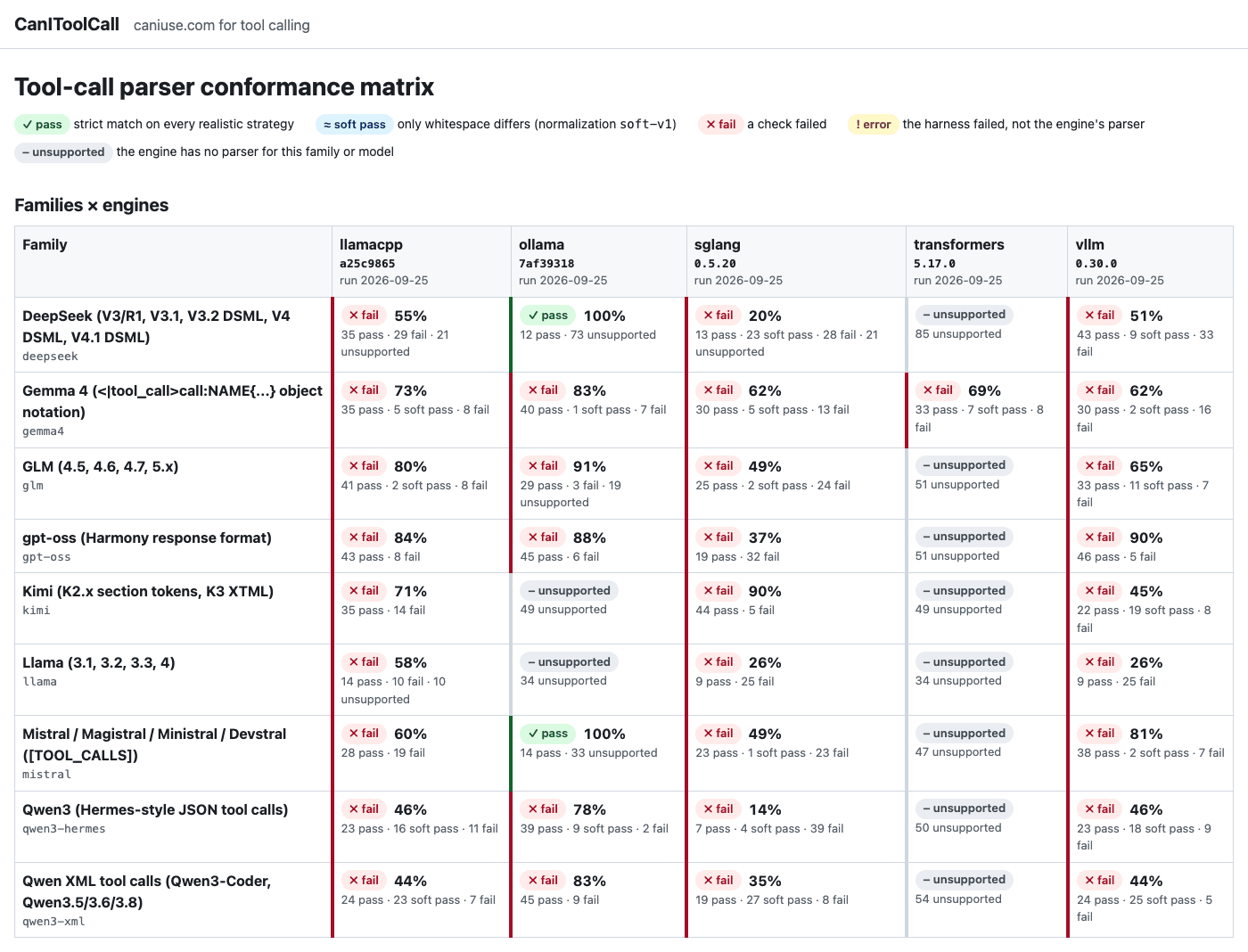
Check your own server in one line (vLLM, SGLang, llama-server, Ollama, LM Studio or any OpenAI-compatible API):
uvx canitoolcall probe --base-url http://localhost:11434/v1 --model qwen3:8b
Or pip install canitoolcall. Browse the full matrix at https://redd34.github.io/canitoolcall/, rebuilt every night.
Why this exists
The same model can call tools correctly on one server and break on another. The model writes its tool calls as raw text with special markers, and every inference engine has its own parser that turns that text into the tool_calls, content and reasoning_content your app receives. Those parsers break often: arguments get dropped, markers leak into the chat text, and streaming gives a different answer from non-streaming. From the app it looks like the model is bad at tool calling, when the engine garbled a correct answer.
Diagram: view it rendered on GitHub
Benchmarks such as BFCL measure how good a model is at choosing tools. CanIToolCall measures something different: whether the engine faithfully parses what the model wrote.
What we found
Every engine we tested has tool-call parser bugs. Replaying 469 fixtures through the pinned parsers of five engines, the triage found 22 engine bugs, plus 10 already-reported bugs that still reproduce. Two examples: multi-token streaming deltas silently drop tool calls or their arguments, and marker text such as </tool_call> inside a valid JSON argument breaks parsing in every engine.
| Engine | Version | Fixtures it supports | Pass | Soft pass | Fail | Engine bugs found | Known upstream, still reproducing |
|---|---|---|---|---|---|---|---|
| vLLM | 0.30.0 | 469 | 268 | 86 | 115 | 7 | 6 |
| SGLang | 0.5.20 | 448 | 189 | 62 | 197 | 8 | 0 |
| llama.cpp | a25c9865 |
438 | 278 | 46 | 114 | 4 | 1 |
| Ollama | 7af39318 |
261 | 224 | 10 | 27 | 2 | 3 |
| HF transformers | 5.17.0 | 48 | 33 | 7 | 8 | 1 | 0 |
Engines support different subsets of the fixtures, so these numbers are not a ranking. Some fails come from a deliberate policy (for example, output cut off by max_tokens), not from a mis-parse; triage.jsonl classifies every failing case and gives a repro command for each. The results are identical on macOS arm64 (the committed snapshot) and on Linux x86_64 (the nightly), except one Ollama integer-overflow value that depends on the CPU.
Reported upstream
On 2026-09-26 every finding was re-checked against each engine's latest release and main branch, and searched for in the upstream trackers. Several had already been reported, so we added repros or fix verification to those threads instead of opening duplicates.
- New issues (7):
vllm#58824 (llama3_json streaming drops content that starts with
{), vllm#58825 (gpt-oss: a stray header becomes a bogus tool call), sglang#41315 (gpt-oss detector misses some calls), sglang#41316 (Gemma 4:nulland exponent numbers returned as strings), sglang#41317 (DeepSeek V3.2/V4: whitespace stripped from string values), ollama#18658 (GLM-4.7: newlines stripped from argument values), ollama#18659 (GLM-4.7:</tool_call>inside an argument ends the call early). - Repros or fix verification added to existing threads (12): vLLM #48020, #47906, #56263, #57826; SGLang #31915, #35083, #35562; Ollama #18390, #18354, #18421, and fix PRs #16075 and #18340.
- llama.cpp and transformers: their contribution policies ask for human-written bug reports, so those findings are waiting to be written up by hand. The evidence is in
triage.jsonl.
How it works
Diagram: view it rendered on GitHub
- Fixtures are recorded raw model outputs. Each holds the exact text and token ids a model emits, the tools it was offered, and the parse a correct engine should return. They come from rendering the model's official chat template (reproducible with a script in
scripts/fixtures/), from engine test suites (with license and a line-anchored URL), or from public bug reports. Formats are never typed by hand. - Replay feeds each fixture into the engine's own parser code, offline: Python engines are imported directly, and llama.cpp and Ollama run through small compiled harnesses that link their parser code. No GPU and no model weights are needed.
- Checks compare every parse against the expected result and against each other (see What it checks).
- Results feed the public matrix, a triage file with a repro per failure, and a pytest plugin that engines can run in their own CI.
Using it
Probe a live server
canitoolcall probe sends a short series of scripted tool-use requests, first without streaming and then with streaming, and reports pass or fail for each one:
- a single call and parallel calls
- a plain answer where no call is needed
- nested and unicode arguments, and a tool with no arguments
- a forced
tool_choice - a follow-up turn after a tool result
- reasoning followed by a call
Here is example output. It comes from the mock OpenAI-compatible server in the test suite (tests/probe/conftest.py), not from a real engine, with the mock's "tool-call delta without index" quirk turned on for the streaming parallel-calls request so that a failure shows:
$ canitoolcall probe --base-url http://localhost:8011/v1 --model mock-model
canitoolcall probe  http://localhost:8011/v1  model=mock-model

scenario              non-stream  stream  stream=non-stream
--------------------  ----------  ------  -----------------
single-call           pass        pass    pass
parallel-calls        pass        fail    pass
no-call               pass        pass    pass
nested-args           pass        pass    pass
unicode-args          pass        pass    pass
empty-args            pass        pass    pass
forced-tool-choice    pass        pass    pass
tool-result-followup  pass        pass    pass
reasoning-then-call   pass        pass    pass

summary: 26 pass, 1 fail, 0 error, 0 skip

problems:
  parallel-calls [stream] fail: tool-call delta without an integer 'index' (clients cannot merge deltas)
How it judges. The model's exact output is unknown, so the checks are structural: a call to the right tool with arguments that match its schema, no format marker (<tool_call>, <|call|>, [TOOL_CALLS], …) in content, tool names or arguments, and the same shape with and without streaming. Inside reasoning_content, reasoning delimiters such as <think> or Harmony's <|channel|> still fail, because a correct reasoning parser always strips them. Tool-call markers such as <tool_call> there are only a warning, because models often draft their call while thinking. A result with warnings is shown as pass* and the warnings are listed under the table. Warnings do not change the exit code.
Keys and safety. No API key is sent unless you set one: the key is read from $CANITOOLCALL_API_KEY, or from the variable you name with --api-key-env (pass --api-key-env OPENAI_API_KEY to use that one; it is never read by default, so an exported OpenAI key cannot leak to a third-party endpoint). The key is only sent in the Authorization header, only to --base-url (redirects are not followed), and is never logged. The probe refuses to send a key over plain http:// to a host other than localhost unless you pass --allow-insecure. Add --json report.json to keep a machine-readable report. The exit code is 0 when everything passes, 1 on failures and 2 on usage errors or an unreachable endpoint.
Replay the offline suite
Replay the offline suite against an engine. This needs a checkout, because each engine runs in its own isolated environment:
git clone https://github.com/redd34/canitoolcall && cd canitoolcall
uv sync
bash scripts/engines/vllm.sh           # builds .venvs/vllm (pinned; CPU only; no weights)
uv run canitoolcall run --engine vllm   # writes results/vllm-<version>.json
uv run canitoolcall matrix              # renders site/_build/index.html from results/*.json
Real output from the transformers adapter, replaying the Gemma 4 fixtures through tokenizer.parse_response:
$ uv run canitoolcall run --engine transformers --family gemma4 --env HF_HUB_OFFLINE=1
transformers 5.17.0: 48 case(s) -> results/transformers-5.17.0.json
  gemma4         pass=33  soft_pass=7  fail=8
  total          pass=33  soft_pass=7  fail=8  error=0  unsupported=0
Other useful commands:
canitoolcall engineslists the engine adapters, whether each one is set up, and the interpreter it uses.canitoolcall validatechecks fixtures against the spec.canitoolcall matrix --results results/2026-09-25renders the committed snapshot of real runs through all five engines.results/2026-09-25/README.mdexplains the snapshot, and itstriage.jsonlclassifies every failure, with a repro command for each.
What it checks
Every fixture is parsed once without streaming and once for each chunking strategy. A strategy splits the output into stream deltas by grouping its token ids, never its characters, because engines never split a token. The default strategies are:
one: the whole output as a single deltaspecial: split at special-token boundariestoken: one token per deltarand:1:8…rand:5:8: five seeded random groupings
Each strategy is seeded, so it produces the same deltas on every machine. Multi-token strategies only count for engines whose servers can put several tokens in one delta (vLLM, SGLang). llama-server, Ollama and transformers serve stream one token per event, so for them only token counts; the others still run and are reported as synthetic.
A correct parser gives the same answer however the stream is split, and the same answer as without streaming:
Diagram: view it rendered on GitHub
| Check | Passes when |
|---|---|
expected_match |
the parse equals the fixture's expected content, reasoning and tool calls (arguments compared as parsed JSON) |
expected_error |
truncated or malformed output fails gracefully, in one of the accepted ways |
stream_equals_nonstream |
every streamed result equals the non-streaming one |
split_invariance |
the result does not depend on where the stream was split |
no_leakage |
no format marker (<tool_call>, `< |
arguments_json |
every arguments string is a JSON object |
arguments_schema |
the arguments validate against the tool's JSON Schema, and the name is one of the offered tools |
parallel_order |
parallel calls come back complete and in order |
A case gets the worst status over its checks: fail > error > soft pass > pass. Differences only in whitespace, such as a leading \n in the reasoning, count as soft pass, and the matrix shows them separately. unsupported means the engine version has no parser for that model, and CanIToolCall never guesses in its place. The exact rules are in spec/README.md.
Families and engines
-
Model families:
qwen3-hermes,qwen3-xml,gpt-oss,deepseek,kimi,glm,llama,mistralandgemma4. Each has format notes with their sources indocs/formats/. -
Engines (pinned):
Engine Version vLLM 0.30.0 SGLang 0.5.20 llama.cpp a25c9865HF transformers 5.17.0 Ollama 7af39318(built-in parsers) -
How adapters run the parsers:
- Python engines: the adapter imports the engine's parser classes and calls them the way the engine's own server does.
- llama.cpp and Ollama: the adapter drives a small compiled harness that links the engine's parser code.
The adapter contract is in
docs/DESIGN.md.
Every fixture records where it came from:
- a render through the model's official chat template or encoder, reproduced by a script in
scripts/fixtures/, - a case copied from an engine's test suite, with its license and a line-anchored URL,
- or a public bug report.
Formats are never typed by hand.
For engine maintainers: vendor the fixtures
The fixtures are language-neutral JSON Lines files: see fixtures/ and the schemas in spec/. The wheel ships both of them, so you can use the suite without cloning this repository.
From pytest. The package registers a pytest plugin that stays inert until a test asks for it:
# tests/test_canitoolcall.py in your engine's repo
from canitoolcall.pytest_plugin import assert_conforms


def test_conformance(canitoolcall_fixture):  # one test per fixture, ids = fixture ids
    result = my_engine_parse(canitoolcall_fixture)  # -> canitoolcall.results.ParseResult
    assert_conforms(canitoolcall_fixture, result)
pip install canitoolcall
pytest --canitoolcall-family qwen3-hermes --canitoolcall-family glm   # optionally --canitoolcall-tag parallel-calls
Use --canitoolcall-fixtures PATH to test against your own copy of the corpus.
From any language. Read fixtures/<family>/*.jsonl. Use output_token_ids when a fixture has them, rather than re-encoding raw_output: re-encoding is lossy for some tokenizers. Stream the ids through your own detokenizer and parser, and compare with expected. The fields are documented in spec/README.md.
Reproduce a failure from the matrix. Every failing cell has a page with:
- the failing checks and strategies
- the observed parse, as a diff against the expected one
- the exact parser configuration
- a one-line command that replays just that fixture (
--id)
FAQ
Is this a model benchmark? No. The fixtures are what a model already wrote; CanIToolCall only checks whether the engine parses that text correctly. A model can be excellent at tool use and still look broken behind a buggy parser.
Do I need a GPU or model weights? No. The offline suite replays recorded outputs through each engine's parser code on a CPU, using only tokenizer and template files. The live probe talks to whatever server you point it at.
Why do engines have different fixture counts? An engine version may simply have no parser for a model family's format. Those cases are reported as unsupported, and CanIToolCall never guesses in the engine's place.
What is a soft pass? A result that differs from the expected one only in whitespace, such as a leading newline in the reasoning. The matrix shows soft passes separately from passes.
My engine or model isn't covered. Adding a model family or an engine adapter is designed to be a single PR. See CONTRIBUTING.md and the good first issues.
Contributing
Adding a model family takes a single PR; see CONTRIBUTING.md. New models ship every week, so there is always a family or engine quirk to add: the open issues list concrete ones, several marked good first issue. Questions and ideas are welcome in Discussions. Please read the Code of Conduct first. To report a security problem, see SECURITY.md.
License
The code is Apache-2.0; see LICENSE. The fixture corpus quotes material under other licenses, recorded per fixture in provenance.license, with the full notices in THIRD_PARTY_NOTICES.md:
- template renders from model repositories: Apache-2.0 (Qwen, gpt-oss, Gemma, Mistral), MIT (DeepSeek, GLM-4.x), the Kimi K2 modified MIT license, the Kimi K3 license, the GLM-5.3 license;
- short spec examples from Meta's Llama 3.3 and Llama 4 prompt-format docs (Llama 3.3 / Llama 4 Community License);
- cases copied from engine test suites: Apache-2.0 (vLLM, SGLang, transformers, openai-harmony) and MIT (llama.cpp, Ollama);
- short quotes from public GitHub issues (
NOASSERTION, quoted with attribution).
harnesses/llamacpp/replay.cpp contains a block copied from llama.cpp (MIT), marked in the file.
Built with Llama. The fixture corpus includes Llama 3.3 chat-template renders and short quotes from Meta's Llama 3.3 and Llama 4 prompt-format docs, distributed under the Llama 3.3 and Llama 4 Community Licenses (copies in LICENSES/). Llama 3.3 is licensed under the Llama 3.3 Community License, Copyright © Meta Platforms, Inc. All Rights Reserved. Llama 4 is licensed under the Llama 4 Community License, Copyright © Meta Platforms, Inc. All Rights Reserved.
1 maintainer

Release files for canitoolcall 0.1.1
For a detailed explanation of source distributions (sdists) and built distributions (wheels), please see the package formats documentation.
Source distribution (sdist)
| File | Size | Uploaded | |
|---|---|---|---|
| canitoolcall-0.1.1.tar.gz | 590.0 kB | Details |
Built distribution (wheel)
| File | Interpreter | ABI | Platform | Reset |
|---|---|---|---|---|
| canitoolcall-0.1.1-py3-none-any.whl | Python 3 | none | any | Details |
Total release size: 907.5 kB
Release files / canitoolcall-0.1.1.tar.gz
| Download URL | canitoolcall-0.1.1.tar.gz |
|---|---|
| Size | 590.0 kB |
| Tags | Source |
|
SHA-256 checksum How to use checksums |
892078fb408e23609df4e13746aa289bc03182e849cdc07a12cb3686b437f61d
|
|
BLAKE2b-256 checksum How to use checksums |
cb81965a9c13e970d449b934591bbb0b586a4bc688db23cf65fc255e6dd5d6ba
|
| Upload date | |
|
Uploaded using Trusted Publishing? What is trusted publishing? |
Yes |
| Uploaded via |
twine/7.0.0 CPython/3.13.14
|
Provenance
Provenance describes where a file came from. On PyPI, provenance is shared via attestations, which provide a verifiable record of the build or publishing details. View details, limitations and caveats.


PyPI Publish Attestation
PyPI verified that this artifact, at this checksum, originated from the publisher listed below.
Signed by GitHub Actions, verified by PyPI on Sep 26, 2026.
Transparency logRelease files / canitoolcall-0.1.1-py3-none-any.whl
| Download URL | canitoolcall-0.1.1-py3-none-any.whl |
|---|---|
| Size | 317.5 kB |
| Tags | Python 3 |
|
SHA-256 checksum How to use checksums |
a8a0ea82584cfdb00e737f2853d20fb5f233002aeb961ba735f574a225eceb15
|
|
BLAKE2b-256 checksum How to use checksums |
b99e269865f4f86efff0760ee13defc14051de01f3887f2892ba99bc2b4c8695
|
| Upload date | |
|
Uploaded using Trusted Publishing? What is trusted publishing? |
Yes |
| Uploaded via |
twine/7.0.0 CPython/3.13.14
|
Provenance
Provenance describes where a file came from. On PyPI, provenance is shared via attestations, which provide a verifiable record of the build or publishing details. View details, limitations and caveats.
PyPI Publish Attestation
PyPI verified that this artifact, at this checksum, originated from the publisher listed below.
Signed by GitHub Actions, verified by PyPI on Sep 26, 2026.
Transparency log













