
 Canonada
Canonada is a data science framework that helps you build production-ready streaming pipelines for data processing in Python.



Why Canonada?
- Standardized: Canonada provides a standardized way to build your data projects
- Modular: Canonada is modular and allows you to build and visualize data pipelines with ease
- Memory Efficient: Canonada is memory efficient and can handle large datasets by streaming data through the pipeline instead of loading it all at once
Features
- Centralized control of data sources: Manage all your data sources in one place, enabling you to keep your team in sync
- Centralized control of the project configuration: Manage all your project configurations in one place
- Easy dataloading: Load data from various sources like CSV, JSON, Parquet, etc.
- Use functions as nodes: Functions are the building blocks of Canonada. You can use any function as a node in your pipeline
- Create streaming data pipelines: Create parallel and sequential data pipelines with ease
- Visualize your data pipeline: Visualize your data pipelines, nodes and connections
Summary
The goal of Canonada is to help data scientists and engineers to organize their data projects with a standardized structure that facilitates more maintainable code compared to one-off scripts and notebooks.
Canonada allows you to define data projects as graphs, composed of nodes and edges, that stream data dynamically from your defined sources to memory, allowing the usage datasets bigger than memory. The system parallelizes the execution of your projects allowing you to focus exclusively on the data processing logic you care about.
Let's quickly define a data pipeline as an example:
We will define this simple pipeline that transforms a few timeseries signals:
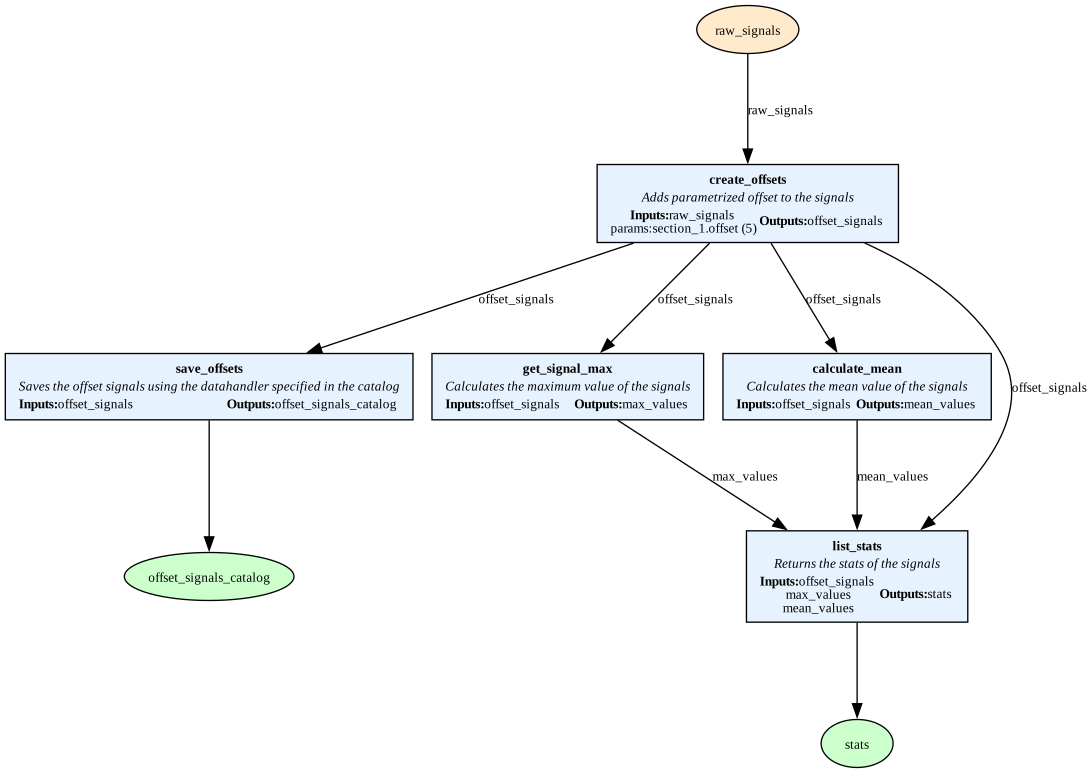
Use
canonada viewto get a representation of your data pipelines
# Import example functions to transform the data
from .nodes import example_nodes

# Define the pipeline
streaming_pipe = Pipeline("streaming_pipe", [
        # Read each signal from the catalog and add an offset defined in the parameters
        Node(
            func=example_nodes.add_offset,
            input=["raw_signals", "params:section_1.offset"], # Load inputs from the catalog
            output=["offset_signals"],
            name="create_offsets",
            description="Adds parametrized offset to the signals"
            ),
        # Save the previous output to disk with a dummy module
        Node(
            func=lambda x: x, # Just pass the input to the output
            input=["offset_signals"],
            output=["offset_signals_catalog"],
            name="save_offsets",
            description="Saves the offset signals using the datahandler specified in the catalog"
        ),
        # Calculate the maximum value of each signal
        Node(
            func=example_nodes.get_signal_max,
            input=["offset_signals"],
            output=["max_values"],
            name="get_signal_max",
            description="Calculates the maximum value of the signals"
        ),
        # Calculate the mean value of each signal
        Node(
            func=example_nodes.calculate_mean,
            input=["offset_signals"],
            output=["mean_values"],
            name="calculate_mean",
            description="Calculates the mean value of the signals"
        ),
        # Save the stats of the signals in a CSV file
        Node(
            func=example_nodes.list_stats,
            input=["offset_signals", "max_values", "mean_values"],
            output=["stats"], # It will be saved in the defined file in the catalog
            name="list_stats",
            description="Returns the stats of the signals"
        )
    ],
    description="This pipeline reads signals from the catalog, adds an offset, calculates the maximum and mean values, and saves the stats to disk"
)
Done! Defining a data pipeline is as simple as that. To execute it you can type canonada run pipelines streaming_pipe on your terminal or use the .run() method of your pipeline object. Canonada will take care of the rest and parallelize the execution without any extra effort.
Checkout the Getting Started guide for more information.
Usage
Available commands:
Usage: canonada <command> <args>
Commands:
    new <project_name> - Create a new project
    catalog [list/params] - List all available datasets or get the project parameters
    registry [pipelines/systems] - List all available pipelines or systems
    run [pipelines/systems] <name(s)> - Run a pipeline or system
    view [pipelines/systems] <name(s)> - View a pipeline or system
    version - Print the version of Canonada
Installation
Canonada is available on PyPI and can be installed using pip:
pip install canonada
Check out the Getting Started guide to learn how to create a new project with Canonada.
Documentation
Check out the project's documentation here
1 maintainer

Metadata
1 maintainer
Release files for canonada 0.6.7
For a detailed explanation of source distributions (sdists) and built distributions (wheels), please see the package formats documentation.
Source distribution (sdist)
| File | Size | Uploaded | |
|---|---|---|---|
| canonada-0.6.7.tar.gz | 26.1 kB | Details |
Built distribution (wheel)
| File | Interpreter | ABI | Platform | Reset |
|---|---|---|---|---|
| canonada-0.6.7-py3-none-any.whl | Python 3 | none | any | Details |
Total release size: 52.0 kB
Release files / canonada-0.6.7.tar.gz
| Download URL | canonada-0.6.7.tar.gz |
|---|---|
| Size | 26.1 kB |
| Tags | Source |
|
SHA-256 checksum How to use checksums |
140008365e7cf513c6adff1ca3cf0395ceb2a08600db9bdf3203a6d6f398083c
|
|
BLAKE2b-256 checksum How to use checksums |
98a7d8fd46b8ab6951699cff6d449f27e04c045ba1a2fa95ae1204dd191d534b
|
| Upload date | |
|
Uploaded using Trusted Publishing? What is trusted publishing? |
No |
| Uploaded via |
twine/6.2.0 CPython/3.14.3
|
Release files / canonada-0.6.7-py3-none-any.whl
| Download URL | canonada-0.6.7-py3-none-any.whl |
|---|---|
| Size | 25.9 kB |
| Tags | Python 3 |
|
SHA-256 checksum How to use checksums |
29d345f78ba98c212e4e1c54bb1b9ad61969c72759537f45ed328c2d45106114
|
|
BLAKE2b-256 checksum How to use checksums |
416fd83e157f326ab50e83266a3b5571d817bcd55a725d35016fd60603bb76c5
|
| Upload date | |
|
Uploaded using Trusted Publishing? What is trusted publishing? |
No |
| Uploaded via |
twine/6.2.0 CPython/3.14.3
|














