
CANopen Bench
Web tool to test and control CANopen devices on a hardware bench — scan, object access, system tests, firmware download and a live CAN trace, driven by the devices' EDS files. Python backend (Starlette + canopen/python-can), no-build frontend (Preact/HTM), one self-contained workspace folder per bench.
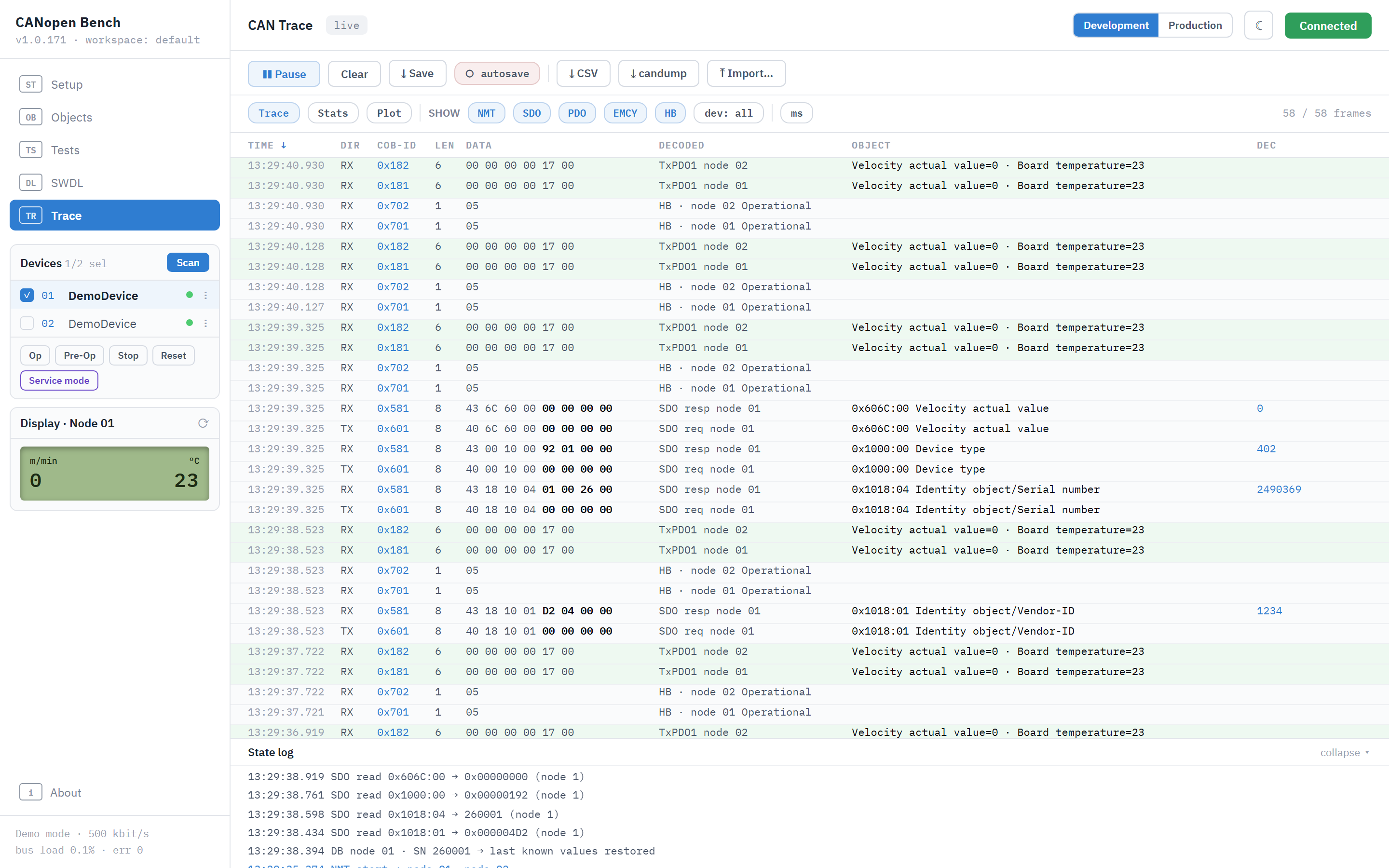
Try it — no hardware needed
pip install canopen-bench
canopen-bench                  # → http://127.0.0.1:8000
No virtualenv needed to just run it. From a clone, pip install .
installs the same thing from the checkout — without -e, which installs
the package for editing, and that is what ## Development below is for.
canopen-bench is a shortcut the install writes; the module runs just as
well by itself, and from a clone's root it runs that checkout:
python -m canopen_bench                       # same thing, same options
python -m canopen_bench --port 8001 --host 0.0.0.0
Two reasons to prefer it. It runs this directory rather than whatever
canopen-bench happens to point at, which matters as soon as a second
copy or a second virtualenv is around. And it needs only the
dependencies, not the package itself: pip install starlette uvicorn websockets canopen python-can pyyaml (the dependencies list in
pyproject.toml) and a clone is enough — worth knowing on a bench
machine where you would rather not install anything.
Note the underscore: the distribution is canopen-bench, the module is
canopen_bench. python -m canopen-bench cannot work — a hyphen is not
valid in a Python module name.
Pick Demo mode on the Setup page, Connect, Scan: virtual
devices are generated from the bundled canopen_bench/seed/DemoDevice.eds
(installed into
the workspace on first run). SDO reads/writes are answered from the EDS
object dictionary — including realistic aborts on out-of-range writes —
and every access shows up in the Trace like real bus traffic.
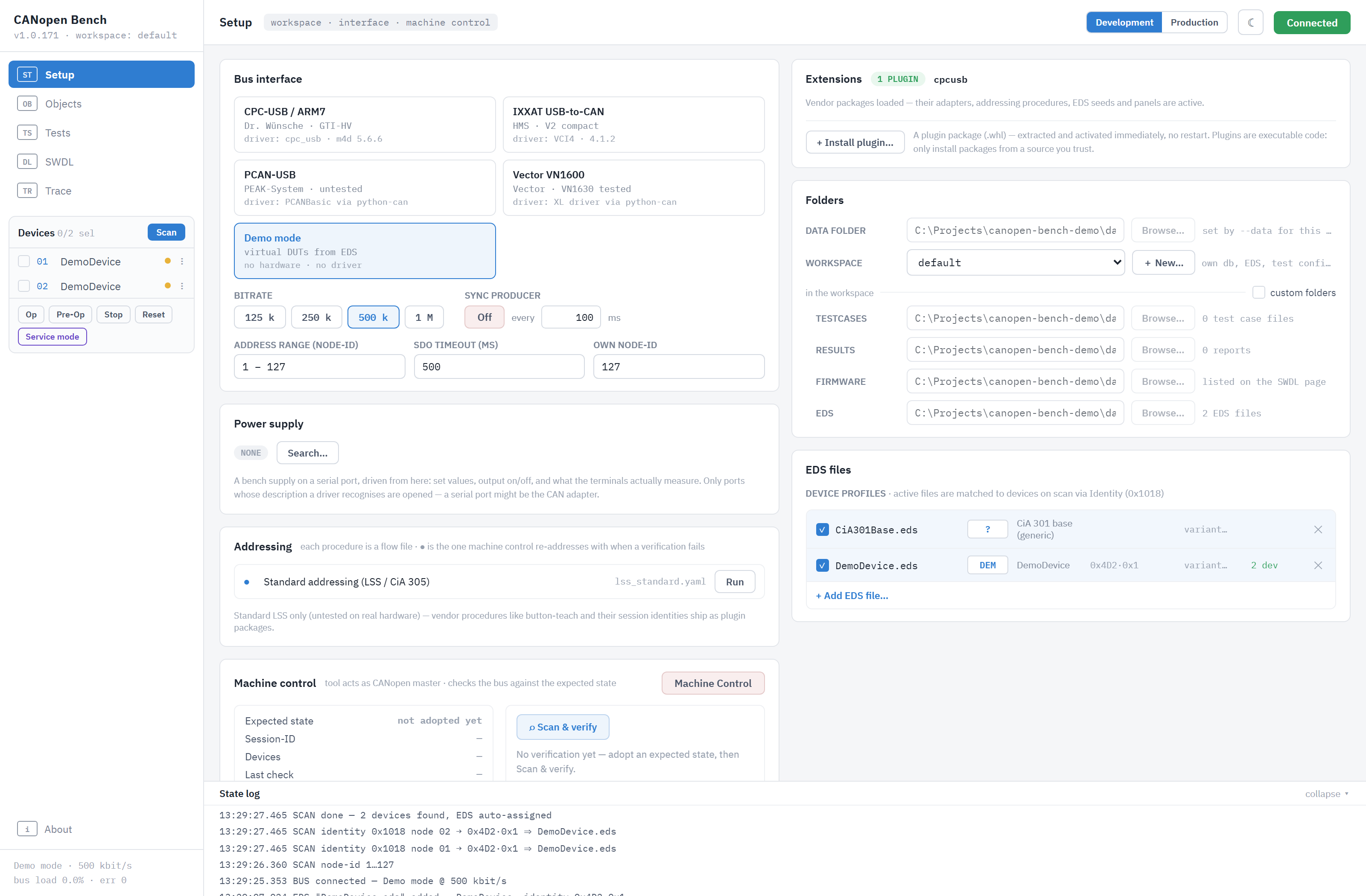
Features
- Setup — adapter/bitrate/scan-range, EDS registry with identity matching (0x1018), machine control: adopt the bench's expected state, scan & verify against it, re-address via exchangeable flow files.
- Production view: a switch to a reduced bench for the end of a line,
showing the procedures a vendor package ships (flows marked
grade: production, e.g. flash a board) with their firmware choices, a Start button, instructions and progress. - Objects — EDS object browser with read/write, favorites (auto-saved), typed RAW rows (SDO / PDO / NMT with per-row node-id), last-known values per device serial number.
- Tests — declarative YAML test cases
(
docs/ablaeufe/testfall-format.md, examples inexamples/testcases/) executed for real against the selected device. A run leaves HTML behind: one file per case, one summary, and a JSON sibling. From those, "Overview by variant" folds the last so many days into one collapsible section per hardware variant — runs, successes and last verdict per case — which is how you tell one broken variant from a broken device family. - Bench instruments — a remote-controllable lab power supply is set
from the Setup page and from a test case (
psustep), which is what keeps an under-voltage case automated instead of asking an operator to turn a knob. Serial port,pip install ".[serial]"; drivers incanopen_bench/instruments/. - SWDL — firmware download; the files come from a folder you point at (often the firmware project's build output, drag & drop works too), and what each one is comes from the extension that knows the format. Download protocols are manufacturer-specific and ship as vendor extension packages (see the note on the page).
- Trace — live monitor, newest frame at the top, scrollable back through the whole 200k-frame ring buffer or an opened capture rather than a screenful. Class + device filters, ms/µs timestamps, capture save/load, and autosave — every recorded frame written to a capture file as it arrives, kept for two weeks, for the endurance runs that are longer than the ring is deep.
Hardware
Which adapters the tool talks to, via python-can. Names are the
manufacturers' — see the trademark note in THIRD-PARTY-NOTICES.md;
this project is not affiliated with any of them, and the table says what
has been exercised, not what is warranted.
| Adapter | Driver | State |
|---|---|---|
| IXXAT USB-to-CAN | VCI4 (Windows) | in regular use on the author's bench |
| PCAN-USB | PCANBasic | wired up, never run — no such adapter here |
| Vector VN1600 (VN1610/VN1630) | XL driver (Windows) | run against a VN1630 |
| Demo mode | — | no hardware, EDS-driven simulation |
| other adapters (e.g. CPC-USB) | via plugin packages | separate install |
Everything above demo mode goes through python-can's own backends, so
adapter support tracks python-can. The Vector entry exists because plain
CAN on a VN1600 needs only Vector's freely downloadable XL driver — the
CANoe/CANalyzer licences are for their applications, not for talking to
the hardware — and a lot of that hardware outlives the software budget
it was bought with. Bring-up checklists live in
docs/ablaeufe/A-01-verbinden.md and A-02-scan.md.
Workspaces
Every subfolder of the data folder is one workspace: its own sqlite db,
EDS files, trace captures and flow files. Create and switch workspaces on
the Setup page; copy a folder to clone or back up a bench. The data folder
is chosen under Setup > Folders and kept per user (%APPDATA%\CANopen-Bench,
~/.config/canopen-bench), so the bench finds it wherever it is started
from; on the first start it is ./data where there is one, else
~/CANopen-Bench. --data <folder> names it for one start (a second bench
beside the everyday one, a mounted Docker volume). --db <path> remains as an expert override for a
single explicit database file.
Flows and EDS files a package ships are written over in the workspace on every start, like its test cases: an update arrives without anybody looking for the old copy. A file of one's own goes in under another name.
Docker
docker build -t canopen-bench .
docker run -p 8000:8000 -v canopen-bench:/data canopen-bench
All workspaces live on the /data volume. Demo mode works out of the
box; USB CAN adapters need the device passed through
(--device=/dev/bus/usb). The tool has no authentication — keep the
port on a trusted network (see SECURITY.md).
Extending
Vendor- and device-specific functionality (adapter cards, EDS seeds,
firmware catalogs, addressing procedures with session identities, demo
protocol simulations, trace decoders, EMCY code tables, custom
test-step primitives, SWDL strategies) lives in separate pip packages
registered under the
canopen_bench.plugins entry-point group — installing one activates it.
In multi-workspace mode this needs no shell at all: Setup > Extensions
installs a plugin package (.whl) straight from the browser, active
immediately — its own dependencies are not installed with it, and the
state log names any this Python lacks, with the pip command that adds
them. Guide with hook table and a minimal example:
docs/extending.md; API: canopen_bench/plugin.py. A complete worked
example ships in this repo under
plugins/cob-cpcusb/ — python-can driver plus
adapter card, its own tests, MIT. It is a separate distribution, not part
of the canopen-bench package: install it only if you have that
adapter.
Documentation
IMPLEMENTATION.md— architecture and design decisionsCONTRIBUTING.md— dev setup, test conventions, what goes wheredocs/extending.md— plugin guidedocs/ablaeufe/— operational sequence specs (German)docs/ablaeufe/testfall-format.md— YAML test-case format
Development
python -m venv .venv && . .venv/bin/activate
pip install -e ".[dev]"         # editable + pytest/ruff
pytest                          # core suite
CONTRIBUTING.md has the rest: what CI checks, where things belong, the
versioning rule.
Behind a TLS-inspecting corporate proxy, pip fails with
CERTIFICATE_VERIFY_FAILED on pypi.org: the proxy's CA is trusted by the
operating system but not by the certificate bundle Python ships. On
pip 23.2+, --use-feature=truststore makes pip use the OS store
instead. On older pip that route is closed — it needs the truststore
package, which also comes from pypi.org — so export the OS root
certificates to a PEM and point pip at it with --cert, or set it once
with pip config set global.cert <file>. Either way certificate
verification stays on.
License & author
Core application: MIT (LICENSE). Plugin packages are licensed
independently — vendor plugins proprietary, cob-cpcusb MIT.
Bundled and depended-on third-party components, and the trademark note
(CANopen® and CiA® belong to CAN in Automation e.V.; this is not a
CiA-certified or CiA-affiliated tool), are listed in
THIRD-PARTY-NOTICES.md.
1 maintainer

Metadata
1 maintainer
Release files for canopen-bench 1.0.170
For a detailed explanation of source distributions (sdists) and built distributions (wheels), please see the package formats documentation.
Source distribution (sdist)
| File | Size | Uploaded | Provenance | Actions |
|---|---|---|---|---|
| canopen_bench-1.0.170.tar.gz | 913.5 kB | With provenance | Details for canopen_bench-1.0.170.tar.gz |
Built distribution (wheel)
| File | Interpreter | ABI | Platform | Actions Reset |
|---|---|---|---|---|
| canopen_bench-1.0.170-py3-none-any.whl | Python 3 | none | any | Details for canopen_bench-1.0.170-py3-none-any.whl |
Total release size: 1.6 MB
Release files / canopen_bench-1.0.170.tar.gz
| Download URL | canopen_bench-1.0.170.tar.gz |
|---|---|
| Size | 913.5 kB |
| Tags | Source |
|
SHA-256 checksum How to use checksums |
c3cda71d58529cc9d05b272cf487ddc479c04b18174980dd8dc7d248ef43d44a
|
|
BLAKE2b-256 checksum How to use checksums |
0d7221ca26f6ccaa04b443bff32b0b0eedd71f6538a8314d87b9027a47e17b92
|
| Upload date | |
|
Uploaded using Trusted Publishing? What is trusted publishing? |
Yes |
| Uploaded via |
twine/7.0.0 CPython/3.13.16
|
Provenance
Provenance describes where a file came from. On PyPI, provenance is shared via attestations, which provide a verifiable record of the build or publishing details. View details, limitations and caveats.


PyPI Publish Attestation
PyPI verified that this artifact, at this checksum, originated from the publisher listed below.
Signed by GitHub Actions, verified by PyPI on Nov 2, 2026.
Transparency logRelease files / canopen_bench-1.0.170-py3-none-any.whl
| Download URL | canopen_bench-1.0.170-py3-none-any.whl |
|---|---|
| Size | 726.1 kB |
| Tags | Python 3 |
|
SHA-256 checksum How to use checksums |
a12372d9a40df336977cbb110c7979d6cfe598e1ba823f6a6eff7b6b4cf17f5d
|
|
BLAKE2b-256 checksum How to use checksums |
c09c0d17cea2c9cf49ef4bd36f19aa3886d3062aeb96fda802a011cfa27a678c
|
| Upload date | |
|
Uploaded using Trusted Publishing? What is trusted publishing? |
Yes |
| Uploaded via |
twine/7.0.0 CPython/3.13.16
|
Provenance
Provenance describes where a file came from. On PyPI, provenance is shared via attestations, which provide a verifiable record of the build or publishing details. View details, limitations and caveats.
PyPI Publish Attestation
PyPI verified that this artifact, at this checksum, originated from the publisher listed below.
Signed by GitHub Actions, verified by PyPI on Nov 2, 2026.
Transparency logSecurity for canopen-bench 1.0.170
Provenance
Provenance describes where a file came from. On PyPI, provenance is shared via attestations, which provide a verifiable record of the build or publishing details. View details, limitations and caveats.
Full provenance
All 2 files in this release have been uploaded with provenance metadata.
Attestation for canopen_bench-1.0.170.tar.gz
PyPI Publish Attestation
PyPI verified that this artifact, at this checksum, originated from the publisher listed below.
Signed by GitHub Actions, verified by PyPI on Nov 2, 2026.
Transparency logA note on package security
PyPI is a repository for distributing packages, not a service for auditing them. While third-party security researchers and our staff do their best to detect and remove malicious packages, PyPI cannot guarantee the quality, security or suitability of any given package.
To learn more about protecting yourself from malicious actors, visit our package security documentation.














