
CANpeek
CANpeek is a graphical CAN bus observer and analyzer for Linux and Windows based on Python and Qt with can databases (DBC) support and some CANopen functionality.
Features
- 🧩 Project-based configuration with filters, DBC files, and persistent decoding options
- 🌐 Multi-interface support: socketcan, pcan, kvaser, vector and other interfaces based on python-can
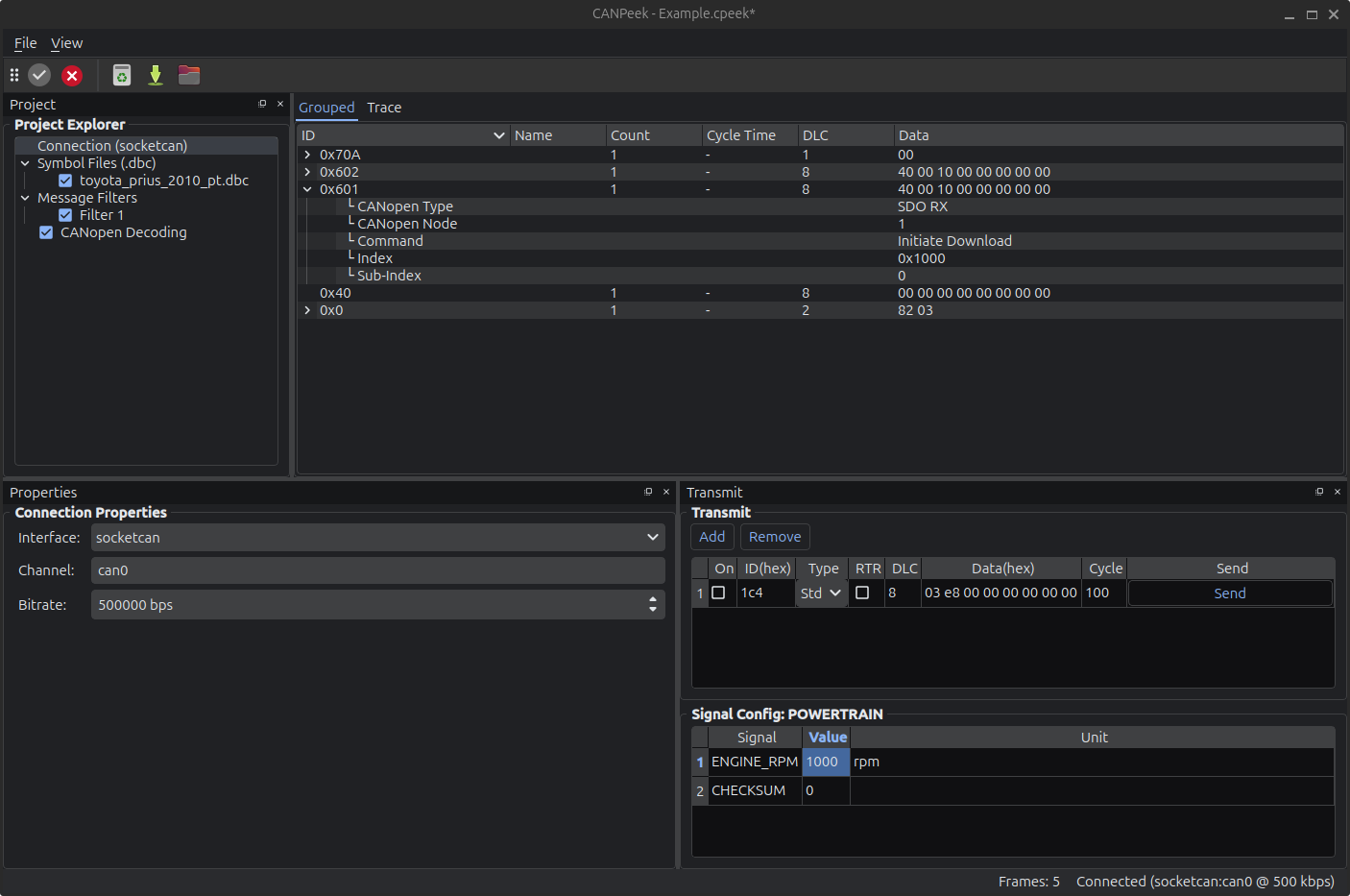
- 📊 Dual View: Real-time Trace View and hierarchical Grouped View with signal expansion
- 📁 Multi-DBC support with signal decoding from cantools
- 🧠 Generic CANopen decoder with support for NMT, PDO, SDO, Heartbeat, and more
- 🗃️ CANopen Object Dictionary with an SDO client for read/write operations
- 📦 CAN frame transmitter, supporting both raw and signal-based (DBC) messages
- 📜 Log support: Save/load CAN logs in all python-can IO formats
- 🔌 Connections Management: Handling of multiple simultaneous CAN connections
Screenshots
Installation
The interfaces avaibility depends on modules and drivers available on your system. Watch console output at startup.
With pip
Use the extra [interfaces] to install optionals python modules.
pip install canpeek[interfaces]
canpeek
From source
- Install uv
- Run
uv run canpeek --extra interfaces
🤖 About the Code (aka “AI Slop” Warning)
This project includes code — and this very README — that were generated almost entirely with large language models (LLMs). Yes, the term “AI slop” was insisted upon.
While the app works and provides a full-featured CAN bus GUI, you may find:
- Some awkward structure and bloated chunks of logic
- Repetitive patterns that could use refactoring
- Giant all-in-one files (yes,
main.py, we’re looking at you) - Documentation (including this README) was AI-generated too — so if it sounds polished but slightly overconfident, that’s why.
The goal was rapid prototyping, not pristine architecture. Use it, improve it, rewrite parts of it — all contributions are welcome.
Usage
-
Connect to a CAN interface:
- Select backend (
socketcan,pcan,kvaser, etc.) - Enter the channel (e.g.,
can0) - Click Connect
- Select backend (
-
Load DBC files via the "Project Explorer" to decode signals.
-
Create Filters to limit visible traffic.
-
Send CAN messages:
- Manually from the Transmit tab
- If the message id is in the DBC, a dedicated panel is available to edit signals values
-
Save / Load CAN logs in multiples formats.
Other tools
CANPeek is designed to be quick & simple, you might find those intersesting:
License
- This project is licensed by MIT License
- icons : Yaru : CC BY-SA 4.0
1 maintainer

Metadata
1 maintainer
Release files for canpeek 0.7.0
For a detailed explanation of source distributions (sdists) and built distributions (wheels), please see the package formats documentation.
Source distribution (sdist)
| File | Size | Uploaded | Provenance | Actions |
|---|---|---|---|---|
| canpeek-0.7.0.tar.gz | 3.9 MB | Without provenance | Details for canpeek-0.7.0.tar.gz |
Built distribution (wheel)
| File | Interpreter | ABI | Platform | Actions Reset |
|---|---|---|---|---|
| canpeek-0.7.0-py3-none-any.whl | Python 3 | none | any | Details for canpeek-0.7.0-py3-none-any.whl |
Total release size: 7.7 MB
Release files / canpeek-0.7.0.tar.gz
| Download URL | canpeek-0.7.0.tar.gz |
|---|---|
| Size | 3.9 MB |
| Tags | Source |
|
SHA-256 checksum How to use checksums |
e570ce865ceaec05755cf10e411ca57abcd32fcf6e0ca69ed124393ac34ee686
|
|
BLAKE2b-256 checksum How to use checksums |
b25e9cdf8e08eabbad5960b29211169f7083e3228289651047501ce7c1c29b6f
|
| Upload date | |
|
Uploaded using Trusted Publishing? What is trusted publishing? |
Yes |
| Uploaded via |
uv/0.7.19
|
Release files / canpeek-0.7.0-py3-none-any.whl
| Download URL | canpeek-0.7.0-py3-none-any.whl |
|---|---|
| Size | 3.8 MB |
| Tags | Python 3 |
|
SHA-256 checksum How to use checksums |
0dfb8cda410c79e9a9b1189ed4cbfce32ca8d5aab00805a46672388b321e8bba
|
|
BLAKE2b-256 checksum How to use checksums |
fdadc5d01184d31f73ce37cf5e308984b0cb8f257ef61532876fe09229cb4c23
|
| Upload date | |
|
Uploaded using Trusted Publishing? What is trusted publishing? |
Yes |
| Uploaded via |
uv/0.7.19
|
Security for canpeek 0.7.0
Provenance
Provenance describes where a file came from. On PyPI, provenance is shared via attestations, which provide a verifiable record of the build or publishing details. View details, limitations and caveats.
No provenance found
None of the files in this release were uploaded with provenance metadata.
A note on package security
PyPI is a repository for distributing packages, not a service for auditing them. While third-party security researchers and our staff do their best to detect and remove malicious packages, PyPI cannot guarantee the quality, security or suitability of any given package.
To learn more about protecting yourself from malicious actors, visit our package security documentation.














