
canswim
Developer toolkit for CANSLIM investment style practitioners
NOT FINANCIAL OR INVESTMENT ADVICE. USE AT YOUR OWN RISK.
For a brief introduction read this blog post.
Here is also a video recording of a CANSWIM presentation for the Python Austin Meetup.
Documentation
Published site: https://ivelin.github.io/canswim/ (built from main / docs/ via GitHub Actions — not the legacy website branch).
| Doc | Contents |
|---|---|
| docs/cli.md | CLI tasks, recipes, env vars |
| docs/run_triggers.md | Get market data / run forecast (CLI · GUI · MCP) |
| docs/mcp.md | MCP server (tools, opt-in writes) |
| docs/data_store.md | Parquet (SoT) vs DuckDB (search/UI) |
| AGENTS.md | CI, merge rules, docs DoD for agents |
Flags: python -m canswim -h is the source of truth. Local site preview: pip install mkdocs-material && mkdocs serve.
Setup
pip install canswim
# pin a release: pip install canswim==0.0.20260714

# dev checkout
pip install -e ".[dev]"

# recommended for this repo
conda activate canswim
See CHANGELOG.md for release notes. Docs: https://ivelin.github.io/canswim/.
Local-first market data
By default gatherdata does not download or upload the full Hugging Face dataset.
That HF snapshot step is slow and was a common reason the CLI “hung”. Instead:
- Use local parquet under
data/data-3rd-party/(created/updated by gather). - Refresh from FMP / yfinance APIs as needed.
- Resolve ticker universes from checked-in
symbol_lists/*.csv.
# full-universe local gather (no HF dataset sync)
hfhub_sync=False python -m canswim gatherdata

# scoped list via --tickers (same pipeline as Dashboard Run + MCP gather_tickers)
hfhub_sync=False python -m canswim gatherdata --tickers "AAPL, MSFT"
| Env | Default | Meaning |
|---|---|---|
hfhub_sync |
False |
Full dataset/model sync off |
SYNC_SYMBOL_LISTS |
False |
If True, fetch only light CSVs from the HF dataset once |
YFINANCE_USE_CACHE |
False |
Avoid multi‑GB SQLite cache hang |
MCP_ALLOW_RUNS |
unset | Enable MCP gather/forecast tools (CLI/GUI do not need this) |
Train/forecast skip tickers without complete ground-truth OHLCV (no synthetic price fill). Details: docs/data_store.md, docs/cli.md.
Get market data & run forecasts (CLI · GUI · MCP)
Two separate steps, same backend (canswim.run_triggers). Details: docs/run_triggers.md.
| Get market data | Run a forecast | Check start date | |
|---|---|---|---|
| CLI | gatherdata --tickers "…" |
forecast --tickers "…" [date] [--dry_run] |
resolve_start |
| GUI | Refresh data & forecasts / Update market data | Run forecast | Check start date |
| MCP | gather_tickers* |
forecast_tickers* |
resolve_forecast_start |
*MCP write tools need MCP_ALLOW_RUNS=1. Full MCP guide: docs/mcp.md.
Scoped get-market-data uses ~2 years of history, fundamentals (unless --no_covariates), and skips downloads when local files are already complete. Forecasts stop if data is incomplete (no invented prices).
python -m canswim gatherdata --tickers "AAPL, MSFT"
python -m canswim resolve_start --forecast_start_date 2026-03-05
python -m canswim forecast --tickers AAPL --forecast_start_date 2026-03-05 --dry_run
python -m canswim dashboard --same_data True
Full recipes: docs/cli.md.
Dashboard (GUI)
python -m canswim dashboard --same_data True
| Tab | Purpose |
|---|---|
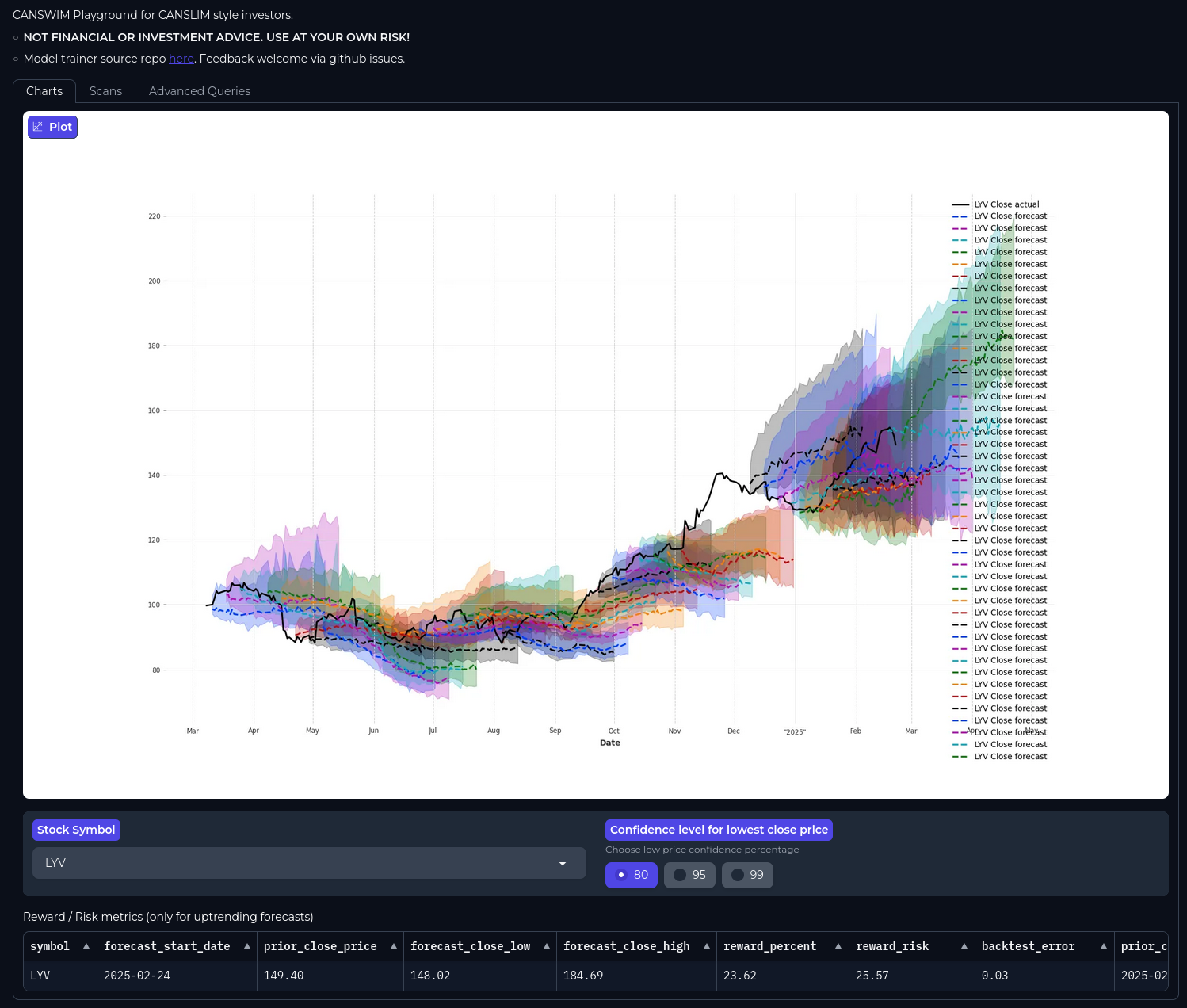
| Charts | Price history + forecast bands for a symbol |
| Scans | Filter forecasts by as-of date, reward, risk, confidence |
| Run | Refresh data & forecasts (primary) · more options for gather-only / forecast-only / Rebuild Charts database |
| Advanced Queries | Read-only SQL against the search DB |
Sample screenshots


(If images are missing in a fork, open the dashboard locally and refresh captures under docs/images/ — same PR as any UI change.)
Historical example chart:
Command line (quick)
python -m canswim -h
Main tasks: dashboard, gatherdata, forecast, resolve_start, mcp, train, modelsearch, downloaddata, uploaddata.
| Flag | Used by | Meaning |
|---|---|---|
--tickers |
gatherdata, forecast |
Scoped run via shared orchestration |
--forecast_start_date |
forecast, resolve_start |
Origin date (week-aligned for scoped runs) |
--dry_run |
forecast --tickers |
Resolve start + validate only |
--no_covariates |
gatherdata --tickers |
Prices only (skip fundamentals) |
--same_data |
dashboard |
Reuse DuckDB search DB |
--new_model |
train |
Fresh model vs continue |
MCP server (quick)
Read-only by default. Write tools need MCP_ALLOW_RUNS=1.
python -m canswim mcp
MCP_ALLOW_RUNS=1 python -m canswim mcp
→ docs/mcp.md for tools, client config, and prerequisites.
1 maintainer

Metadata
1 maintainer
Release files for canswim 0.0.20260714
For a detailed explanation of source distributions (sdists) and built distributions (wheels), please see the package formats documentation.
Source distribution (sdist)
| File | Size | Uploaded | Provenance | Actions |
|---|---|---|---|---|
| canswim-0.0.20260714.tar.gz | 125.0 kB | Without provenance | Details for canswim-0.0.20260714.tar.gz |
Built distribution (wheel)
| File | Interpreter | ABI | Platform | Actions Reset |
|---|---|---|---|---|
| canswim-0.0.20260714-py3-none-any.whl | Python 3 | none | any | Details for canswim-0.0.20260714-py3-none-any.whl |
Total release size: 258.3 kB
Release files / canswim-0.0.20260714.tar.gz
| Download URL | canswim-0.0.20260714.tar.gz |
|---|---|
| Size | 125.0 kB |
| Tags | Source |
|
SHA-256 checksum How to use checksums |
4d0fd03a21ced490e6a0272c38f82d19295bd92cb7a1c588d8558c7dd20eff52
|
|
BLAKE2b-256 checksum How to use checksums |
30c9aac165a9593b5766e3fd597a37eda673f326906419c8743f7483f4324d48
|
| Upload date | |
|
Uploaded using Trusted Publishing? What is trusted publishing? |
No |
| Uploaded via |
twine/6.2.0 CPython/3.11.7
|
Release files / canswim-0.0.20260714-py3-none-any.whl
| Download URL | canswim-0.0.20260714-py3-none-any.whl |
|---|---|
| Size | 133.3 kB |
| Tags | Python 3 |
|
SHA-256 checksum How to use checksums |
d7057a11596b27fefadf8f74c3041a7d1699f03bce8fd15a518d096d307221a6
|
|
BLAKE2b-256 checksum How to use checksums |
b9535249f1a8e4098f0f9a7336b5ac0461057f66d0a969d37c5a247b730afd0d
|
| Upload date | |
|
Uploaded using Trusted Publishing? What is trusted publishing? |
No |
| Uploaded via |
twine/6.2.0 CPython/3.11.7
|
Security for canswim 0.0.20260714
Provenance
Provenance describes where a file came from. On PyPI, provenance is shared via attestations, which provide a verifiable record of the build or publishing details. View details, limitations and caveats.
No provenance found
None of the files in this release were uploaded with provenance metadata.
A note on package security
PyPI is a repository for distributing packages, not a service for auditing them. While third-party security researchers and our staff do their best to detect and remove malicious packages, PyPI cannot guarantee the quality, security or suitability of any given package.
To learn more about protecting yourself from malicious actors, visit our package security documentation.














