
                          __
  _________ _____  ____ _/ /_
 / ___/ __ `/ __ \/ __ `/ __/
/ /__/ /_/ / /_/ / /_/ / /_
\___/\__,_/ .___/\__,_/\__/
         /_/
capat - CAPtcha ATtacking Tool


Does your login page's CAPTCHA actually stop bots? capat tells you, with a number.
An image CAPTCHA - the distorted letters you type to prove you are human - was designed for a time when software could not read distorted text. Neural networks ended that. A text-recognition model of about 10 MB, free to download, reads most CAPTCHAs in milliseconds on an ordinary laptop CPU: no training, no GPU, no service to pay. And where a stock model struggles, one trained on that specific CAPTCHA will not - which is exactly what a motivated attacker does.
Point capat at a login page you have the right to test. It answers three questions:
1. Can a model read the CAPTCHA? It pulls real challenges from your site, runs them through a trained recognition network, and reports the percentage it got right. At 70%, an attacker spends about 1.4 attempts per guess - the CAPTCHA is barely slowing anything down.
2. Is the CAPTCHA even being checked? Many sites never enforce it properly. capat tries the simple ways around it: leaving the field out entirely, sending it empty, and reusing an answer that already worked. None of these need OCR at all.
3. What is actually protecting the page? If the site starts refusing requests, capat stops and reports where that limit began - because rate limiting, not the CAPTCHA, is usually the control doing the real work.
Output is a table, JSON or Markdown.
What makes it different:
- It never claims more than it proved. If a check could not run, the report says so, instead of showing a clean result. A tool that quietly reports "no problems" for a test it skipped is worse than no tool at all.
- It gives credit, not just blame. A site with working rate limiting is reported as having it - most scanners only tell you what is missing.
- It is safe by default. The solve-rate measurement uses an invented username and a fresh random password each time, so it cannot lock anyone out or log in by accident. It never tries real passwords unless you give it a wordlist.
- It runs your model, not just its own. Every engine is swappable, and a
network you trained yourself loads as a file path:
-s model.onnx. - It fits real login pages. Plain HTML forms, JSON APIs, CSRF tokens, CAPTCHA URLs that change on every load, and images embedded directly in the page.
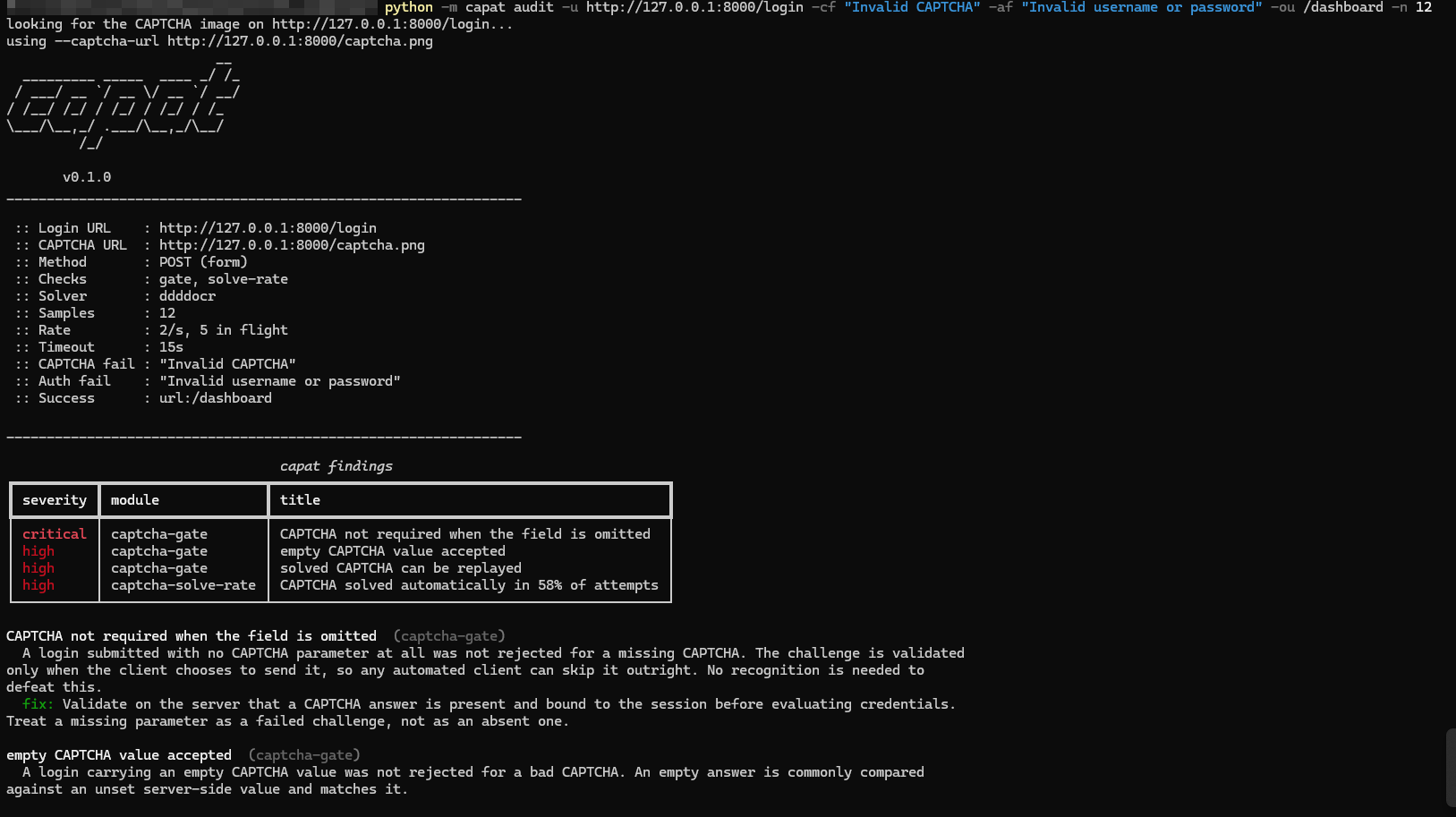
A deliberately broken test application: three enforcement failures and a 58% solve rate, with the reasoning printed under each finding.
Installation
Python 3.10 or newer. Two ways, both fine.
Option 1 - from PyPI
The short one. Nothing to clone:
pip install "capat[ddddocr]"
The quotes matter - most shells eat the square brackets without them.
The part in brackets is the recognition engine, and it is a choice. capat ships no engine of its own: the tool is the measurement harness, and the network that reads the image is installed separately so you can pick one, swap it, or bring your own. Four are supported, three of them neural:
| Install | Engine | Why you would pick it |
|---|---|---|
pip install "capat[ddddocr]" |
ddddocr - CRNN+CTC, ONNX runtime | The default. Reads the whole image as one sequence, so deliberate glyph overlap costs it little. ~18 ms a solve, installs in seconds, no torch. Start here. |
pip install "capat[easyocr]" |
EasyOCR - CRAFT detector + CRNN, PyTorch | A general scene-text model. Large - it pulls in torch - and its detection stage splits touching glyphs, which is why it scores worse here than its reputation suggests. |
pip install "capat[tesseract]" |
Tesseract - LSTM | Classic, and already present on many machines. Note the tesseract binary must also be installed and on PATH; pip only installs the Python wrapper. |
pip install "capat[all-solvers]" |
all three | Required for -s ensemble and -s ensemble-fast, which run several engines and select by mean confidence. Highest accuracy, slowest. |
pip install capat |
none | Core only. The enforcement checks, rate-limit detection and reporting all still work; the solve rate reports that it has no solver rather than printing a misleading 0%. |
A model you trained yourself needs no extra install of its own: -s model.onnx
loads a custom CRNN+CTC network through the ddddocr runtime, so
"capat[ddddocr]" covers it. See Which engine? for measured
accuracy and speed, and why the default is what it is.
Option 2 - from GitHub
Use this if you want the source to change something:
git clone https://github.com/goblensec/capat && cd capat
pip install -e ".[ddddocr]"
-e installs in editable mode, so edits to the source take effect without
reinstalling. The same extras apply: ".[all-solvers]", or -e . for core
only.
To install from the repository without cloning it:
pip install "capat[ddddocr] @ git+https://github.com/goblensec/capat.git"
Either way
The recognition engine is an optional extra, never bundled: pip fetches
ddddocr from PyPI itself, and capat ships no model of its own. That keeps the
core install small and means you can swap in easyocr, tesseract, or your own
.onnx model instead.
Check the install with capat --version. If capat is not on your PATH,
python -m capat works identically everywhere below.
Quick start
Point it at a login page you are authorized to test. The two phrases are the measurement: telling "wrong CAPTCHA" apart from "wrong password" is what makes a solve rate mean anything.
capat audit -u https://app.example.com/login -cf "invalid captcha" -af "invalid username or password"
Leave -c out and the login page is fetched and the CAPTCHA image found on it.
If you do not know the flags yet, capat setup asks for the facts, writes a
profile and runs it.
capat setup
Save a working configuration with -P app.json and re-run it with -p app.json; any flag still overrides the file.
Usage
capat audit is the command; everything below is how to drive it. The full
flag reference is at the end of this section, folded so it stays out of the way.
The other commands
audit is the one with the flags. The rest are small enough to read from their
own -h:
| Command | What it does | Network |
|---|---|---|
capat setup |
Asks for the URLs, the field names and the two phrases, writes a profile, prints the command it built, then runs it | yes |
capat collect -c URL -n 25 -o corpus |
Downloads CAPTCHA images for a corpus. Never submits a login | yes |
capat bench corpus -s ddddocr -l 5 |
Scores a solver against a labelled corpus | no |
capat solve img.png --save-processed out.png |
Solves one image and shows the preprocessing in force. How a recipe gets tuned | no |
capat setup -h capat collect -h capat bench -h capat solve -h
Every command prints the banner and its configuration before it starts;
--no-banner turns that off for CI.
Guided setup
If you do not know the flags yet, answer questions instead - capat setup is
the wizard, and after it has written a profile you never need it again.
capat setup
Which engine?
--solver |
Exact | Per solve | Solves/hour |
|---|---|---|---|
easyocr |
1/6 (17%) | 1497 ms | ~400 |
ddddocr |
4/6 (67%) | 18 ms | ~131,000 |
ensemble-fast |
4/6 (67%) | 143 ms | ~16,800 |
ensemble |
5/6 (83%) | 1936 ms | ~1,550 |
Measured on six CAPTCHAs from one production login - indicative, not a
published rate. ddddocr is the default: it reads the whole image as one
sequence, so deliberate glyph overlap costs it far less than a general
scene-text engine, and it installs in seconds without torch.
-s model.onnx loads a custom CRNN+CTC model instead of a registered engine.
A companion module for training one - graded synthetic corpora, exporting ONNX
that plugs straight in - is in development and lands in a later release.
Exit codes
| Code | Meaning |
|---|---|
0 |
Ran clean, nothing at MEDIUM or above |
1 |
Findings at MEDIUM or above |
2 |
Usage error, or the target could not be reached |
130 |
Interrupted |
Every audit flag
capat audit -h — the complete flag reference
usage: capat audit [-h] [-p PROFILE] [-n N] [--skip-solve-rate] [-M MODULE] [-d] [-r N] [-t N]
                   [-T SEC] [-x URL] [-k] [-A UA] [-w WORDLIST] [-U WORDLIST]
                   [--order {spray,brute}] [--max-attempts N] [--captcha-retries N]
                   [--lockout-threshold N] [--ignore-lockout] [-f FMT] [-o FILE] [--no-banner]
                   [-m LEVEL] [-s NAME|PATH] [--charset CHARS] [--charset-file PATH] [-l N]
                   [--scale N] [--threshold N] [--median N] [--min-saturation N] [--dilate N]
                   [--invert] [--case-sensitive] [-u URL] [-c URL] [-fu URL] [-X M] [-e ENC]
                   [-H 'Name: Value'] [-b 'N=V; N2=V2'] [-F name=value] [-E name=src:key]
                   [--username NAME] [--username-field NAME] [--password-field NAME]
                   [--csrf-field NAME] [-cr KIND] [-cm M] [-ci PATH] [-cd PATH] [-cn NAME]
                   [-cv NAME] [-cH 'Name: Value'] [-cf MATCH] [-af MATCH] [-ok MATCH] [-ou FRAGMENT]
                   [-P PATH]

capat - evidence that image CAPTCHAs are not a bot control.
Use only against systems you are authorized to test.

options:
  -h, --help                      show this help message and exit

GENERAL OPTIONS:
  -p, --profile PROFILE           JSON file describing the login form (optional; -u alone also
                                  works)
  -n, --samples N                 CAPTCHAs to measure (default 25)
  --skip-solve-rate               only run the enforcement checks (no OCR)
  -M, --only MODULE               run only these checks. Repeatable. See MODULES
  -d, --debug                     print every request, including live credentials. Keep it on a
                                  terminal

HTTP OPTIONS:
  -r, --rps N                     max requests/second (default 2)
  -t, --threads N                 parallel checks in flight (default 5)
  -T, --timeout SEC               request timeout (default 15s)
  -x, --proxy URL                 proxy, e.g. http://127.0.0.1:8080 for Burp/ZAP
  -k, --insecure                  disable TLS verification (warns)
  -A, --user-agent UA             override the User-Agent header

CREDENTIAL TEST OPTIONS (only run when -w is given):
  -w, --passwords WORDLIST        password list. Giving one ALSO submits real logins - off unless
                                  given
  -U, --users WORDLIST            file of real accounts to guess against, one per line. Overrides
                                  --username. Without either, -w has nothing to run against
  --order {spray,brute}           spray: every identity per password, safest (default). brute: one
                                  at a time
  --max-attempts N                cap credential-test attempts (default: the whole wordlist)
  --captcha-retries N             retries when a CAPTCHA was misread, so no password goes untested
                                  (default 3)
  --lockout-threshold N           wrong-password budget PER ACCOUNT, not for the whole run (default
                                  4). CAPTCHA misreads do not count against it
  --ignore-lockout                keep guessing at an account after it spends its budget. OFF by
                                  default: capat drops that account and carries on with the rest.
                                  Turning it on CAN LOCK A REAL PERSON OUT

OUTPUT OPTIONS:
  -f, --format FMT                report format: table (default), json, markdown
  -o, --output FILE               write the report to a file
  --no-banner                     skip the start-of-run banner and configuration
  -m, --min-severity LEVEL        hide findings below this level, e.g. -m medium (default info)

SOLVER OPTIONS (tuning; save with -P and reuse):
  -s, --solver NAME|PATH          engine: ddddocr, easyocr, ensemble, ensemble-fast,
                                  tesseract (default ddddocr), or the path to a custom .onnx model
  --charset CHARS                 characters the CAPTCHA can contain
  --charset-file PATH             labels for a custom -s model.onnx (default: the model path with
                                  .json)
  -l, --length N                  how many characters the answer has. Used by easyocr, tesseract and
                                  ensemble only - ddddocr and -s model.onnx read the image as one
                                  sequence and ignore it, so train the length in instead
  --scale N                       upscale factor (default 3.0)
  --threshold N                   binarization cut-off 0-255, -1 keeps grayscale (default 140)
  --median N                      median denoise kernel, 0 disables (default 3)
  --min-saturation N              drop pixels below this saturation 0-255, killing grey noise (try
                                  60)
  --dilate N                      thicken strokes, odd kernel (default 0, try 3)
  --invert                        invert after thresholding
  --case-sensitive                compare answers case-sensitively

TARGET (instead of, or on top of, --profile):
  -u, --url URL                   login URL the form posts to
  -c, --captcha-url URL           CAPTCHA endpoint. Discovered if omitted; 'auto' re-reads it every
                                  attempt; 'base64' takes it from a data: URI in the page;
                                  {{placeholders}} are filled by -E
  -fu, --form-url URL             page holding the form, if it differs from -u
  -X, --method M                  login request method (default POST)
  -e, --encoding ENC              login body encoding: form (default), json, multipart
  -H, --header 'Name: Value'      header on every request. Repeatable
  -b, --cookie 'N=V; N2=V2'       cookie data, for copy-as-curl. Same as -H 'Cookie: ...'
  -F, --field name=value          extra login form field. Repeatable
  -E, --extract name=src:key      pull a per-request value out of the page first, e.g.
                                  'token=hidden:_token'. Repeatable. See EXTRACT SYNTAX
  --username NAME                 the ONE real account -w guesses against. Ignored when -U is given;
                                  the other checks never use it, they invent a throwaway name
  --username-field NAME           form field for the username (default username)
  --password-field NAME           form field for the password (default password)
  --csrf-field NAME               hidden field to carry over, e.g. _token
  -P, --save-profile PATH         write the assembled profile as JSON and carry on, so a run that
                                  worked repeats

CAPTCHA ENDPOINT:
  -cr, --captcha-response KIND    'image' for a raw image body (default), 'json' for a base64
                                  payload
  -cm, --captcha-method M         method for the CAPTCHA request (default GET)
  -ci, --captcha-image-key PATH   dotted path to the base64 image
  -cd, --captcha-id-key PATH      dotted path to the challenge id
  -cn, --captcha-id-field NAME    field the challenge id is submitted back in
  -cv, --captcha-field NAME       form field for the answer (default captcha)
  -cH, --captcha-header 'Name: Value'
                                  header on the CAPTCHA request only. Repeatable

MATCHER OPTIONS (telling these apart IS the measurement):
  -cf, --captcha-fail MATCH       how the app rejects a wrong CAPTCHA. Repeatable, OR-ed. Without it
                                  a CAPTCHA rejection cannot be told from a credential one, so the
                                  gate checks report inconclusive rather than guess
  -af, --auth-fail MATCH          how the app rejects wrong credentials. Repeatable, OR-ed. Keep it
                                  narrow: a substring that also matches the CAPTCHA rejection makes
                                  the two indistinguishable
  -ok, --success MATCH            how the app answers a successful login. Repeatable, OR-ed
  -ou, --success-url FRAGMENT     shorthand for -ok 'url:FRAGMENT'

MATCH SYNTAX (-cf / -af / -ok):
  invalid captcha        a substring of the response body
  re:PATTERN             regular expression against the body
  status:422             HTTP status code
  url:/dashboard         substring of the final URL, after redirects
  json:code=4001         dotted JSON path equals a value
  header:location=/home  response header equals a value
  Each flag repeats; its conditions are OR-ed.

EXTRACT SYNTAX (-E name=source:key):
  token=hidden:_token                 a hidden form input
  nonce=regex:captcha[?]n=([^"]+)     one capture group
  sid=json:data.id@captcha            dotted JSON path, from the CAPTCHA reply
  xsrf=cookie:XSRF-TOKEN              a cookie the app expects echoed back
  Names become {{placeholders}} usable in -c, -u, -H and the body.

MODULES (-M, all run by default):
  gate         is the CAPTCHA required, single-use and rotating at all
  solve-rate   how often OCR reads it, using a throwaway identity - needs -cf and -af
  credential   password test straight through the CAPTCHA - needs -w

EXAMPLE USAGE:
  Tune the engine offline first; a live run spends attempts the target rate limits.
    capat collect -c https://example.org/captcha -o corpus   # then name each file its answer
    capat bench corpus -s ddddocr

  Measure a plain HTML login form. The two phrases are the measurement.
    capat audit -u https://example.org/login \
      -cf "invalid captcha" -af "invalid username or password"

  A page that mints a fresh CAPTCHA URL on every load.
    capat audit -u https://example.org/login -c auto \
      -cf "invalid captcha" -af "invalid username or password"

  A JSON API returning a base64 image and an id, matched on response codes.
    capat audit -u https://example.org/api/login -e json \
      -c https://example.org/api/captcha -cr json -ci data.image \
      -cd data.id -cn captchaId \
      -cf json:code=4001 -af json:code=4002 -ok json:code=0 -P app.json

  Replay a saved profile through Burp, enforcement checks only, no OCR.
    capat audit -p app.json -M gate -x http://127.0.0.1:8080

  Only the findings worth acting on, written to a file.
    capat audit -p app.json -m medium -f markdown -o report.md
Full guide
docs/GUIDE.md is the reference:
| Section | What it covers |
|---|---|
| Start here: benchmark offline | build a labelled corpus, then measure the engine against known answers |
| Auditing a live login page | the wizard, the flags, and saving a target as a profile |
| Target shapes | JSON CAPTCHA endpoints, -c auto for a per-load URL, -c base64 for an inline data: image |
| Fitting it to any application | the full profile format, token extraction, custom matchers, request templating |
| How the live solve rate is measured | why a throwaway identity, and what the number does and does not claim |
| Checks that need no OCR | the enforcement tests that run without a solver |
| The credential audit | the opt-in wordlist run, lockout budget and CAPTCHA retries |
| Pick a solver, then run the wordlist | the sequence that decides whether a wordlist is runnable at all |
| Extending it | writing a solver or a check against the entry points |
Contributing
Third-party engines and checks register through the capat.solvers and
capat.modules entry points; docs/GUIDE.md shows how.
Open an issue before a large change. The suite must pass without the OCR extras installed, and no test may touch the network or load a real model.
License
MIT - see LICENSE.
For authorized security testing and research only. The authors accept no liability for misuse.
1 maintainer

Download files
Download the file for your platform. If you're not sure which to choose, learn more about installing packages.
Source Distribution
Built Distribution
Filter files by name, interpreter, ABI, and platform.
If you're not sure about the file name format, learn more about wheel file names.
Copy a direct link to the current filters
File details
Details for the file capat-0.1.0.tar.gz.
File metadata
- Download URL: capat-0.1.0.tar.gz
- Upload date:
- Size: 183.8 kB
- Tags: Source
- Uploaded using Trusted Publishing? Yes
- Uploaded via:
twine/7.0.0 CPython/3.13.14
File hashes
| Algorithm | Hash digest | |
|---|---|---|
| SHA256 |
11d5478fe6625c8f6864effd145d6a6baad714a76058040b0d6fe338ed5eb1a9
|
|
| MD5 |
0041e33d2feafe3c80c60c4e42a6fa7c
|
|
| BLAKE2b-256 |
f2de7540d92d2b6f1d772ba82698a0ccf6dd46599b33b2ba99bf036edbbde345
|
Provenance
The following attestation bundles were made for capat-0.1.0.tar.gz:
Publisher:
release.yml on goblensec/capat
-
Statement:
-
Statement type:
https://in-toto.io/Statement/v1 -
Predicate type:
https://docs.pypi.org/attestations/publish/v1 -
Subject name:
capat-0.1.0.tar.gz -
Subject digest:
11d5478fe6625c8f6864effd145d6a6baad714a76058040b0d6fe338ed5eb1a9 - Sigstore transparency entry: 2820198716
- Sigstore integration time:
-
Permalink:
goblensec/capat@86a8e588dea6cb0291add19b4346efe7636ca707 -
Branch / Tag:
refs/tags/v0.1.0 - Owner: https://github.com/goblensec
-
Access:
private
-
Token Issuer:
https://token.actions.githubusercontent.com -
Runner Environment:
github-hosted -
Publication workflow:
release.yml@86a8e588dea6cb0291add19b4346efe7636ca707 -
Trigger Event:
push
-
Statement type:
File details
Details for the file capat-0.1.0-py3-none-any.whl.
File metadata
- Download URL: capat-0.1.0-py3-none-any.whl
- Upload date:
- Size: 98.1 kB
- Tags: Python 3
- Uploaded using Trusted Publishing? Yes
- Uploaded via:
twine/7.0.0 CPython/3.13.14
File hashes
| Algorithm | Hash digest | |
|---|---|---|
| SHA256 |
c1afd1153640fe7b9a51dd12e88287daedf4e616e27171b7cce5d9a4ae9ec66f
|
|
| MD5 |
2d0367ca69582607441a48fb62dbd955
|
|
| BLAKE2b-256 |
d9ba28d49350f3bcc4da1bb0e5c7a66e6c01333eb24dc47f280c243124b03a9a
|
Provenance
The following attestation bundles were made for capat-0.1.0-py3-none-any.whl:
Publisher:
release.yml on goblensec/capat
-
Statement:
-
Statement type:
https://in-toto.io/Statement/v1 -
Predicate type:
https://docs.pypi.org/attestations/publish/v1 -
Subject name:
capat-0.1.0-py3-none-any.whl -
Subject digest:
c1afd1153640fe7b9a51dd12e88287daedf4e616e27171b7cce5d9a4ae9ec66f - Sigstore transparency entry: 2820198728
- Sigstore integration time:
-
Permalink:
goblensec/capat@86a8e588dea6cb0291add19b4346efe7636ca707 -
Branch / Tag:
refs/tags/v0.1.0 - Owner: https://github.com/goblensec
-
Access:
private
-
Token Issuer:
https://token.actions.githubusercontent.com -
Runner Environment:
github-hosted -
Publication workflow:
release.yml@86a8e588dea6cb0291add19b4346efe7636ca707 -
Trigger Event:
push
-
Statement type:














