
Captain Search
CLI-first web and code search for agents, with MCP when you need it
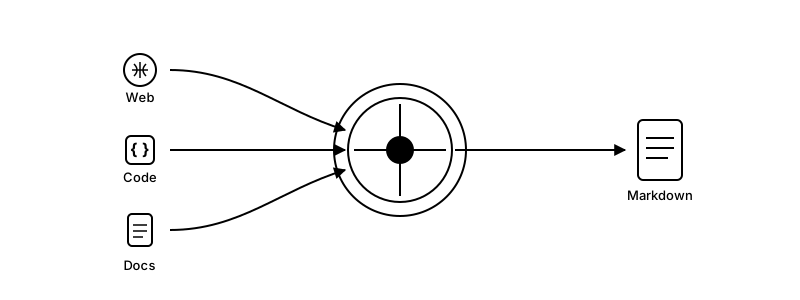
One CLI. Multiple providers. Clean Markdown.


Quick Start
Captain Search should usually start as a CLI workflow, not an MCP setup flow. Install the skill or run the CLI first, prove one command works, and only then add MCP if you explicitly need a server.
From this checkout today
git clone https://github.com/mnm-matin/captain-search.git
cd captain-search
uv sync
uv run csearch skill install --scope user
uv run csearch web "openai api" --max-results 5
After the first PyPI release
uvx --from captain-search csearch skill install
uvx --from captain-search csearch web "openai api" --max-results 5
Supported Providers
Web Search
You only need one provider to get started. Add more for redundancy.
| Provider | Free Tier | Best For | Get API Key |
|---|---|---|---|
| Parallel | $20 on first signup | AI-native web search | platform.parallel.ai |
| Serper | 2,500/month | Google results | serper.dev |
| Brave | 2,000/month | Independent index | brave.com/search/api |
| Tavily | 1,000/month | AI-optimized results | app.tavily.com |
| Exa | $10 credit | Neural/semantic search | dashboard.exa.ai |
| Perplexity | $5/mo credit | AI-powered answers | perplexity.ai/settings/api |
💡 Tip: Serper + Brave = 4,500 free searches/month with automatic failover
Code Search
| Provider | Free Tier | Best For | Get API Key |
|---|---|---|---|
| Exa (MCP) | Unlimited* | Semantic code context | exa.ai |
| Morph (Warp Grep) | Paid | Repo-local agentic search | morphllm.com |
| grep.app | Free (no key) | Exact text matching | grep.app |
| DeepWiki | Free (MCP) | Repo Q&A / Architecture | deepwiki.com |
| Noodlbox | Temporarily disabled | Local graph analysis | noodlbox.io |
Webpage Extraction
| Provider | Free Tier | Best For | Get API Key |
|---|---|---|---|
| Parallel Extract | Uses the $20 signup credit | JS-heavy pages, PDFs, clean markdown | platform.parallel.ai |
| Jina | 1M tokens | Webpage/PDF extraction | jina.ai/reader |
| Trafilatura (fallback) | Free | Local HTML extraction fallback | trafilatura.readthedocs.io |
| MarkItDown (optional fallback) | Free | Local document → Markdown (DOCX/PPTX/XLSX/...) | github.com/microsoft/markitdown |
Enable MarkItDown locally with: uv sync --extra markitdown (minimal) or uv sync --extra markitdown-all (all formats)
Installation
Skill install
If you want an agent to keep reusing Captain Search across sessions or repos, install the Captain Search CLI skill first.
# User-level install from this checkout
uv run csearch skill install --scope user

# Project-local install for the current repo
uv run csearch skill install --scope project

# Claude Code-compatible skill directory
uv run csearch skill install --target claude

# Once published to PyPI
uvx --from captain-search csearch skill install
The installer writes captain-search-cli under .agents/skills by default and can target .claude/skills with --target claude. From a source checkout, --runtime auto bakes in uv run --directory /path/to/captain-search csearch .... From a published package, it defaults to uvx --from captain-search csearch .... Use --force to refresh an existing install.
MCP client install instructions (copy/paste)
Only use this section when the user explicitly wants MCP client setup.
These MCP client configs intentionally use uv run --directory ... because the client may launch the server from an arbitrary working directory and should not depend on your shell having the project virtualenv activated.
You are installing the Captain Search MCP server. First ask the user which API keys they want to configure: SERPER_API_KEY, BRAVE_API_KEY, TAVILY_API_KEY, PERPLEXITY_API_KEY, PARALLEL_API_KEY, EXA_API_KEY, JINA_API_KEY, MORPH_API_KEY. Then ask which client they want to set up (Cursor, Claude Code, VS Code, Windsurf/Antigravity, OpenCode). Use only the keys they choose and remind them at least one web-search key is required.

Then provide the client-specific setup:
- Cursor: give the Captain Search Cursor deeplink and tell them to set the chosen keys as environment variables, then restart Cursor.
- Claude Code: use `claude mcp add captain-search -- uv run --directory /path/to/captain-search csearch mcp` and pass only the chosen keys with `-e KEY=value`.
- VS Code: use the `code --add-mcp` command with only the chosen env keys (or leave them blank if the user wants to fill later).
- Windsurf/Antigravity: add the MCP server to ~/.codeium/windsurf/mcp_config.json with the chosen env keys.
- OpenCode: add to opencode.jsonc under `mcp` with `type: "local"`, `command: ["uv", "run", "--directory", "/path/to/captain-search", "csearch", "mcp"]`, and an `environment` object with the chosen keys.
Install in Cursor
API keys are pulled from your environment (e.g., SERPER_API_KEY). Set them in your shell or system settings, then restart Cursor.
Install in Claude Code
claude mcp add captain-search -e SERPER_API_KEY=your-key -- uv run --directory /path/to/captain-search csearch mcp
Install in VS Code
Install via terminal:
code --add-mcp '{"name":"captain-search","command":"uv","args":["run","--directory","/path/to/captain-search","csearch","mcp"],"env":{"SERPER_API_KEY":"your-key-here","BRAVE_API_KEY":"","TAVILY_API_KEY":"","PERPLEXITY_API_KEY":"","PARALLEL_API_KEY":"","EXA_API_KEY":"","MORPH_API_KEY":"","JINA_API_KEY":""}}'
Or add to your User Settings (JSON) via Ctrl+Shift+P → Preferences: Open User Settings (JSON):
{
  "mcp": {
    "servers": {
      "captain-search": {
        "command": "uv",
        "args": ["run", "--directory", "/path/to/captain-search", "csearch", "mcp"],
        "env": {
          "SERPER_API_KEY": "your-key-here",
          "BRAVE_API_KEY": "",
          "TAVILY_API_KEY": "",
          "PERPLEXITY_API_KEY": "",
          "PARALLEL_API_KEY": "",
          "EXA_API_KEY": "",
          "MORPH_API_KEY": "",
          "JINA_API_KEY": ""
        }
      }
    }
  }
}
Or add to .vscode/mcp.json in your workspace to share with your team.
Install in Windsurf / Antigravity
Add to your ~/.codeium/windsurf/mcp_config.json (shared config for Windsurf and Antigravity):
{
  "mcpServers": {
    "captain-search": {
      "command": "uv",
      "args": ["run", "--directory", "/path/to/captain-search", "csearch", "mcp"],
      "env": {
        "SERPER_API_KEY": "your-key-here",
        "BRAVE_API_KEY": "",
        "TAVILY_API_KEY": "",
        "PERPLEXITY_API_KEY": "",
        "PARALLEL_API_KEY": "",
        "EXA_API_KEY": "",
        "MORPH_API_KEY": "",
        "JINA_API_KEY": ""
      }
    }
  }
}
Install in OpenCode
Add to your opencode.jsonc (project root) under mcp:
{
  "$schema": "https://opencode.ai/config.json",
  "mcp": {
    "captain_search": {
      "type": "local",
      "command": ["uv", "run", "--directory", "/path/to/captain-search", "csearch", "mcp"],
      "enabled": true,
      "environment": {
        "SERPER_API_KEY": "your-key-here",
        "BRAVE_API_KEY": "",
        "TAVILY_API_KEY": "",
        "PERPLEXITY_API_KEY": "",
        "PARALLEL_API_KEY": "",
        "EXA_API_KEY": "",
        "MORPH_API_KEY": "",
        "JINA_API_KEY": ""
      }
    }
  }
}
Getting Started
git clone https://github.com/mnm-matin/captain-search.git
cd captain-search
uv sync
uv run csearch skill install --scope user
If you want a no-activation, one-off run from this checkout, use uvx:
uvx --from . csearch --help
uvx --from . csearch web "openai api"
That creates console scripts in the project virtualenv. If you activate it, you can run the CLI directly:
source .venv/bin/activate
captain-search --help
csearch --help
If you do not want to activate the virtualenv, you can still call the wrappers directly:
.venv/bin/captain-search --help
.venv/bin/csearch --help
uv run is just the convenience wrapper that runs those same commands inside the project environment.
If you want a persistent command on your shell PATH, install the tool:
uv tool install .
If you publish Captain Search to PyPI, end users can skip cloning entirely:
# One-off runs
uvx --from captain-search csearch --help
uvx --from captain-search csearch web "openai api"

# Persistent install
uv tool install captain-search
Then update /path/to/captain-search in the configs above to your actual path.
Available Tools
| Tool | Description |
|---|---|
search_web |
Search with weighted selection and optional multi-provider mode |
search_code |
Search code across Exa, grep.app, DeepWiki, Morph, and local exact matches |
fetch_webpage |
Extract content from any URL (articles, PDFs, docs) |
search_web provider selector:
auto(default): weighted single-provider selection with fallbackmultiorall: parallel search across all enabled providers- Provider name:
serper,brave,tavily,perplexity,parallel,exa,exa_mcp - Comma-separated list for multi-provider search
search_code providers:
- Exa Code Context: Semantic search (always runs)
- grep.app: Exact text matching (always runs)
- DeepWiki: Repo Q&A (requires repo filter)
- Morph Warp Grep: Repo-local agentic search (requires repo filter + MORPH_API_KEY)
- Local Exact Matches: Repo-local fixed-string search (requires repo filter)
- Noodl: Temporarily disabled
CLI Usage
captain-search and csearch expose the same CLI. The docs use csearch, and MCP server startup now requires an explicit mcp subcommand.
# Bare invocation shows help
csearch
csearch version
csearch skill install --scope user

# Explicit MCP server startup
csearch mcp
csearch mcp --transport http --port 8000

# Direct CLI commands
csearch web "openai api" --max-results 5
csearch web "openai api" --all
csearch code "search_web" --repo mnm-matin/captain-search --format json
csearch fetch https://example.com --format json

# No-activation ephemeral runs with uvx
uvx --from . csearch web "openai api"

# Once published to PyPI
uvx --from captain-search csearch web "openai api"

# No-activation form if you want uv to launch the project env for you
uv run csearch web "openai api"

# Module form also works
uv run python -m captain_search web "openai api"
Direct command exit codes are shell-friendly: 0 for successful output, 1 for a top-level command error, and 2 for invalid CLI usage.
Running as a Remote Server
For teams or cloud deployment:
# HTTP mode
captain-search mcp --transport http --port 8000

# SSE mode
captain-search mcp --transport sse --port 8000
With Authentication
export MCP_AUTH_TOKEN="your-secret-token"
captain-search mcp --transport http --port 8000
Connect via:
- Header:
Authorization: Bearer your-secret-token - Query:
http://host:8000/mcp?token=your-secret-token
Environment Variables
| Variable | Required |
|---|---|
SERPER_API_KEY |
At least one provider |
BRAVE_API_KEY |
At least one provider |
TAVILY_API_KEY |
At least one provider |
PERPLEXITY_API_KEY |
Optional |
PARALLEL_API_KEY |
Optional (web search + webpage extraction) |
EXA_API_KEY |
Optional |
MORPH_API_KEY |
Optional (code search) |
MORPH_BASE_URL |
Optional (defaults to https://api.morphllm.com/v1) |
JINA_API_KEY |
Optional (works without) |
MCP_AUTH_TOKEN |
For remote mode |
CAPTAIN_SEARCH_LOG_ENABLED |
Optional (defaults to true) |
CAPTAIN_SEARCH_LOG_DIR |
Optional (defaults to ~/.captain-search/logs) |
CAPTAIN_SEARCH_LOG_FULL_PAYLOADS |
Optional (defaults to true) |
Every keyed provider also supports a comma-separated *_API_KEYS environment variable for rotation, for example SERPER_API_KEYS, BRAVE_API_KEYS, TAVILY_API_KEYS, PERPLEXITY_API_KEYS, PARALLEL_API_KEYS, EXA_API_KEYS, and JINA_API_KEYS.
Telemetry Logging
Captain Search writes daily JSONL telemetry files to ~/.captain-search/logs/YYYY-MM-DD.jsonl by default.
Each tool call logs:
- full input arguments
- final output returned to the client
- provider attempts and per-provider results
- repo resolution and cache events for
search_code - Parallel/Jina/fallback stages for
fetch_webpage
If you want to reduce what gets stored, set CAPTAIN_SEARCH_LOG_FULL_PAYLOADS=false to log previews instead of full payloads. Set CAPTAIN_SEARCH_LOG_ENABLED=false to disable logging entirely.
How It Works
- Weighted Selection: Providers chosen based on free tier limits
- Health-Aware Fallback: If one fails or is cooling down, routing skips it and tries the next
- Multi-Provider:
search_webstill supports multi-provider mode internally, while the CLI exposes that breadth ascsearch web --all - Fetch Routing:
fetch_webpageuses Parallel Extract first whenPARALLEL_API_KEYis configured, then Jina Reader, then local fallback - Doctor Command:
csearch doctorshows configured providers, recent telemetry, and current cooldown state
Default weights: Serper (42%) → Brave (33%) → Tavily (17%) → Perplexity (8%)
Customize via config.yaml:
providers:
  serper:
    weight: 50
    enabled: true
  brave:
    weight: 30
    enabled: true
Docker
docker build -t captain-search .

docker run -p 8000:8000 \
  -e SERPER_API_KEY=your_key \
  -e MCP_AUTH_TOKEN=your_secret \
  captain-search mcp --transport http --port 8000
Development
git clone https://github.com/mnm-matin/captain-search.git
cd captain-search
uv pip install -e ".[dev]"
pytest
Run the opt-in live provider audit when you want real endpoint checks plus a per-task configured-vs-working summary for web search, code search, and fetch:
RUN_E2E=1 uv run --extra dev python -m pytest -q tests/test_providers.py
LIVE_PROVIDER_CACHE_TTL_SECONDS=900 RUN_E2E=1 uv run --extra dev python -m pytest -q tests/test_providers.py
LIVE_PROVIDER_FORCE_REFRESH=1 RUN_E2E=1 uv run --extra dev python -m pytest -q tests/test_providers.py
The live audit reuses fresh results from .pytest_cache until the TTL expires and prints a
session-end summary showing how many active providers are working for each task.
License
MIT License - see LICENSE
Built with ❤️ for the AI agent ecosystem
1 maintainer

Metadata
1 maintainer
Release files for captain-search 0.1.0
For a detailed explanation of source distributions (sdists) and built distributions (wheels), please see the package formats documentation.
Source distribution (sdist)
| File | Size | Uploaded | |
|---|---|---|---|
| captain_search-0.1.0.tar.gz | 225.0 kB | Details |
Built distribution (wheel)
| File | Interpreter | ABI | Platform | Reset |
|---|---|---|---|---|
| captain_search-0.1.0-py3-none-any.whl | Python 3 | none | any | Details |
Total release size: 304.6 kB
Release files / captain_search-0.1.0.tar.gz
| Download URL | captain_search-0.1.0.tar.gz |
|---|---|
| Size | 225.0 kB |
| Tags | Source |
|
SHA-256 checksum How to use checksums |
6ecb5f116d9487220f2325a6ecf04e7262d00d51537cef70decc8123c89b61cc
|
|
BLAKE2b-256 checksum How to use checksums |
280c34c62e6015ba1040d96b531d1a0411656a990aeceb47e2d531cc7c1793ec
|
| Upload date | |
|
Uploaded using Trusted Publishing? What is trusted publishing? |
No |
| Uploaded via |
uv/0.9.24 {"installer":{"name":"uv","version":"0.9.24","subcommand":["publish"]},"python":null,"implementation":{"name":null,"version":null},"distro":{"name":"macOS","version":null,"id":null,"libc":null},"system":{"name":null,"release":null},"cpu":null,"openssl_version":null,"setuptools_version":null,"rustc_version":null,"ci":null}
|
Release files / captain_search-0.1.0-py3-none-any.whl
| Download URL | captain_search-0.1.0-py3-none-any.whl |
|---|---|
| Size | 79.6 kB |
| Tags | Python 3 |
|
SHA-256 checksum How to use checksums |
ee15f5e05e5291c38d0f3b34945e20bfb039363d68c7dd8f1431b972edcdc813
|
|
BLAKE2b-256 checksum How to use checksums |
e2cb2735c0d0876c432e57e18fa80d4f4c8ec0aee57e377e8d0bed8ebe0255c4
|
| Upload date | |
|
Uploaded using Trusted Publishing? What is trusted publishing? |
No |
| Uploaded via |
uv/0.9.24 {"installer":{"name":"uv","version":"0.9.24","subcommand":["publish"]},"python":null,"implementation":{"name":null,"version":null},"distro":{"name":"macOS","version":null,"id":null,"libc":null},"system":{"name":null,"release":null},"cpu":null,"openssl_version":null,"setuptools_version":null,"rustc_version":null,"ci":null}
|













