
captcha-solver
OCR-based Python library to solve two common image CAPTCHA styles. Ready for PyPI.
Requires Tesseract OCR installed on your system (not only the pytesseract pip package).
CAPTCHA types this library solves
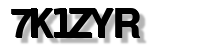
1. Image CAPTCHA — solveImageCaptcha
Clear character row (e.g. 6 characters).
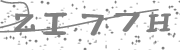
2. Noisy CAPTCHA — solveImageNoiseCaptcha
Heavy background noise, diagonal lines, and speckles. Use when the text is obscured but still readable. Uses segmentation + per-character OCR. Returns one result or 25 candidate results to try until the form accepts one.
Install
pip install captcha-solver
System dependency: Install Tesseract OCR.
| Platform | Command |
|---|---|
| Ubuntu/Debian | sudo apt-get install tesseract-ocr |
| macOS | brew install tesseract |
| Windows | Tesseract at UB Mannheim — then set TESSERACT_CMD to the executable path if needed. |
Usage
Class-based API
from captcha_solver import CaptchaSolver

solver = CaptchaSolver()

# Image CAPTCHA → one result
text = solver.solveImageCaptcha("path/to/Image.png")

# Noise CAPTCHA → one result (optional: num_chars, uppercase)
text = solver.solveImageNoiseCaptcha("path/to/noisy_captcha.png")

# Grid CAPTCHA → 25 candidate results (try each until form accepts)
results = solver.solve_grid_five_results("path/to/grid_captcha.png")
for i, r in enumerate(results, 1):
    print(f"{i}: {r}")
Optional: Tesseract path (e.g. Windows)
import os
os.environ["TESSERACT_CMD"] = r"C:\Program Files\Tesseract-OCR\tesseract.exe"

from captcha_solver import CaptchaSolver
solver = CaptchaSolver()
# ... use as above
Grid solver options
| Parameter | Type | Default | Description |
|---|---|---|---|
num_chars |
int | None |
5 |
Expected number of characters; result is trimmed/padded to this length. |
uppercase |
bool |
True |
If True, return uppercase; if False, return lowercase. |
Development
git clone https://github.com/Rahulkatoch99/CaptchaSolver
cd captcha-solver
pip install -e ".[dev]"
License
MIT.
1 maintainer

Download files
Download the file for your platform. If you're not sure which to choose, learn more about installing packages.
Source Distribution
Built Distribution
Filter files by name, interpreter, ABI, and platform.
If you're not sure about the file name format, learn more about wheel file names.
Copy a direct link to the current filters
File details
Details for the file captcha_vision_engine-0.1.2.tar.gz.
File metadata
- Download URL: captcha_vision_engine-0.1.2.tar.gz
- Upload date:
- Size: 13.7 kB
- Tags: Source
- Uploaded using Trusted Publishing? No
- Uploaded via:
twine/6.2.0 CPython/3.12.3
File hashes
| Algorithm | Hash digest | |
|---|---|---|
| SHA256 |
11bf539d353ea77018a1266da261af4830e4cf5396c31add964f313d93dc63a6
|
|
| MD5 |
9c818cf6e57c5ea66c918707cad74ef8
|
|
| BLAKE2b-256 |
33c4b1495448625c5bf695cbc7ef0c10b5ef16d43608e8d3e6faeed41b5ae00f
|
File details
Details for the file captcha_vision_engine-0.1.2-py3-none-any.whl.
File metadata
- Download URL: captcha_vision_engine-0.1.2-py3-none-any.whl
- Upload date:
- Size: 14.1 kB
- Tags: Python 3
- Uploaded using Trusted Publishing? No
- Uploaded via:
twine/6.2.0 CPython/3.12.3
File hashes
| Algorithm | Hash digest | |
|---|---|---|
| SHA256 |
54ccc84143eba3da8efa2a93353966526cf06a33c2ad24a2a2ff868047b23d29
|
|
| MD5 |
108a3e8253a55209d4810f946dff510d
|
|
| BLAKE2b-256 |
521817746b6c255e0dbe7c5ff2ba0f586a95e0a99cba7a5ad61ee37d42d18f5b
|














