
Captchium
Captchium is a Python library for solving Google reCAPTCHA challenges using audio recognition. It provides a convenient way to automate CAPTCHA solving in web scraping or automation tasks.
Installation
To install Captchium, you can use pip:
pip install captchium
Usage
Here's an example of how to use Captchium:
from selenium.webdriver.chrome.service import Service
from selenium.webdriver.common.by import By
from selenium import webdriver
from captchium import Captchium
from driverium import Driverium

# Create a web driver instance
driver_options = webdriver.ChromeOptions()
service = Service(Driverium().get_driver())
driver = webdriver.Chrome(service=service, options=driver_options)

# Initialize Captchium with the web driver instance
captchium = Captchium(driver, recognize_service="google")

# Solve the CAPTCHA challenge within an iframe
iframe = driver.find_element(By.TAG_NAME, "iframe")
captchium.solve(iframe)

# Continue with your automation task
# ...
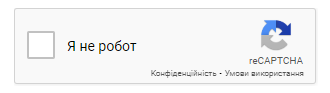
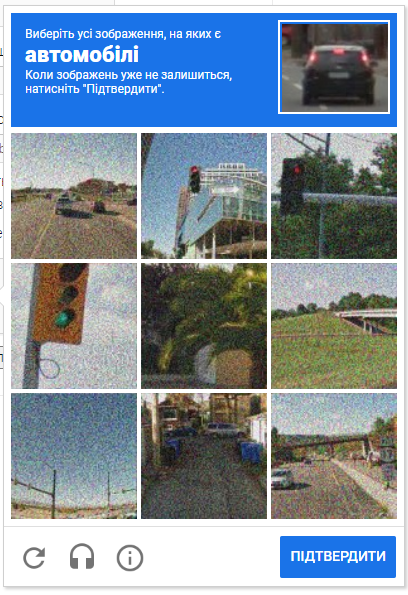
To use the solve function, you need to pass the iframe element that opens after clicking on the CAPTCHA. This can be done by locating the iframe element using Selenium's find_element method and passing it as an argument to the solve function.
Do not pass this iframe to the function
Pass this iframe
Supported Audio Recognition Services
Captchium currently supports two audio recognition services: Google and Vosk. By default, it uses the Google service. You can specify the service when initializing Captchium:
captchium = Captchium(driver, recognize_service="vosk", model_path="path/to/model")
Please note that if you choose the Vosk service, you need to download the Vosk model from https://alphacephei.com/vosk/models and unpack it as 'model' in the current folder or specify the path to the model using the model_path parameter.
Contributing
Contributions are welcome! If you find any issues or have suggestions for improvements, please open an issue or submit a pull request on the Captchium GitHub repository.
License
Captchium is licensed under the MIT License. See the LICENSE file for more information.
1 maintainer

Metadata
1 maintainer
Release files for captchium 1.1.5
For a detailed explanation of source distributions (sdists) and built distributions (wheels), please see the package formats documentation.
Source distribution (sdist)
| File | Size | Uploaded | |
|---|---|---|---|
| captchium-1.1.5.tar.gz | 5.1 kB | Details |
Built distribution (wheel)
| File | Interpreter | ABI | Platform | Reset |
|---|---|---|---|---|
| captchium-1.1.5-py3-none-any.whl | Python 3 | none | any | Details |
Total release size: 10.6 kB
Release files / captchium-1.1.5.tar.gz
| Download URL | captchium-1.1.5.tar.gz |
|---|---|
| Size | 5.1 kB |
| Tags | Source |
|
SHA-256 checksum How to use checksums |
44941b7b59a7a3dadb169576b3110b687e61318d822971a4651b30e16a9fa6be
|
|
BLAKE2b-256 checksum How to use checksums |
f3b2fe6c43dbb8da159e50c12646ca264d99ee6a7d9eb5ab39c7a95b17076af2
|
| Upload date | |
|
Uploaded using Trusted Publishing? What is trusted publishing? |
No |
| Uploaded via |
twine/5.1.1 CPython/3.11.7
|
Release files / captchium-1.1.5-py3-none-any.whl
| Download URL | captchium-1.1.5-py3-none-any.whl |
|---|---|
| Size | 5.5 kB |
| Tags | Python 3 |
|
SHA-256 checksum How to use checksums |
dea84e280bfa3f9f442370015c08c01856b6dacdced8d83bb31862bc0b5e9013
|
|
BLAKE2b-256 checksum How to use checksums |
2f4b21901af068f8d1864306888b7c9e55c8d8f0e7d5e1c5ecfb0a706db73fe3
|
| Upload date | |
|
Uploaded using Trusted Publishing? What is trusted publishing? |
No |
| Uploaded via |
twine/5.1.1 CPython/3.11.7
|














