
Self-contained distributed community captioning system

Project description
captionflow
$ pip install caption-flow
$ caption-flow orchestrator|worker|monitor
scalable, fault-tolerant vllm-powered image captioning. this "first round" focuses on a blazing fast websocket orchestrator plus lightweight gpu workers that batch requests through vllm.
performance: consumer 4090s often outpace h100s on smaller models (3b-7b) due to higher clock speeds and lower overhead. we've seen 150+ images/sec on a single 4090 with qwen2.5-vl-3b.
- orchestrator: hands out work in chunked shards, collects captions, checkpoints progress, and keeps simple stats. handles 10k+ chunks/sec on commodity hardware.
- workers (vllm): connect to the orchestrator, stream in image samples, batch them, and generate 1..n captions per image using prompts supplied by the orchestrator.
- dataworkers (coming soon): separate non-gpu clients that fetch/preprocess images and feed them to the orchestrator, freeing gpu workers to focus purely on inference.
- config-driven: all components read yaml config; flags can override.
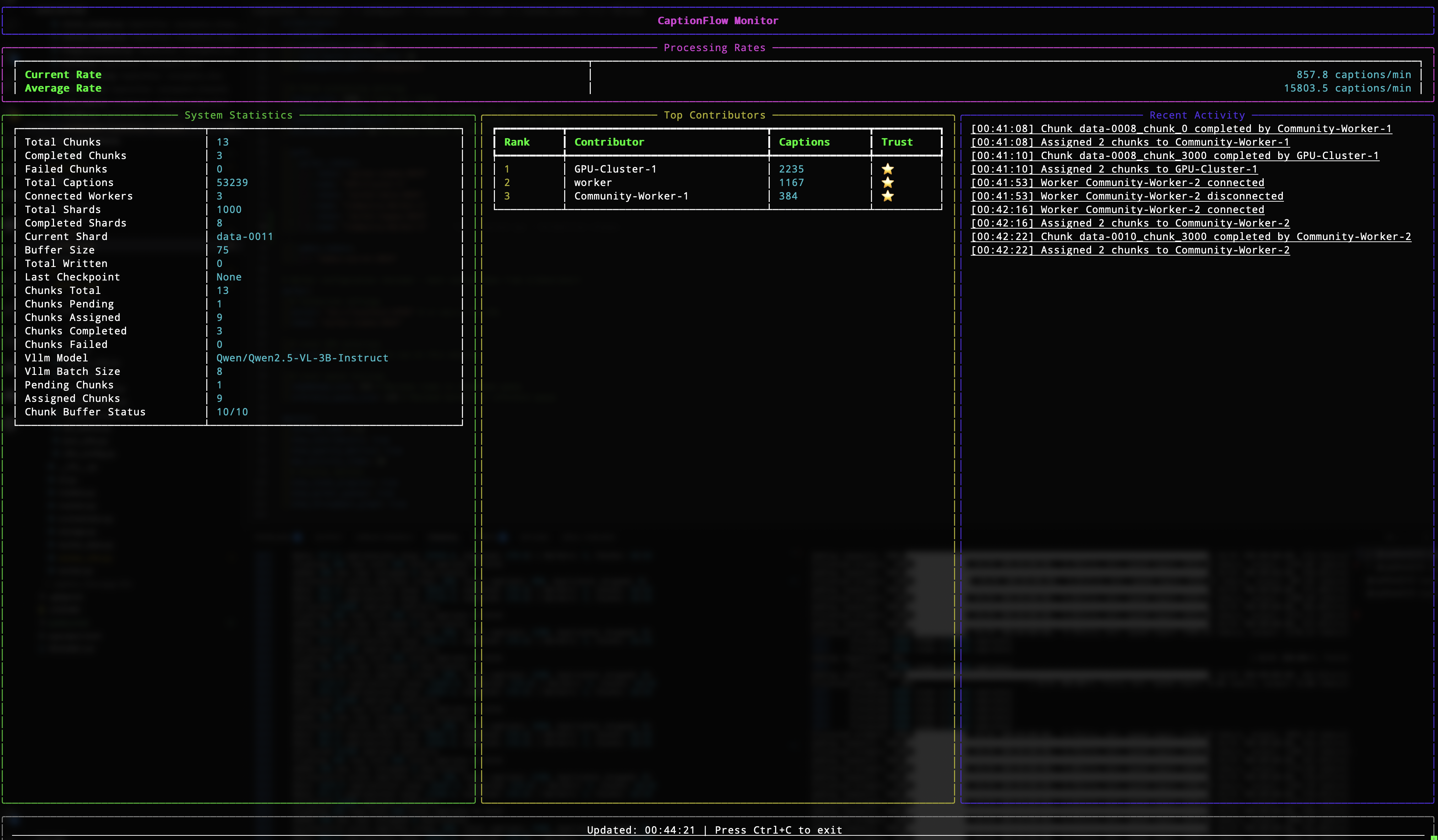
- tui monitor (optional): a monitor client is wired into the cli; ship a
monitormodule to enable it.
no conda. just
venv+pip.
install
python -m venv .venv
source .venv/bin/activate  # windows: .venv\Scripts\activate
pip install --upgrade pip
pip install -e .  # installs the `caption-flow` command
# or: pip install -e git+ssh://git@github.com/bghira/captionflow
quickstart (single box)
- copy + edit the sample configs
cp examples/orchestrator.yaml config/orchestrator.yaml
cp examples/worker.yaml config/worker.yaml
cp examples/monitor.yaml config/monitor.yaml
set a unique shared token in both config/orchestrator.yaml and config/worker.yaml (see auth.worker_tokens in the orchestrator config and worker.token in the worker config). if you use private hugging face datasets/models, export HUGGINGFACE_HUB_TOKEN or use hf auth login (old style: huggingface-cli login) before starting workers.
- start the orchestrator
caption-flow orchestrator
- start one or more vllm workers
# gpu 0 on the same host
caption-flow worker --gpu-id 0

# your second gpu
caption-flow worker --gpu-id 1
- (optional) start the monitor to check on status
caption-flow monitor
- (optional) scan/fix chunks on disk if you had crashes or want to ensure you're actually receiving all captions correctly
caption-flow scan_chunks --data-dir ./caption_data --checkpoint-dir ./checkpoints --fix
how it's wired
orchestrator
- websocket server (default
0.0.0.0:8765) with four client roles: workers, dataworkers, monitors, and admin. - blazing fast: handles 10,000+ chunks/sec, 100k+ concurrent connections. the bottleneck is always gpu inference, never the orchestrator.
- dataset control: the orchestrator centrally defines the dataset (
huggingfaceorlocal) and version/name. it chunk-slices shards and assigns work. - vllm config broadcast: model, tp size, dtype, max seq len, memory targets, batching, sampling params, and inference prompts are all pushed to workers; workers can apply many changes without a model reload.
- storage + checkpoints: captions buffer to disk with periodic checkpoints. chunk state is tracked so restarts don't double-work.
- auth: token lists for
worker,dataworker,monitor, andadminroles.
start flags you'll likely use:
--config path                # yaml config for the orchestrator
--port int, --host str       # bind controls
--data-dir path              # overrides storage.data_dir
--cert path, --key path      # enable tls (or use --no-ssl for ws:// in dev)
--vllm                       # use the vllm-style orchestrator (webdataset/hf)
vllm worker
- one process per gpu. select the device with
--gpu-id(orworker.gpu_idin yaml). - gets its marching orders from the orchestrator: dataset info, model, prompts, batch size, and sampling.
- resilient: detects disconnects, abandons the current chunk cleanly, clears queues, reconnects, and resumes.
- batched generate(): images are resized down for consistent batching; each image can get multiple captions (one per prompt).
- optimized for consumer gpus: 4090s often beat h100s on 3b-7b models. higher boost clocks + lower kernel overhead = faster tokens/sec.
start flags you'll likely use:
--config path                 # yaml for the worker
--server url                  # ws(s)://host:port
--token str                   # must match an allowed worker token on the orchestrator
--batch-size int              # override vllm batch size
--vllm                        # use the vllm worker implementation
--gpu-id int                  # which gpu to use
--precision str, --model str  # optional overrides for dtype/model
--no-verify-ssl               # accept self-signed certs in dev
dataworker (coming soon)
- cpu-only image fetching: separate clients that handle dataset i/o, image loading, and preprocessing
- frees gpu workers: gpu workers receive pre-loaded images, spending 100% of time on inference
- scales horizontally: spin up dozens of dataworkers on cpu nodes to saturate gpu throughput
- smart prefetching: predictive loading keeps gpu workers fed with zero wait time
(optional) monitor
- a cli entry exists for a tui monitor; wire in a
monitormodule to enable it. config lives inmonitor.yamlor insideorchestrator.yamlundermonitor:.
configuration
config discovery order
for any component, the cli looks for config in this order (first match wins):
--config /path/to/file.yaml./<component>.yaml(current directory)./config/<component>.yaml(config subdirectory)~/.caption-flow/<component>.yaml$XDG_CONFIG_HOME/caption-flow/<component>.yaml/etc/caption-flow/<component>.yaml- any
$XDG_CONFIG_DIRSentries undercaption-flow/ ./examples/<component>.yaml(fallback)
orchestrator.yaml (highlights)
orchestrator:
  host: 0.0.0.0
  port: 8765
  # ssl:
  #   cert: /path/fullchain.pem
  #   key:  /path/privkey.pem

  dataset:
    type: huggingface   # or "local"
    path: <hf-dataset-or-local-path>
    name: <logical-name>
    version: "1.0"

  vllm:
    model: qwen/qwen2.5-vl-3b-instruct
    tensor_parallel_size: 1
    max_model_len: 16384
    dtype: float16
    gpu_memory_utilization: 0.92
    enforce_eager: true
    disable_mm_preprocessor_cache: true
    limit_mm_per_prompt: { image: 1 }

    batch_size: 8

    sampling:
      temperature: 0.7
      top_p: 0.95
      max_tokens: 256
      repetition_penalty: 1.05
      skip_special_tokens: true
      stop: ["<|end|>", "<|endoftext|>", "<|im_end|>"]

    inference_prompts:
      - "describe this image in detail"
      - "provide a comprehensive description of the visual content"
      - "what are the key elements in this image?"

  storage:
    data_dir: ./caption_data
    checkpoint_dir: ./checkpoints
    caption_buffer_size: 100
    checkpoint_interval: 1000

  # chunking/queueing
  chunk_size: 1000
  chunks_per_request: 2
  chunk_buffer_multiplier: 3
  min_chunk_buffer: 10

  auth:
    worker_tokens:
      - { token: "example-worker-token", name: "example worker" }
    dataworker_tokens:
      - { token: "dataworker-token", name: "data feeder 1" }
    monitor_tokens:
      - { token: "letmein", name: "default monitor" }
    admin_tokens:
      - { token: "admin-secret-2024", name: "admin" }
worker.yaml (highlights)
worker:
  server: ws://localhost:8765   # use wss:// in prod
  token: example-worker-token
  name: local-gpu
  gpu_id: 0
  vllm: true

  # local queues
  readahead_size: 256
  inference_queue_size: 128
monitor.yaml (optional)
monitor:
  server: ws://localhost:8765
  token: letmein
  refresh_rate: 1.0
  show_contributors: true
  show_quality_metrics: true
  max_activity_items: 20
  show_chunk_progress: true
  show_worker_queues: true
  show_throughput_graph: true
performance notes
consumer gpus shine on smaller models where CPU bottlenecks arise:
- 4090 @ 3b model: 8-15 images/sec
- 4090 @ 7b model: 8-12 images/sec
- h100 @ 3b model: 2-10 images/sec (lower CPU clocks)
- h100 @ 70b model: 2-10 images/sec (where the H100 belongs)
orchestrator throughput:
- 10,000+ chunks/sec on a typical Ryzen / Intel virtual machine
- 10,000+ concurrent websocket connections
- sub-millisecond chunk assignment latency
- bottleneck is always gpu inference, never the orchestrator
scaling tips:
- use smaller models (3b-7b) for first-pass captioning
- consumer gpus (4090/4080) offer best perf/$ on these models
- add dataworkers to prefetch and saturate gpu throughput
- run multiple workers per node (one per gpu)
- for B200, RTX 6000 Pro, and other fast GPUs, using two worker processes per GPU (two tokens required) can provide added GPU utilisation
tls / certificates
use the built-in helpers during development:
# self-signed certs for quick local testing
caption-flow generate_cert --self-signed --domain localhost --output-dir ./certs

# inspect any certificate file
caption-flow inspect_cert ./certs/fullchain.pem
then point the orchestrator at the resulting cert/key (or run --no-ssl for dev-only ws://).
tips & notes
- multi-gpu: start one worker process per gpu (set
--gpu-idorworker.gpu_id). - throughput: tune
vllm.batch_sizein the orchestrator config (or override with--batch-sizeat worker start). higher isn't always better; watch vram. - prompts: add more strings under
vllm.inference_promptsto get multiple captions per image; the worker returns only non-empty generations. - private hf: if your dataset/model needs auth, export
HUGGINGFACE_HUB_TOKENbeforecaption-flow worker .... - self-signed ssl: pass
--no-verify-sslto workers/monitors in dev. - recovery: if you hard-crash mid-run and want to verify your database,
caption-flow scan_chunks --fixcan help but is basically never needed.
architecture
                                   ┌──────────────┐
                                   │              │
┌─────────────┐     websocket      │              │      ┌──────────────┐
│ gpu worker  │◄───────────────────┤              ├─────►│arrow/parquet │
└─────────────┘                    │              │      │   storage    │
                                   │ orchestrator │      └──────────────┘
┌─────────────┐                    │              │
│ gpu worker  │◄───────────────────┤   10k+       │      ┌──────────────┐
└─────────────┘                    │ chunks/sec   ├─────►│ checkpoints  │
                                   │              │      └──────────────┘
┌─────────────┐                    │              │
│ dataworker  │◄───────────────────┤              │
└─────────────┘                    │              │
                                   │              │
┌─────────────┐                    │              │
│   monitor   │◄───────────────────┤              │
└─────────────┘                    └──────────────┘
storage schema
captions.parquet
job_id: unique job identifierdataset: dataset nameshard: shard identifieritem_key: item within shardcaption: generated caption textcontributor_id: worker who generated ittimestamp: generation timequality_score: optional quality metric
jobs.parquet
job_id: unique identifierdataset: dataset nameshard: shard identifierstatus: pending/processing/completed/failedassigned_to: worker idtimestamp: status change time
contributors.parquet
contributor_id: unique identifiername: display nametotal_captions: lifetime counttrust_level: quality tier (0-5)
development
# install with dev dependencies
pip install -e ".[dev]"

# run tests
pytest

# format code
black src/
ruff --fix src/

# type checking
mypy src/
community contribution
to contribute compute:
- install caption-flow:
pip install caption-flow - get a worker token from the project maintainer
- run:
caption-flow worker --server wss://project.domain.com:8765 --token YOUR_TOKEN
your contributions will be tracked and attributed in the final dataset!
roadmap
in no particular order:
- dataworker implementation for cpu-based data feeding
- video captioning
- hot config reload via the admin websocket path
- richer monitor tui with real-time graphs
- web interface
- automatic huggingface hub dataset continuous exports
- sequence-parallel inference for large vision models
- discord interface
- more in-depth integration for non-wds datasets
- support chaining of workflows, for 2nd/3rd pass after use of initial tag model etc
- distributed orchestrator clustering for planet-scale captioning
prs welcome. keep it simple and fast.
license
AGPLv3
Release history Release notifications | RSS feed


Download files
Download the file for your platform. If you're not sure which to choose, learn more about installing packages.
Source Distribution
Built Distribution
Filter files by name, interpreter, ABI, and platform.
If you're not sure about the file name format, learn more about wheel file names.
Copy a direct link to the current filters
File details
Details for the file caption_flow-0.1.0.tar.gz.
File metadata
- Download URL: caption_flow-0.1.0.tar.gz
- Upload date:
- Size: 74.3 kB
- Tags: Source
- Uploaded using Trusted Publishing? No
- Uploaded via: twine/6.1.0 CPython/3.11.13
File hashes
| Algorithm | Hash digest | |
|---|---|---|
| SHA256 |
586b8472da1c4a38092e6851d79728b19ed725d6bf150cc7d6ffa2d2137ce0fe
|
|
| MD5 |
59e21d028d195333d34ff499ee27b0a1
|
|
| BLAKE2b-256 |
4ecfe43eecf392b042ddee7f9742e05e7b130a1fc4d3c401b75f5d3032dd6f25
|
File details
Details for the file caption_flow-0.1.0-py3-none-any.whl.
File metadata
- Download URL: caption_flow-0.1.0-py3-none-any.whl
- Upload date:
- Size: 77.5 kB
- Tags: Python 3
- Uploaded using Trusted Publishing? No
- Uploaded via: twine/6.1.0 CPython/3.11.13
File hashes
| Algorithm | Hash digest | |
|---|---|---|
| SHA256 |
0ab6e3ebdd3b76ad6505dc288fead94ea038fe07803d8c2ad8651ad7574effcc
|
|
| MD5 |
75e9620788ab34cf84a701a9f8db0eb3
|
|
| BLAKE2b-256 |
da2030d5af294df5d759c4ac9f4adb52d81ce21dfc593a8b77b9acddfab45ef7
|






