
CaptionKit
Local-first CLI that makes accurate captions for any video or audio in 90+ languages with Whisper — no cloud, no paid APIs.
CaptionKit runs entirely on your machine. Your media never leaves your computer. It uses faster-whisper for transcription and ffmpeg for burning captions into video — both free and open source.
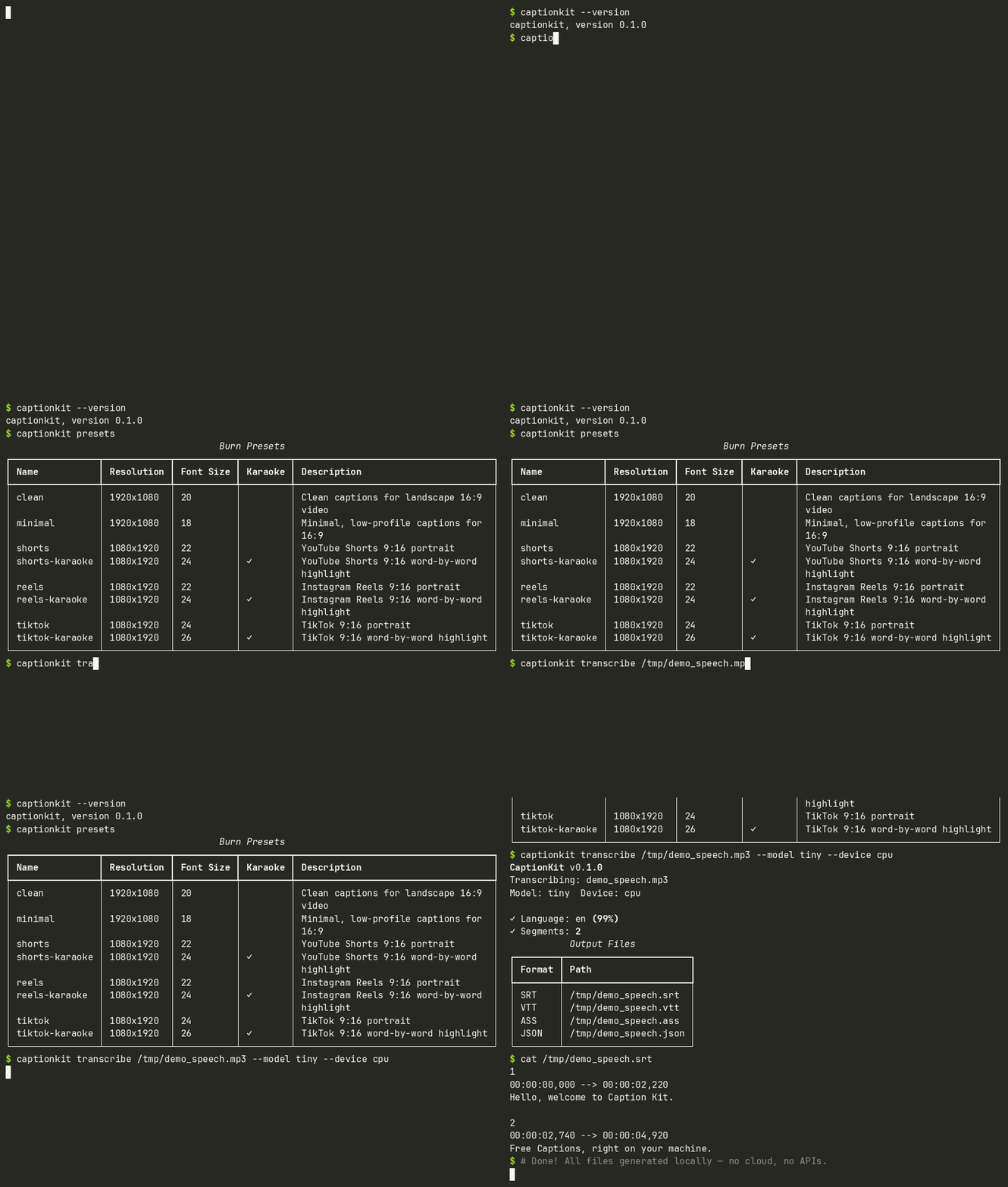

Why CaptionKit?
- Free forever — no API keys, no subscriptions, no usage limits
- Private — your files never leave your machine
- Offline — works without an internet connection (after model download)
- Accurate — powered by OpenAI's Whisper model via faster-whisper
- 90+ languages — auto-detects the language or use
--languageto specify - Multiple formats — outputs SRT, VTT, ASS, and JSON with word-level timestamps
- Burn captions into video — styled presets for YouTube Shorts, Reels, TikTok
- Karaoke mode — word-by-word highlight captions for short-form content
- RTL and CJK support — proper rendering for Arabic, Hebrew, Chinese, Japanese, Korean
- Batch processing — caption an entire folder in one command
Install
Requires Python 3.10+ and ffmpeg.
# Install ffmpeg (if not already installed)
# macOS:   brew install ffmpeg
# Ubuntu:  sudo apt install ffmpeg
# Windows: https://ffmpeg.org/download.html

# Install from PyPI
pip install captionkit

# Or with pipx (isolated install)
pipx install captionkit
For GPU acceleration (optional):
# NVIDIA CUDA
pip install captionkit ctranslate2 nvidia-cublas-cu12 nvidia-cudnn-cu12
Quick start
Transcribe a file
# Auto-detect language, output SRT + VTT + ASS + JSON
captionkit transcribe video.mp4

# Specify language
captionkit transcribe podcast.mp3 --language en

# Use a larger model for better accuracy
captionkit transcribe interview.wav --model large-v3

# Translate to English
captionkit transcribe video_french.mp4 --translate
Burn captions into video
# Clean captions for landscape video
captionkit burn video.mp4

# TikTok-style with karaoke highlighting
captionkit burn video.mp4 --preset tiktok-karaoke

# YouTube Shorts preset
captionkit burn video.mp4 --preset shorts

# Custom styling
captionkit burn video.mp4 --font "Noto Sans" --font-size 28 --position top
Batch process a folder
# Transcribe all media files in a folder
captionkit batch ./videos/ --mode transcribe

# Burn captions into all videos with Reels preset
captionkit batch ./videos/ --mode burn --preset reels-karaoke
List available presets
captionkit presets
Presets
| Preset | Aspect | Karaoke | Use case |
|---|---|---|---|
clean |
16:9 | No | Standard landscape video |
minimal |
16:9 | No | Low-profile captions |
shorts |
9:16 | No | YouTube Shorts |
shorts-karaoke |
9:16 | Yes | YouTube Shorts with word highlighting |
reels |
9:16 | No | Instagram Reels |
reels-karaoke |
9:16 | Yes | Instagram Reels with word highlighting |
tiktok |
9:16 | No | TikTok |
tiktok-karaoke |
9:16 | Yes | TikTok with word highlighting |
Model sizes
| Model | Parameters | English | Multilingual | Speed | VRAM |
|---|---|---|---|---|---|
tiny |
39M | Good | Okay | Fastest | ~1 GB |
base |
74M | Good | Good | Fast | ~1 GB |
small |
244M | Great | Good | Moderate | ~2 GB |
medium |
769M | Great | Great | Slow | ~5 GB |
large-v3 |
1550M | Best | Best | Slowest | ~10 GB |
Default is base — a good balance of speed and accuracy. Use tiny for quick drafts, large-v3 for final production.
Language support
CaptionKit supports 90+ languages through Whisper, including but not limited to:
Latin script: English, Spanish, French, German, Portuguese, Italian, Dutch, Polish, Turkish, Vietnamese, Indonesian, Malay, Swahili, and many more
Arabic script: Arabic, Urdu, Persian, Pashto
CJK: Chinese (Simplified & Traditional), Japanese, Korean
Devanagari: Hindi, Marathi, Sanskrit, Nepali
Other scripts: Thai, Greek, Russian, Ukrainian, Georgian, Armenian, Hebrew, Bengali, Tamil, Telugu, Kannada, Malayalam, Burmese, Khmer, Lao
Language is auto-detected by default. Use --language <code> to specify (e.g., --language ar for Arabic, --language zh for Chinese).
RTL and CJK rendering
When burning captions, CaptionKit uses font fallback to find appropriate fonts for the detected script. For best results with RTL or CJK content, install Noto fonts:
# Ubuntu/Debian
sudo apt install fonts-noto fonts-noto-cjk fonts-noto-color-emoji

# macOS (via Homebrew)
brew install font-noto-sans font-noto-sans-cjk
Output formats
| Format | Extension | Word timestamps | Use case |
|---|---|---|---|
| SRT | .srt |
Segment-level | Most video players and editors |
| WebVTT | .vtt |
Segment-level | Web video, HTML5 <track> |
| ASS | .ass |
Word-level (karaoke) | Advanced styling, burning |
| JSON | .json |
Word-level | Programmatic access, custom tools |
Development
git clone https://github.com/abubakar60675/captionkit.git
cd captionkit
python -m venv .venv
source .venv/bin/activate
pip install -e ".[dev]"

# Run tests
pytest -v

# Lint
ruff check src/ tests/
See CONTRIBUTING.md for the full contribution guide.
Changelog
See CHANGELOG.md for release history.
Roadmap
See ROADMAP.md for planned features and good first issue ideas.
License
MIT — free for personal and commercial use.
1 maintainer

Metadata
1 maintainer
Release files for captionkit 0.1.0
For a detailed explanation of source distributions (sdists) and built distributions (wheels), please see the package formats documentation.
Source distribution (sdist)
| File | Size | Uploaded | Provenance | Actions |
|---|---|---|---|---|
| captionkit-0.1.0.tar.gz | 396.7 kB | With provenance | Details for captionkit-0.1.0.tar.gz |
Built distribution (wheel)
| File | Interpreter | ABI | Platform | Actions Reset |
|---|---|---|---|---|
| captionkit-0.1.0-py3-none-any.whl | Python 3 | none | any | Details for captionkit-0.1.0-py3-none-any.whl |
Total release size: 411.3 kB
Release files / captionkit-0.1.0.tar.gz
| Download URL | captionkit-0.1.0.tar.gz |
|---|---|
| Size | 396.7 kB |
| Tags | Source |
|
SHA-256 checksum How to use checksums |
a7b42fcc8f00df9f7b8ccdd03ec106dfea189781e7f625e17c49d4fd3f2df7eb
|
|
BLAKE2b-256 checksum How to use checksums |
adc2e4f62333a88899c3359c5c7d5fc2d8f52272267c2eba48a819738a01c029
|
| Upload date | |
|
Uploaded using Trusted Publishing? What is trusted publishing? |
Yes |
| Uploaded via |
twine/7.0.0 CPython/3.13.16
|
Provenance
Provenance describes where a file came from. On PyPI, provenance is shared via attestations, which provide a verifiable record of the build or publishing details. View details, limitations and caveats.


PyPI Publish Attestation
PyPI verified that this artifact, at this checksum, originated from the publisher listed below.
Signed by GitHub Actions, verified by PyPI on Nov 29, 2026.
Transparency logRelease files / captionkit-0.1.0-py3-none-any.whl
| Download URL | captionkit-0.1.0-py3-none-any.whl |
|---|---|
| Size | 14.6 kB |
| Tags | Python 3 |
|
SHA-256 checksum How to use checksums |
3ee4889a1ff6434f51e9ce2c00d3a17591b3e38ec27c346fca1b598bf311817a
|
|
BLAKE2b-256 checksum How to use checksums |
892df2009d18c77e5fb21c85c195c1f270dcbc6a2aa77e19055c211c5dfffe2f
|
| Upload date | |
|
Uploaded using Trusted Publishing? What is trusted publishing? |
Yes |
| Uploaded via |
twine/7.0.0 CPython/3.13.16
|
Provenance
Provenance describes where a file came from. On PyPI, provenance is shared via attestations, which provide a verifiable record of the build or publishing details. View details, limitations and caveats.
PyPI Publish Attestation
PyPI verified that this artifact, at this checksum, originated from the publisher listed below.
Signed by GitHub Actions, verified by PyPI on Nov 29, 2026.
Transparency logSecurity for captionkit 0.1.0
Provenance
Provenance describes where a file came from. On PyPI, provenance is shared via attestations, which provide a verifiable record of the build or publishing details. View details, limitations and caveats.
Full provenance
Both files in this release have been uploaded with provenance metadata.
Attestation for captionkit-0.1.0.tar.gz
PyPI Publish Attestation
PyPI verified that this artifact, at this checksum, originated from the publisher listed below.
Signed by GitHub Actions, verified by PyPI on Nov 29, 2026.
Transparency logA note on package security
PyPI is a repository for distributing packages, not a service for auditing them. While third-party security researchers and our staff do their best to detect and remove malicious packages, PyPI cannot guarantee the quality, security or suitability of any given package.
To learn more about protecting yourself from malicious actors, visit our package security documentation.













