
Moooove your data with ease using our udderly simple pipeline framework.

Project description
Carabao
                                                           +:
   -                                                        *-
  -*                                                        +--
 -*                                                          *=:
-=*                                                         +=+-
-+*                                                        +==*-
++=*                                                      **=+-
 *==*+                                                 -**==*-
  -***=*++                                         -*=**=**-%
   %-****=*===----------#*%*##+%#@#**-*---------===**+=-%-#
      **=-***-=*==*==--****%#%%@*@@%#*-----+*=++%++++%%*
          *%%%#%####%##%*#%%=##@++%@%%######%%%%#%@
               + @%@@@@##%#=@#@@+++@@%
             --+++++##%@%#=@@+@@%%@#@#++++=%
           @+*@@@@@@##@##*=**+*@%%%@#@+@@#@++%
              #*       *#**##+#%%%*@ %%%%++++#+
                       *+****+#%%%*@
                       **=*==+#%##*
                        *=*=+*#%#*
                        #=*****#*
                       #@=***#@##
                       %%=%%%#=#%#
                       ####%%%#
A Python library for building robust publisher-subscriber (pub/sub) frameworks with built-in lanes for common tasks.
Features
- Core framework for managing pub/sub systems based on l2l (lane2lane)
- Live RAM / CPU / network stats in the dev UI status bar (when
psutilis installed) - Automatic configuration management with settings system
- Error handling with custom error handlers
- Clean shutdown with exit handlers
- Command-line interface for management, including interactive selection
- Support for multiple database connections (MongoDB, Redis, Elasticsearch, PostgreSQL)
- Development and production mode support
- Test mode for safe testing in production environments
Installation
pip install carabao
The interactive developer UI (the moo dev selector + live visualizer) is
optional — it ships in the standard extra (à la fastapi[standard]):
pip install "carabao[standard]"
Without the extra, the core runtime (moo run, moo dev <lane>) works fully;
only the interactive screens require it (you'll get a clear message prompting
the install if you open them without it).
Requirements
Core: async-timeout, dnspython, fun-things, lazy-main, python-dotenv,
typing-extensions, typer, lane2lane.
standard extra (interactive UI): textual, textual-slider.
Usage
Basic Usage
The framework is started using the CLI commands:
# For development mode
moo dev [queue_name]

# For production mode
moo run
No import statement is needed to start the framework.
Forms
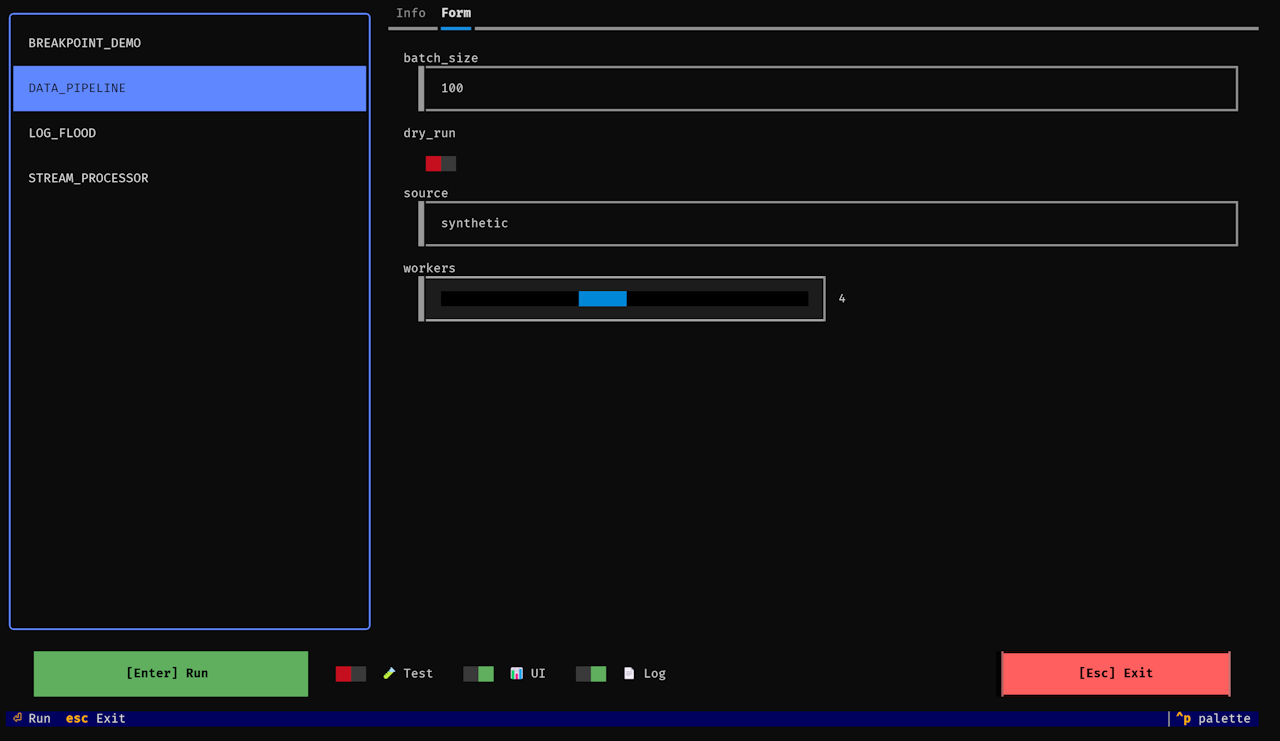
A lane can declare a Form — typed inputs the moo dev selector prompts for
before running. Define an inner Form class with annotated attributes (or
Field(...) for a bounded numeric slider), then read the values anywhere via
the global F:
from l2l import Lane

from carabao import F, Field


class Main(Lane):
    class Form:
        source: str = "synthetic"   # text input
        batch_size: int = 100       # number input
        threshold: float = 0.5
        dry_run: bool = False       # checkbox
        workers = Field(cast=int, default=4, min_value=1, max_value=8, step=1)  # slider

    @classmethod
    def primary(cls) -> bool:
        return True

    def process(self, value):
        if F.dry_run:
            ...
        print(F.source, F.batch_size, F.workers)
- Plain annotations become typed inputs:
str→ text,int/float→ number,bool→ checkbox. Field(cast=int, min_value=…, max_value=…, step=…)renders a slider.- Read values with
F.<name>(orF["<name>"]). The selector remembers the last-entered values per lane. - Forms are optional — a lane without one just runs.
Environment Variables
Carabao uses the following environment variables:
QUEUE_NAME: (Required) Name of the queue to consumeCARABAO_AUTO_INITIALIZE: Controls automatic initializationCARABAO_AUTO_START: Controls automatic startingCARABAO_START_WITH_ERROR: Whether to start even if errors occurredSINGLE_RUN: Run once then exit ifTrueTESTING: Enable debug logging ifTrue
Environment Files
Carabao supports environment variables loaded from .env files using python-dotenv:
.env.development: Used when running in development mode (moo dev).env.release: Used when running in production mode (moo run).env: Used as a fallback if neither of the above files exists
When initializing a new project with moo init, these files are automatically created.
The framework prioritizes environment variables in the following order:
- Variables defined in the system environment
- Variables defined in the appropriate .env file
- Default values defined in settings
This makes it easy to maintain different configurations for development, testing, and production environments without changing code.
Settings System
Carabao uses a centralized Settings system for configuration management. The Settings class provides a unified interface for accessing configuration values throughout the application.
Setting Up settings.py
A typical settings.py file inherits from the base Settings class:
from carabao import Settings as S


class Settings(S):
    # Directory where the lane modules are stored
    LANE_DIRECTORIES = [
        "lanes",
    ]

    # Whether to run the pipeline once and exit
    SINGLE_RUN = False

    # Minimum and maximum sleep times between runs (in seconds)
    SLEEP_MIN = 1.0
    SLEEP_MAX = 3.0

    # Whether to exit when processing is finished
    EXIT_ON_FINISH = False

    # Delay before exiting (in seconds)
    EXIT_DELAY = 0.0

    # Number of parallel processes to use
    PROCESSES = 1

    # Whether to deploy safely in production
    DEPLOY_SAFELY = True

    # Custom error handler function
    @classmethod
    def error_handler(cls, error: Exception) -> None:
        """
        Custom error handler for the application.

        Args:
            error: The exception that was raised.
        """
        print(f"An error occurred: {error}")

    @classmethod
    def before_start(cls) -> None:
        """
        Hook method called before framework startup.
        """
        # Perform any necessary initialization
        pass
When you run moo init, this file is automatically created for you in the appropriate location.
Settings Configuration
-
carabao.cfg File: The framework uses a configuration file to locate your settings module:
[directories] settings = src.settings # or path.to.your.settings -
Accessing Settings in Code: To use these settings in your code:
from carabao.settings import Settings

settings = Settings.get()
value = settings.value_of("LANE_DIRECTORIES")
-
Available Settings: Common settings include:
LANE_DIRECTORIES: List of directories to search for lane definitionsSINGLE_RUN: Whether to run lanes once or continuouslySLEEP_MIN,SLEEP_MAX: Minimum and maximum sleep times between runsEXIT_ON_FINISH: Whether to exit after finishing processingEXIT_DELAY: Delay before exitingPROCESSES: Number of parallel processes to useDEPLOY_SAFELY: Whether to enforce production safety settings
You can also define your own custom settings and access them the same way.
-
Overriding Settings: Settings can be overridden by environment variables. For example, if your setting is named
SINGLE_RUN, you can override it by setting theSINGLE_RUNenvironment variable.
CLI Usage
Carabao provides a command-line interface for managing lanes:
# Run in production mode
moo run [queue_name]

# Run in development mode
moo dev [queue_name]

# Initialize a new project
moo init [--skip]

# Create a new lane
moo new [lane_name]
Development UI (moo dev)
Requires the standard extra (pip install "carabao[standard]").
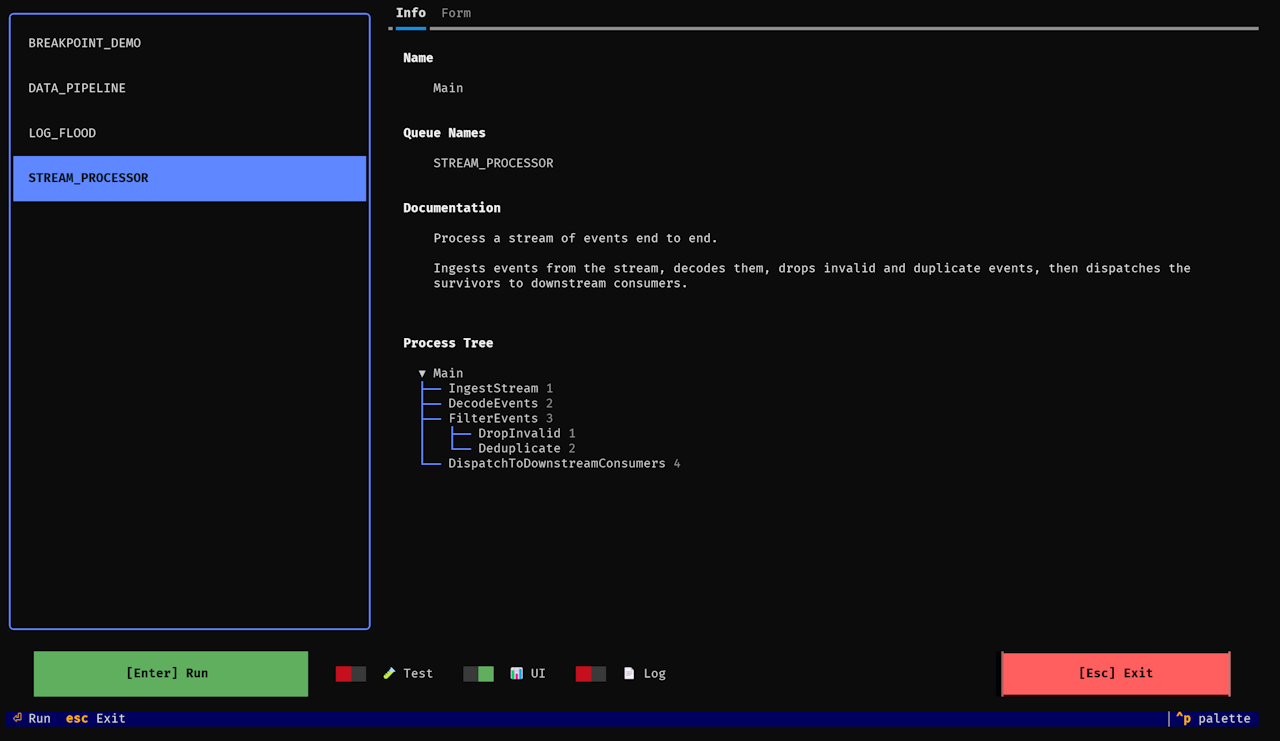
Selector. moo dev (no queue name) opens an interactive screen:
- Lists every available primary lane — both sync (
Lane) and async (AsyncLane). - Shows the selected lane's docstring and a process tree built from its
lanesfield (recursive — sub-lanes appear automatically). - Edits the lane's form fields (if it defines a
Form). - Toggles: 🧪 Test Mode and 📊 UI (the live visualizer; on by default).
- Remembers your last selection.
Enterruns,Escexits.
moo dev <queue_name> skips the selector and runs that lane directly.
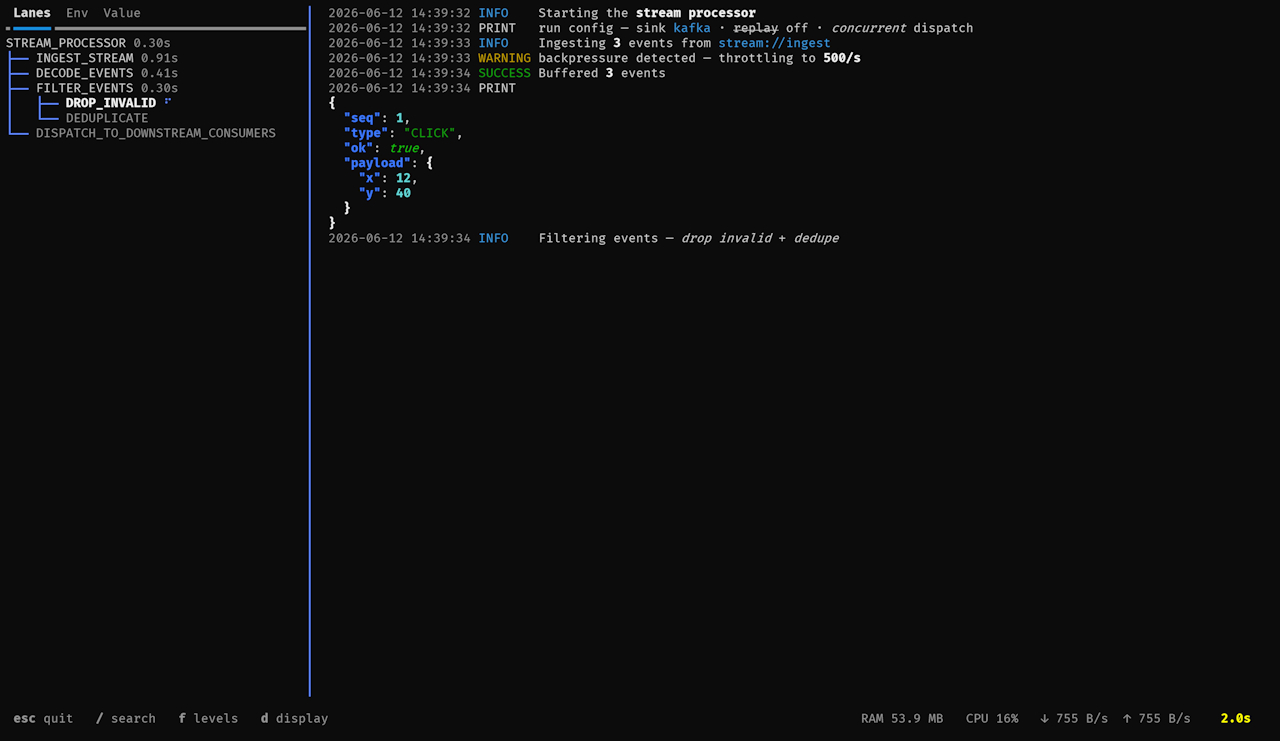
Live UI. With the 📊 UI toggle on, running a lane opens a live dashboard.
The left panel (toggle with panel) has tabs:
- Lanes — the full pipeline laid out from the
lanesfield up front; each lane spins while active and shows its true work time when done. - Env — the loaded
.envfile(s) and the env vars actually read. - Value — the latest value flowing between lanes (type · count · bytes), as pretty JSON.
The log pane captures print(), the l2l logger, loguru, and the
stdlib logging module (including non-propagating loggers):
- selectable text (drag to select,
Ctrl+Cto copy) - syntax-highlighted JSON and inline markdown (
**bold**,`code`,*italic*,~~strike~~) - per-level filter checkboxes that appear only for levels seen, each with a
live count (
INFO 5K);TRACEis off by default /to search; top-right toggles for time, lvl, rich, scroll
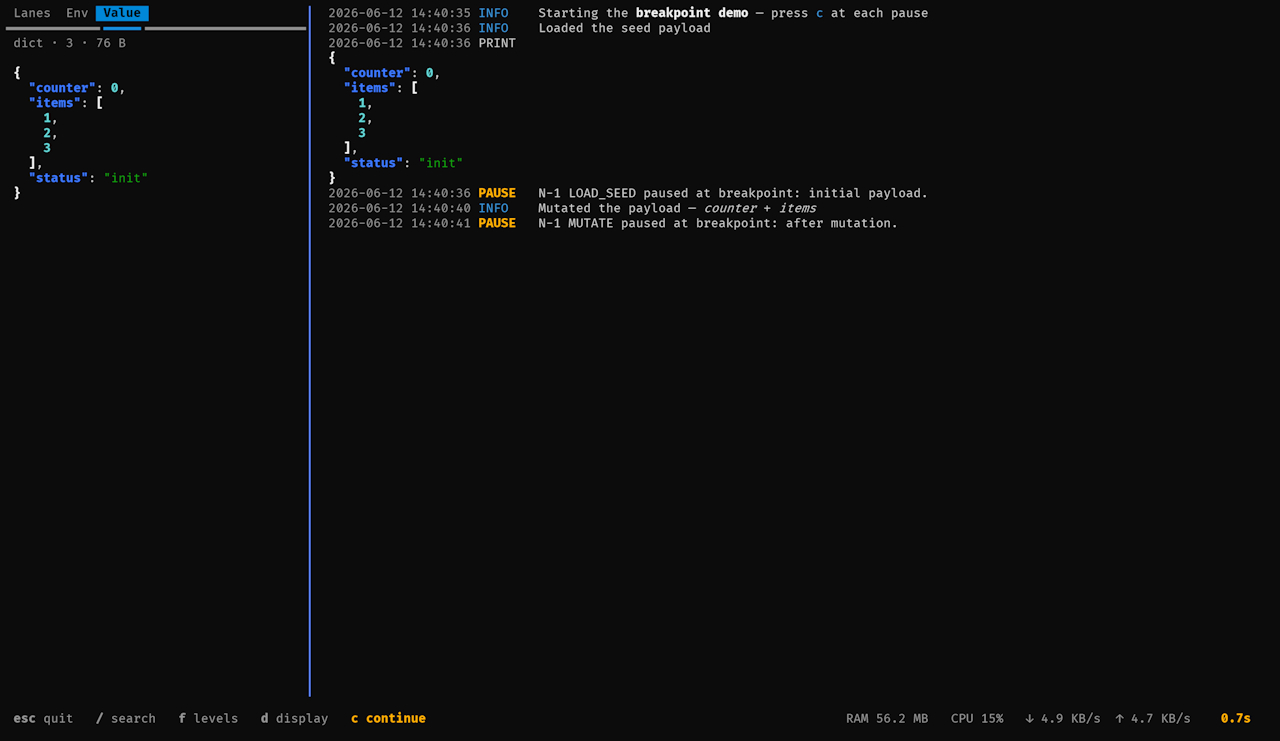
Breakpoints. Call self.breakpoint("label") inside process() to pause the
pipeline (dev-only — a no-op under moo run). The lane shows ⏸, logs at the
PAUSE level, and the timer freezes; inspect the payload in the Value tab,
then press c to continue.
The status bar shows live RAM / CPU / network (when psutil is installed)
and an elapsed timer — Done in <time> (green) or Error: … (red) on
completion. Esc quits (confirms first if still running; the hotkey turns red
once it's safe to exit).
Async lanes are detected automatically and run via asyncio; the core runtime
(moo run) carries no overhead from any of the UI instrumentation.
Development
Creating a New Project
You can quickly initialize a new project with:
moo init
This will set up the necessary directory structure and configuration files.
Creating a New Lane
To create a new lane for processing:
moo new MyLaneName
This will generate a file with proper naming conventions (snake_case for the filename, PascalCase for the class name).
Release history Release notifications | RSS feed


Download files
Download the file for your platform. If you're not sure which to choose, learn more about installing packages.
Source Distribution
Built Distribution
Filter files by name, interpreter, ABI, and platform.
If you're not sure about the file name format, learn more about wheel file names.
Copy a direct link to the current filters
File details
Details for the file carabao-2.1.14.tar.gz.
File metadata
- Download URL: carabao-2.1.14.tar.gz
- Upload date:
- Size: 49.7 kB
- Tags: Source
- Uploaded using Trusted Publishing? No
- Uploaded via: twine/6.1.0 CPython/3.10.20
File hashes
| Algorithm | Hash digest | |
|---|---|---|
| SHA256 |
60ed8f5e7a749b279c753a4b35b1129ca932784a93265347d6302ab4a070a321
|
|
| MD5 |
d10f397a47fe2f0642b4353b7ee39e7f
|
|
| BLAKE2b-256 |
bb025d0b8c6fba161169882b799400d8bfb9e3392d79128e6750370a7707d5ec
|
File details
Details for the file carabao-2.1.14-py3-none-any.whl.
File metadata
- Download URL: carabao-2.1.14-py3-none-any.whl
- Upload date:
- Size: 56.0 kB
- Tags: Python 3
- Uploaded using Trusted Publishing? No
- Uploaded via: twine/6.1.0 CPython/3.10.20
File hashes
| Algorithm | Hash digest | |
|---|---|---|
| SHA256 |
c71ddc218b6cbdb0bb2896ba784f1850b7351a86598347d9894a24f6b5b9d30f
|
|
| MD5 |
bc8c4bc7deaa2e567577922f07184a76
|
|
| BLAKE2b-256 |
787c7e0c8a7947a91e9ffb59f01165439460b46562ae2dbcc478cefb1149fae8
|






