
carcal
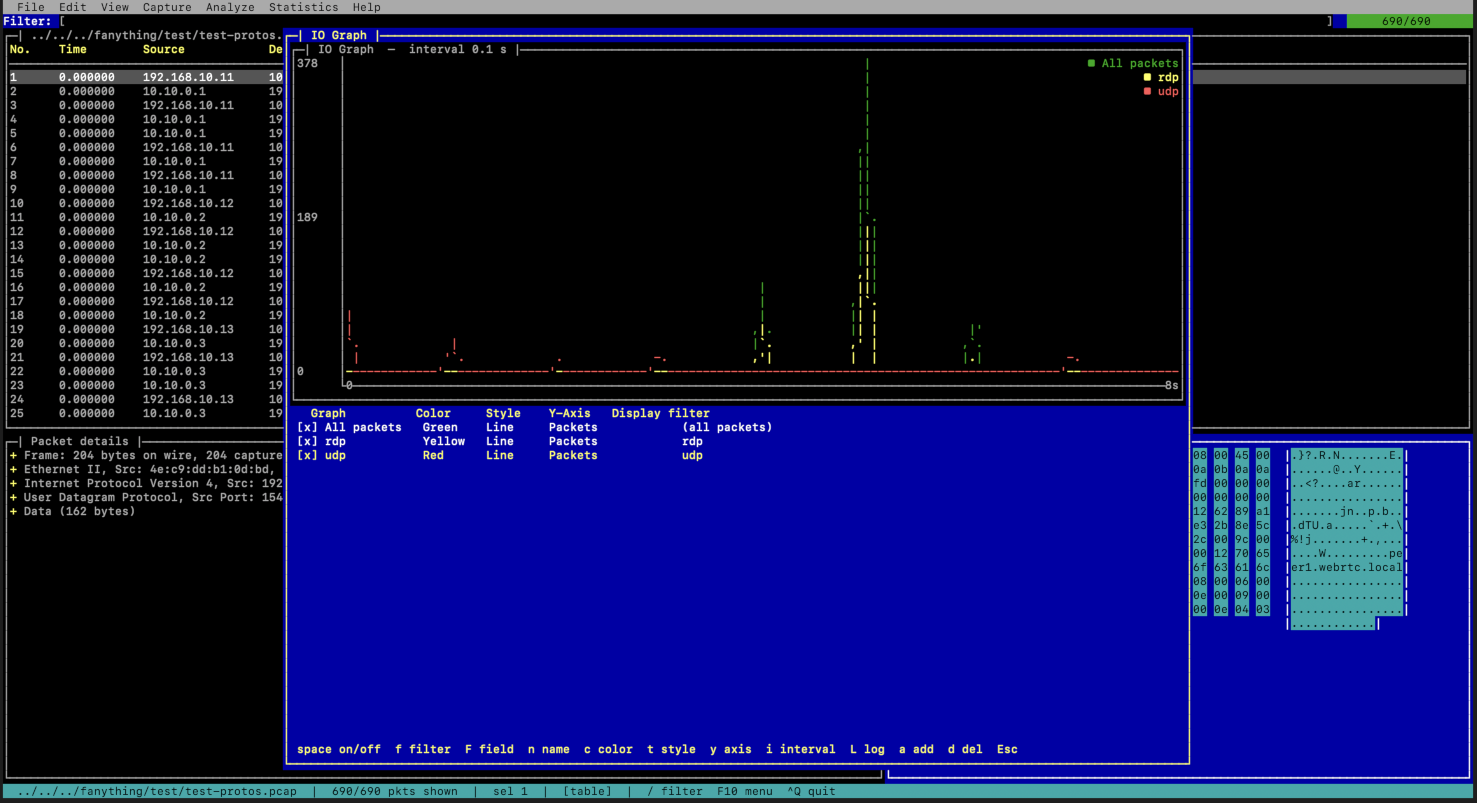
A terminal packet analyzer — a tiny Wireshark for the TUI. carcal opens
pcap/pcapng captures, lists packets in a table view, shows the selected
packet's protocol layers in a tree view, and filters with a
Wireshark/tshark-compatible display-filter syntax. New protocols can be
defined at runtime with libpcapng-style .posa files and bound to ports.
It also has a command-line scripting mode (a generalized MQS): instead of decoding only MySQL and handing a query string to Lua, carcal decodes any protocol and hands the fully decoded fields — and reassembled IP datagrams and TCP streams — to a LuaJIT script.
Built on:
- gtcaca — libcaca TUI widget toolkit (table, tree, menu, filechooser, dialog, entry, status bar).
- libpcapng — pcapng reading; IP-fragment and TCP-stream
reassembly (
libpcapng_reasm_*,pcapng_tcp_reasm_*);.posaprotocols. - LuaJIT — embedded scripting engine (found via
pkg-config).
Building
The .posa protocol decoders live in their own repo,
network.protos.posa, wired in
as the protos/ submodule — clone recursively (or git submodule update --init
in an existing checkout):
git clone --recurse-submodules https://github.com/stricaud/carcal
Both dependencies must be built first (their build/ trees are found
automatically as siblings of this repo). libcaca is found via pkg-config.
mkdir build && cd build
cmake ..
make
./carcal /path/to/capture.pcapng
Override dependency locations if they live elsewhere:
cmake .. -DGTCACA_ROOT=/path/to/gtcaca -DLIBPCAPNG_ROOT=/path/to/libpcapng
Runtime note. carcal needs the current gtcaca and libpcapng shared libraries (the scripting mode uses libpcapng's reassembly API). If an older copy is already installed in
/usr/local/lib, it can shadow the freshly built one. Either install the up-to-date libraries from their build dirs (sudo make installin eachbuild/), or run withDYLD_LIBRARY_PATH=/path/to/libpcapng/build/lib.
Using it
| Key | Action |
|---|---|
F2 / ^O |
Open a capture file |
F9 / F10 |
Open the menu bar (File / Analyze / Help) |
/ |
Jump to the display-filter box |
Tab |
Cycle focus: filter → packet table → detail tree → bytes → menu bar |
= |
Apply as Filter — filter on the field the detail tree is on |
| |
Apply as Column — add that field as a packet-list column |
c |
Conversation Filter — filter to the selected packet's conversation |
t |
Cycle the time display format (since first / time of day / epoch / delta) |
m |
Mark / unmark the selected packet |
^G |
Go to packet number |
↑ ↓ PgUp PgDn Home End |
Navigate the focused pane |
← → / Space / Enter |
Collapse/expand a detail-tree node |
^F |
Find packet (text, or hex:DE AD BE EF) |
n / N |
Jump to next / previous find match |
q / ^Q |
Quit |
Reaching the menu. F9 and F10 both open the menu bar, and Tab also
cycles into it — because GNOME Terminal, xterm and others grab F10 for their
own menubar and carcal never sees the key. Use F9 (as Midnight Commander does,
for the same reason) or just Tab around to it; Esc or Tab leaves it again.
The lower area is split into the detail tree (left) and a Wireshark-style hex byte pane (right) for the selected packet. Menus:
- Edit — Find Packet / Find Next / Find Previous.
- Analyze — Follow TCP Stream, Follow UDP Stream, Decode As…, Decoders…
(list built-in + loaded
.posadecoders;iimport a.posa,nwrite a new one in the built-in editor with a posa cheat-sheet panel;^Ssaves & loads it). - Statistics — IO Graph (packets per interval; green = all, yellow = current filter match), drawn with gtcaca's line chart.
Coloring rules
The packet list is colored by an ordered list of <display filter> → fg/bg
rules — first match wins, as in Wireshark. Rules are consulted from three
places, most specific first:
<protos dir>/colorfilters— your own rules, so you can override anything:# <display filter> <fg> <bg> tcp.flags.reset == 1 yellow red dns white bluecolorlines declared inside the loaded.posadecoders (see below) — a protocol ships its own coloring next to its dissector.- carcal's built-in defaults (resets, ICMP, ARP, DNS, HTTP, SYN, TCP, UDP).
carcal --colors [FILE] prints the rules in the order they're consulted and, if
given a capture, which rule paints each packet — coloring is otherwise only
observable by staring at a terminal, which makes a mis-typed rule hard to debug.
Toggle coloring with View ▸ Colorize Packet List; a marked packet (m)
always overrides its rule color.
Display filters
Type an expression in the filter box and press Enter. Examples:
ip.addr == 192.168.1.0/24
tcp.port == 443 && ip.src != 10.0.0.1
udp and dns.qry.name contains "example"
icmp || arp
tcp.flags == 0x12
eth.src == aa:bb:cc:dd:ee:ff
Operators: == eq, != ne, > gt, < lt, >= ge, <= le, contains,
matches (substring), && and, || or, ! not, parentheses. Fields use
Wireshark names (ip.src, tcp.dstport, dns.qry.name, …). Aliases match
either direction: ip.addr, ipv6.addr, tcp.port, udp.port, eth.addr.
A bare field name is an existence test (tcp, dns).
Custom protocols (.posa)
carcal loads every *.posa in its protos/ directory at startup, and you can
load more with File ▸ Load .posa…. A definition looks like:
Object<main> SensorBeacon
    required mac    sensor_mac = 00:00:00:00:00:00
    required ip4    sensor_ip  = 0.0.0.0
    required uint32 uptime_sec = 0
    required uint16 battery_mv = 3300
    required uint8  seq = 0
Bind it to a transport port either in the file itself, with a rule line —
rule udp.port == 6666 => SensorBeacon
— or at runtime via Analyze ▸ Decode As…, entering e.g. udp 6666 SensorBeacon. Matching packets are then dissected with that protocol, its fields
appearing in the detail tree and usable in filters (SensorBeacon.seq == 1).
A decoder can also declare how its packets should be colored, so it ships its own look alongside its dissector:
color rdp.type == 3 => yellow red      # negotiation failure stands out
color rdp           => black lightcyan
These are consulted before carcal's generic tcp/udp rules, so a protocol's
own color wins (first match wins). Colors: black blue green cyan red magenta brown lightgray darkgray lightblue lightgreen lightcyan lightred lightmagenta yellow white default.
Bindings and colors are entirely data-driven: the rule and color lines are
read from the .posa itself, so dropping a file into protos/ is all it takes to
teach carcal a new protocol — decoded, bound and colored, with no C change and no
rebuild. (There are deliberately no compiled-in
decoder rules; adding one that a .posa already declares would decode the packet
twice and attach the subtree twice.) rule binds a port; Decode As… and
protos/decoders.rules take any display-filter condition, for what a port can't
express.
Field types: uint8/16/32/64, le_uint16/32/64, mac, ip4, cstring,
payload, bytes<N>, bytes[lenfield]. Indented NAME = value lines under an
integer field define enum labels. Object<parent> groups sub-protocols
dispatched on the first field's value (see protos/tftp.posa). The extended
grammar adds layer, scope, when, string … until, info and rule — see
protos/rdp.posa.
Bundled decoders
protos/ is the network.protos.posa
submodule — a hundred-plus decoders (DNS, TLS, SMB, HTTP, QUIC, Kerberos, BGP,
Modbus/S7comm, …), each carrying its own bindings and colors. Two worth reading
as examples:
| file | protocol | binds to |
|---|---|---|
protos/tftp.posa |
TFTP (RFC 1350), dispatched by opcode | udp.port == 69 |
protos/rdp.posa |
RDP over TPKT / X.224 COTP — connection request/confirm, mstshash cookie and the negotiation request (requested security protocols) |
tcp.port == 3389 |
New protocols go in that repo, not here — pull them in with
git submodule update --remote protos.
Command line
carcal --help lists everything. The short version:
carcal capture.pcapng            # open a file in the UI
carcal -i eth0                   # start capturing on eth0 right away
carcal -i eth0 -f "tcp.port == 443"   # …with a capture filter
carcal --dump capture.pcapng "dns"    # headless: dissect to stdout and exit
carcal --list-protocols          # every loaded dissector: built-in, then .posa
carcal -v                        # version, from the tag this build was made at
-v / --version prints what git describe --tags --dirty said when the build
was configured — 0.2.0 for a release, 0.2.0-3-gd575dbe for a build three
commits past it, so a bug report names an exact tree.
--list-protocols prints the protos/ directory it read alongside the decoders
it found there, so a decoder that seems to be missing is one command away from an
answer — usually that carcal is reading a different protos/ than the one you
edited (CARCAL_PROTOS_DIR overrides it).
-i goes straight into a live capture, exactly as Capture ▸ Start… would —
so it needs the same privileges (root, or CAP_NET_RAW on Linux) and is
unavailable on Windows. -f is its capture filter, in display-filter syntax.
-i and a capture file are mutually exclusive.
Command-line scripting (LuaJIT)
Drive captures from a Lua script — the generalized MQS use-case. Selecting -s
enters scripting mode (no TUI):
carcal -s script.lua -r capture.pcapng \
        [-f "display filter"] [-X "tcp 3306 MySQL"] [-p extra.posa]
| Flag | Meaning |
|---|---|
-s |
Lua script to run |
-r |
capture file to read (pcap/pcapng) |
-f |
display filter limiting which packets reach packet() |
-X |
bind a port to a .posa protocol ("<udp|tcp> <port> <Proto>"), repeatable |
-p |
load an extra .posa file, repeatable |
A script defines any of these entry points:
function init()          end   -- once, before processing
function packet(pkt)     end   -- per (IP-defragmented) packet
function stream(s)       end   -- per reassembled in-order TCP chunk
function finish(stats)   end   -- once, after processing
pkt carries the decoded packet and its fields in their various forms:
pkt.number, pkt.time, pkt.len, pkt.protocol, pkt.src, pkt.dst, pkt.info
pkt.srcport, pkt.dstport, pkt.l4, pkt.payload   -- transport payload (full bytes)
pkt.raw                                          -- whole frame bytes
pkt.layers          -- { "eth", "ip", "tcp", … }  ordered
pkt.fields["ip.src"]                             -- natural Lua value
pkt:get("ip.src")   -- { type=, value=, hex=, label= }  (the "various ways")
pkt:getall("ip.addr")                            -- every matching field
pkt:has("tcp")                                   -- existence test
pkt:matches("tcp.flags == 0x02")                 -- the display-filter engine
Globals decode arbitrary bytes — including "the various ways a protocol can be decoded":
carcal.decode_as(bytes, "TFTP")    -- dispatched posa decode → {field=value,…}
carcal.decode_all(bytes, "TFTP")   -- every candidate sub-protocol's decode
carcal.dissect(bytes [, linktype]) -- full built-in dissection of raw bytes
carcal.protocols()                 -- names of loaded posa protocols
carcal.hex(bytes)
Reassembly
- IP fragments are reassembled by libpcapng (
libpcapng_reasm_add); a fragmented datagram reachespacket()whole. - TCP streams are reassembled by libpcapng's
pcapng_tcp_reasm_*API (added as a library feature, not specific to carcal). In-order bytes per direction arrive atstream(s)withs.data(new bytes),s.all(cumulative),s.src/dst/srcport/dstport/dir, ands:decode_as(proto).
Bundled examples are in scripts/: summary.lua, fields.lua,
tftp.lua, and mysql-queries.lua (sniff MariaDB/MySQL COM_QUERY statements
from a reassembled stream — the MQS use-case, on any capture file):
carcal -s scripts/mysql-queries.lua -r dump.pcapng -f "tcp.port == 3306"
Download
The quickest way, on any of the three platforms:
pip install carcal
carcal /path/to/capture.pcapng
There is no Python in carcal — the wheel is just the same self-contained bundle
the releases ship, with a shim that puts carcal on your PATH (the way ruff
and cmake are distributed on PyPI). pipx install carcal works too, and keeps
it out of your site-packages.
Otherwise, prebuilt binaries for Windows, macOS and Linux: stricaud.github.io/carcal (or the releases page).
On macOS, open the .dmg and either drag carcal.app to Applications or run the
.pkg inside it to get carcal on your PATH.
On Windows, either run the setup.exe installer (Start Menu entry, optional
.pcap/.pcapng association, uninstaller) or unzip the portable .zip anywhere
and run carcal.exe — no admin rights needed; it finds its protos\ and
grammars\ next to the executable. Note that live capture is not available on
Windows (see Live capture); opening capture files is fully
supported.
Packaging (Linux, macOS & Windows)
packaging/build.sh builds carcal + the sibling libraries (gtcaca, libpcapng)
in Release and produces a self-contained bundle under dist/ — every
non-system library (gtcaca, libpcapng, libcaca, luajit, oniguruma) is bundled
and the binary's load paths are rewritten (@executable_path/../lib on macOS,
$ORIGIN/../lib on Linux), so it runs with no Homebrew / LD_LIBRARY_PATH.
On Windows the DLLs simply sit next to carcal.exe, which is where Windows
looks first.
# libraries checked out next to this repo (../gtcaca, ../libpcapng):
packaging/build.sh
# → dist/carcal-macos-arm64.tar.gz   (or carcal-linux-x86_64.tar.gz, …)
# → dist/carcal-windows-x86_64.zip   (from an MSYS2 UCRT64 shell)
The Windows build uses MSYS2 / MinGW-w64 (UCRT64), where libcaca, LuaJIT and oniguruma are all available prebuilt:
pacman -S --needed mingw-w64-ucrt-x86_64-{toolchain,cmake,ninja,libcaca,luajit,oniguruma,nsis} zip
packaging/build.sh          # from the UCRT64 shell
The tarball contains carcal (a launcher that points at its bundled
protos/ and grammars/), bin/carcal, and lib/. carcal honors
CARCAL_PROTOS_DIR / CARCAL_GRAMMARS_DIR so the bundle finds its data
wherever it's unpacked.
build.sh also emits a native installer alongside the tarball:
- macOS —
dist/carcal-macos-<arch>.dmg, the disk image users actually download. It holds bothcarcal.app(drag to the/Applicationssymlink; double-clicking opens carcal in a new Terminal window, since it's a TUI) and the.pkgfor anyone who'd rather havecarcalon theirPATH. Also emitted standalone:dist/carcal-macos-<arch>.pkg(installs to/usr/local/carcal, symlinks/usr/local/bin/carcal). Both are unsigned, so first run is right-click ▸ Open; sign/notarize separately for wide distribution. - Linux —
dist/carcal-linux-<arch>.AppImage, a single self-contained executable (built withlinuxdeploy; anAppRunhook points carcal at its bundled data). Falls back to just the tarball iflinuxdeploycan't be fetched. - Windows —
dist/carcal-<version>-<arch>-setup.exe, an NSIS installer (packaging/carcal.nsi) that installs the same tree the zip contains, plus a Start Menu entry, an Add/Remove Programs entry and an uninstaller. Associating.pcap/.pcapngwith carcal is an optional, off-by-default component, so it never silently steals the extensions from Wireshark. Unsigned, so SmartScreen will warn on first run; sign separately for wide distribution. Skipped with a warning ifmakensisisn't installed.
Python wheels (pip install carcal)
packaging/wheel.py repacks a dist/ bundle as a
platform-tagged wheel — the bundles are already relocatable, so this is a repack,
not a second build. There is no Python in the project and no compilation here:
the wheel is the bundle plus a console_scripts shim that sets
CARCAL_PROTOS_DIR / CARCAL_GRAMMARS_DIR to the copies inside it and execs
the binary. It's the launcher script's job, done where Python already knows the
install prefix (both env vars are setdefault, so pointing carcal at your own
.posa decoders still wins).
packaging/build.sh                  # produces dist/carcal-<plat>/
python3 packaging/wheel.py          # → dist/carcal-<ver>-py3-none-<tag>.whl
The platform tag is read off the binaries rather than hardcoded, so it can't
promise more compatibility than the bundle has: the glibc it linked against on
Linux (manylinux_2_35_x86_64 from the pinned 22.04 runner) and the highest
LC_BUILD_VERSION across the binary and every bundled dylib on macOS — that
floor is set by the Homebrew bottles, not by carcal, so macOS wheels support the
CI runner's OS and newer. A wheel tagged below its true floor installs fine and
then dies at exec, which is exactly the bug this avoids.
CI (.github/workflows/release.yml) builds the
same artifacts on a matrix (Linux x86_64, macOS arm64, Windows x86_64) and
attaches them to a release when a v* tag is pushed. It also installs each wheel
into a fresh venv and dissects a packet through the console script, then
publishes them to PyPI via Trusted Publishing (OIDC — no API token in secrets;
the publisher is configured on PyPI for this repo + release.yml + the pypi
environment). gtcaca and libpcapng are
pinned by commit (GTCACA_REF / LIBPCAPNG_REF at the top of the workflow), so
re-running an old tag rebuilds it identically instead of picking up whatever has
since landed on their default branches — bump those two refs to take new library
versions. Cross-compiling is
intentionally avoided — each platform builds natively (libcaca's terminal
backends make cross-builds of the C dependencies more trouble than a CI matrix).
The Windows job also smoke-tests the packaged exe with --dump, so a missing
DLL or a broken data-dir lookup fails the build instead of shipping.
The download page at docs/index.html is served by GitHub Pages and reads the latest release from the GitHub API at load time, so pushing a tag is all it takes to update it.
Live capture
Capture ▸ Start… lists your interfaces (via libpcapng's live-capture API), lets you pick one and optionally enter a capture filter (Wireshark display- filter syntax, applied in-kernel), and streams packets into the table in real time — the display filter still narrows what's shown, and the view auto-follows the newest packet. Capture ▸ Stop ends it.
Opening an interface needs privileges: root, or on Linux
sudo setcap cap_net_raw+eip $(readlink -f ./carcal). Listing interfaces does
not. Captured frames are assumed Ethernet.
Not available on Windows. libpcapng's capture backends are Linux
(PACKET_MMAP) and BSD/macOS (bpf); there is no Npcap backend, so on Windows
the capture API compiles to stubs, the interface list comes back empty and
Capture ▸ Start… reports that live capture is unsupported. Capture with
Wireshark/dumpcap and open the file in carcal instead.
Scope / limitations
- pcapng is read via libpcapng; classic
.pcapvia a small built-in reader; live capture via libpcapng's capture API (LinuxPACKET_MMAP, macOSbpf; unsupported on Windows). - Built-in dissectors: Ethernet/802.1Q, IPv4, IPv6 (base header), ARP, TCP,
UDP, ICMP/ICMPv6, DNS. Everything else is reachable through
.posa. - Filters use "any" matching semantics for multi-valued fields, like Wireshark.
1 maintainer

Metadata
1 maintainer
Release files for carcal 0.2.1
For a detailed explanation of source distributions (sdists) and built distributions (wheels), please see the package formats documentation.
Built distributions (wheels)
| File | Interpreter | ABI | Platform | Reset |
|---|---|---|---|---|
| carcal-0.2.1-py3-none-win_amd64.whl | Python 3 | none | Windows x86-64 | Details |
| carcal-0.2.1-py3-none-manylinux_2_35_x86_64.whl | Python 3 | none | Linux glibc 2.35+ x86-64 | Details |
| carcal-0.2.1-py3-none-macosx_14_0_arm64.whl | Python 3 | none | macOS 14.0+ ARM64 | Details |
Total release size: 6.6 MB
Release files / carcal-0.2.1-py3-none-win_amd64.whl
| Download URL | carcal-0.2.1-py3-none-win_amd64.whl |
|---|---|
| Size | 2.3 MB |
| Tags | Python 3 Windows x86-64 |
|
SHA-256 checksum How to use checksums |
f43d07911efef607f6dd11f9f5ea6dac9a4afdbfea5bb338b98d7bba29d0680e
|
|
BLAKE2b-256 checksum How to use checksums |
766987be19162b5a340772d25427e9646ee762a0a816cab8ad0985e6d6731426
|
| Upload date | |
|
Uploaded using Trusted Publishing? What is trusted publishing? |
Yes |
| Uploaded via |
twine/7.0.0 CPython/3.13.14
|
Provenance
Provenance describes where a file came from. On PyPI, provenance is shared via attestations, which provide a verifiable record of the build or publishing details. View details, limitations and caveats.


PyPI Publish Attestation
PyPI verified that this artifact, at this checksum, originated from the publisher listed below.
Signed by GitHub Actions, verified by PyPI on Aug 2, 2026.
Transparency logRelease files / carcal-0.2.1-py3-none-manylinux_2_35_x86_64.whl
| Download URL | carcal-0.2.1-py3-none-manylinux_2_35_x86_64.whl |
|---|---|
| Size | 3.0 MB |
| Tags | Linux glibc 2.35+ x86-64 Python 3 |
|
SHA-256 checksum How to use checksums |
16c11205e9ae4be69dbf53b452e53b1e06b9d81ea0f4482e40273afaa9e89b10
|
|
BLAKE2b-256 checksum How to use checksums |
940562b81ad5726fb4d94ef299cbc85c8d05a9cfd1936ae34e5c4c4b23a5ba79
|
| Upload date | |
|
Uploaded using Trusted Publishing? What is trusted publishing? |
Yes |
| Uploaded via |
twine/7.0.0 CPython/3.13.14
|
Provenance
Provenance describes where a file came from. On PyPI, provenance is shared via attestations, which provide a verifiable record of the build or publishing details. View details, limitations and caveats.
PyPI Publish Attestation
PyPI verified that this artifact, at this checksum, originated from the publisher listed below.
Signed by GitHub Actions, verified by PyPI on Aug 2, 2026.
Transparency logRelease files / carcal-0.2.1-py3-none-macosx_14_0_arm64.whl
| Download URL | carcal-0.2.1-py3-none-macosx_14_0_arm64.whl |
|---|---|
| Size | 1.3 MB |
| Tags | Python 3 macOS 14.0+ ARM64 |
|
SHA-256 checksum How to use checksums |
9781541fa363774fc427da8bcb796e4a6eec0d836ba367d26a5a2dc7026a4dfc
|
|
BLAKE2b-256 checksum How to use checksums |
69ccba7987bd7c70c82b9011b1b4482b9b6869ef0f56f85aa95e16572f32c802
|
| Upload date | |
|
Uploaded using Trusted Publishing? What is trusted publishing? |
Yes |
| Uploaded via |
twine/7.0.0 CPython/3.13.14
|
Provenance
Provenance describes where a file came from. On PyPI, provenance is shared via attestations, which provide a verifiable record of the build or publishing details. View details, limitations and caveats.
PyPI Publish Attestation
PyPI verified that this artifact, at this checksum, originated from the publisher listed below.
Signed by GitHub Actions, verified by PyPI on Aug 2, 2026.
Transparency log













