

cardbox
Script in. Video out. In your own voice.
Narrated, captioned, animated videos for Reels, Shorts, YouTube and LinkedIn from plain text.
No paid AI needed, and your AI assistant can drive it over MCP when you want more.
Website · Quick start · MCP · Spec reference · Render API


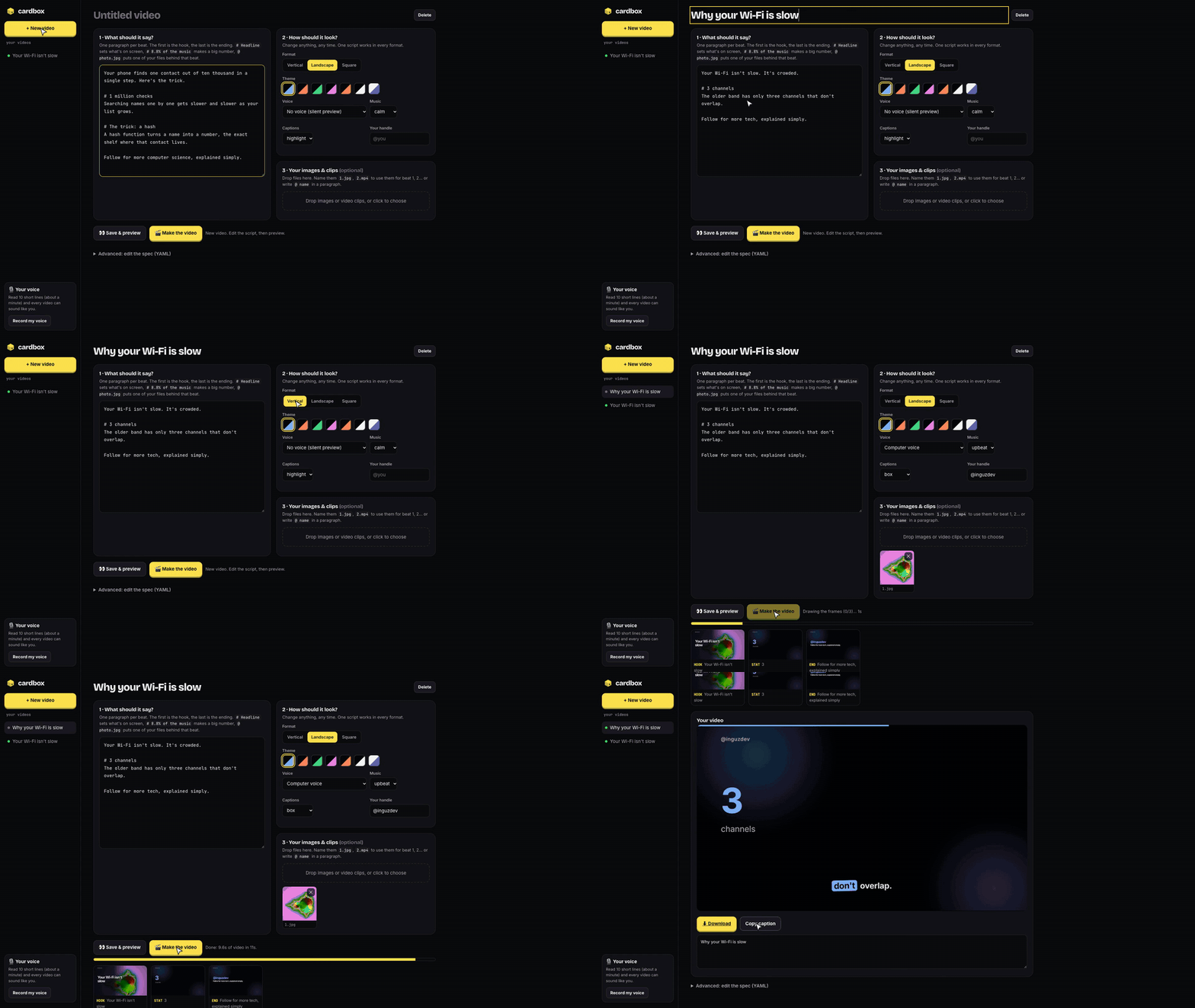
Watch the 80-second explainer: made with cardbox, narrated in my cloned voice.
No paid AI needed
cardbox's core needs no paid AI, no API keys and no account. Write what you want to say in plain text, pick a look, and it makes the video on your own computer, voice included.
Want more? Connect your AI assistant (Claude, Cursor or any MCP client). It can write the script from one sentence, find openly licensed images, pick animated scenes and time them to your words, and check preview frames before rendering.
| Without AI (free, the core) | With your AI assistant (optional) | |
|---|---|---|
| Script | You write plain text | Written from one sentence |
| Visuals | Templates, themes, your own images and clips | + licensed image search, scene choice, word-timed animations |
| Voice | Your cloned voice, or the computer's voice | Same |
| Cost | Free | Whatever your assistant costs |
Why cardbox
Making a short explainer video by hand means scripting, recording, re-recording the line you fluffed, cutting, captioning, animating and syncing it all. With cardbox you either ask your AI assistant for the video, or write what you want to say:
One step. Any size. Your phone finds one contact out of ten thousand in a single step.

# 1 million checks
Searching names one by one gets slower as your list grows.

# 1 step, at any size
A hash table turns a name into the exact shelf where it lives.

Follow for more computer science, explained simply.
cardbox make script.txt --format vertical --voice me --render # → script.mp4 + caption.txt (or just use the app)
Each paragraph becomes one beat. The first is the hook, the last is the closing card, a # headline sets what's on screen, and a headline that starts with a number becomes a big stat card.
Want full control (animated scenes, images, word-timed animations)? The same video as a spec:
title: How a hash table finds anything instantly
format: vertical          # vertical · landscape · square
theme: midnight           # 7 themes, or any accent color
voice: me                 # your cloned voice · system · none
beats:
  - kind: hook
    text: One step. Any size.
    say: Your phone finds one contact out of ten thousand in a single step.
  - kind: scene
    scene: counter
    head: So the lookup is
    say: Finding Priya takes one step, whether you have ten contacts or ten million.
    params: {to: 1, label: step, on: one}      # fires the moment you say "one"
  - kind: end
    text: Follow for more
    say: Follow for more computer science, explained simply.
What makes it different
- 🎙️ Your voice, cloned on your machine. Read ten short lines in a browser page (about a minute), and every video is narrated in your voice. A consent statement is the first thing recorded.
- 👂 It checks its own narration. Every line is transcribed with Whisper and compared with the script. If a word came out slurred or skipped, cardbox re-records that line with a new seed. No more listening to every take.
- ⏱️ Animations land on the word.
on: billionstarts a counter the instant you say "billion". Captions highlight each word as it's spoken. - 🤖 An MCP server, built in. Claude, Cursor or any MCP client can write the script, look at preview frames before rendering, find images, walk you through voice recording, and render.
- 🖼️ License-safe images. Search Openverse and Wikimedia Commons for reusable images only (CC0, public domain, CC BY, CC BY-SA). Credits are written into the post caption automatically.
- 📐 One script, every platform.
format: landscapere-lays out every beat for YouTube;squarefor the LinkedIn feed. - 🎵 A soundtrack with no licensing questions. A music bed is synthesized for each video (calm, upbeat or tense), with a hit on every cut and ducking under the voice.
- 🛠️ Runs as a service. A Go render API with a worker pool, live progress over SSE, signed webhooks, idempotency and Prometheus metrics.
Quick start
pipx install cardbox-video && cardbox # opens the app in your browser
That's it! Everything — the video renderer, browser automation, and voice cloning stack (Chatterbox + Whisper) — is included. If you don't have Google Chrome, run python -m playwright install chromium once.
command not found: cardbox? First time using pipx: runpipx ensurepath, then open a new terminal.
Requirements
| Python | 3.10, 3.11 or 3.12 |
| ffmpeg | brew install ffmpeg · sudo apt install ffmpeg · winget install ffmpeg |
| A browser | Google Chrome, or Chromium via Playwright (used to draw frames) |
| System voice (optional) | built into macOS; espeak-ng on Linux |
| Voice cloning (optional) | cardbox-video[voice]: about 3 GB of models. Apple Silicon or an NVIDIA GPU recommended. On CPU it works, but each line takes a while |
Tested on macOS (Apple Silicon) and Linux. Windows should work for everything except the system voice; reports welcome.
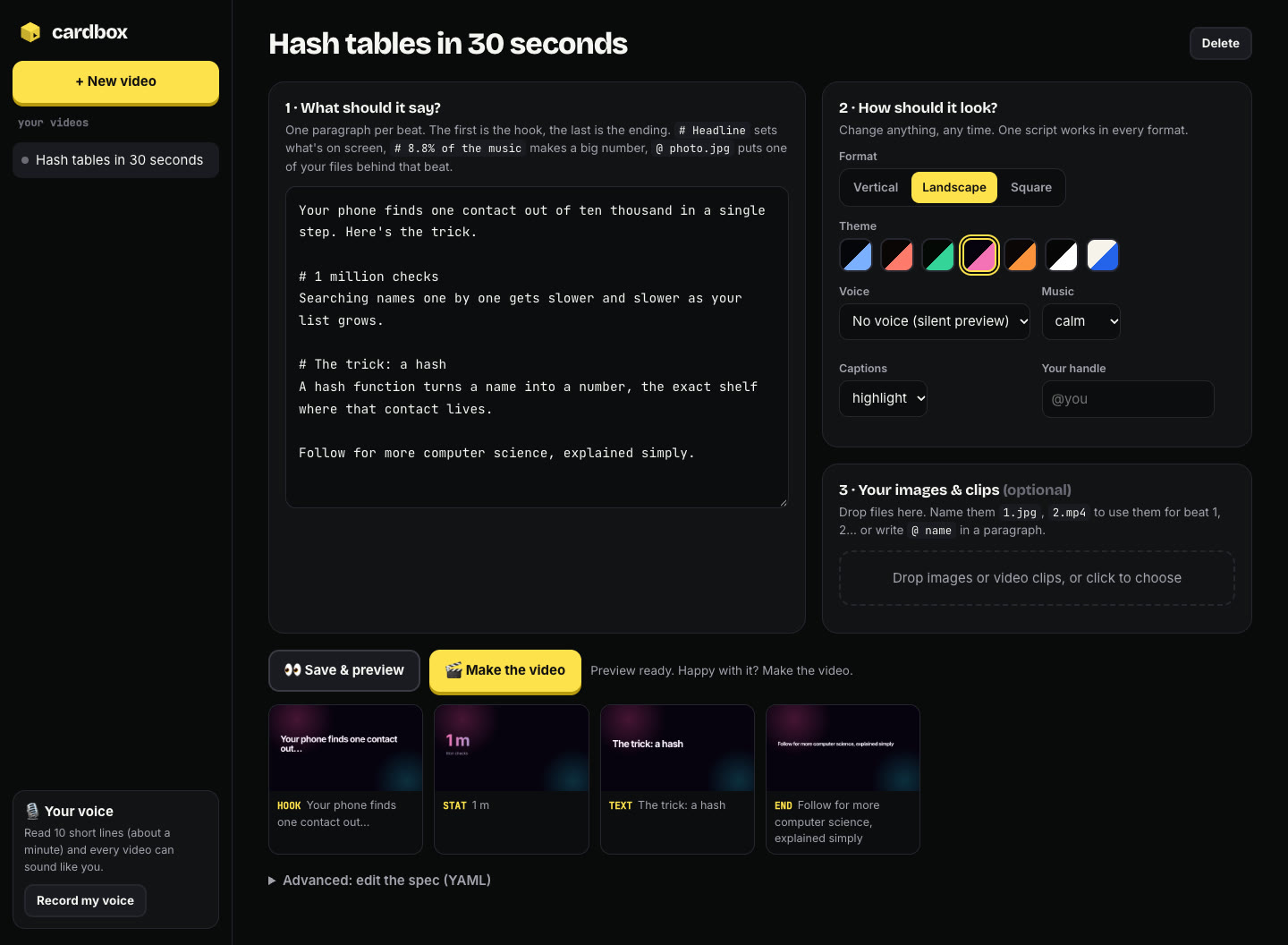
The app does everything without commands. You write the script, pick a format, theme, voice and music, drop in your own images or clips, record your voice, preview every frame, and render. You can then watch the video, download it and copy its caption. Your videos live in ~/Cardbox, shared with the CLI and the MCP server.
Your own voice. Click Record my voice in the app (about a minute of reading). Once recorded, your cloned voice is automatically used for your videos.
The voice models run locally using PyTorch. Apple Silicon or an NVIDIA GPU is recommended for fastest generation.
Your own images and clips. Drop them into the app, or into the video's media/ folder. Name them 1.jpg, 2.mp4, … to use them for beat 1, 2, … or write @ photo.jpg inside a paragraph.
Prefer the terminal?
cardbox make script.txt --format landscape --voice me --render   # plain text → video
cardbox new my-video && cardbox render my-video                   # a full YAML spec
cardbox preview my-video 1                                        # a PNG of beat 1
cardbox voice record me                                           # the recording studio
cardbox doctor                                                    # check your setup
Tutorial
A complete walkthrough, recorded live on a laptop: installing, the app, writing a script, formats and themes, your own images, previewing, rendering, voice recording, the YAML spec, MCP and the CLI. The narration is the author's cloned voice.
The recording itself is reproducible: tutorial/record.py drives the real app in Chrome,
runs the real commands, and narrates with a recorded voice.
Use it from your AI assistant (MCP)
Add cardbox to your client's MCP config:
{
  "mcpServers": {
    "cardbox": { "command": "cardbox", "args": ["mcp"] }
  }
}
- Claude Desktop:
claude_desktop_config.json· Claude Code:claude mcp add cardbox -- cardbox mcp· Cursor:.cursor/mcp.json
Then just ask: "Make a 40-second vertical video explaining how DNS works, in my voice."
| Tool | What it does |
|---|---|
make_video |
Plain-text script in, video spec out: the quickest start |
guide |
How to write a good video: spec format, scenes, writing rules |
create_reel / get_reel / list_reels |
Save and read specs (validation errors come back in plain English) |
preview_beat |
Returns a frame image so the assistant can see its work before rendering |
render_reel |
Renders the MP4 and the post caption, and flags lines the voice may have fumbled |
search_images / add_image |
Openly licensed images, downloaded and credited |
voice_status / voice_record / voice_test |
Record, check and try your cloned voice |
find_icons / spec_schema |
1,900 Lucide icons; the full JSON Schema |
Formats, themes and styles
| Option | Values |
|---|---|
format |
vertical 1080×1920 (Reels, Shorts, TikTok) · landscape 1920×1080 (YouTube, LinkedIn) · square 1080×1080 (feeds) |
theme |
midnight · ember · forest · neon · sunset · mono · paper (light) |
accent |
any hex color, overriding the theme's accent |
font |
sans (Inter) · mono (JetBrains Mono) |
captions |
highlight · box · minimal · none |
music |
calm · upbeat · tense · none |
Beat kinds: hook, text, stat, list, scene, end. Hooks and text beats can take a background (an image with a slow push-in, or any scene).
Scenes (13): counter · donut · bars · flow · terminal · mesh · grid · photo · logo · chat · script · voice · formats. See docs/spec.md for every parameter.
Pronunciation: captions show say, but the voice reads pronounce when you set it. Write say: SongsPK with pronounce: Songs P K.
Render API (Go)
server/ is an HTTP service that queues renders and streams progress:
cd server && go run ./cmd/cardbox-server     # or: docker compose up
curl -X POST localhost:8080/v1/renders -H "Content-Type: application/yaml" --data-binary @video.yaml
curl -N localhost:8080/v1/renders/<id>/events   # live progress (SSE)
A ready image is published with every release: docker run -p 8080:8080 ghcr.io/aryainguz/cardbox.
It has a bounded worker pool with backpressure, cancellation, graceful drain, SQLite persistence with crash recovery, idempotency keys, reuse of identical renders, HMAC-signed webhooks with retries, API keys, per-key rate limits and Prometheus metrics. Details are in server/README.md.
How it works
spec.yaml ─► voice (clone · verify with Whisper · retry) ─► word timings
          ─► cards (HTML) + scenes (canvas, cued to words) in a headless browser
          ─► per-beat clips (captions word by word, progress bar) ─► concat
          ─► synthesized music, ducked under the voice ─► video.mp4 + caption.txt
Everything runs locally. Your recordings and your voice model never leave your machine.
Responsible use
Voice cloning is powerful. cardbox records a consent statement as the first take of every voice profile, and won't build a voice without it. Only clone your own voice, or a voice you have explicit permission to use. Don't use cardbox to impersonate anyone or to mislead people about who is speaking.
Contributing
New scenes, themes and caption styles are the easiest place to start: each scene is a single function in src/cardbox/scenes/library.js. See CONTRIBUTING.md.
Credits
- Chatterbox (MIT) for voice cloning, and Whisper (MIT) for listening back.
- Lucide icons (ISC), plus Inter and JetBrains Mono (SIL OFL).
- Openverse and Wikimedia Commons for openly licensed images.
MIT licensed.
1 maintainer

Metadata
1 maintainer
Release files for cardbox-video 0.1.5
For a detailed explanation of source distributions (sdists) and built distributions (wheels), please see the package formats documentation.
Source distribution (sdist)
| File | Size | Uploaded | Provenance | Actions |
|---|---|---|---|---|
| cardbox_video-0.1.5.tar.gz | 809.0 kB | With provenance | Details for cardbox_video-0.1.5.tar.gz |
Built distribution (wheel)
| File | Interpreter | ABI | Platform | Actions Reset |
|---|---|---|---|---|
| cardbox_video-0.1.5-py3-none-any.whl | Python 3 | none | any | Details for cardbox_video-0.1.5-py3-none-any.whl |
Total release size: 1.6 MB
Release files / cardbox_video-0.1.5.tar.gz
| Download URL | cardbox_video-0.1.5.tar.gz |
|---|---|
| Size | 809.0 kB |
| Tags | Source |
|
SHA-256 checksum How to use checksums |
a78e528fba3f7e9ddbd247cdd01623502faad5702fee21fa600b175bd0831f4c
|
|
BLAKE2b-256 checksum How to use checksums |
a1307571fa5dc6f72d500c9c6d914c0a24153f72c46e216223c7d6b19ffc297f
|
| Upload date | |
|
Uploaded using Trusted Publishing? What is trusted publishing? |
Yes |
| Uploaded via |
twine/7.0.0 CPython/3.13.16
|
Provenance
Provenance describes where a file came from. On PyPI, provenance is shared via attestations, which provide a verifiable record of the build or publishing details. View details, limitations and caveats.


PyPI Publish Attestation
PyPI verified that this artifact, at this checksum, originated from the publisher listed below.
Signed by GitHub Actions, verified by PyPI on Nov 17, 2026.
Transparency logRelease files / cardbox_video-0.1.5-py3-none-any.whl
| Download URL | cardbox_video-0.1.5-py3-none-any.whl |
|---|---|
| Size | 787.5 kB |
| Tags | Python 3 |
|
SHA-256 checksum How to use checksums |
06cd563b895af2320d03ab4bb52b30d0f6a9f1f83882b36d8a2c2a3f3714ef3f
|
|
BLAKE2b-256 checksum How to use checksums |
e297ec3257cbab03ada7b83750ff54db5f9d93655dae9a9b021715161cedef8f
|
| Upload date | |
|
Uploaded using Trusted Publishing? What is trusted publishing? |
Yes |
| Uploaded via |
twine/7.0.0 CPython/3.13.16
|
Provenance
Provenance describes where a file came from. On PyPI, provenance is shared via attestations, which provide a verifiable record of the build or publishing details. View details, limitations and caveats.
PyPI Publish Attestation
PyPI verified that this artifact, at this checksum, originated from the publisher listed below.
Signed by GitHub Actions, verified by PyPI on Nov 17, 2026.
Transparency logSecurity for cardbox-video 0.1.5
Provenance
Provenance describes where a file came from. On PyPI, provenance is shared via attestations, which provide a verifiable record of the build or publishing details. View details, limitations and caveats.
Full provenance
Both files in this release have been uploaded with provenance metadata.
Attestation for cardbox_video-0.1.5.tar.gz
PyPI Publish Attestation
PyPI verified that this artifact, at this checksum, originated from the publisher listed below.
Signed by GitHub Actions, verified by PyPI on Nov 17, 2026.
Transparency logA note on package security
PyPI is a repository for distributing packages, not a service for auditing them. While third-party security researchers and our staff do their best to detect and remove malicious packages, PyPI cannot guarantee the quality, security or suitability of any given package.
To learn more about protecting yourself from malicious actors, visit our package security documentation.














