
Cartograph


A local first reusable code registry for AI agents. Search, install, create, validate, and check in code modules across projects. Only requires Python. Other languages in the repo are native validation scanners for their respective widget types. The tool is designed to use the languages you have installed.
For setups who don't want to tune instructions for their agents, we recommend using the Plugin if you use one of the supported agents. If you run the MCP we would recommend using the cartograph setup --agent [agent] command to support the other features.
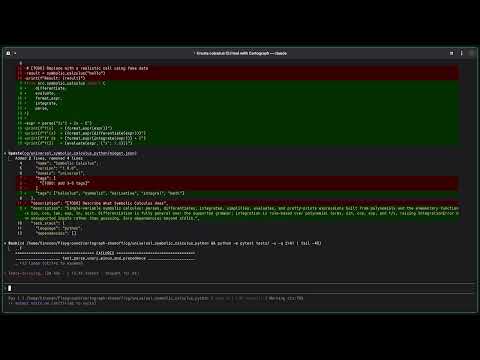
Demonstration of creating, installing, and composing widgets
Why Cartograph
AI agents write a lot of code, but it disappears. Each new project starts from scratch, and agents can't naturally reuse logic across codebases without somewhere to put it.
Cartograph came out of a personal frustration. Features that took 10 to 20 hours to polish with AI coding tools would need to be rebuilt almost from scratch when the next project needed them and most of the hardened logic would be gone. Then I built a basic engine, and those same features could be dropped into a new project in minutes.
Those same widgets have now been reused across many projects and have settled into a quiet loop of continuous improvement. Each time a new edge case surfaces, the fix goes back into the library, and every project that installs it going forward starts with that bug already squashed.
Per aspera ad astra. Through hardships to the stars. This is a tool that takes struggle to get the benefits, and they will compound.
What is a widget?
A widget is a reusable code module with tests, examples, metadata, and declared dependencies. Each widget is self-contained and language-specific.
cg/backend_retry_backoff_python/
  widget.json          # metadata, version, dependencies
  src/                 # source code
  tests/               # test files (80%+ coverage required)
  examples/
    example_usage.py   # must run successfully
Widget IDs follow <domain>-<name>-<language>, for example backend-retry-backoff-python or algorithms-edit-distance-nim.
When installed into a project, widgets live under cg/ in your working directory.
Quick start
pip install cartograph-cli
Set up instructions for your AI agent:
cartograph setup
This auto-detects your agent (Claude, Cursor, Codex, Gemini) and appends Cartograph instructions to the appropriate config file. Use --print to preview without writing.
Example workflow
# Create a new widget
cartograph create backend-retry-backoff-python --language python --domain backend

# Write your code in cg/backend_retry_backoff_python/src/ and tests/

# Validate it (runs tests, coverage, contamination scanning)
cartograph validate cg/backend_retry_backoff_python

# Check it into your library
cartograph checkin cg/backend_retry_backoff_python --reason "initial implementation"

# Later, in a different project:
cartograph search "retry backoff"
cartograph install backend-retry-backoff-python
Philosophy
This CLI tool is built with agents in mind first. Commands are non-interactive and output JSON so both humans and AI agents can consume them.
We only ship what we can validate. Every widget that enters the library has passed a full pipeline: structure checks, manifest validation, coverage enforcement, contamination scanning, example execution, and versioning. If the pipeline can't run it, it doesn't go in.
Supporting a language means owning its full validation pipeline, not just generating files. We add languages as those pipelines are ready, not before.
Common commands
The commands you'll reach for daily. All run from your project root.
cartograph search <query>                              # find a widget
cartograph install <widget_id>                         # install into cg/
cartograph create <name> --domain <d> --language <l>   # scaffold a new widget
cartograph validate [path]                             # run the full pipeline
cartograph checkin [path] --reason "..."               # push edits back
cartograph status                                      # installed widgets
cartograph setup                                       # configure your agent
Full reference: cartograph <command> --help for a single command, or
cartograph setup --print for the complete surface grouped by section.
The reference is generated directly from the CLI, so it never drifts from
what the tool actually supports.
Language support
- Python: pytest, coverage.py, AST-based contamination scanner
- JavaScript/TypeScript: vitest, native JS scanner, React component support
- Nim: nimble, std/unittest, native Nim scanner, stdlib-aware import checking
- OpenSCAD: renders to STL, non-empty mesh check, Python contamination scanner (OpenSCAD has no file I/O). Requires 2021.01+ for
assert()support. BOSL2 optional. - SystemVerilog: Icarus Verilog (iverilog + vvp),
-g2012mode. Enforcesalways_comb/always_ff(legacyalways @(...)blocked). Contamination scanner checks vendor primitives, simulation-only constructs (initial,#delay,$display), blocking/non-blocking assignment misuse, and hardcoded constants. Vendor primitives allowed when the vendor library is declared as a dependency. - Angular: Angular CLI (
ng test+ng build), Karma + Jasmine with ChromeHeadless, 80% coverage viakarma.conf.jsthresholds. Standalone components (Angular 14+). Reuses JS contamination scanner. Example validation:ng build(build artifact, not script execution). Requires@angular/cliglobally and Chrome/Chromium installed. - PHP: Composer + PHPUnit 11, Xdebug or PCOV for coverage, 80% threshold via
--min-coverage. PSR-4 autoloading underCartograph\namespace. Contamination scanner blocks WordPress globals (wp_*,add_action,$wpdb, etc.) andechoin src/ to enforce pure PHP utility widgets. - Terraform:
terraform validateagainst src/, tests/, and examples/ (shape-only - no test runner, no coverage; modules harden through use). Blocks provider/backend blocks in src/, real AWS account IDs, and credential-shaped assignments. Providers cached viaTF_PLUGIN_CACHE_DIR. - Go:
go testwith built-in coverage (80% via-coverpkg),go vet+ build check, nativego/astcontamination scanner. Single-binary toolchain. Widgets are libraries: console output,os.Exit, andpanicininit()are blocked in src/. - SPICE: ngspice batch simulation (
analogdomain). A testbench must drive the block, simulate to convergence, and assert measured quantities with.meas+ ASSERT_PASS/ASSERT_FAIL echo sentinels - ngspice's exit code alone is unreliable, so the engine parses output. Every component value in a.subcktmust be a{param}; hardcoded values warn. Machine-specific.includepaths blocked; device-model libraries are declared dependencies the consumer supplies. - Rust: cargo + cargo-llvm-cov line coverage (80%, tests/ and examples/ excluded from the denominator),
cargo fmt --checkas a hard gate, native raw-string-aware scanner.println!/process::exit/unsafeblocked in src/. Blueprints compose via Cargo path deps. Requires the cargo-llvm-cov subcommand and llvm-tools-preview component. - GDScript: Godot 4 headless (
gamedevdomain) - singlegodotbinary, never opens the editor. Every script parse-checked with--check-only; tests areextends SceneTreescripts asserting via ASSERT_PASS/quit-code contract. Deprecated Godot 3 syntax is hard-blocked by the native scanner (the headline check - LLMs constantly emit Godot 3 into Godot 4 projects). No coverage floor (no tool exists). - Java: Gradle + JUnit 5, JaCoCo line coverage (80%, Gradle core plugin - the whole toolchain is JDK 21+ plus Gradle), native comment/string/text-block-aware scanner run in JDK single-file mode. Widgets own their full build.gradle including plugins (build-time plugins like Fabric Loom work); the engine only requires a JaCoCo XML report from
testand arunExampletask.System.out/err,System.exit, andThread.sleepare blocked in src/. - Lean 4: elan + lake,
lake buildkernel-checks every theorem - checked-in means proven. Native Lean scanner hard-blocks unprovensorry/admit(the compiler only warns) and customaxiomdeclarations in src/. ASSERT_PASS runtime test contract on top of proof checking; no coverage floor (the kernel is a stronger floor than coverage for proof code). Widgets may declare amathlibdependency, served from one shared version-pinned workspace (cartograph setup-mathlib, explicit multi-GB provision - never automatic); everything else builds against the Lean core library only. - C#: .NET SDK 10+ (the whole toolchain - xUnit and coverlet are fetched from NuGet by the scaffolded test project),
dotnet testwith coverlet line coverage (80%), native comment/string/verbatim/raw-string-aware scanner run via file-baseddotnet run. Widgets own their csproj files (analyzers and source generators work); the engine only requires a Cobertura report from tests and a runnable examples project.Consoleprinting,Environment.Exit/FailFast, andThread.Sleepare blocked in src/. - Flutter: Flutter SDK 3.x (bundles its own Dart - the whole toolchain in one install),
flutter test+ flutter_test harness with lcov line coverage (80%),flutter analyzegate, native comment/string-aware Dart scanner (handles Dart's nested block comments and raw strings). Widgets own their pubspec.yaml (two marked dependency blocks are generated); sources live in src/ and the engine generates lib/ from it at validation time because Flutter's coverage collector only reports lib/. Examples run headless through the flutter_test harness (Flutter UI can't execute on the bare Dart VM). Pure Dart logic widgets validate through the same path.print/debugPrint,exit(), and blockingsleep()are blocked in src/. Blueprints compose via pub path deps. - Blender: Blender 4.2 LTS+ headless (
blender -b, never the UI or a GPU render;modeling/gamedevdomains). pytest + pytest-cov line coverage (80%) run inside Blender's embedded Python - the test tools are installed once per Blender Python version by pip running inside Blender, so they always match its interpreter. Python AST contamination scanner with Blender's bundled modules (bpy, bmesh, mathutils, numpy, ...) importable;bpy.opsin src/ warns (prefer the data API), .blend file operators with literal paths block. v1 widgets import only the standard library and what Blender bundles. - KiCad: KiCad 10+ headless (
modeling/infradomains). Widgets are Python run under KiCad's own interpreter (the one that canimport pcbnew) withkicad-clion PATH; pytest + pytest-cov line coverage (80%). Bundled native files are validated by KiCad itself: symbol and footprint libraries must load, schematics and boards must pass ERC/DRC with zero errors. Python AST contamination scanner withpcbnewimportable; editor-only calls (GetBoard,Refresh),wxand the IPC API block; absolute 3D model paths in bundled footprints block. Pinned pip dependencies (e.g.skidl) are installed per validation into an isolated directory.
Each language has its own validation engine. The contamination scanners are written in the target language itself where possible (Python uses AST, JS uses a token-based parser, Nim uses a line-based scanner). OpenSCAD and SystemVerilog use Python-based scanners since neither language has general-purpose file I/O suitable for static analysis tooling.
Cloud registry
The CLI is built around a local registry on your machine. It also supports an optional cloud registry for sharing widgets across teams or publicly.
The hosted registry is in early development. The local engine is more ready and does not depend on cloud availability. If the registry is down or unreachable, everything local continues to work.
To point at your own registry instance:
export CARTOGRAPH_REGISTRY_URL=https://your-registry.example.com
cartograph login opens a browser-based authentication flow provided by whichever registry you're connected to.
Running or building a registry? The protocol contract - endpoints, the widget row schema, search ordering semantics, auth - is documented in REGISTRY.md.
Development
pip install -e .
git config core.hooksPath .githooks   # enable the pre-push hook
pytest
The widget library lives in your platform's user data directory. To override the location, set WIDGET_LIBRARY_PATH. When running from source, a Widget_Library/ directory alongside this repo takes precedence so local edits work without configuration.
Run cartograph doctor to check that all language engine dependencies (pytest, coverage, node, npx, vitest, nim, nimble, openscad, iverilog, ng, php, composer, terraform, go, cargo, cargo-llvm-cov, ngspice, godot, java, gradle, lean, lake, dotnet, flutter, dart, blender, kicad-cli) are installed correctly.
Pre-push checks and release preflight
The tracked .githooks/pre-push hook runs two fast checks in ~20-30 seconds before every push:
- Import smoke (catches syntax errors).
- Wheel-install smoke (build into a tempdir venv, verify
cartograph setup --printstill works — catches the dogfood-path-resolution class of bug that v0.5.29 shipped).
For a release push, run the full gauntlet first (~5-6 minutes, includes pytest):
./scripts/preflight.sh && git push origin master
# then tag:
git tag vX.Y.Z && git push origin vX.Y.Z
1 maintainer

Metadata
1 maintainer
Release files for cartograph-cli 0.7.27
For a detailed explanation of source distributions (sdists) and built distributions (wheels), please see the package formats documentation.
Source distribution (sdist)
| File | Size | Uploaded | Provenance | |
|---|---|---|---|---|
| cartograph_cli-0.7.27.tar.gz | 757.6 kB | With provenance | Details |
Built distribution (wheel)
| File | Interpreter | ABI | Platform | Reset |
|---|---|---|---|---|
| cartograph_cli-0.7.27-py3-none-any.whl | Python 3 | none | any | Details |
Total release size: 1.4 MB
Release files / cartograph_cli-0.7.27.tar.gz
| Download URL | cartograph_cli-0.7.27.tar.gz |
|---|---|
| Size | 757.6 kB |
| Tags | Source |
|
SHA-256 checksum How to use checksums |
7dfc162631138000ada2fb6c9999d91d789914cfe56f1643fe1164fed6ceea82
|
|
BLAKE2b-256 checksum How to use checksums |
0044f0cae47fe6d42cbb080236a2e99b4c256ad8cafe7b521c0c7addb9de148f
|
| Upload date | |
|
Uploaded using Trusted Publishing? What is trusted publishing? |
Yes |
| Uploaded via |
twine/7.0.0 CPython/3.13.14
|
Provenance
Provenance describes where a file came from. On PyPI, provenance is shared via attestations, which provide a verifiable record of the build or publishing details. View details, limitations and caveats.


PyPI Publish Attestation
PyPI verified that this artifact, at this checksum, originated from the publisher listed below.
Signed by GitHub Actions, verified by PyPI on Oct 6, 2026.
Transparency logRelease files / cartograph_cli-0.7.27-py3-none-any.whl
| Download URL | cartograph_cli-0.7.27-py3-none-any.whl |
|---|---|
| Size | 605.7 kB |
| Tags | Python 3 |
|
SHA-256 checksum How to use checksums |
9f22c3e3510b48203542ac3b053346a934e102c3be8c100ab09a374fbaf53bae
|
|
BLAKE2b-256 checksum How to use checksums |
d438dfcfe1eea4546764c1ca7298030b095a3ae8a5d56b2856ee01f1a554981c
|
| Upload date | |
|
Uploaded using Trusted Publishing? What is trusted publishing? |
Yes |
| Uploaded via |
twine/7.0.0 CPython/3.13.14
|
Provenance
Provenance describes where a file came from. On PyPI, provenance is shared via attestations, which provide a verifiable record of the build or publishing details. View details, limitations and caveats.
PyPI Publish Attestation
PyPI verified that this artifact, at this checksum, originated from the publisher listed below.
Signed by GitHub Actions, verified by PyPI on Oct 6, 2026.
Transparency logSecurity for cartograph-cli 0.7.27
Provenance
Provenance describes where a file came from. On PyPI, provenance is shared via attestations, which provide a verifiable record of the build or publishing details. View details, limitations and caveats.
Full provenance
All 2 files in this release have been uploaded with provenance metadata.
Attestation for cartograph_cli-0.7.27.tar.gz
PyPI Publish Attestation
PyPI verified that this artifact, at this checksum, originated from the publisher listed below.
Signed by GitHub Actions, verified by PyPI on Oct 6, 2026.
Transparency logA note on package security
PyPI is a repository for distributing packages, not a service for auditing them. While third-party security researchers and our staff do their best to detect and remove malicious packages, PyPI cannot guarantee the quality, security or suitability of any given package.














