
A blazing fast, One Dark-themed local test case runner for developers.





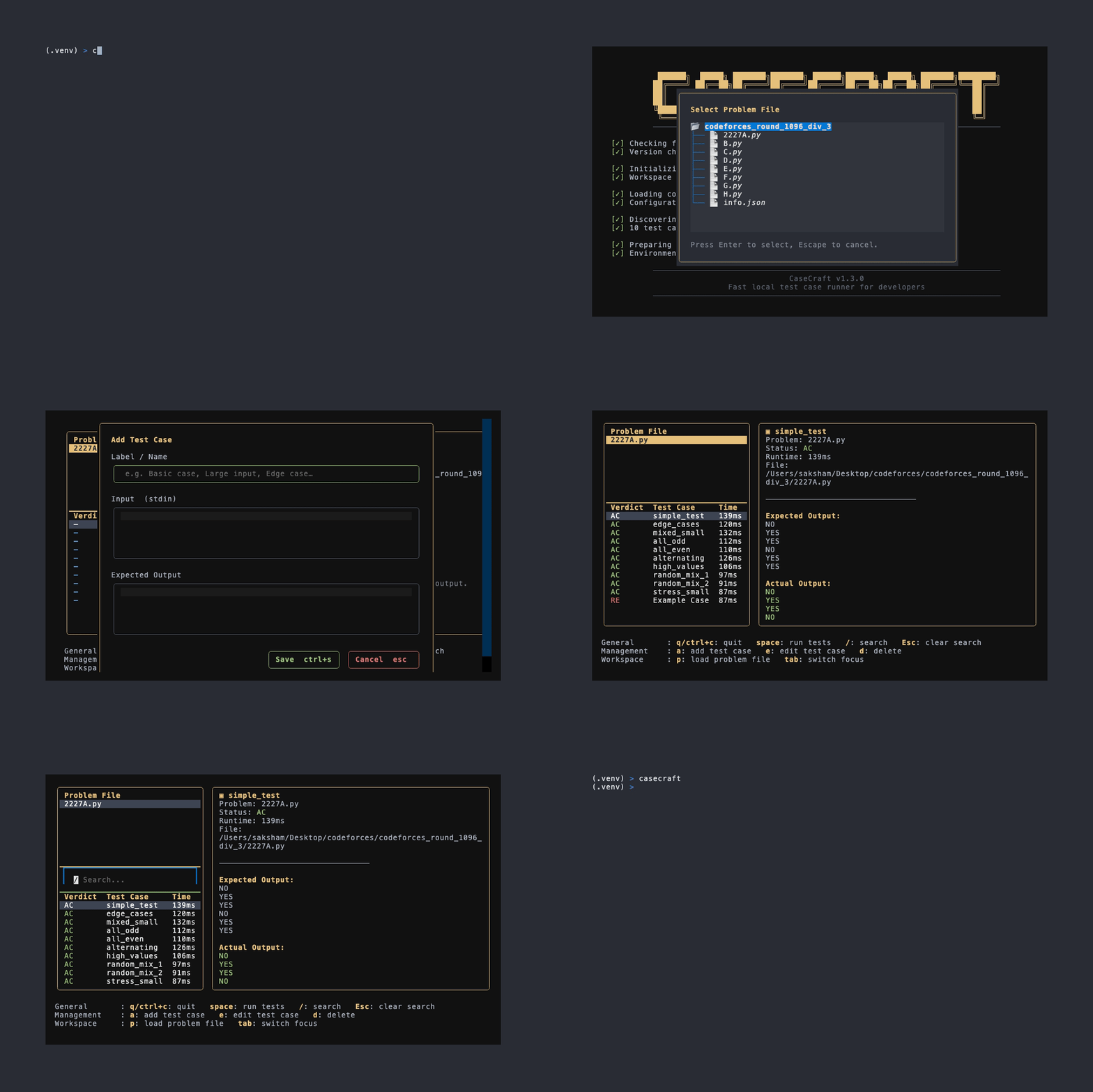
❓ Why CaseCraft?
✨ Features
- Dynamic Boot Sequence: Hacker-style splash screen that automatically checks PyPI for version updates in the background.
- Native Transparency: Automatically inherits your terminal's background color and opacity for a stunning glass-like aesthetic.
- Lazygit-Style Interface: Fully keyboard-driven UI designed for maximum developer speed.
- Cross-Platform Execution: Safely evaluates the correct executable environments (e.g.
python3vspython) across macOS, Linux, and Windows. - Local Persistence: Test cases are safely persisted per-file inside a hidden
.casecraft/folder in your project workspace.
🚀 Quick Start
Installation
CaseCraft is available via pip. It requires Python 3.11+.
pip install casecraft
Initialization
To start using CaseCraft in a new project, run the initialization command in your project's root directory:
casecraft init
Launch the Dashboard
casecraft
⚙️ How It Works Under the Hood
Click to reveal the architectural flowchart
CaseCraft handles all the heavy lifting of compilation, execution, and process management behind the scenes:
graph TD
    A[User Hits Space] --> B{Determine Language}

    B -->|Python/JS| C[Direct Execution via Subprocess]
    B -->|C++/Java| D[Compile Source Code]

    D --> E{Compile Success?}
    E -->|No| F((Runtime Error))
    E -->|Yes| C

    C --> G[Feed Expected Input via Stdin]
    G --> H[Capture Stdout]

    H --> I{Match Expected Output?}
    I -->|Yes| J((AC - Accepted))
    I -->|No| K((WA - Wrong Answer))
⌨️ Keyboard Shortcuts
CaseCraft is built for speed. Once the dashboard is open, use these keybindings to navigate seamlessly:
| Action | Key | Context |
|---|---|---|
| Load Source File | p | Opens a visual directory tree to select a file |
| Switch Focus | Tab | Toggles focus between the Problems table and Test Case table |
| Add Test Case | a | Opens the Add Test Case modal |
| Edit Test Case | e | Edits the currently highlighted test case |
| Delete Test Case | d | Deletes the currently highlighted test case |
| Search / Filter | / | Opens the search bar (Press Esc to clear) |
| Run All Tests | Space | Executes all test cases for the active file |
| Quit | q | Exits CaseCraft |
🛠️ Supported Languages
CaseCraft natively supports running files from multiple programming languages out of the box:
- Python (
.py) - JavaScript (
.js) - C++ (
.cpp,.cc) — Automatically compiles usingg++to a temporary directory. - Java (
.java) — Automatically compiles usingjavac.
🚦 Verdicts
After pressing Space to run your tests, CaseCraft will display clear, color-coded verdicts:
- 🟢
AC(Accepted) — Actual output exactly matches the expected output. (Note: Trailing whitespaces and blank lines are ignored). - 🔴
WA(Wrong Answer) — Actual output differs from expected. - 🟡
TLE(Time Limit Exceeded) — Execution took longer than the standard 2.0-second timeout limit. - 🟣
RE(Runtime Error) — The script exited with a non-zero exit code or threw an exception.
🗺️ Roadmap & Future Goals
- Initial PyPI Release
- LazyGit-Style Navigation
- Python, C++, JS, and Java Support
- Custom Execution Arguments: Pass custom flags to compilers.
- Memory Tracking: Display exact memory footprint during execution.
- Detailed Diff View: Expand a test case to see a precise
git diffstyle output highlighting where the Expected and Actual outputs differ.
🤝 About & Support
CaseCraft is passionately built and maintained by Saksham Tale.
If you encounter any bugs, have a cool feature request, or want to contribute, please visit the official Issue Tracker.
1 maintainer

Metadata
1 maintainer
Release files for casecraft 1.5.1
For a detailed explanation of source distributions (sdists) and built distributions (wheels), please see the package formats documentation.
Source distribution (sdist)
| File | Size | Uploaded | Provenance | Actions |
|---|---|---|---|---|
| casecraft-1.5.1.tar.gz | 22.0 kB | With provenance | Details for casecraft-1.5.1.tar.gz |
Built distribution (wheel)
| File | Interpreter | ABI | Platform | Actions Reset |
|---|---|---|---|---|
| casecraft-1.5.1-py3-none-any.whl | Python 3 | none | any | Details for casecraft-1.5.1-py3-none-any.whl |
Total release size: 47.6 kB
Release files / casecraft-1.5.1.tar.gz
| Download URL | casecraft-1.5.1.tar.gz |
|---|---|
| Size | 22.0 kB |
| Tags | Source |
|
SHA-256 checksum How to use checksums |
420b929c3e27107eed84bb15fb946bc1bb73ab7bf8e96fb03ec44c18886cec5f
|
|
BLAKE2b-256 checksum How to use checksums |
8dd1f88b746a45f54e942aeef01c5a074973c6193c91e68b8c2dd70b36283bc5
|
| Upload date | |
|
Uploaded using Trusted Publishing? What is trusted publishing? |
Yes |
| Uploaded via |
twine/6.1.0 CPython/3.13.12
|
Provenance
Provenance describes where a file came from. On PyPI, provenance is shared via attestations, which provide a verifiable record of the build or publishing details. View details, limitations and caveats.


PyPI Publish Attestation
PyPI verified that this artifact, at this checksum, originated from the publisher listed below.
Signed by GitHub Actions, verified by PyPI on Jun 9, 2026.
Transparency logRelease files / casecraft-1.5.1-py3-none-any.whl
| Download URL | casecraft-1.5.1-py3-none-any.whl |
|---|---|
| Size | 25.6 kB |
| Tags | Python 3 |
|
SHA-256 checksum How to use checksums |
51141b59926892aab2ace14b2471def0b58f5264d0585280bbab386011f566de
|
|
BLAKE2b-256 checksum How to use checksums |
2e02138071a0fbff5c36172e55f8e053dff61953937ef38e767983691d89bfff
|
| Upload date | |
|
Uploaded using Trusted Publishing? What is trusted publishing? |
Yes |
| Uploaded via |
twine/6.1.0 CPython/3.13.12
|
Provenance
Provenance describes where a file came from. On PyPI, provenance is shared via attestations, which provide a verifiable record of the build or publishing details. View details, limitations and caveats.
PyPI Publish Attestation
PyPI verified that this artifact, at this checksum, originated from the publisher listed below.
Signed by GitHub Actions, verified by PyPI on Jun 9, 2026.
Transparency logSecurity for casecraft 1.5.1
Provenance
Provenance describes where a file came from. On PyPI, provenance is shared via attestations, which provide a verifiable record of the build or publishing details. View details, limitations and caveats.
Full provenance
Both files in this release have been uploaded with provenance metadata.
Attestation for casecraft-1.5.1.tar.gz
PyPI Publish Attestation
PyPI verified that this artifact, at this checksum, originated from the publisher listed below.
Signed by GitHub Actions, verified by PyPI on Jun 9, 2026.
Transparency logA note on package security
PyPI is a repository for distributing packages, not a service for auditing them. While third-party security researchers and our staff do their best to detect and remove malicious packages, PyPI cannot guarantee the quality, security or suitability of any given package.
To learn more about protecting yourself from malicious actors, visit our package security documentation.














