
CASParser







Parse Consolidated Account Statement (CAS) PDF files generated from CAMS, KFintech, NSDL, and CDSL.
casparser also includes a command line tool with the following analysis tools
summary- print portfolio summarygains- capital gains report (summary and detailed), reconciled with the CAMS/KFin capital-gains statements- with option to generate csv files for ITR in schedule 112A format
Supported inputs
casparser parses original CAS PDFs delivered by the four
recognised issuers:
| Issuer | Variant(s) | Source |
|---|---|---|
| CAMS | Detailed, Summary | mailback.camsonline.com request |
| KFintech | Detailed, Summary | mfs.kfintech.com request |
| NSDL | Demat consolidated | NSDL CAS email (monthly) |
| CDSL | Demat consolidated | CDSL CAS email (monthly) |
Known unsupported inputs
- Re-printed PDFs. If you "print to PDF" an existing CAS
(Microsoft Print to PDF, "Save as PDF" via a browser print
dialog, macOS print preview → save, etc.) the watermark gets
flattened from selectable text into a bitmap and the original
generator metadata is wiped. The visual appearance is
identical but
casparsercan no longer prove what it's looking at, and will reject the file. Re-request the statement from the issuer directly and parse the original. - MF Central statements. MF Central's CAS uses a different template / generator and is not in scope for v1.0.
- Third-party-reformatted statements (broker portals that re-render CAS data, Excel/CSV exports converted back to PDF, etc.) — same reason as re-prints.
If you need to support one of these flows for downstream
tooling, the recommended path is to keep the original
issuer-delivered PDF alongside any redistributed copy and feed
the original to casparser.
Installation
pip install -U casparser
Since v1.0 the parser is built on pypdfium2 (Apache-2.0 / BSD-3) — no optional PDF backends, no GPL/AGPL dependencies.
Usage
import casparser
data = casparser.read_cas_pdf("/path/to/cas/file.pdf", "password")

# Get data in json format
json_str = casparser.read_cas_pdf("/path/to/cas/file.pdf", "password", output="json")

# Get transactions data in csv string format
csv_str = casparser.read_cas_pdf("/path/to/cas/file.pdf", "password", output="csv")
Data structure
read_cas_pdf returns a typed pydantic model —
CASData for CAMS / KFintech statements, NSDLCASData for NSDL / CDSL demat
statements (see casparser.types). With output="json" the same shape is
serialised to a JSON string.
Machine-readable JSON Schema files for both shapes
are generated from the models and checked in under
schema/ — use
those for validation or client code generation. The sketches below are for
humans.
Serialisation notes:
- Decimal fields serialise as JSON strings (
"amount": "4999.75") to preserve precision — parse them with a decimal type, not a float. - Transaction and valuation dates serialise as ISO dates (
"2024-04-01");statement_periodkeeps the statement's ownDD-MMM-YYYYformat.
CAMS / KFintech — CASData
// decimal = a JSON string holding an exact decimal number, e.g. "4999.75"
{
  statement_period: { from: string, to: string },   // "01-Apr-2024"
  file_type: "CAMS" | "KFINTECH",
  cas_type: "DETAILED" | "SUMMARY",
  investor_info: { name: string, email: string, address: string, mobile: string },
  folios: {
    folio: string,                       // "12345678 / 90"
    amc: string,
    name: string | null,                 // folio holder's name as printed;
                                         // null on older templates that omit it
    PAN: string | null,
    KYC: "OK" | "NOT OK" | null,
    PANKYC: "OK" | "NOT OK" | null,
    schemes: {
      scheme: string,
      advisor: string | null,            // distributor ARN / RIA code
      rta_code: string,                  // scheme's per-RTA code
      rta: string,                       // registrar: "CAMS", "KFINTECH", …
      type: string | null,               // "EQUITY" | "DEBT" | …
      isin: string | null,
      amfi: string | null,
      nominees: string[],
      open: decimal,                     // opening unit balance
      close: decimal,                    // closing unit balance (as printed)
      close_calculated: decimal,         // open + sum of parsed units
      valuation: { date: string, nav: decimal, cost: decimal | null, value: decimal },
      transactions: {
        date: string,                    // ISO: "2024-04-01"
        description: string,
        amount: decimal | null,
        units: decimal | null,           // null for non-unit rows (taxes)
        nav: decimal | null,
        balance: decimal | null,         // running unit balance
        type: string,                    // see transaction types below
        dividend_rate: decimal | null,   // DIVIDEND_* rows only
        gift_folio: string | null,       // GIFT_IN/OUT only: counterparty folio
      }[],
    }[],
  }[],
  parse_warnings: string[],
}
A non-empty parse_warnings means at least one scheme's transactions did not
reconcile against the statement's printed running unit balance — the parse
still returns, but the flagged scheme's data should not be trusted blindly.
Example (truncated)
{
  "statement_period": { "from": "01-Apr-2024", "to": "31-Mar-2025" },
  "file_type": "CAMS",
  "cas_type": "DETAILED",
  "investor_info": {
    "name": "JOHN DOE",
    "email": "john@example.com",
    "address": "1, MAIN STREET, BENGALURU 560001",
    "mobile": "+919999999999"
  },
  "folios": [
    {
      "folio": "12345678 / 90",
      "amc": "HDFC Mutual Fund",
      "name": "JOHN DOE",
      "PAN": "ABCDE1234F",
      "KYC": "OK",
      "PANKYC": "OK",
      "schemes": [
        {
          "scheme": "HDFC Flexi Cap Fund - Direct Plan - Growth",
          "advisor": "ARN-12345",
          "rta_code": "H1234",
          "rta": "CAMS",
          "type": "EQUITY",
          "isin": "INF179K01VY8",
          "amfi": "118834",
          "nominees": ["JANE DOE"],
          "open": "0.000",
          "close": "33.412",
          "close_calculated": "33.412",
          "valuation": {
            "date": "2025-03-31",
            "nav": "165.41",
            "cost": "4999.75",
            "value": "5526.68"
          },
          "transactions": [
            {
              "date": "2024-04-02",
              "description": "SIP Purchase - Instalment 1/12",
              "amount": "4999.75",
              "units": "33.412",
              "nav": "149.64",
              "balance": "33.412",
              "type": "PURCHASE_SIP",
              "dividend_rate": null
            },
            {
              "date": "2024-04-02",
              "description": "*** Stamp Duty ***",
              "amount": "0.25",
              "units": null,
              "nav": null,
              "balance": null,
              "type": "STAMP_DUTY_TAX",
              "dividend_rate": null
            }
          ]
        }
      ]
    }
  ],
  "parse_warnings": []
}
Transaction types
type |
Meaning |
|---|---|
PURCHASE / PURCHASE_SIP |
Lump-sum / SIP-instalment purchase |
REDEMPTION |
Redemption / withdrawal |
SWITCH_IN / SWITCH_IN_MERGER |
Units received from a switch (or scheme merger) |
SWITCH_OUT / SWITCH_OUT_MERGER |
Units moved out via a switch (or scheme merger) |
DIVIDEND_PAYOUT / DIVIDEND_REINVEST |
IDCW / dividend rows — these carry dividend_rate |
STT_TAX / STAMP_DUTY_TAX / TDS_TAX |
Tax rows — amount only, no units |
SEGREGATION |
Units allotted in a segregated (side-pocketed) portfolio |
GIFT_IN / GIFT_OUT |
Units gifted in / out via inter-folio transfer |
REVERSAL |
Reversed / rejected transaction |
MISC / UNKNOWN |
Anything that doesn't match the above |
NSDL / CDSL — NSDLCASData
Demat statements return holdings (no transactions), grouped per demat account:
{
  statement_period: { from: string, to: string },
  file_type: "NSDL" | "CDSL",
  investor_info: { name: string, email: string, address: string, mobile: string },
  accounts: {
    name: string,                        // account / DP name
    type: string,                        // "NSDL" | "CDSL"
    dp_id: string | null,
    client_id: string | null,
    folios: number,                      // count of MF folios in the account
    balance: decimal,                    // total account valuation
    owners: { name: string, PAN: string }[],
    equities: {
      isin: string, name: string | null,
      num_shares: decimal, price: decimal, value: decimal,
      symbol: string | null, exchange: string | null,   // from the ISIN DB
    }[],
    mutual_funds: {
      isin: string, name: string | null,
      amfi: string | null, type: string | null,         // from the ISIN DB
      balance: decimal, nav: decimal, value: decimal,
      avg_cost: decimal | null, total_cost: decimal | null,
      ucc: string | null, folio: string | null,
      pnl: decimal | null, return: decimal | null,
    }[],
    bonds: {
      isin: string, name: string | null,
      num_bonds: decimal, value: decimal,
      face_value: decimal | null, coupon_rate: decimal | null,
      coupon_frequency: string | null, maturity_date: string | null,
      market_price: decimal | null,
    }[],
  }[],
  parse_warnings: string[],              // non-fatal demat data-quality warnings
  nps: {                                 // National Pension System, if present (CDSL)
    pran: string | null,                 // PRAN (as printed; often masked)
    nps_sp: string | null,               // NPS service provider / CRA, e.g. "PROT"
    value: decimal,                      // reported NPS portfolio value
    schemes: {
      scheme: string, fund_manager: string | null,
      tier: string | null,               // "I" | "II"
      asset_class: string | null,        // "E" | "C" | "G" | "A"
      units: decimal, nav: decimal, value: decimal,
    }[],
  } | null,
}
A non-empty parse_warnings means at least one holding's nav / value could
not be reconciled arithmetically during parsing; the data for that holding
should be treated with caution.
CLI
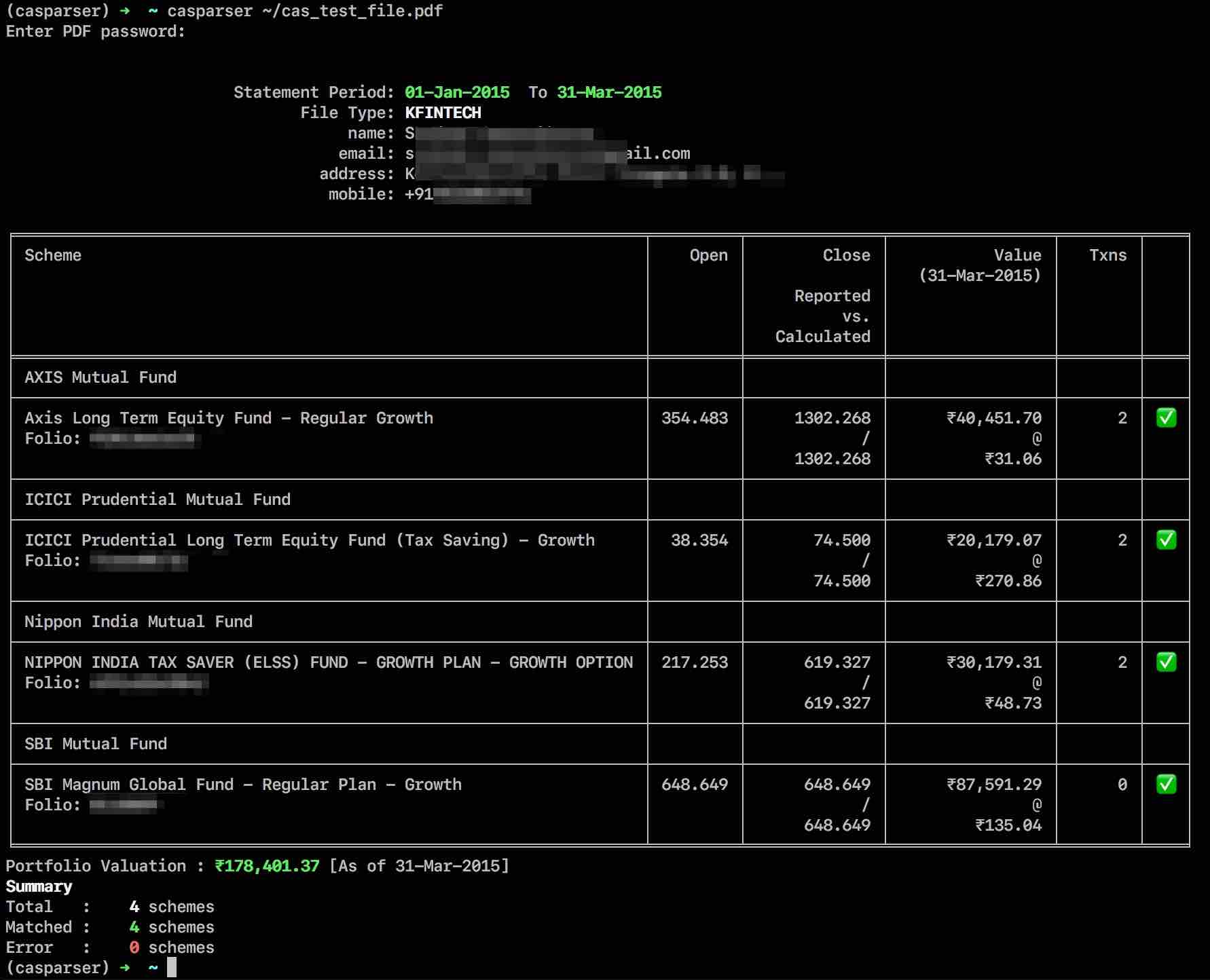
casparser also comes with a command-line interface that prints summary of parsed portfolio in a wide variety of formats.
Usage: casparser [-o output_file.json|output_file.csv] [-p password] [-s] [-a] CAS_PDF_FILE

  -o, --output FILE               Output file path. Saves the parsed data as json or csv
                                  depending on the file extension. For other extensions, the
                                  summary output is saved. [See note below]

  -s, --summary                   Print Summary of transactions parsed.
  -p PASSWORD                     CAS password
  -a, --include-all               Include schemes with zero valuation in the
                                  summary output
  -g, --gains                     Generate Capital Gains Report
  --gains-112a ask|FY2020-21      Generate Capital Gains Report - 112A format for
                                  a given financial year - Use 'ask' for a prompt
                                  from available options

  --version                       Show the version and exit.
  -h, --help                      Show this message and exit.
CLI examples
# Print portfolio summary
casparser /path/to/cas.pdf -p password

# Print portfolio and capital gains summary
casparser /path/to/cas.pdf -p password -g

# Save parsed data as a json file
casparser /path/to/cas.pdf -p password -o pdf_parsed.json

# Save parsed data as a csv file
casparser /path/to/cas.pdf -p password -o pdf_parsed.csv

# Save capital gains transactions in csv files (pdf_parsed-gains-summary.csv and
# pdf_parsed-gains-detailed.csv)
casparser /path/to/cas.pdf -p password -g -o pdf_parsed.csv
Note: casparser cli supports two special output file formats [-o file.json / file.csv]
json- complete parsed data is exported in json format (including investor info)csv- Summary info is exported in csv format if the input file is a summary statement or if a summary flag (-s/--summary) is passed as argument to the CLI. Otherwise, full transaction history is included in the export. If-gflag is present, two additional files '{basename}-gains-summary.csv', '{basename}-gains-detailed.csv' are created with the capital-gains data. If the statement contains inter-folio gift transfers, a '{basename}-gifts.csv' is also written. Gifts are listed in a separate informational section and are not included in the capital-gains figures — a gift is not a transfer for the donor, and the recipient's cost basis carries over from the donor (not present in a single CAS). This is a disclosure, not tax advice.- any other extension - The summary table is saved in the file.
Demo
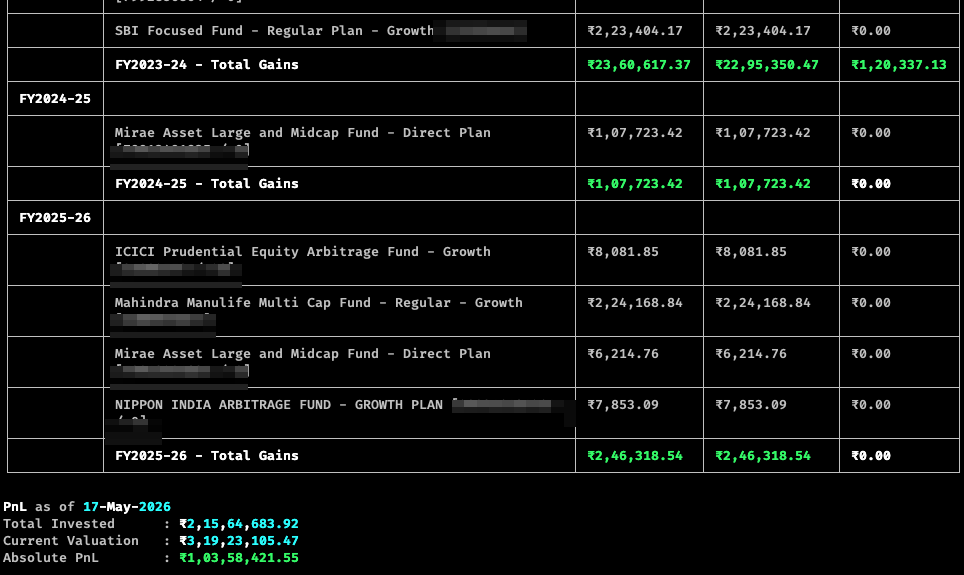
Capital gains, reconciled with the source
casparser computes your realised capital gains — and a ready-to-file
Schedule 112A CSV — directly from the CAS, fully offline. Nothing leaves
your machine.
The numbers reconcile to the paisa with the official CAMS and KFintech capital-gains statements — the same registrar records you file your return from. FY2025-26 on a sample portfolio:
| Fund | casparser | CAMS / KFin statement |
|---|---|---|
| ICICI Prudential Arbitrage | ₹8,081.85 | ₹8,081.86 |
| Mirae Asset Large & Midcap | ₹6,214.76 | ₹6,214.76 |
| Mahindra Manulife Multi Cap | ₹2,24,168.84 | ₹2,24,168.84 |
| Nippon India Arbitrage | ₹7,853.09 | ₹7,853.10 |
| Total LTCG | ₹2,46,318.54 | ₹2,46,318.56 |
Cost of acquisition includes buy-side stamp duty (s.55) and STT is not netted into the gain (s.48) — exactly how the registrars compute it.
💡 Run
casparser -gon your own CAS and reconcile against your CAMS/KFin capital-gains statement — they should line up. Reporting differences between tools usually come down to two things: whether buy-side stamp duty is included in the cost of acquisition (it should be), and whether every redeemed folio is captured. casparser does both, so you can verify it against the source.
ISIN & AMFI code support
Since v0.4.3, casparser includes support for identifying ISIN and AMFI code for the parsed schemes
via the helper module casparser-isin. If the parser
fails to assign ISIN or AMFI codes to a scheme, try updating the local ISIN database by
casparser-isin --update
If it still fails, please raise an issue at casparser-isin with the failing scheme name(s).
Related projects
casparser powers a small ecosystem of tools for working with your CAS data:
- folioman — self-hosted mutual
fund portfolio tracker. Imports your CAS via
casparserand tracks holdings, XIRR, and capital gains over time. - casparser-web — parse your
CAS in the browser. No install, runs
casparserso your statement never leaves your machine. - casparser-isin — the ISIN /
AMFI code database used by
casparserfor scheme identification.
License
CASParser is distributed under the MIT license.
Resources
- CAS from CAMS
- CAS from Karvy/Kfintech
- NSDL Consolidated Account Statement
- CDSL Consolidated Account Statement
Support the project
casparser is open-source and maintained in spare time. If it saved you time or helped you build something, here are a few ways to help:
- Leave a ⭐: A simple star goes a long way and helps others discover the project.
- Contribute: Found a bug, a missing statement format, or have a suggestion? Issues and pull requests are always welcome.
- Sponsor: If you'd like to support ongoing maintenance with a tip, you can sponsor the project via GitHub Sponsors or Buy Me A Coffee.
Everything is entirely optional — your feedback, issue reports, and contributions are what keep the project going.
1 maintainer

Metadata
1 maintainer
Release files for casparser 1.4.1
For a detailed explanation of source distributions (sdists) and built distributions (wheels), please see the package formats documentation.
Source distribution (sdist)
| File | Size | Uploaded | |
|---|---|---|---|
| casparser-1.4.1.tar.gz | 90.7 kB | Details |
Built distribution (wheel)
| File | Interpreter | ABI | Platform | Reset |
|---|---|---|---|---|
| casparser-1.4.1-py3-none-any.whl | Python 3 | none | any | Details |
Total release size: 191.1 kB
Release files / casparser-1.4.1.tar.gz
| Download URL | casparser-1.4.1.tar.gz |
|---|---|
| Size | 90.7 kB |
| Tags | Source |
|
SHA-256 checksum How to use checksums |
786346d494810f8809d614889b23d1a743f5f0e5621a9c9d64814ecc76c924b0
|
|
BLAKE2b-256 checksum How to use checksums |
022a9f259b08a76cf03e08196838da93c96e572b05f96232469e0b7873216620
|
| Upload date | |
|
Uploaded using Trusted Publishing? What is trusted publishing? |
Yes |
| Uploaded via |
uv/0.12.7 {"installer":{"name":"uv","version":"0.12.7","subcommand":["publish"]},"python":null,"implementation":{"name":null,"version":null},"distro":{"name":"Ubuntu","version":"24.04","id":"noble","libc":null},"system":{"name":null,"release":null},"cpu":null,"openssl_version":null,"setuptools_version":null,"rustc_version":null,"ci":true}
|
Release files / casparser-1.4.1-py3-none-any.whl
| Download URL | casparser-1.4.1-py3-none-any.whl |
|---|---|
| Size | 100.4 kB |
| Tags | Python 3 |
|
SHA-256 checksum How to use checksums |
fd4e1759cd889e79f4da39fa3e78e2199f392b3d45ff5e05347fcea9aecece68
|
|
BLAKE2b-256 checksum How to use checksums |
f1f67cfdddeb928ee9f7259713842ca93539f66f7475f9860d7b6608c1e4e432
|
| Upload date | |
|
Uploaded using Trusted Publishing? What is trusted publishing? |
Yes |
| Uploaded via |
uv/0.12.7 {"installer":{"name":"uv","version":"0.12.7","subcommand":["publish"]},"python":null,"implementation":{"name":null,"version":null},"distro":{"name":"Ubuntu","version":"24.04","id":"noble","libc":null},"system":{"name":null,"release":null},"cpu":null,"openssl_version":null,"setuptools_version":null,"rustc_version":null,"ci":true}
|














