
CastBot
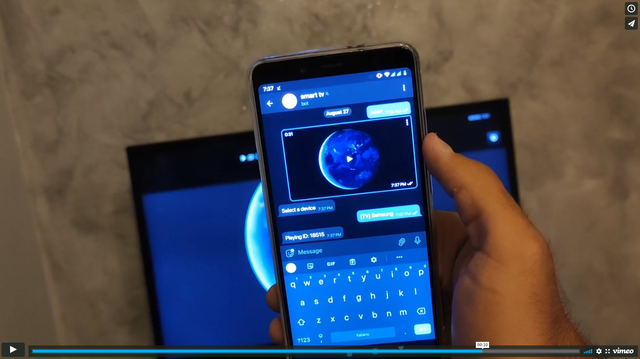
A Telegram Bot to stream contents (Telegram videos, Youtube videos and more) to your smart TV





Demonstration video
Feature
- Stream Telegram videos to any device that supports UPnP (AVTransport), Chromecast, Vlc (telnet api), Kodi (xbmc http api)
- Web interface that plays videos in your browser
- Download videos by URLs and stream to devices
Known issues
- Chromecast (1st, 2nd and 3rd Gen.) only supports H.264 and VP8 video codecs
- Most LG TVs with WebOS have an incorrect UPnP implementation
- This bot supports videos of ~4.5Mb/s bit rate at maximum. The videos of higher bit rate would keep freezing.
How to run castbot with pip
Create a configuration file config.toml and then run the following command
pip install castbot
castbot -c config.toml -v 1
Note: Make sure you have a version of Python 3.8+
How to run castbot with Docker
Create a configuration file config.toml and then run the following command
docker run --network host -v "$(pwd)/config.toml:/app/config.toml:ro" -d ghcr.io/zhongkechen/castbot:master
How to config
Create a file config.toml with the following content
[downloader]
# Use yt-dlp or you-get to download Youtube videos
downloader = "yt-dlp"

# how many concurrent downloads
concurrency = 10

[bot]

# `api_id` and `api_hash` can be generated here: https://core.telegram.org/api/obtaining_api_id
api_id=652324
api_hash="eb06d4abfb49dc3eeb1aeb9f581e"

# `token` can be created from https://telegram.me/BotFather
token="xxxxxxxxx"

# `session_name` can be an arbitary string.
session_name="castbot"

# Only users in this `admins` list can use this bot.
# Your own user id can be found here https://telegram.me/getuseridbot
admins=[337885031,32432424,44353421]

[http]

# The IP address or the hostname of the host running castbot
listen_host = "192.168.1.2"

# An arbitary port that is not in use
listen_port = 8350


# The following devices sections are optional. Add the sections you need.

[[devices]]
# When this section is added, all the UPNP devices in the local network will be auto-discovered.
# For Kodi, UPNP must be enabled in Settings -> Services -> UPNP/DLNA
# https://kodi.wiki/view/Settings/Services/UPnP_DLNA
type="upnp"

[[devices]]
# When this section is added, all the ChromeCast devices in the local network will be auto-discovered.
type="chromecast"

[[devices]]
# When this section is added, open http://`listen_host`:`listen_port`/static/index.html in a browser.
# Now if you send a video to the bot, you can choose to play it in the browser
type="web"
password="changeit"

[[devices]]
# When this section is added, we can play video on a device running VLC.
# VLC Telnet interface must be enabled.
type="vlc"
host = "127.0.0.1"
port = 4212
password = "123"

[[devices]]
# When UPNP is blocked by firewall, we can use this section to connect to Kodi.
# Remote Control of Kodi must be enabled: Settings -> Services -> Control.
# https://kodi.wiki/view/Settings/Services/Control
type="xbmc"
host = "192.168.42.140"
port = 8080
username = ""
password = ""
1 maintainer

Metadata
1 maintainer
Release files for castbot 1.6.0
For a detailed explanation of source distributions (sdists) and built distributions (wheels), please see the package formats documentation.
Source distribution (sdist)
| File | Size | Uploaded | |
|---|---|---|---|
| castbot-1.6.0.tar.gz | 32.9 kB | Details |
Built distribution (wheel)
| File | Interpreter | ABI | Platform | Reset |
|---|---|---|---|---|
| castbot-1.6.0-py3-none-any.whl | Python 3 | none | any | Details |
Total release size: 70.8 kB
Release files / castbot-1.6.0.tar.gz
| Download URL | castbot-1.6.0.tar.gz |
|---|---|
| Size | 32.9 kB |
| Tags | Source |
|
SHA-256 checksum How to use checksums |
4612af9ccab2ec197e9458d436a06d2b854a06f2a0388375dc64387717ccab60
|
|
BLAKE2b-256 checksum How to use checksums |
5d78bea7bd5c501dc0bfac4de9e50654d2a868d4c857ac779078c6da2279ed8f
|
| Upload date | |
|
Uploaded using Trusted Publishing? What is trusted publishing? |
No |
| Uploaded via |
twine/6.2.0 CPython/3.9.25
|
Release files / castbot-1.6.0-py3-none-any.whl
| Download URL | castbot-1.6.0-py3-none-any.whl |
|---|---|
| Size | 37.9 kB |
| Tags | Python 3 |
|
SHA-256 checksum How to use checksums |
5719ffda4d23af0a4d61b3f4eb92b8113b7af560929586528bf389569ce2a766
|
|
BLAKE2b-256 checksum How to use checksums |
b6d117c2c158278ee221deb64713f61ce92b68d99aae3865c67e34225640b572
|
| Upload date | |
|
Uploaded using Trusted Publishing? What is trusted publishing? |
No |
| Uploaded via |
twine/6.2.0 CPython/3.9.25
|














