


catface s a Command Line Interface (CLI) tool that helps you create Python projects with best practices built-in. It uses cookiecutter under the hood to provide project templates that you can customize based on your needs.
Features
-
Documentation (MkDocs)
- Automatic API documentation
- Material design theme
- Ready-to-deploy structure
-
Docker Integration
- Multi-stage builds
- Production-ready configuration
- Python version specific base images
-
Development Tools
- Pre-commit hooks for code quality
- Ruff for fast linting and formatting
- Tox for testing across Python versions
Quick Start
# Install Catface
pip install catface

# Create a new project
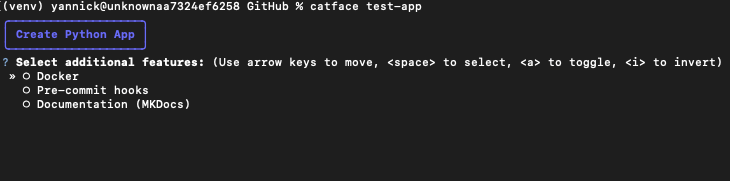
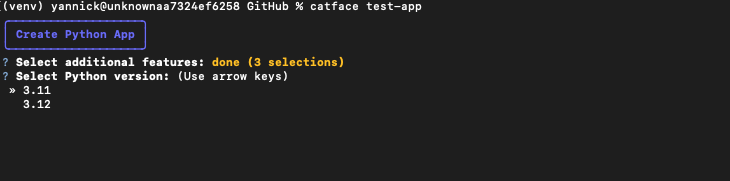
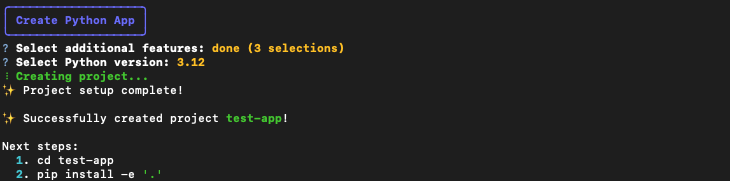
catface my-awesome-project
Project structure
The final project structure is going to be something like this based on the features you choose.
Pre-configured Tox file
- Task automation: Using Tox we can automate repetitive tasks
- Test against multiple Python versions
- Environment management: Using Tox we can create different environments each with its dependencies
- Lint and format code using Ruff
# Cd inside your project
cd my-awesome-project

tox # runs all environments
tox -e <env_name> # running each environment individually by name
tox -p all # parallel execution
1 maintainer

Release files for catface 0.1.5
For a detailed explanation of source distributions (sdists) and built distributions (wheels), please see the package formats documentation.
Source distribution (sdist)
| File | Size | Uploaded | |
|---|---|---|---|
| catface-0.1.5.tar.gz | 10.5 kB | Details |
Built distribution (wheel)
| File | Interpreter | ABI | Platform | Reset |
|---|---|---|---|---|
| catface-0.1.5-py3-none-any.whl | Python 3 | none | any | Details |
Total release size:23.8 kB
Release files / catface-0.1.5.tar.gz
| Download URL | catface-0.1.5.tar.gz |
|---|---|
| Size | 10.5 kB |
| Tags | Source |
|
SHA-256 checksum How to use checksums |
38daa5b0e90a49b27f57e76769a8b157d7c726c39e37b842d8347f0508dcd8b9
|
|
BLAKE2b-256 checksum How to use checksums |
61ec0e1c62d679875a0b7d64160179c2990025fecbd80b37ac577fe609997a74
|
| Upload date | |
|
Uploaded using Trusted Publishing? What is trusted publishing? |
No |
| Uploaded via |
twine/6.0.1 CPython/3.12.4
|
Release files / catface-0.1.5-py3-none-any.whl
| Download URL | catface-0.1.5-py3-none-any.whl |
|---|---|
| Size | 13.3 kB |
| Tags | Python 3 |
|
SHA-256 checksum How to use checksums |
ec709c8f211e9f69fc537b6d1f680a8873427bb6aa10856b15c8aab19daceb15
|
|
BLAKE2b-256 checksum How to use checksums |
f0d6020776e5ddfe6ce6e9157475ed6e0b4cdc72f869b028c2b3e4f6e75aacfe
|
| Upload date | |
|
Uploaded using Trusted Publishing? What is trusted publishing? |
No |
| Uploaded via |
twine/6.0.1 CPython/3.12.4
|














