
AWS IAM Role/Policy permission viewer — see what a role or policy can do

Project description
catrole

AWS IAM visibility tool — inspect roles, policies, users, groups, and AWS Identity Center permission sets across your organization.
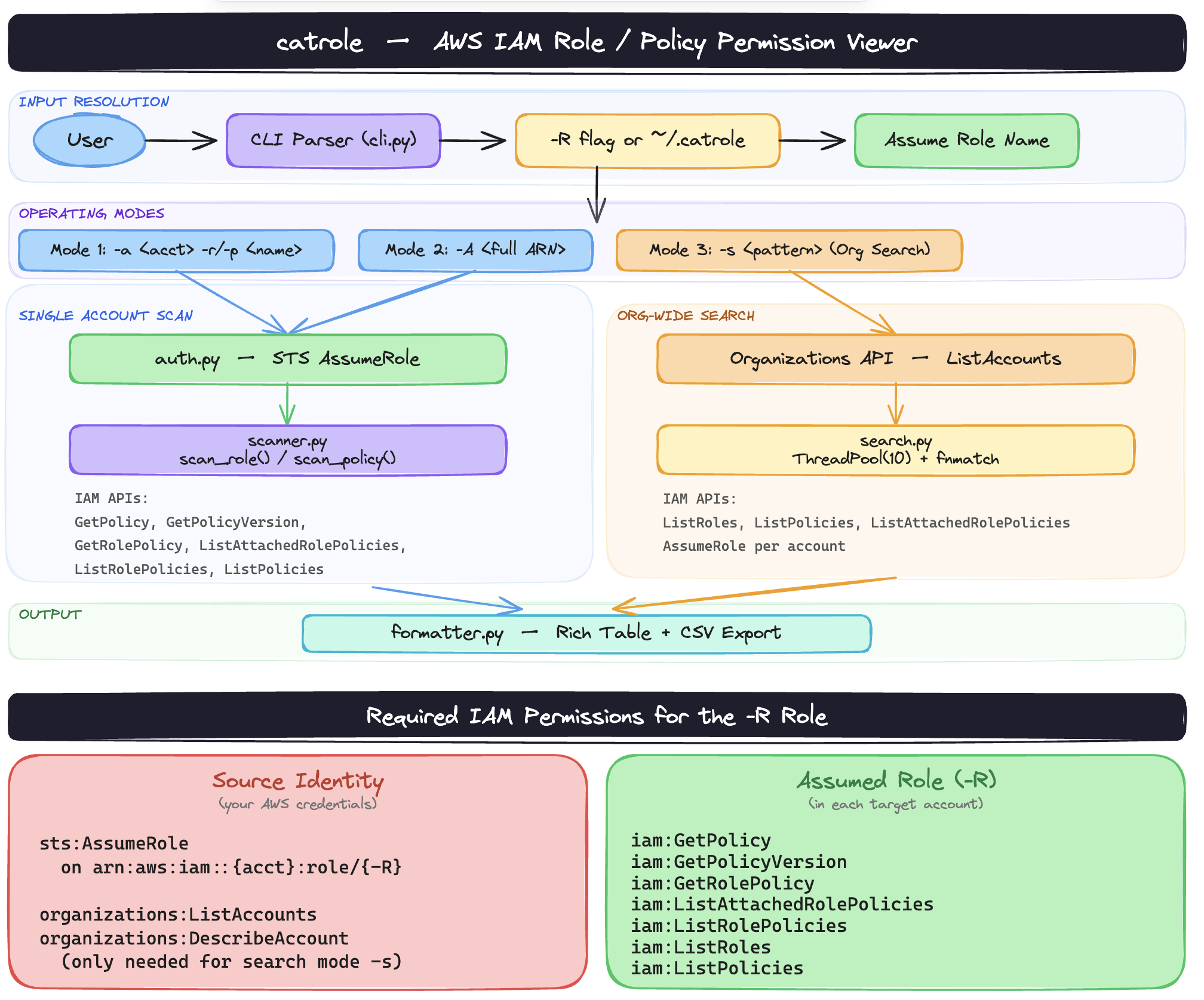
Architectural Diagram
Requirements
- Python >= 3.11
- AWS credentials configured (via
~/.aws/credentials, environment variables, or SSO) - A cross-account IAM role you can assume in target account(s)
Installation
From PyPI
pip3 install catrole
From source
git clone https://github.com/RajChowdhury240/catrole.git
cd catrole
pip3 install .
For development (editable install):
pip3 install -e .
How it works
catrole uses -R to specify an IAM role to assume in the target account via STS. All API calls are made using the temporary credentials from that assumed role.
If -R is not provided, catrole reads the role name from ~/.catrole.
Setting a default assume role
echo "readonly-role" > ~/.catrole
Once set, you can omit -R from all commands. -R on the command line always takes precedence over ~/.catrole.
Modes
1. Scan a role
Shows all attached (managed + inline) policies for an IAM role, flattened into individual permission rows.
catrole -R readonly-role -a 123456789012 -r AppRole
2. Scan a policy
Shows all statements in a customer-managed or AWS-managed policy.
catrole -R readonly-role -a 123456789012 -p MyPolicy
3. Scan by ARN
Directly specify the full ARN of a role or policy — account ID is extracted automatically.
catrole -R readonly-role -A arn:aws:iam::123456789012:role/AppRole
catrole -R readonly-role -A arn:aws:iam::123456789012:policy/MyPolicy
4. Search roles/policies by name pattern
Wildcard search for roles and policies by name. Searches all active accounts in the AWS Organization by default, or scope it to a single account with -a.
# Org-wide
catrole -R readonly-role -s '*lambda*'

# Single account
catrole -R readonly-role -s '*admin*' -a 123456789012
Wildcards: * matches any sequence of characters, ? matches a single character.
5. Find roles by IAM action
Search for roles whose policies grant a specific IAM action. Supports wildcards. Searches all org accounts or a single account.
# Find all roles that can create S3 buckets
catrole -R readonly-role -f 's3:CreateBucket'

# Find all roles with any S3 permission
catrole -R readonly-role -f 's3:*'

# Scope to a single account
catrole -R readonly-role -f 's3:*' -a 123456789012
Matching is bidirectional: a policy with s3:* matches a search for s3:CreateBucket, and a search for s3:* matches a policy with a specific action like s3:PutObject.
6. Scan an IAM user
Shows a complete profile for an IAM user including:
- User metadata (ARN, User ID, path, creation date, password last used)
- Access keys — Key ID, status (Active/Inactive), creation date, last used date, region, and service
- MFA devices — serial number and enabled date (warns if no MFA is configured)
- Group memberships
- Direct permissions — all attached managed and inline policies directly on the user
- Group-inherited permissions — policies from every group the user belongs to, shown per group
catrole -R readonly-role -a 123456789012 -u john.doe
The CSV export includes a Source column indicating whether each permission row comes from Direct attachment or a specific Group:<name>.
7. Scan an IAM group
Shows a complete profile for an IAM group including:
- Group metadata (ARN, Group ID, path, creation date)
- All members (user name, ARN, creation date)
- All permissions — attached managed and inline policies, flattened into individual rows
catrole -R readonly-role -a 123456789012 -g MyDevGroup
8. Scan an AWS Identity Center permission set
Shows a complete profile for an IDC permission set including:
- Permission set metadata (ARN, instance ARN, identity store ID, description, session duration, relay state)
- AWS managed policies attached to the permission set
- Customer managed policy references
- Inline policy (pretty-printed JSON)
- All provisioned accounts and principal assignments — every user and group assigned to the permission set across all provisioned accounts, with names resolved via the Identity Store
catrole -R readonly-role -a 123456789012 -P MyPermissionSet --region us-east-1
--regionis required when your Identity Center instance is not in your shell's default AWS region. Thesso-adminandidentitystoreAPIs are regional and must target the region where IDC was set up (commonlyus-east-1).
Output
Every scan prints a colour-coded Rich table to the terminal and automatically saves results to a timestamped CSV file in the current directory.
| Mode | CSV filename pattern |
|---|---|
| Role | iam-role_<account>_<name>_<ts>.csv |
| Policy | iam-policy_<account>_<name>_<ts>.csv |
| Search | iam-search_<pattern>_<ts>.csv |
| Action search | iam-action-search_<pattern>_<ts>.csv |
| User | iam-user_<account>_<name>_<ts>.csv |
| Group | iam-group_<account>_<name>_<ts>.csv |
| Permission Set | idc-permset_<account>_<name>_<ts>.csv |
All flags
  -R, --assume-role ROLE      IAM role to assume in target account(s) (or set via ~/.catrole)
  -a, --account ACCOUNT       AWS account ID (12 digits)
  -r, --role ROLE             IAM role name to scan
  -p, --policy POLICY         IAM policy name to scan
  -A, --arn ARN               Full ARN of an IAM role or policy
  -s, --search PATTERN        Wildcard pattern to search role/policy names across org
  -f, --find-action ACTION    IAM action pattern to find in role policies across org
  -u, --user USER             IAM user name to scan
  -g, --group GROUP           IAM group name to scan
  -P, --permission-set NAME   IDC permission set name to scan
      --region REGION         AWS region for IDC (required with -P if not your default region)
  -v, --version               Show version and exit
  -h, --help                  Show help and exit
Run catrole -h for full help.
Release history Release notifications | RSS feed


Download files
Download the file for your platform. If you're not sure which to choose, learn more about installing packages.
Source Distribution
Built Distribution
Filter files by name, interpreter, ABI, and platform.
If you're not sure about the file name format, learn more about wheel file names.
Copy a direct link to the current filters
File details
Details for the file catrole-0.3.0.tar.gz.
File metadata
- Download URL: catrole-0.3.0.tar.gz
- Upload date:
- Size: 19.5 kB
- Tags: Source
- Uploaded using Trusted Publishing? No
- Uploaded via: twine/6.2.0 CPython/3.14.0
File hashes
| Algorithm | Hash digest | |
|---|---|---|
| SHA256 |
db83490649f2498951d5d3d05ce853059b2246881c6d8a7325001dd8f8e95278
|
|
| MD5 |
d9c43a7ed6692c85c67ef36b64b0611e
|
|
| BLAKE2b-256 |
cb462ea833a570879af3e68808150be4bd7463b39aea06af86a274d7e308c1dc
|
File details
Details for the file catrole-0.3.0-py3-none-any.whl.
File metadata
- Download URL: catrole-0.3.0-py3-none-any.whl
- Upload date:
- Size: 20.0 kB
- Tags: Python 3
- Uploaded using Trusted Publishing? No
- Uploaded via: twine/6.2.0 CPython/3.14.0
File hashes
| Algorithm | Hash digest | |
|---|---|---|
| SHA256 |
462888617483c59625f5908f8337a03349fce1217292749645053d11d1ce153f
|
|
| MD5 |
7a0a47daae40e0e2acd36207a3edd5fe
|
|
| BLAKE2b-256 |
87b0d5dd2938b06de5bb713a6c5b0e626d6374c0eae2324215a73f14a98e90e9
|






