
EN | 简体中文
causal-strength  : Measure the Strength Between Cause and Effect


causal-strength is a Python package for evaluating the causal strength between statements using various metrics such as CESAR (Causal Embedding aSsociation with Attention Rating). This package leverages pre-trained models available on Hugging Face Transformers for efficient and scalable computations.
Table of Contents
📜 Citation 
If you find this package helpful, please star this repository causal-strength and the related repository: defeasibility-in-causality. For academic purposes, please cite our paper:
@inproceedings{cui-etal-2024-exploring,
    title = "Exploring Defeasibility in Causal Reasoning",
    author = "Cui, Shaobo  and
      Milikic, Lazar  and
      Feng, Yiyang  and
      Ismayilzada, Mete  and
      Paul, Debjit  and
      Bosselut, Antoine  and
      Faltings, Boi",
    booktitle = "Findings of the Association for Computational Linguistics ACL 2024",
    month = aug,
    year = "2024",
    address = "Bangkok, Thailand and virtual meeting",
    publisher = "Association for Computational Linguistics",
    url = "https://aclanthology.org/2024.findings-acl.384",
    doi = "10.18653/v1/2024.findings-acl.384",
    pages = "6433--6452",
}
🌟 Features 
- Causal Strength Evaluation: Compute the causal strength between two statements using models like CESAR.
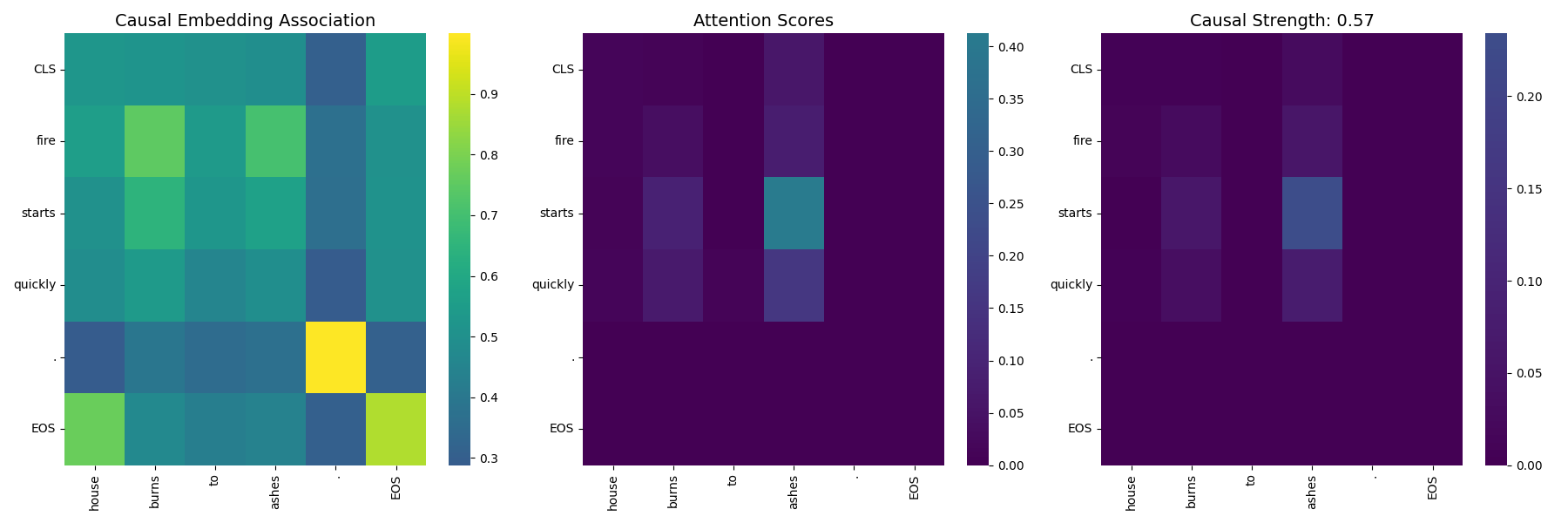
- Visualization Tools: Generate heatmaps to visualize attention and similarity scores between tokens.
- Extensibility: Easily add new metrics and models for evaluation.
- Hugging Face Integration: Load models directly from the Hugging Face Model Hub.
🚀 Installation 
Prerequisites
- Python 3.7 or higher
- PyTorch (for GPU support, ensure CUDA is properly configured)
Steps
-
Install it directly from PyPI
pip install causal-strength
-
Install it from source code
git clone https://github.com/cui-shaobo/causal-strength.git
cd causal-strength
pip install .
🛠️ Usage 
Quick Start
Here's a quick example to evaluate the causal strength between two statements:
from causalstrength import evaluate

# Test CESAR Model
s1_cesar = "Tom is very hungry now."
s2_cesar = "He goes to McDonald for some food."

print("Testing CESAR model:")
cesar_score = evaluate(s1_cesar, s2_cesar, model_name='CESAR', model_path='shaobocui/cesar-bert-large')
print(f"CESAR Causal strength between \"{s1_cesar}\" and \"{s2_cesar}\": {cesar_score:.4f}")
This will output the following without errors:
Testing CESAR model:
CESAR Causal strength between "Tom is very hungry now." and "He goes to McDonald for some food.": 0.4482
Evaluating Causal Strength
The evaluate function computes the causal strength between two statements.
-
For the CESAR model.
from causalstrength import evaluate

# Test CESAR Model
s1_cesar = "Tom is very hungry now."
s2_cesar = "He goes to McDonald for some food."

print("Testing CESAR model:")
cesar_score = evaluate(s1_cesar, s2_cesar, model_name='CESAR', model_path='shaobocui/cesar-bert-large')
print(f"CESAR Causal strength between \"{s1_cesar}\" and \"{s2_cesar}\": {cesar_score:.4f}")
This will now output the following without errors:
Testing CESAR model:
CESAR Causal strength between "Tom is very hungry now." and "He goes to McDonald for some food.": 0.4482
-
For the CEQ model
 from causalstrength import evaluate

 # Test CEQ Model
 s1_ceq = "Tom is very hungry now."
 s2_ceq = "He goes to McDonald for some food."

 print("\nTesting CEQ model:")
 ceq_score = evaluate(s1_ceq, s2_ceq, model_name='CEQ')
 print(f"CEQ Causal strength between \"{s1_ceq}\" and \"{s2_ceq}\": {ceq_score:.4f}")
This will now output the following without errors:
Testing CEQ model:
CEQ Causal strength between "Tom is very hungry now." and "He goes to McDonald for some food.": 0.0168
Parameters:
s1(str): The cause statement.s2(str): The effect statement.model_name(str): The name of the model to use ('CESAR','CEQ', etc.).model_path(str): Hugging Face model identifier or local path to the model.
Generating Causal Heatmaps
Visualize the attention and similarity scores between tokens using heatmaps.
from causalstrength.visualization.causal_heatmap import plot_causal_heatmap

# Statements to visualize
s1 = "Tom is very hungry now."
s2 = "He goes to McDonald for some food."

# Generate heatmap
plot_causal_heatmap(
    s1,
    s2,
    model_name='shaobocui/cesar-bert-large',
    save_path='causal_heatmap.png'
)
This will now output the following without errors:
Testing CESAR model:
Warning: The sliced score_map dimensions do not match the number of tokens.
The causal heatmap is saved to ./figures/causal_heatmap.png
The causal heatmap is as follows:
📚 References 
- Cui, Shaobo, et al. "Exploring Defeasibility in Causal Reasoning." Findings of the Association for Computational Linguistics ACL 2024. 2024.
- Du, Li, et al. "e-CARE: a New Dataset for Exploring Explainable Causal Reasoning." Proceedings of the 60th Annual Meeting of the Association for Computational Linguistics (Volume 1: Long Papers). 2022.
1 maintainer

Metadata
1 maintainer
Release files for causal-strength 0.1.0
For a detailed explanation of source distributions (sdists) and built distributions (wheels), please see the package formats documentation.
Source distribution (sdist)
| File | Size | Uploaded | |
|---|---|---|---|
| causal-strength-0.1.0.tar.gz | 14.2 kB | Details |
Release files / causal-strength-0.1.0.tar.gz
| Download URL | causal-strength-0.1.0.tar.gz |
|---|---|
| Size | 14.2 kB |
| Tags | Source |
|
SHA-256 checksum How to use checksums |
1ffb2cc426302a64bfbb51cba18c20056d5c09b8bab0a5cdf38df4c70e611536
|
|
BLAKE2b-256 checksum How to use checksums |
bd5e9168dae1a17c4e69376913920b63f76e75c196d38b049c13fa61e74bf7cd
|
| Upload date | |
|
Uploaded using Trusted Publishing? What is trusted publishing? |
No |
| Uploaded via |
twine/5.1.1 CPython/3.9.6
|













