
Causal Validation
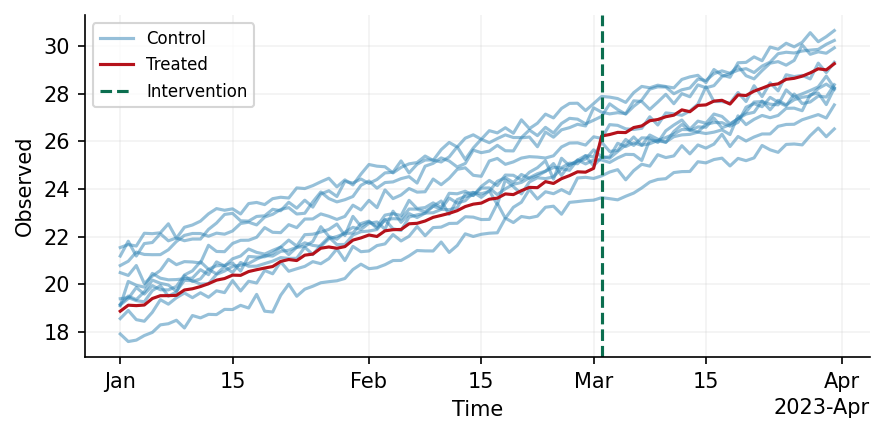
This package provides functionality to define your own causal data generation process and then simulate data from the process. Within the package, there is functionality to include complex components to your process, such as periodic and temporal trends, and all of these operations are fully composable with one another.
A short example is given below
from causal_validation import Config, simulate
from causal_validation.effects import StaticEffect
from causal_validation.plotters import plot
from causal_validation.transforms import Trend, Periodic
from causal_validation.transforms.parameter import UnitVaryingParameter
from scipy.stats import norm

cfg = Config(
    n_control_units=10,
    n_pre_intervention_timepoints=60,
    n_post_intervention_timepoints=30,
)

# Simulate the base observation
base_data = simulate(cfg)

# Apply a linear trend with unit-varying intercept
intercept = UnitVaryingParameter(sampling_dist = norm(0, 1))
trend_component = Trend(degree=1, coefficient=0.1, intercept=intercept)
trended_data = trend_component(base_data)

# Simulate a 5% lift in the treated unit's post-intervention data
effect = StaticEffect(0.05)
inflated_data = effect(trended_data)

# Plot your data
plot(inflated_data)
Examples
To supplement the above example, we have two more detailed notebooks which exhaustively present and explain the functionalty in this package, along with how the generated data may be integrated with AZCausal.
- Data Synthesis: We here show the full range of available functions for data generation.
- Placebo testing: Validate your model(s) using placebo tests.
- AZCausal notebook: We here show how the generated data may be used within an AZCausal model.
Installation
In this section we guide the user through the installation of this package. We distinguish here between users of the package who seek to define their own data generating processes, and developers who wish to extend the existing functionality of the package.
Prerequisites
- Python 3.10 or higher
- Hatch (optional, but recommended for developers)
To install the latest stable version, run
pip install causal-validation
in your terminal.
For Users
- It's strongly recommended to use a virtual environment. Create and activate one using your preferred method before proceeding with the installation.
- Clone the package
git clone git@github.com:amazon-science/causal-validation.git - Enter the package's root directory
cd causal-validation - Install the package
pip install -e .
For Developers
- Follow steps 1-3 from
For Users - Create a hatch environment
hatch env create - Open a hatch shell
hatch shell - Validate your installation by running
hatch run dev:test
1 maintainer

Metadata
1 maintainer
Release files for causal-validation 0.0.9
For a detailed explanation of source distributions (sdists) and built distributions (wheels), please see the package formats documentation.
Source distribution (sdist)
| File | Size | Uploaded | |
|---|---|---|---|
| causal_validation-0.0.9.tar.gz | 16.7 kB | Details |
Built distribution (wheel)
| File | Interpreter | ABI | Platform | Reset |
|---|---|---|---|---|
| causal_validation-0.0.9-py3-none-any.whl | Python 3 | none | any | Details |
Total release size: 39.9 kB
Release files / causal_validation-0.0.9.tar.gz
| Download URL | causal_validation-0.0.9.tar.gz |
|---|---|
| Size | 16.7 kB |
| Tags | Source |
|
SHA-256 checksum How to use checksums |
d1300cac2af7591c76d9dfadf752130326514754eab1afdf582546916a5c5aad
|
|
BLAKE2b-256 checksum How to use checksums |
455a1e8fd1564308baeaeede6b1c45e3ec33a2c09835f45fbeb490ac042d4664
|
| Upload date | |
|
Uploaded using Trusted Publishing? What is trusted publishing? |
No |
| Uploaded via |
twine/5.1.1 CPython/3.10.12
|
Release files / causal_validation-0.0.9-py3-none-any.whl
| Download URL | causal_validation-0.0.9-py3-none-any.whl |
|---|---|
| Size | 23.2 kB |
| Tags | Python 3 |
|
SHA-256 checksum How to use checksums |
262b800897b2e9ae12020de990b750caf55014f43c8954dc82d96bdd60baface
|
|
BLAKE2b-256 checksum How to use checksums |
6eca295c26cfd7845d9e66abb37fa4dac7d792043ff83c9a09455ffca170c9c4
|
| Upload date | |
|
Uploaded using Trusted Publishing? What is trusted publishing? |
No |
| Uploaded via |
twine/5.1.1 CPython/3.10.12
|














