
CaveFiller
A Python tool to find and fill protein cavities with water molecules using KVFinder, Monte Carlo sampling, and RDKit-based explicit water generation.
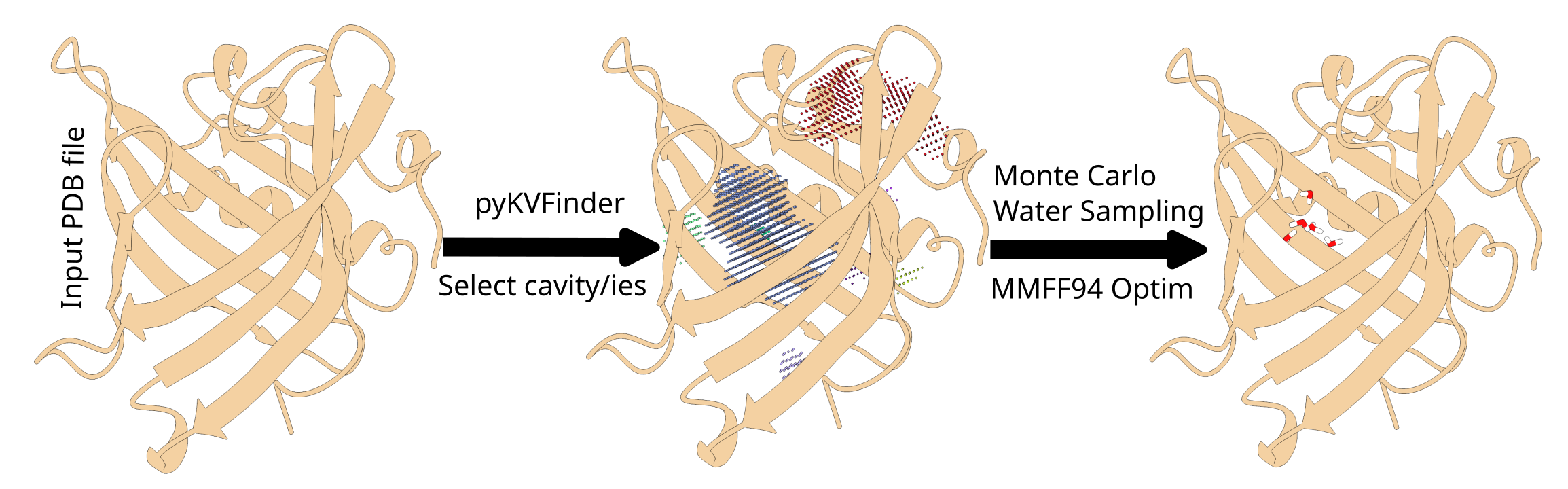
ities to fill with user-defined water counts
- Monte Carlo Sampling: Places water molecules using Monte Carlo sampling with clash detection
- Explicit Waters: Builds full H-O-H waters with RDKit (including hydrogens)
- CLI Interface: Easy-to-use command-line interface built with Typer
Installation
Prerequisites
- Python: Python 3.8 or higher
Install CaveFiller
You can install this via pip by running:
pip install cavefiller
Or install it from here - from source to get the newest version:
pip install git+https://github.com/Desperadus/CaveFiller
alternatively
# Clone the repository
git clone https://github.com/Desperadus/CaveFiller.git
cd CaveFiller

# Install the package
pip install -e .
Install with OpenMM support:
pip install -e ".[openmm]"
Using uv (recommended for lock-managed environments):
uv sync --extra openmm
Usage
Basic Usage
cavefiller protein.pdb
This will:
- Detect cavities in
protein.pdb - Display a list of found cavities with their volumes and areas
- Prompt you to select which cavities to fill
- Prompt you for the number of water molecules per cavity
- Place waters using Monte Carlo sampling with clash detection
- Build explicit RDKit H-O-H waters and export a combined PDB
- Save the output to
./output/protein_filled.pdb
Command-line Options
cavefiller [PROTEIN_FILE] [OPTIONS]
Arguments:
PROTEIN_FILE: Path to the protein PDB file (required)
Options:
--output-dir PATH: Directory to save output files (default:./output)--grid-step FLOAT: Grid spacing for cavity detection in Ångströms (default: 0.6)--probe-in FLOAT: Probe In radius for cavity detection in Ångströms (default: 1.4)--probe-out FLOAT: Probe Out radius for cavity detection in Ångströms (default: 4.0)--exterior-trim-distance FLOAT: Exterior trim distance in Ångströms (default: 2.4)--volume-cutoff FLOAT: Minimum cavity volume to consider in Ų (default: 5.0)--auto-select: Automatically select all cavities without user interaction--cavity-ids TEXT: Comma-separated list of cavity IDs to fill (e.g., '1,2,3')--waters-per-cavity TEXT: Comma-separated list of water counts (e.g., '10,15,20'), must match cavity-ids order--optimize-mmff94 / --no-optimize-mmff94: Enable/disable MMFF94 with protein fixed - Note IT IS VERY SLOW ON BIGGER COMPLEXES (default: enabled)--mmff-max-iterations INTEGER: Max MMFF94 iterations (default: 300)--optimize-openmm / --no-optimize-openmm: Enable/disable OpenMM minimization with AMBER14/TIP3P and standard energy minimization; protein atoms are fixed by zero mass (takes precedence over MMFF94 when active)--cuda / --no-cuda: When OpenMM is enabled, require CUDA platform (fails if unavailable) (default: disabled)--openmm-max-iterations INTEGER: Max OpenMM minimization iterations (default: 500)--keep-all: Keep all optimized waters (skip post-optimization clash-based dropping) (default: disabled)
Recommended usage:
- Prefer interactive/manual cavity and water-count selection over
--auto-select. Auto-selection often overfills cavities with too many waters. - If OpenMM is installed and MMFF94 optimization is enabled, CaveFiller will prefer OpenMM automatically.
- Use
--optimize-openmmif OpenMM is installed and you want stronger relaxation of residual clashes. - Otherwise keep
--optimize-mmff94enabled to refine water placement after Monte Carlo sampling. - Use
--keep-allif you want to keep all waters after OpenMM/MMFF94.
Examples
Interactive cavity and water selection:
cavefiller protein.pdb --output-dir results
Auto-select all cavities with default water counts (not generally recommended):
cavefiller protein.pdb --auto-select
Fill specific cavities with specific water counts:
cavefiller protein.pdb --cavity-ids "1,3,5" --waters-per-cavity "10,15,20"
Custom cavity detection parameters:
cavefiller protein.pdb --grid-step 0.6 --probe-in 1.4 --probe-out 4.0 --exterior-trim-distance 2.4 --volume-cutoff 5.0
Workflow
- Cavity Detection: The tool uses pyKVFinder to detect cavities in the input protein structure
- Cavity Analysis: Displays information about detected cavities (ID, volume, surface area)
- Cavity Selection:
- Interactive mode: User selects cavities and specifies water counts
- Auto mode: All cavities are selected with automatic water count estimation
- Command-line mode: Specific cavities and water counts are pre-selected
- Water Placement:
- Monte Carlo sampling places waters randomly in cavity
- Clash detection validates each position against protein atoms and other waters
- Uses Van der Waals radii for distance calculations
- RDKit Water Construction:
- Explicit H-O-H waters are generated with ideal geometry
- Waters include hydrogens and proper HOH residue records in the output PDB
Algorithm Details
Monte Carlo Sampling
- Samples around cavity grid points with small local jitter
- Validates position stays near cavity voxels (< 0.7 Å from a grid point)
- Checks for clashes with protein atoms (minimum distance based on VDW radii)
- Checks for clashes with other waters (minimum 2.7 Å separation)
- Attempts up to 500 placements per water molecule
Clash Detection
- Uses Van der Waals radii for different atom types (H, C, N, O, S, P)
- Minimum water-protein distance: 2.35 Å
- Minimum water-water distance: 2.7 Å
- Tolerance of 0.5 Å for VDW overlap
RDKit Water Geometry
- Creates proper H-O-H geometry for each water
- Writes explicit HOH residues (O, H1, H2) into output PDB
Output
The tool generates the following files in the output directory:
protein_filled.pdb: Protein structure with explicit water molecules in selected cavities
Dependencies
- typer: CLI framework
- pyKVFinder: Cavity detection
- rdkit: Molecular manipulation and explicit water generation
- numpy: Numerical operations
- biopython: PDB file handling
- openmm (optional extra): OpenMM minimization with optional pdbfixer fallback for topology repair
Development
Running Tests
uv sync --group dev
uv run pytest
License
See LICENSE file for details.
Citation
If you use CaveFiller in your research, please cite:
- pyKVFinder: Guerra et al. (2020) BMC Bioinformatics
- RDKit: RDKit: Open-source cheminformatics; http://www.rdkit.org
Contributing
Contributions are welcome! Please feel free to submit a Pull Request.
1 maintainer

Metadata
1 maintainer
Release files for cavefiller 0.4.2
For a detailed explanation of source distributions (sdists) and built distributions (wheels), please see the package formats documentation.
Source distribution (sdist)
| File | Size | Uploaded | |
|---|---|---|---|
| cavefiller-0.4.2.tar.gz | 28.4 kB | Details |
Built distribution (wheel)
| File | Interpreter | ABI | Platform | Reset |
|---|---|---|---|---|
| cavefiller-0.4.2-py3-none-any.whl | Python 3 | none | any | Details |
Total release size: 53.6 kB
Release files / cavefiller-0.4.2.tar.gz
| Download URL | cavefiller-0.4.2.tar.gz |
|---|---|
| Size | 28.4 kB |
| Tags | Source |
|
SHA-256 checksum How to use checksums |
653c0ad854ad7a85a1fe6816a51c3892676ae0ce1ea40a7e7bf1b118f318d4fb
|
|
BLAKE2b-256 checksum How to use checksums |
c7bb55fe162533b6e11b47e15af756e0b976103c9539ab2ed04fae3ded8dd7ee
|
| Upload date | |
|
Uploaded using Trusted Publishing? What is trusted publishing? |
Yes |
| Uploaded via |
twine/6.1.0 CPython/3.13.7
|
Provenance
Provenance describes where a file came from. On PyPI, provenance is shared via attestations, which provide a verifiable record of the build or publishing details. View details, limitations and caveats.


PyPI Publish Attestation
PyPI verified that this artifact, at this checksum, originated from the publisher listed below.
Signed by GitHub Actions, verified by PyPI on Mar 3, 2026.
Transparency logRelease files / cavefiller-0.4.2-py3-none-any.whl
| Download URL | cavefiller-0.4.2-py3-none-any.whl |
|---|---|
| Size | 25.2 kB |
| Tags | Python 3 |
|
SHA-256 checksum How to use checksums |
41ab83b57faf1141f67d133e48c29fd120639996824bb8acdbf568c825c71a24
|
|
BLAKE2b-256 checksum How to use checksums |
e2ac249b9685cb341697418328170ac0bded56ecea3930305c53bd04ead48b45
|
| Upload date | |
|
Uploaded using Trusted Publishing? What is trusted publishing? |
Yes |
| Uploaded via |
twine/6.1.0 CPython/3.13.7
|
Provenance
Provenance describes where a file came from. On PyPI, provenance is shared via attestations, which provide a verifiable record of the build or publishing details. View details, limitations and caveats.
PyPI Publish Attestation
PyPI verified that this artifact, at this checksum, originated from the publisher listed below.
Signed by GitHub Actions, verified by PyPI on Mar 3, 2026.
Transparency log













