
A PyTorch-based library for Control Barrier Functions (CBF) and safe control

Project description
CBFTorch: Control Barrier Functions in PyTorch


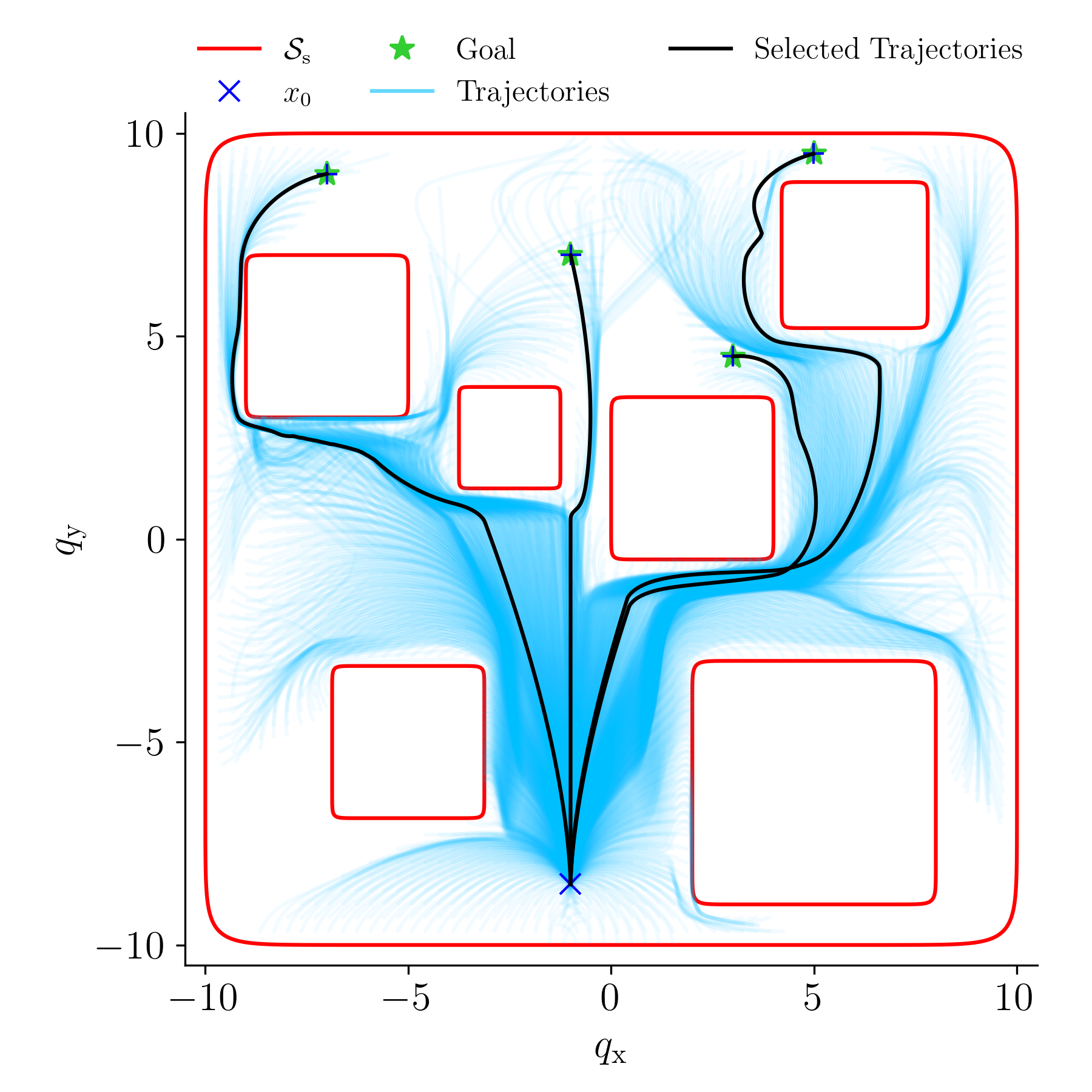
CBFTorch is a PyTorch-based library for implementing Control Barrier Functions (CBFs) and higher-order CBFs for safe control of dynamical systems. It provides a flexible and efficient framework for constructing safety filters using barrier functions with closed-form solutions.
Installation
Quick Install
pip install cbftorch
Prerequisites
CBFTorch requires PyTorch. Since PyTorch installation depends on your system's CUDA version, you may need to install it separately:
For CUDA 12.4 (latest):
pip install torch torchvision torchaudio --index-url https://download.pytorch.org/whl/cu124
pip install cbftorch
For CUDA 11.8:
pip install torch torchvision torchaudio --index-url https://download.pytorch.org/whl/cu118
pip install cbftorch
For CPU only:
pip install torch torchvision torchaudio --index-url https://download.pytorch.org/whl/cpu
pip install cbftorch
Development Installation
For development, clone the repository and install in editable mode:
git clone https://github.com/pedramrabiee/cbftorch.git
cd cbftorch
pip install -e .
Conda Environment
For a complete environment setup, use the provided environment.yml:
git clone https://github.com/pedramrabiee/cbftorch.git
cd cbftorch
conda env create -f environment.yml
conda activate cbftorch
System Dependencies
For full functionality (including LaTeX rendering in plots), install:
Ubuntu/Debian:
sudo apt-get install texlive-latex-base texlive-latex-extra dvipng
macOS:
brew install --cask mactex
Features
- Control Barrier Functions: Implementation of CBFs with automatic differentiation
- Higher-Order CBFs: Support for systems with high relative degree
- Barrier Composition: Smooth and non-smooth composition of multiple barriers
- Closed-Form Solutions: Efficient closed-form safe control synthesis
- PyTorch Integration: GPU acceleration and automatic differentiation
- Input Constraints: Handle control input limits through augmented dynamics
Barrier Class
The Barrier class represents a basic barrier function with methods for assigning barrier functions, dynamics, and computing barrier values.
assign(barrier_func, rel_deg=1, alphas=None): Assigns a barrier function to the Barrier object.assign_dynamics(dynamics): Assigns dynamics to the Barrier object and generates higher-order barrier functions.raise_rel_deg(x, raise_rel_deg_by=1, alphas=None): Raises the relative degree of the barrier function.barrier(x): Computes the barrier function value at a given state.hocbf(x): Computes the highest-order barrier function value at a given state.Lf_hocbf(x): Computes the Lie derivative of the highest-order barrier function with respect to the system dynamics.Lg_hocbf(x): Computes the Lie derivative of the highest-order barrier function with respect to the system dynamics.compute_barriers_at(x): Computes barrier values at a given state.get_min_barrier_at(x): Gets the minimum barrier value at a given state.
CompositionBarrier Class
The CompositionBarrier class extends the Barrier class and represents a barrier formed by composing multiple barriers with a specific rule.
assign_barriers_and_rule(barriers, rule): Assigns multiple barriers and a composition rule to the CompositionBarrier object.min_barrier(x): Calculates the minimum value among all the barrier values computed at a point.compose(c_key): Selects the appropriate composition rule based on the provided key.
SoftCompositionBarrier Class
The SoftCompositionBarrier class extends the CompositionBarrier class and represents a soft composition of multiple barriers with specific soft composition rules.
NonSmoothCompositionBarrier Class
The NonSmoothCompositionBarrier class extends the CompositionBarrier class and represents a non-smooth composition of multiple barriers with specific non-smooth composition rules.
CFSafeControl Class
The CFSafeControl class implements a safety filter for closed-form optimal control. It allows for safe control of dynamical systems by incorporating barrier functions and Lie derivatives.
assign_state_barrier(barrier): Assigns a state barrier to the safety filter.assign_dynamics(dynamics): Assigns system dynamics to the safety filter.assign_cost(Q, c): Assigns the cost function parameters for optimal control.safe_optimal_control(x): Computes safe optimal control actions based on the current state.get_safe_optimal_trajs(x0, timestep, sim_time, method): Simulates the system trajectory under safe optimal control.eval_barrier(x): Evaluates the barrier function at a given state.
MinIntervCFSafeControl Class
The MinIntervCFSafeControl class extends the CFSafeControl and automatically assigns the cost function for minimizing intervention during control. It provides methods for assigning desired control actions.
assign_desired_control(desired_control): Assigns the desired control action for the system.
InputConstCFSafeControl Class
The InputConstCFSafeControl class extends the CFSafeControl and incorporates input constraints into the safety filtering process. It provides methods for assigning state and action dynamics, as well as action barriers.
assign_state_action_dynamics(state_dynamics, action_dynamics, action_output_function): Assigns both state and action dynamics along with an action output function.assign_state_barrier(barrier): Assigns a state barrier to the safety filter.assign_action_barrier(action_barrier, rel_deg): Assigns an action barrier and its relative degree.
MinIntervInputConstCFSafeControl Class
The MinIntervInputConstCFSafeControl class extends the InputConstCFSafeControl and automatically assigns the desired control action while considering input constraints.
assign_desired_control(desired_control): Assigns the desired control action for the system.
Usage Example
# Create a Barrier object
barrier = Barrier().assign(barrier_func=h, rel_deg=2, alphas=[alpha1, alpha2])
barrier.assign_dynamics(dynamics)

# Compute the barrier function, HOCBF, and their Lie derivatives
barrier_value = barrier.barrier(x)
hocbf_value = barrier.hocbf(x)
Lf_hocbf = barrier.Lf_hocbf(x)
Lg_hocbf = barrier.Lg_hocbf(x)

# Create a CompositionBarrier object
barriers = [barrier1, barrier2, barrier3]
composition_barrier = SoftCompositionBarrier().assign_barriers_and_rule(barriers, 'union')

# Compute the composed barrier function and HOCBF
composed_barrier_value = composition_barrier.barrier(x)
composed_hocbf_value = composition_barrier.hocbf(x)
Unicycle Example
The Unicycle example demonstrates the use of higher-order composition barrier functions for safe control of a unicycle robot navigating through obstacles to reach predefined goal locations.
Example code snippet:
from cbftorch import Barrier, SoftCompositionBarrier, MinIntervCFSafeControl
from cbftorch.utils.dynamics import AffineInControlDynamics

# Instantiate dynamics
dynamics = UnicycleDynamics(state_dim=4, action_dim=2)

# Define barrier function configurations and dynamics parameters and create a Map object
map = Map(barriers_info=barriers_info, dynamics=dynamics, cfg=cfg)

# Simulate the unicycle's trajectory
If you use this code or find it helpful in your research, please consider citing our paper:
@article{rabiee2024closed,
  title={A Closed-Form Control for Safety Under Input Constraints Using a Composition of Control Barrier Functions},
  author={Rabiee, Pedram and Hoagg, Jesse B},
  journal={arXiv preprint arXiv:2406.16874},
  year={2024}
}
Release history Release notifications | RSS feed

Download files
Download the file for your platform. If you're not sure which to choose, learn more about installing packages.
Source Distribution
Built Distribution
Filter files by name, interpreter, ABI, and platform.
If you're not sure about the file name format, learn more about wheel file names.
Copy a direct link to the current filters
File details
Details for the file cbftorch-0.1.1.tar.gz.
File metadata
- Download URL: cbftorch-0.1.1.tar.gz
- Upload date:
- Size: 24.0 kB
- Tags: Source
- Uploaded using Trusted Publishing? No
- Uploaded via: twine/6.1.0 CPython/3.12.11
File hashes
| Algorithm | Hash digest | |
|---|---|---|
| SHA256 |
6dd878a979c020a61e0e22460aa2975d27d59924295b105192decc4253f2f175
|
|
| MD5 |
12790b650a8d688478c5cf3892c0d505
|
|
| BLAKE2b-256 |
d5b339616783998a5d33906accd7f7ed79764038aae65b056b329074a7718eaf
|
File details
Details for the file cbftorch-0.1.1-py3-none-any.whl.
File metadata
- Download URL: cbftorch-0.1.1-py3-none-any.whl
- Upload date:
- Size: 26.1 kB
- Tags: Python 3
- Uploaded using Trusted Publishing? No
- Uploaded via: twine/6.1.0 CPython/3.12.11
File hashes
| Algorithm | Hash digest | |
|---|---|---|
| SHA256 |
68050e65964575bc5ea22e5d76b2bd64a262f10107ecbe88adc0bb4d2505935b
|
|
| MD5 |
fa6f4ca5273b282f69f227903d8189a0
|
|
| BLAKE2b-256 |
2be58e36dc3128b907dd9f59ce3ae216c250b001e1032b54a77927cc47b1829e
|






