
CraftBeerPi4 Plugin to Group Actors

Project description
CBPi4 Grouped Power Actor Plugin (Focus: Heating elements)
This Actor plugin can be used to group up to 8 actors into on actor
Group multiple actors into one actor
- This plugin allows to group up to 8 actors into one actor
- If the Grouped Actor is switched on, all actors that belong to the group will be switched on
- If the power is changed for the grouped actor, power will be adapted to the individual actors
Current requirement
- All heating elements need to have the same nominal power. (e.g. 3 x 3 kW)
- Elements with different nominal power are not yet supported, but feasibility is planned
Example
- You have 3 heating elements with 3 kW per element
- You have grouped all 3 heating elements into one grouped Power Actor
- You set the power for the grouped actor to 33% -> Element 1 of the grouped actor will heat with 100%
- You set the power of the grouped Actor to 50% -> Element 1 of the grouped actor will heat with 100% and Element 2 of the grouped actor will heat with 50% (pulsed or PWM)
- You set the power of the grouped Actor to 80% -> Element 1 and 2 of the grouped actor will heat with 100% and Element 3 will heat with ~ 40% (pulsed or PWM)
- All values between 0 and 100 can be used for the Grouped Power Actor
- Up to 8 Elements should work (3 have been tested so far)
Installation:
Please have a look at the Craftbeerpi4 Documentation
- Package name: cbpi4-GroupedPowerActor
- Package link: https://github.com/PiBrewing/cbpi4-GroupedPowerActor/archive/main.zip
Parameters:
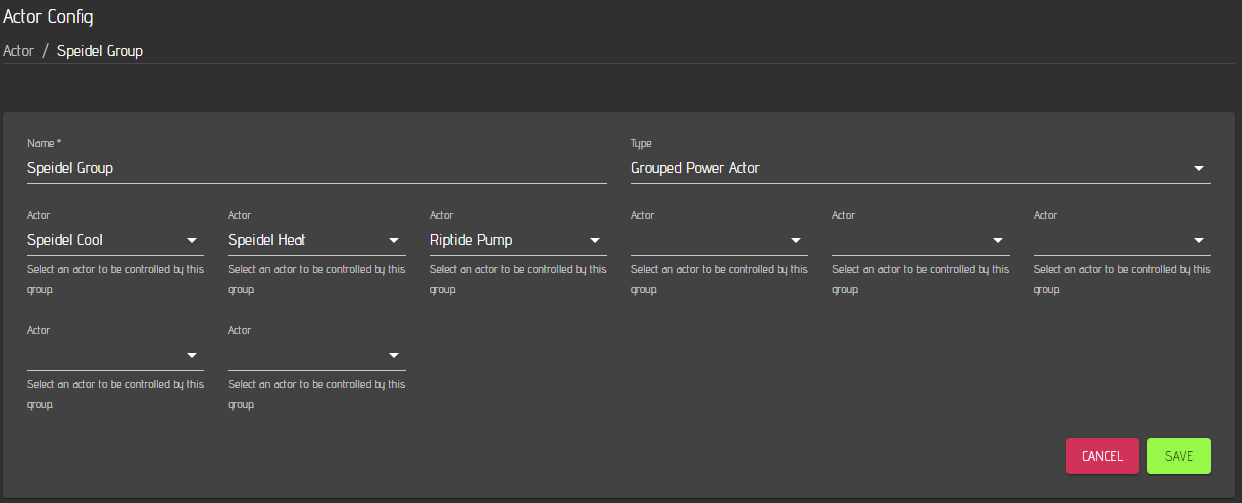
- Actor 1-8: Actors can be added to the group
Usage:
- You can add individual Actors to your dashboard
- Add the grouped Actor to your dashboard and enable actions to set power for the actor group
- The example below shows the grouped actor configuration for three actors that are in the group:
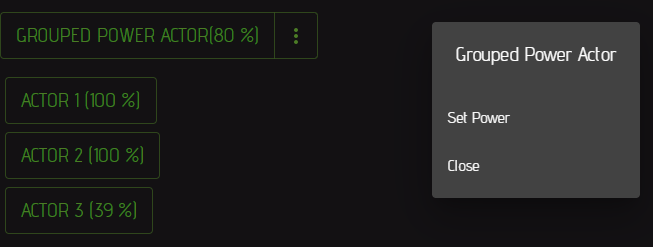
- If you click on the action menu of the grouped actor (3 dots on the right), the actions menu will be opend to set the power
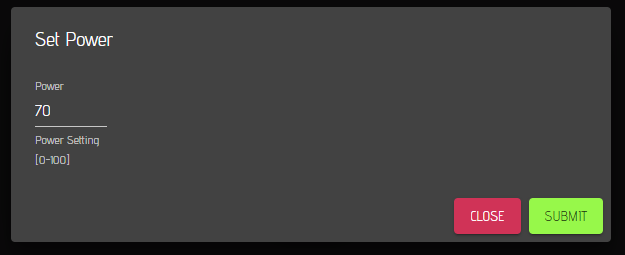
- If you choose 'Set Power', the corresponding dialog will open and you can set the power for the grouped actor. Hit save.
- Once you saved the power setting, the power of the grouped actor and the actors from the group are set. Power is 'filled up' starting with Actor 1. The following image shows an example for 25% power setting of the grouped power actor. Only actor 1 will be set to a value which is equivalent to 33% total power of the group.
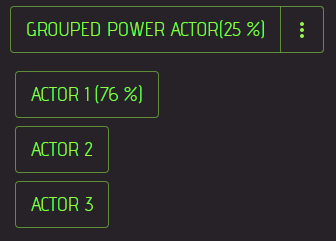
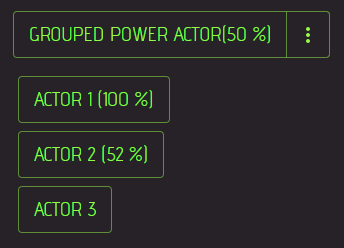
- If you change the power to 50%, actor 1 is set to 100% and Actor 2 power will be set to a value of ~ 50%. This is equivalent to 50% of the total power of this group.
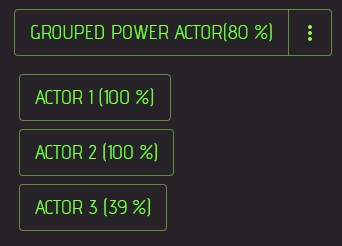
- If you further increase the power to 80%, actor 1 and 2 are set to 100% and Actor 3 power will be set to a value of ~ 40%. This is equivalent to 80% of the total power of this group.
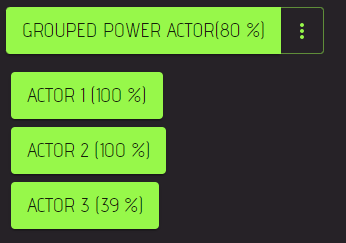
- If you click on the grouped actor button, all actors in the group will be switched on.
The grouped actor can be alo used in the Kettle Logic plugins that use power settings (e.g. PIDBoil,...)
Changelog:
- 24.11.25: (0.1.0) Added pyproject.toml to support pip 25.3+
- 11.05.22: (0.0.6) Updated README (removed cbpi add)
- 10.05.22: (0.0.5) Removed cbpi dependency
- 25.02.22: (0.0.4) Changed README -> pip install available
- 07.02.22: (0.0.3) Removal of duplicated mqtt messages
- 07.02.22: (0.0.2) Initial commit


Download files
Download the file for your platform. If you're not sure which to choose, learn more about installing packages.
Source Distribution
File details
Details for the file cbpi4_groupedpoweractor-0.1.0.tar.gz.
File metadata
- Download URL: cbpi4_groupedpoweractor-0.1.0.tar.gz
- Upload date:
- Size: 16.6 kB
- Tags: Source
- Uploaded using Trusted Publishing? No
- Uploaded via: twine/6.2.0 CPython/3.13.9
File hashes
| Algorithm | Hash digest | |
|---|---|---|
| SHA256 |
aa9dd4318f5fe1439c6c259d72ab3c07de0ecc2f1490b4f507e6ab025534ed14
|
|
| MD5 |
935b4427c11cafc2fd10c3ae28fe8823
|
|
| BLAKE2b-256 |
ac36c471cd481a491cf05de43527e624409b552a063d4b33ea0c5b1b08ae00dd
|






