
cbxy
cbxy is a sidecar format for comic panel geometry.
A Brief Introduction
A .cbxy file is a ZIP archive of JSON files (same idea as CBZ, but metadata instead of images).
book.cbz                         book.cbxy
├── page-001.jpg                 ├── page-001.json
├── page-002.jpg                 ├── page-002.json
└── Art/page-003.png             └── Art/page-003.json
Coordinates are normalized fractions of the page (0–1), so they survive resize. Array order is reading order.
{
  "page": "page-001.jpg",
  "width": 1680,
  "height": 2583,
  "panels": [
    { "x": 0.035, "y": 0.058, "w": 0.388, "h": 0.286 },
    { "x": 0.437, "y": 0.058, "w": 0.526, "h": 0.287 }
  ]
}
For a full specification, see the latest version of the spec.
About This Repository
This repository is a Python reference implementation of the cbxy format and tools. It is meant to be a showcase for the format and tools.
Installation
Install using pip:
pip install cbxy
or uv:
uv tool install cbxy
Tools
Once installed, three command-line tools are available:
cbxy-detect: Detects panels in a comic and writes a.cbxysidecar beside it.cbxy-reader: Opens a comic in the browser with optional guided panel view.cbxy-editor: Visual editor for creating or fixing panel boxes.
cbxy-detect
Detects panels in a comic archive and writes a .cbxy sidecar next to it (OpenCV by default, with ML fallback for irregular layouts).
cbxy-detect path/to/book.cbz
| Argument | Description |
|---|---|
comic |
Path to a .cbz, .cbr, image folder, or single page image |
-o, --out |
Output .cbxy path (default: same stem beside the comic) |
--engine auto|cv|ml |
Detection backend (default: auto) |
--min-area |
Minimum panel area as a fraction of the page (default: 0.03) |
--gutter |
Near-white gutter threshold for CV, 0–255 (default: 230) |
--conf |
ML confidence threshold (default: 0.25) |
--limit |
Only process the first N pages |
--preview-dir |
Write annotated preview JPEGs into this folder |
Engines
--engine chooses how panels are found. Most of the time auto is enough; pick cv or ml when you know the page style.
| Engine | When to use |
|---|---|
auto (default) |
Best general choice: tries OpenCV first, falls back to ML when a page looks irregular (e.g. one huge “panel”) |
cv |
Traditional grid layouts with clear white gutters (fast, no model download) |
ml |
Messy / borderless / overlapping layouts (Image-style pages, splash + insets) |
The ML path uses Ultralytics YOLO with the pretrained comic-panel weights mosesb/best-comic-panel-detection (downloaded on first ML run).
cbxy-reader
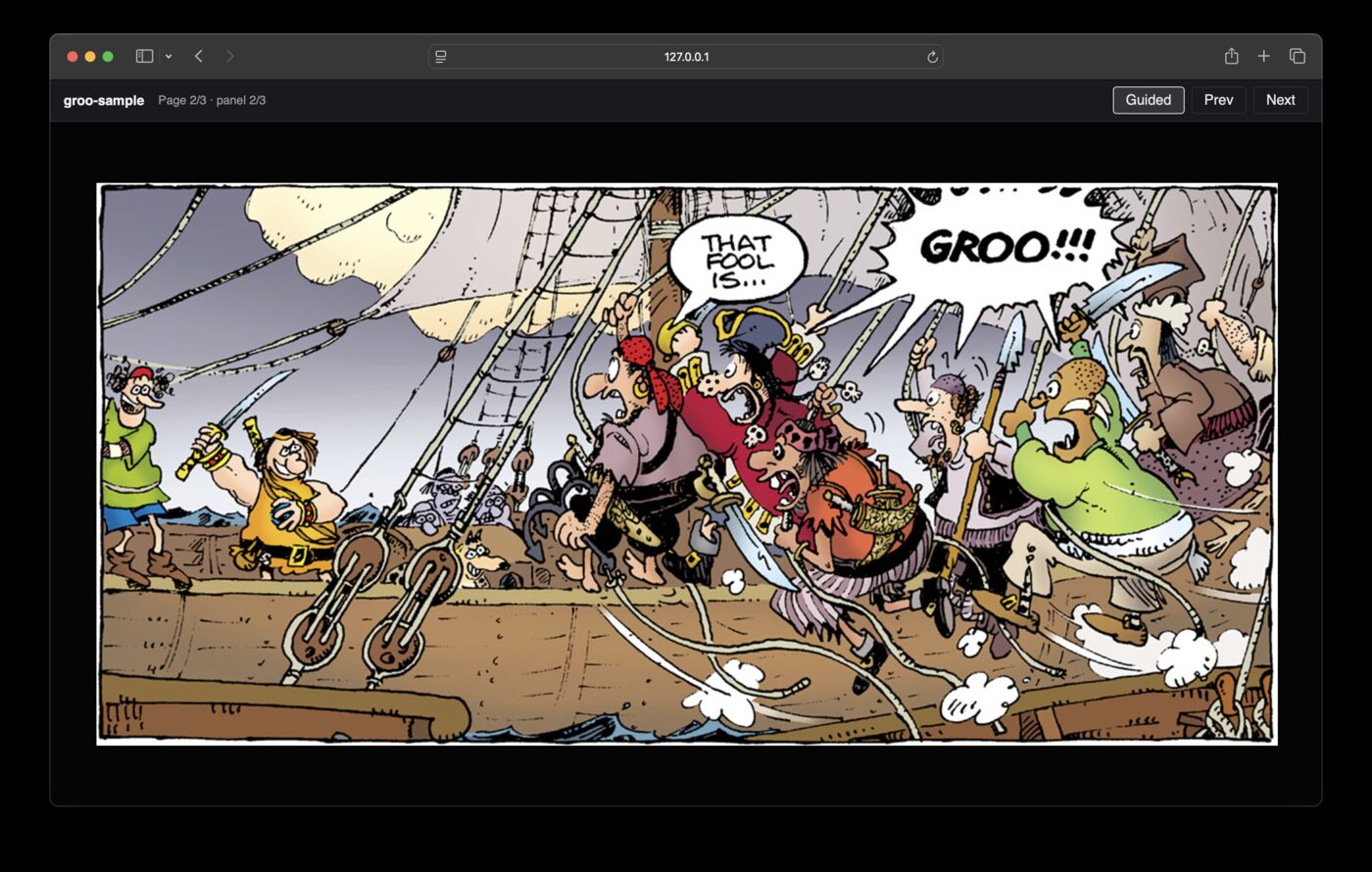
Opens a comic in the browser. If a sibling .cbxy is present, supports guided panel-by-panel view; otherwise pages only.
cbxy-reader path/to/book.cbz
| Argument | Description |
|---|---|
comic |
Path to a .cbz, .cbr, image folder, or single page image |
--host |
Bind address (default: 127.0.0.1) |
--port |
Port (default: 8765) |
--no-open |
Do not open a browser window automatically |
cbxy-editor
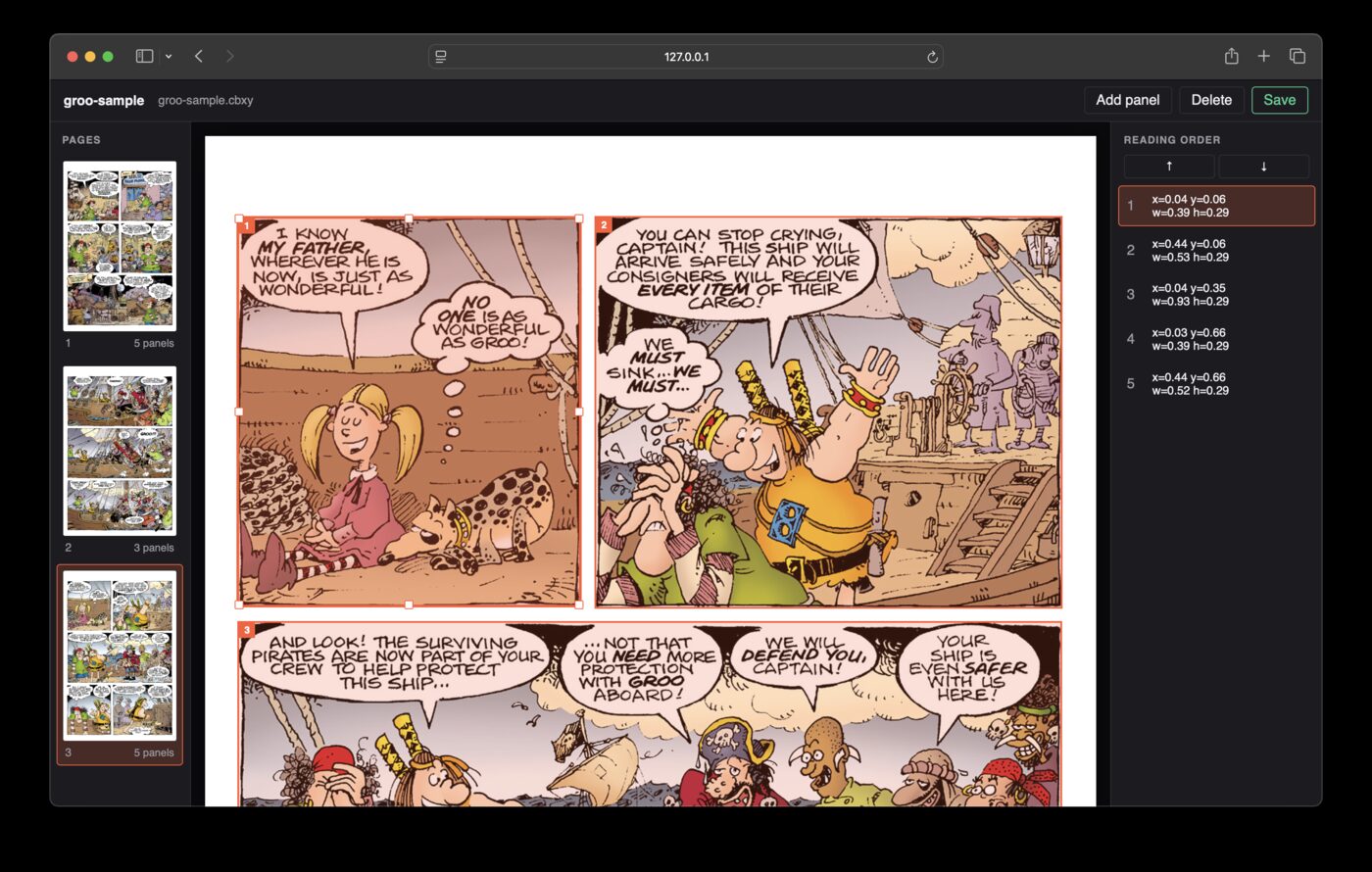
Browser UI to create or edit panel boxes and save a .cbxy beside the comic.
cbxy-editor path/to/book.cbz
| Argument | Description |
|---|---|
comic |
Path to a .cbz, .cbr, image folder, or single page image |
--host |
Bind address (default: 127.0.0.1) |
--port |
Port (default: 8766) |
--no-open |
Do not open a browser window automatically |
1 maintainer

Download files
Download the file for your platform. If you're not sure which to choose, learn more about installing packages.
Source Distribution
Built Distribution
Filter files by name, interpreter, ABI, and platform.
If you're not sure about the file name format, learn more about wheel file names.
Copy a direct link to the current filters
File details
Details for the file cbxy-0.1.2.tar.gz.
File metadata
- Download URL: cbxy-0.1.2.tar.gz
- Upload date:
- Size: 2.6 MB
- Tags: Source
- Uploaded using Trusted Publishing? Yes
- Uploaded via:
uv/0.12.7 {"installer":{"name":"uv","version":"0.12.7","subcommand":["publish"]},"python":null,"implementation":{"name":null,"version":null},"distro":{"name":"Ubuntu","version":"24.04","id":"noble","libc":null},"system":{"name":null,"release":null},"cpu":null,"openssl_version":null,"setuptools_version":null,"rustc_version":null,"ci":true}
File hashes
| Algorithm | Hash digest | |
|---|---|---|
| SHA256 |
9b064bb3063f15a1a9ad7b667dab94e060fe0979449c25a24dbf43ba3242e7b5
|
|
| MD5 |
cee150fee04e64275f7de59e853729c2
|
|
| BLAKE2b-256 |
befe355e3f118f391c7b7bb00447214db0209bcee1ea08a23fb278e3e59ed9be
|
File details
Details for the file cbxy-0.1.2-py3-none-any.whl.
File metadata
- Download URL: cbxy-0.1.2-py3-none-any.whl
- Upload date:
- Size: 32.9 kB
- Tags: Python 3
- Uploaded using Trusted Publishing? Yes
- Uploaded via:
uv/0.12.7 {"installer":{"name":"uv","version":"0.12.7","subcommand":["publish"]},"python":null,"implementation":{"name":null,"version":null},"distro":{"name":"Ubuntu","version":"24.04","id":"noble","libc":null},"system":{"name":null,"release":null},"cpu":null,"openssl_version":null,"setuptools_version":null,"rustc_version":null,"ci":true}
File hashes
| Algorithm | Hash digest | |
|---|---|---|
| SHA256 |
d39e94cb9dd205ad02fd8a0e5258bbd06b47b994511c9fa61d6949167ad9e8df
|
|
| MD5 |
c766d83c1d8ad17dc418465624237572
|
|
| BLAKE2b-256 |
b14075efb43f9740a747fee55a8aadf657560554587c39a58fe81e1b99686261
|














