
cc-session-browser
A browser for your Claude Code sessions.
uvx cc-session-browser
No install, no configuration. It indexes ~/.claude/projects and opens a
browser.
Features
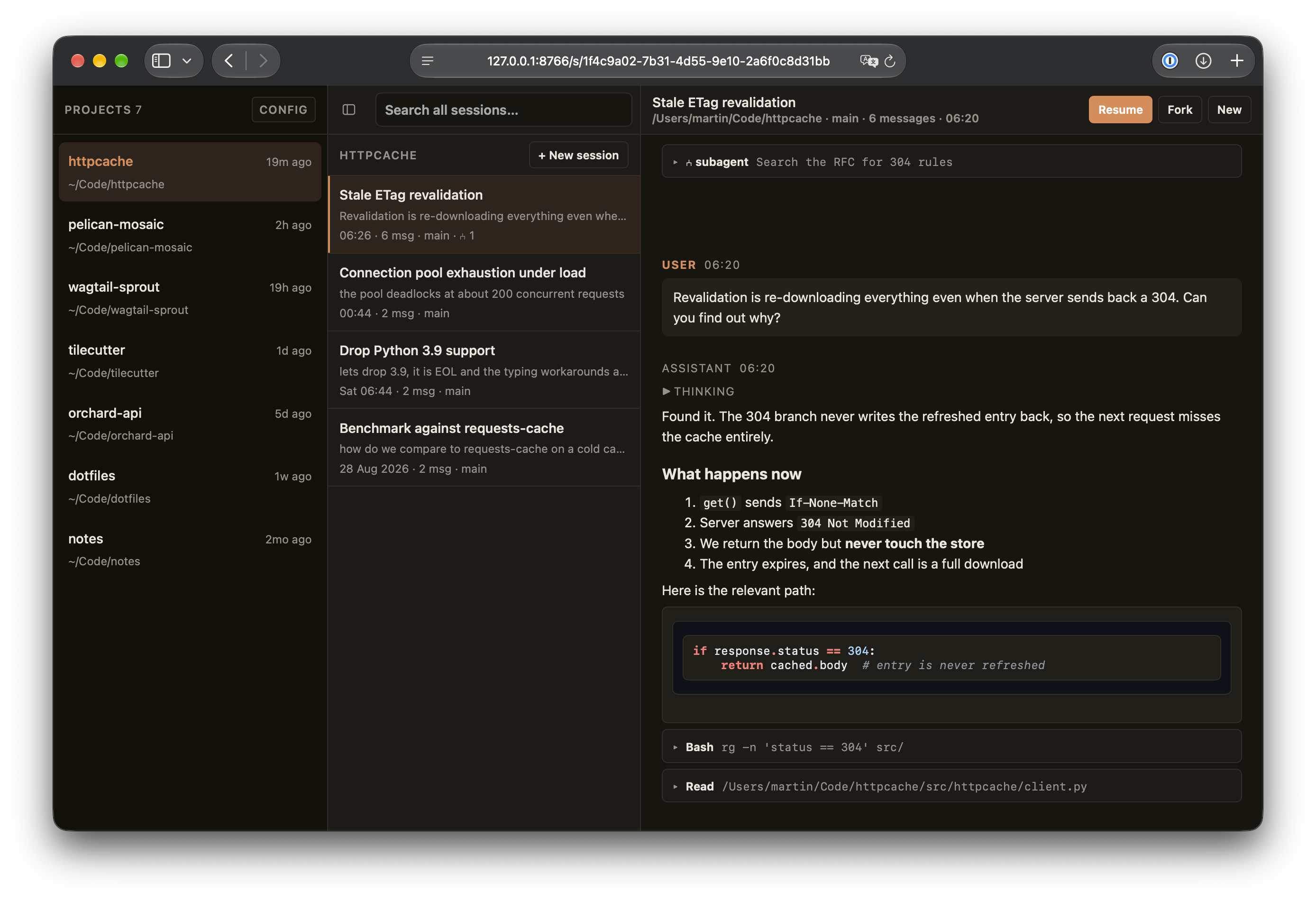
- Browse every project and session Claude Code has recorded, with the real project path recovered from the transcripts rather than the dashed directory name.
- Read transcripts with rendered markdown, syntax-highlighted code, expandable tool calls and their output, inline screenshots, and subagent transcripts shown where they were spawned.
- Search across all sessions — titles, prompts, replies and tool invocations — or within a single project.
- Resume, fork, or start a session in your terminal. Forking uses
--fork-session, so the original transcript is never touched.
Nothing is sent anywhere: the tool reads local files and serves them on
127.0.0.1.
Configuration
Optional. Everything has a working default.
cc-session-browser --help-config    # every option, with your paths filled in
cc-session-browser --write-config   # write a commented starter file
The config file is read from the first of these that exists:
--config PATH$CC_SESSION_BROWSER_CONFIG./cc-session-browser.toml~/.config/cc-session-browser/config.toml(%APPDATA%on Windows)
$CLAUDE_CONFIG_DIR is honoured, so a non-standard Claude Code location needs
no configuration at all.
# cc-session-browser configuration


# Where Claude Code keeps its session transcripts. $CLAUDE_CONFIG_DIR is
# honoured automatically, so you rarely need to set this.
#
# projects_dir = "~/.claude/projects"


# Projects to leave out of the sidebar. Each entry is a glob, matched against
# the project name, its full path, and its Claude Code slug -- so you never
# have to know what a slug looks like.
#
# hide = [
#     "scratch",
#     "*/Workspace/throwaway-*",
# ]


[server]

# Bind address. Leave this on loopback: the endpoint that opens a terminal
# starts processes on your machine.
#
# host = "127.0.0.1"

# Port to serve on.
#
# port = 8765

# Open a browser window on startup.
#
# open_browser = true


[launch]

# Open a session in a new "window" or a new "tab".
# Tabs are supported for: gnome-terminal, iterm, kitty, konsole, wezterm, wt
# (kitty needs allow_remote_control). Every other terminal falls back to a
# window.
#
# mode = "window"

# Which terminal to use. Auto-detected from $TERM_PROGRAM when unset.
# Known terminals: ghostty, gnome-terminal, iterm, kitty, konsole, terminal, wezterm, wt
#
# terminal = "iterm"

# Full override, for a terminal that is not in that list. {script} is a
# generated shell script that cds into the project and runs claude; {cwd} is
# the project directory.
#
# terminal_argv = ["alacritty", "--working-directory", "{cwd}", "-e", "{script}"]

# Path to the claude CLI. Found on PATH when unset.
#
# claude_bin = "/usr/local/bin/claude"
Requirements
Python 3.11+. Terminal integration supports iTerm, Terminal.app, Ghostty,
kitty, WezTerm, GNOME Terminal, Konsole and Windows Terminal; anything else can
be driven with a terminal_argv template.
1 maintainer

Download files
Download the file for your platform. If you're not sure which to choose, learn more about installing packages.
Source Distribution
Built Distribution
Filter files by name, interpreter, ABI, and platform.
If you're not sure about the file name format, learn more about wheel file names.
Copy a direct link to the current filters
File details
Details for the file cc_session_browser-0.1.0.tar.gz.
File metadata
- Download URL: cc_session_browser-0.1.0.tar.gz
- Upload date:
- Size: 47.2 kB
- Tags: Source
- Uploaded using Trusted Publishing? Yes
- Uploaded via:
twine/7.0.0 CPython/3.13.14
File hashes
| Algorithm | Hash digest | |
|---|---|---|
| SHA256 |
86b6563add83a8ece7bbb0a5bda67b8a1a85ecfb18e62854bc4fd9525c7c9772
|
|
| MD5 |
84b1b63c72a13af375fa9d72b98545db
|
|
| BLAKE2b-256 |
cbc49234cbaba316552170843ac04246ad1d9f21491149913492fbdfbc833833
|
Provenance
The following attestation bundles were made for cc_session_browser-0.1.0.tar.gz:
Publisher:
publish.yml on bartTC/cc-session-browser
-
Statement:
-
Statement type:
https://in-toto.io/Statement/v1 -
Predicate type:
https://docs.pypi.org/attestations/publish/v1 -
Subject name:
cc_session_browser-0.1.0.tar.gz -
Subject digest:
86b6563add83a8ece7bbb0a5bda67b8a1a85ecfb18e62854bc4fd9525c7c9772 - Sigstore transparency entry: 2765293344
- Sigstore integration time:
-
Permalink:
bartTC/cc-session-browser@650be35f372c0f2960110996a9fa93d0ad8bab26 -
Branch / Tag:
refs/tags/v0.1.0 - Owner: https://github.com/bartTC
-
Access:
public
-
Token Issuer:
https://token.actions.githubusercontent.com -
Runner Environment:
github-hosted -
Publication workflow:
publish.yml@650be35f372c0f2960110996a9fa93d0ad8bab26 -
Trigger Event:
push
-
Statement type:
File details
Details for the file cc_session_browser-0.1.0-py3-none-any.whl.
File metadata
- Download URL: cc_session_browser-0.1.0-py3-none-any.whl
- Upload date:
- Size: 53.9 kB
- Tags: Python 3
- Uploaded using Trusted Publishing? Yes
- Uploaded via:
twine/7.0.0 CPython/3.13.14
File hashes
| Algorithm | Hash digest | |
|---|---|---|
| SHA256 |
48e9c473c9adeab493d1785c87d828e4a83768b7c0250518fc740d70d11ee0a3
|
|
| MD5 |
e9f5b86598179b6dd6a23d1265eaf44a
|
|
| BLAKE2b-256 |
acf6638a3f07dd0813f7bcac736fc65a6bedfee982bd1d51d80b8b4e12777d5f
|
Provenance
The following attestation bundles were made for cc_session_browser-0.1.0-py3-none-any.whl:
Publisher:
publish.yml on bartTC/cc-session-browser
-
Statement:
-
Statement type:
https://in-toto.io/Statement/v1 -
Predicate type:
https://docs.pypi.org/attestations/publish/v1 -
Subject name:
cc_session_browser-0.1.0-py3-none-any.whl -
Subject digest:
48e9c473c9adeab493d1785c87d828e4a83768b7c0250518fc740d70d11ee0a3 - Sigstore transparency entry: 2765293384
- Sigstore integration time:
-
Permalink:
bartTC/cc-session-browser@650be35f372c0f2960110996a9fa93d0ad8bab26 -
Branch / Tag:
refs/tags/v0.1.0 - Owner: https://github.com/bartTC
-
Access:
public
-
Token Issuer:
https://token.actions.githubusercontent.com -
Runner Environment:
github-hosted -
Publication workflow:
publish.yml@650be35f372c0f2960110996a9fa93d0ad8bab26 -
Trigger Event:
push
-
Statement type:













