
Claude Code Toolbox
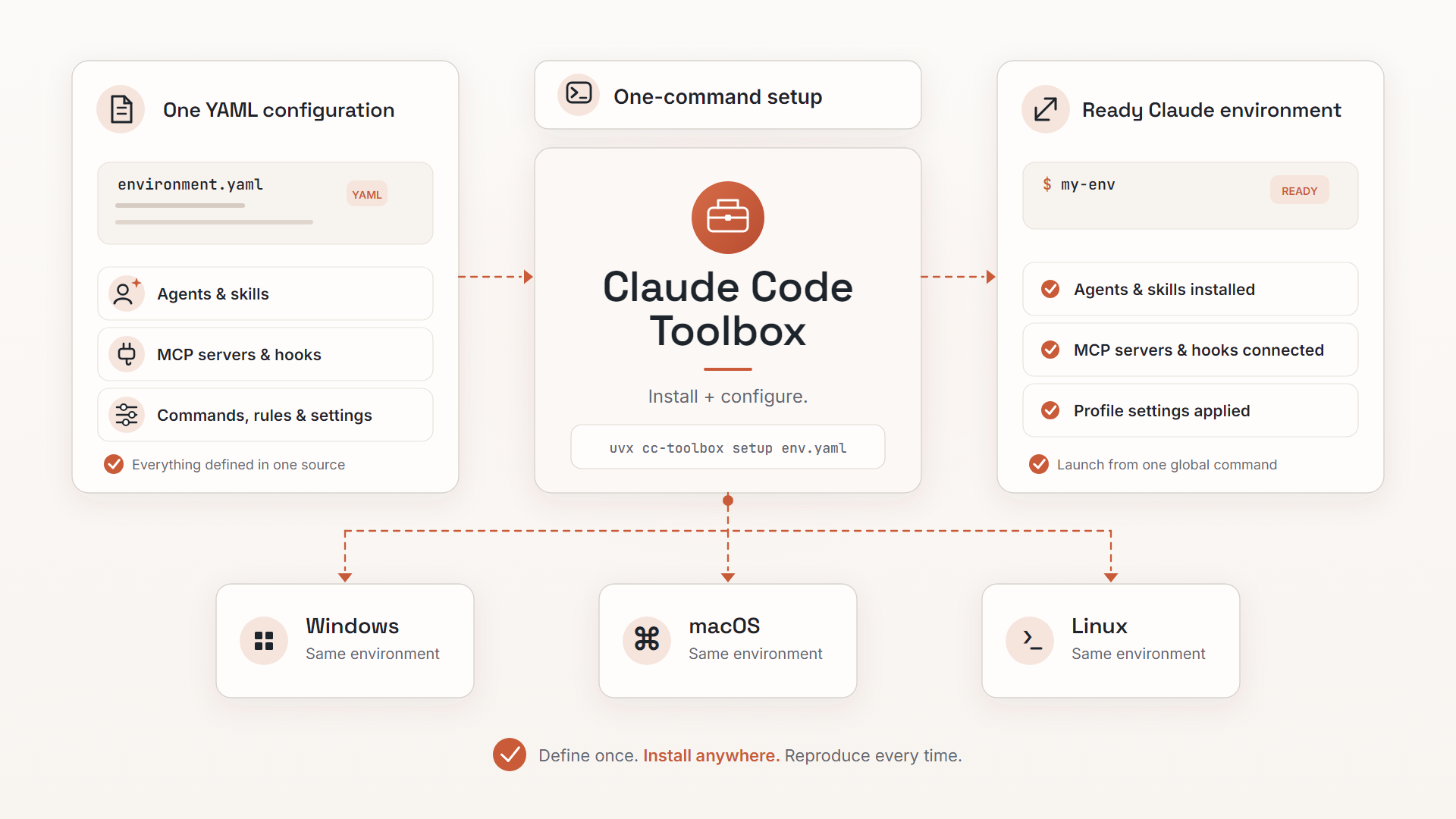


Automated installers and an environment configuration framework for Claude Code on Windows, macOS, and Linux.
Define your complete Claude Code environment in a single YAML file -- custom agents, MCP servers, slash commands, hooks, skills, settings, and more -- and install everything with one command.
Features
- Custom agents -- specialized subagents for code review, research, debugging, and any workflow you design
- MCP servers -- HTTP, SSE, and stdio transports with scope-based registration; unchanged servers are skipped on reruns, preserving their OAuth authentication
- Slash commands -- custom commands for frequently used workflows
- Rules -- user-scope rule files for coding standards, security policies, and project conventions
- Skills -- multi-file skill packages for complex agent capabilities
- System prompts -- replace or append to the default Claude Code prompt
- Hooks -- five hook types: command (shell scripts, shell or exec form), HTTP (webhooks), prompt (LLM evaluation), agent (subagent with tools), and MCP tool (a tool on a configured MCP server), plus shared helper modules delivered beside the hook scripts
- User and global settings --
user-settingsis rawsettings.jsoncontent (camelCase keys) andglobal-configis raw~/.claude.jsoncontent, covering model selection, permissions, effort levels, thinking mode, environment variables, and every other Claude Code setting - Status line -- custom status bar scripts for real-time session information
- Configuration inheritance -- extend and override parent configurations with selective per-key merge
- Component selection -- author-defined component groups the end user picks at setup time, interactively (checkbox picker) or via
--select/--with/--without; unclaimed items stay mandatory - Shared projects directory -- optionally link an isolated profile's
projects/to the base~/.claude/projects/so the isolated and default Claude share session history - Dependency management -- platform-specific package installation (apt, brew, choco, and more)
- File downloads -- arbitrary files downloaded to specified destinations during setup
- Private repository support -- GitHub and GitLab authentication with token-based access
- Cross-platform -- consistent behavior across Windows, macOS, and Linux
- One-command setup -- everything from a single YAML configuration file
- PyPI distribution -- the same setup and installer, runnable as
uvx cc-toolboxon any machine with uv
Quick Start
Example Configuration
name: "My Development Environment"

command-names:
  - "my-env"

# Base URL for downloading agents, commands, hooks, and other files
base-url: "https://raw.githubusercontent.com/my-org/my-configs/main"

agents:
  - "agents/code-reviewer.md"

slash-commands:
  - "commands/review.md"

rules:
  - "rules/coding-standards.md"

mcp-servers:
  - name: "context-server"
    transport: "http"
    url: "http://localhost:8000/mcp"
    # ${VAR} in a header is stored as-is and expanded by Claude Code at runtime,
    # so the token stays in your environment, never in the config file.
    header: "Authorization: Bearer ${CONTEXT_SERVER_TOKEN}"

# user-settings holds raw settings.json content with camelCase keys
user-settings:
  model: "sonnet"
  effortLevel: "high"

command-defaults:
  system-prompt: "prompts/system-prompt.md"
  mode: "append"

hooks:
  files:
    - "hooks/linter.py"
  # Shared modules the hook scripts import from their own directory
  helpers:
    - "hooks/hook_config_loader.py"
  events:
    - event: "PostToolUse"
      matcher: "Edit|MultiEdit|Write"
      type: "command"
      command: "linter.py"
This creates a global my-env command that launches Claude Code with your custom agents, MCP servers, and hooks. See the Environment Configuration Guide for all configuration keys.
Install Your Environment
Host your YAML configuration in a repository, then run a single command to set everything up:
Linux:
export CLAUDE_CODE_TOOLBOX_ENV_CONFIG='https://raw.githubusercontent.com/your-org/your-repo/main/config.yaml' && curl -fsSL https://raw.githubusercontent.com/alex-feel/claude-code-toolbox/main/scripts/linux/setup-environment.sh | bash
macOS:
export CLAUDE_CODE_TOOLBOX_ENV_CONFIG='https://raw.githubusercontent.com/your-org/your-repo/main/config.yaml' && curl -fsSL https://raw.githubusercontent.com/alex-feel/claude-code-toolbox/main/scripts/macos/setup-environment.sh | bash
Windows:
powershell -NoProfile -ExecutionPolicy Bypass -Command "`$env:CLAUDE_CODE_TOOLBOX_ENV_CONFIG='https://raw.githubusercontent.com/your-org/your-repo/main/config.yaml'; iex (irm 'https://raw.githubusercontent.com/alex-feel/claude-code-toolbox/main/scripts/windows/setup-environment.ps1')"
Any platform, via PyPI (requires uv):
uvx cc-toolbox setup 'https://raw.githubusercontent.com/your-org/your-repo/main/config.yaml'

# Private repositories: pass tokens inline with --env, or export them as regular environment variables
uvx cc-toolbox setup 'https://raw.githubusercontent.com/your-org/your-repo/main/config.yaml' --env GITHUB_TOKEN=ghp_your-token --env GITLAB_TOKEN=glpat-your-token
For a persistent cc-toolbox command, install it once with uv tool install cc-toolbox (or pipx install cc-toolbox).
You can also use a local file (./my-config.yaml) or a configuration from a private repository. See the Environment Configuration Guide for all options including authentication.
Ready-Made Configurations
Browse the claude-code-artifacts-public repository for ready-made environment configurations. Find a configuration you like, copy its raw URL, and use it as the CLAUDE_CODE_TOOLBOX_ENV_CONFIG value in the commands above.
See Ready-Made Configurations for installation examples.
Installing Claude Code
If you just need the Claude Code CLI without a custom environment configuration, the toolbox includes standalone installers that use the official Anthropic native installer with automatic npm fallback. With uv present, uvx cc-toolbox install runs the same installer from PyPI.
See the Installing Claude Code guide for platform-specific commands and options.
Documentation
- Environment Configuration Guide -- complete reference for YAML configuration files with all keys, authentication, inheritance, and more
- Installing Claude Code -- standalone Claude Code installation, methods, and troubleshooting
Security
Environment configurations can execute commands on your system, download files, and configure MCP servers. Only use configurations from sources you trust.
Local files are under your control. Remote URLs should be verified before use. The setup script displays a confirmation prompt and flags sensitive paths before proceeding.
See the Security Considerations section for details.
Contributing
Contributions are welcome! Please see CONTRIBUTING.md for guidelines.
License
MIT License -- see LICENSE for details.
Disclaimer
This is a community project and is not officially affiliated with Anthropic. Claude Code is a product of Anthropic, PBC.
Getting Help
- Bug reports: Report a bug
- Feature requests: Suggest a feature
- Documentation issues: Report a docs issue
- Questions: Ask a question
1 maintainer

Metadata
1 maintainer
Release files for cc-toolbox 7.4.1
For a detailed explanation of source distributions (sdists) and built distributions (wheels), please see the package formats documentation.
Source distribution (sdist)
| File | Size | Uploaded | |
|---|---|---|---|
| cc_toolbox-7.4.1.tar.gz | 247.8 kB | Details |
Built distribution (wheel)
| File | Interpreter | ABI | Platform | Reset |
|---|---|---|---|---|
| cc_toolbox-7.4.1-py3-none-any.whl | Python 3 | none | any | Details |
Total release size: 449.3 kB
Release files / cc_toolbox-7.4.1.tar.gz
| Download URL | cc_toolbox-7.4.1.tar.gz |
|---|---|
| Size | 247.8 kB |
| Tags | Source |
|
SHA-256 checksum How to use checksums |
0d0442e7ea071ccdbfd7fb65f8dac713746d2a997387ef34914ef423dcda68a3
|
|
BLAKE2b-256 checksum How to use checksums |
9f1db76dcc49c7f85304d771074b980d9329c455ee81d205f04911a783f8c535
|
| Upload date | |
|
Uploaded using Trusted Publishing? What is trusted publishing? |
Yes |
| Uploaded via |
twine/7.0.0 CPython/3.13.14
|
Provenance
Provenance describes where a file came from. On PyPI, provenance is shared via attestations, which provide a verifiable record of the build or publishing details. View details, limitations and caveats.


PyPI Publish Attestation
PyPI verified that this artifact, at this checksum, originated from the publisher listed below.
Signed by GitHub Actions, verified by PyPI on Sep 13, 2026.
Transparency logRelease files / cc_toolbox-7.4.1-py3-none-any.whl
| Download URL | cc_toolbox-7.4.1-py3-none-any.whl |
|---|---|
| Size | 201.5 kB |
| Tags | Python 3 |
|
SHA-256 checksum How to use checksums |
0b12405f6cc337540cfc720035d3161d60e5adc8625ebc2f562c8b208fd35f83
|
|
BLAKE2b-256 checksum How to use checksums |
98753646fa2080a7ca57063acae17832288f2f2bffe22cc68d45fff4c1baa006
|
| Upload date | |
|
Uploaded using Trusted Publishing? What is trusted publishing? |
Yes |
| Uploaded via |
twine/7.0.0 CPython/3.13.14
|
Provenance
Provenance describes where a file came from. On PyPI, provenance is shared via attestations, which provide a verifiable record of the build or publishing details. View details, limitations and caveats.
PyPI Publish Attestation
PyPI verified that this artifact, at this checksum, originated from the publisher listed below.
Signed by GitHub Actions, verified by PyPI on Sep 13, 2026.
Transparency log













