
Prevent code coverage regressions

Project description
ccguard


you can only improve! :-)
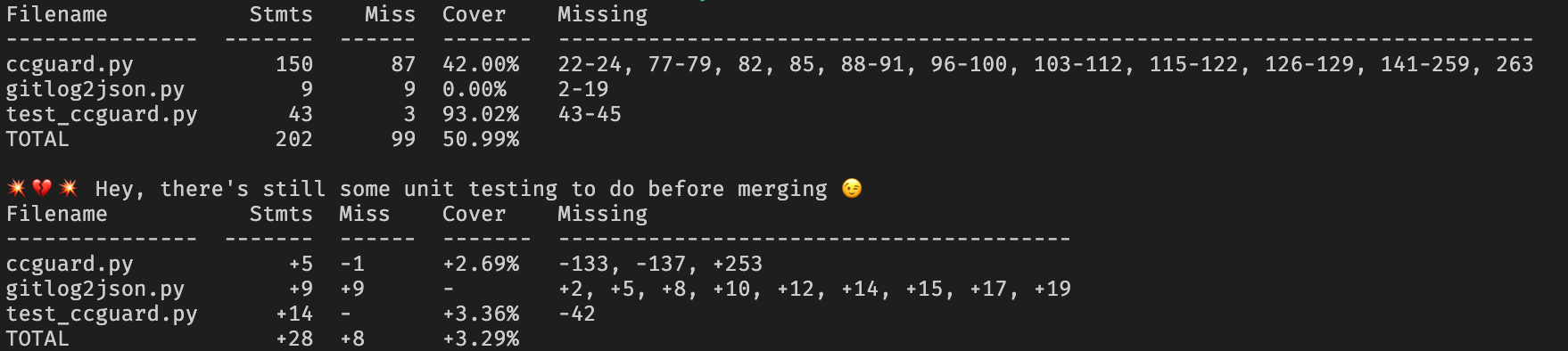
ccguard compares the current code coverage to past code coverage. ccguard fails unless your new code coverage is equal or better than your past code coverage!


requires
- python
- git
Should work on both python2 and python3. python2 is not anymore supported.
how should you use this software
- setup the server
- define your code coverage exclusions and inclusions (in your test runner, not in ccguard)
- setup the CI workflow so that ccguard can (here for CircleCI)
- ingest the code coverage report
- send it to the server
- ensure that the coverage improves
- (optional, but required for the following steps) download reports on your computer using ccguard_sync
- (recommended) inspect the git/reference log with ccguard_log
- (optional) display the code coverage for a specific commit with ccguard_show
- (optional) display the code coverage diff between two references with ccguard_diff
welcome beta testers: setup
# prepare the package and install it
./distrib.sh
contribute
./bootstrap.sh
please execute flake8, black, pytest and ccguard against all of your changes. (a pre-commit hook will ensure that everythng is fine before letting you commit)
./pre-commit
ccguard - the code coverage guard
cd your-favorite-source-folder
# execute unit tests, collecting code coverage here
ccguard coverage.xml
# change your code somehow
# execute unit tests, collecting code coverage
# then verify that your code coverage has not decreased
ccguard --consider-uncommitted-changes coverage.xml
# if you are rather a visual person, check cc.html and diff.html
ccguard --html --consider-uncommitted-changes coverage.xml
# if needed to display the line coverage for each file in the HTML report,
# fine tune the source files path with the --repository argument
ccguard--html --consider-uncommitted-changes coverage.xml --repository src/
# allow regressions up to 3%
ccguard coverage.xml --tolerance 3
# allow regressions up to 10%, but never descend below 70%
ccguard coverage.xml --tolerance 10 --hard-minimum 70
# use the web adapter (ie. send the data to ccguard_server).
# requires a ccguard.server.address setting in the config.
ccguard coverage.xml --adapter web
please see how to produce code coverage data in your favourite language.
display code coverage trends
What a better feedback loop than measuring the work you have accomplished?
ccguard_log
display code coverage report
You could be curious about how the code coverage looked like a few commits ago..
ccguard_show 7b43f26
display code coverage diff
And, you could be curious about how the code coverage has evolved between two commits.
ccguard_diff 3413af3 7b43f26
synchronize repositories
The use case being: you wish to use ccguard as pre-commit. Your team already has some references. Then you could be interested in sharing them.
# upload the report to a distant redis repository
ccguard_sync sqlite redis
# download the report from a distant redis repository
ccguard_sync redis sqlite
# limit to a single repository
ccguard_sync redis sqlite --repository_id abcd
# limit to a single repository and a single commit
ccguard_sync redis sqlite --repository_id abcd --commit_id ef12
# retrieve data from a specific web server, and display whats going on behind the scenes
ccguard_server_address=https://ccguard.nilleb.com ccguard_sync web sqlite --debug
launch a local server
ccguard_server allows you to centralize the reports and the regression checks (useful for CI workflows) also serves coverage and diff reports.
ccguard_server
You could be interested to know how to setup the server.
credits
- Alexandre Conrad for his wonderful pycobertura
- all the beta testers for their precious feedback
Release history Release notifications | RSS feed


Download files
Download the file for your platform. If you're not sure which to choose, learn more about installing packages.
Source Distributions
Built Distribution
Filter files by name, interpreter, ABI, and platform.
If you're not sure about the file name format, learn more about wheel file names.
Copy a direct link to the current filters
File details
Details for the file ccguard-0.4.0-py3-none-any.whl.
File metadata
- Download URL: ccguard-0.4.0-py3-none-any.whl
- Upload date:
- Size: 41.9 kB
- Tags: Python 3
- Uploaded using Trusted Publishing? No
- Uploaded via: twine/3.1.1 pkginfo/1.5.0.1 requests/2.22.0 setuptools/40.8.0 requests-toolbelt/0.9.1 tqdm/4.42.1 CPython/3.7.3
File hashes
| Algorithm | Hash digest | |
|---|---|---|
| SHA256 |
091a4743e09d34cf6e09478f0db25ea1ff700e6973d995e93203741677bb5a07
|
|
| MD5 |
5518d8fc4c37707d74e56f6a8840c64e
|
|
| BLAKE2b-256 |
c91c4c8837342cb486303e3809efecbb5b841e4882efd9c6586fe2d228b1ff1b
|






