

ccswap
Multi-account and usage manager for Claude Code, Codex and Antigravity.







Install · Commands · Auto-switching · Raycast · Docs

What it does
- Keeps several Claude Code and Codex CLI logins side by side and switches the active one with
ccswap switch 2orccswap codex switch 2. - Shows every account's 5-hour, 7-day and Codex weekly usage with reset times in
ccswap list. ccswap autoswitches to the account with the most quota left once the active one crosses 90%, before the rate limit hits.ccswap run 2starts Claude Code as account 2 in one terminal only, so two accounts work in parallel.- A full-screen dashboard (
ccswap) on macOS, Linux and Windows, and an optional macOS menu bar app. - A Raycast extension that lists accounts with their usage and switches with one keystroke.
--jsonoutput and exit codes for scripts and cron.
Quick start
uv tool install ccswap     # or: pipx install ccswap

# Log into Claude Code with your first account, then:
ccswap add
# Log in with the next account, then:
ccswap add

ccswap list       # every account's usage and reset times
ccswap switch 2   # or: ccswap switch --strategy best
ccswap auto       # or let it switch for you before a limit is hit
Codex accounts work the same way: run codex login, then ccswap codex add.
For personal Google Antigravity accounts, sign in with agy, then run ccswap agy add. Use ccswap agy usage for every quota group and ccswap agy switch 2 to change the shared login. Existing CLI, App and IDE sessions may need a restart. Antigravity accounts
You usually don't need to restart Claude Code after a switch. Codex always needs one. See restarts.
Common tasks
Switch by quota. ccswap switch --strategy best picks the account with the most quota left. --strategy consume-first picks the one whose weekly limit resets soonest, so none of it expires unused. All switch options
Switch automatically. ccswap auto polls every 60 seconds and is safe to run while Claude Code works. Thresholds, per-model limits, cron mode and strategies are in auto-switching.
Optional five-hour window warming sends a minimal Haiku prompt for idle Claude accounts. It uses subscription quota and is disabled by default.
Two accounts at once. ccswap run 2 launches Claude Code as account 2 in this terminal only. ccswap map 2 ~/work makes a bare ccswap run pick account 2 in that folder. Session mode
Codex sessions. ccswap codex run 2 launches an account in a private home; the default login runs plain Codex. Codex session mode
Codex. ccswap codex list, codex switch and codex auto mirror the Claude commands. Codex must use its file credential store. Codex accounts
Dashboard. Run ccswap for the dashboard above, or ccswap watch for a live usage monitor. Dashboard and menu bar
Menu bar (macOS). ccswap menubar puts every provider's usage one click away: switch or add accounts, pick a switch strategy, turn auto-switch on and change settings from the popover. ccswap menubar --install-service starts it at login. It needs the extra: uv tool install --force "ccswap[menubar]". Prefer a plain text menu? Set menubar.style to classic.
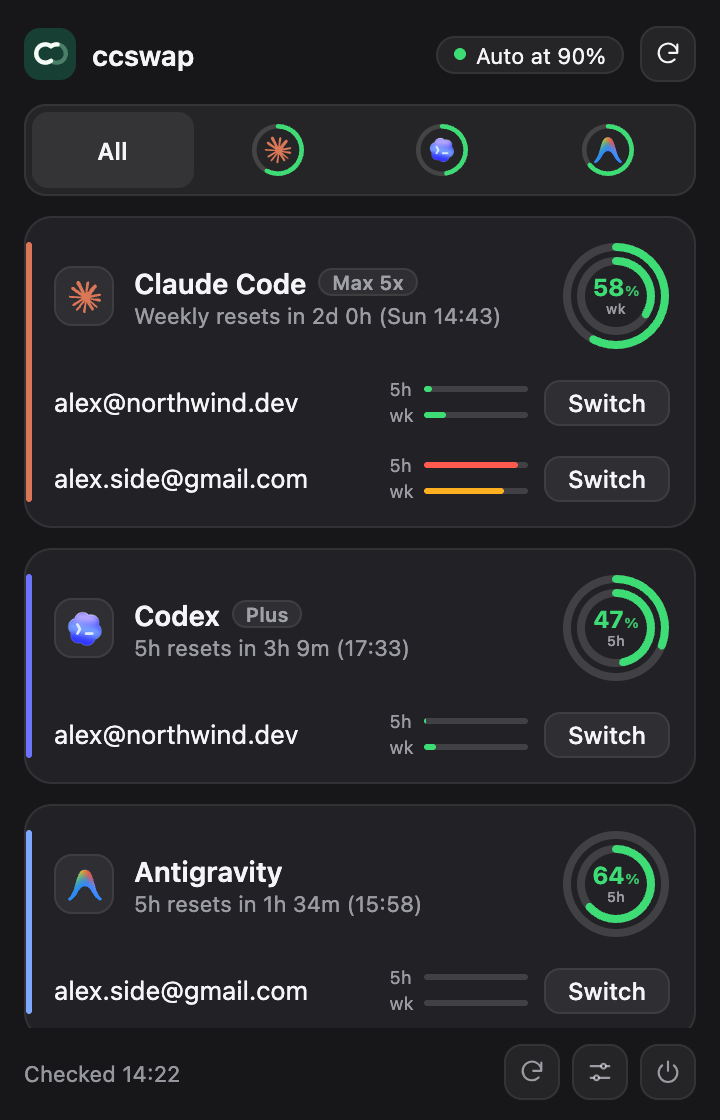
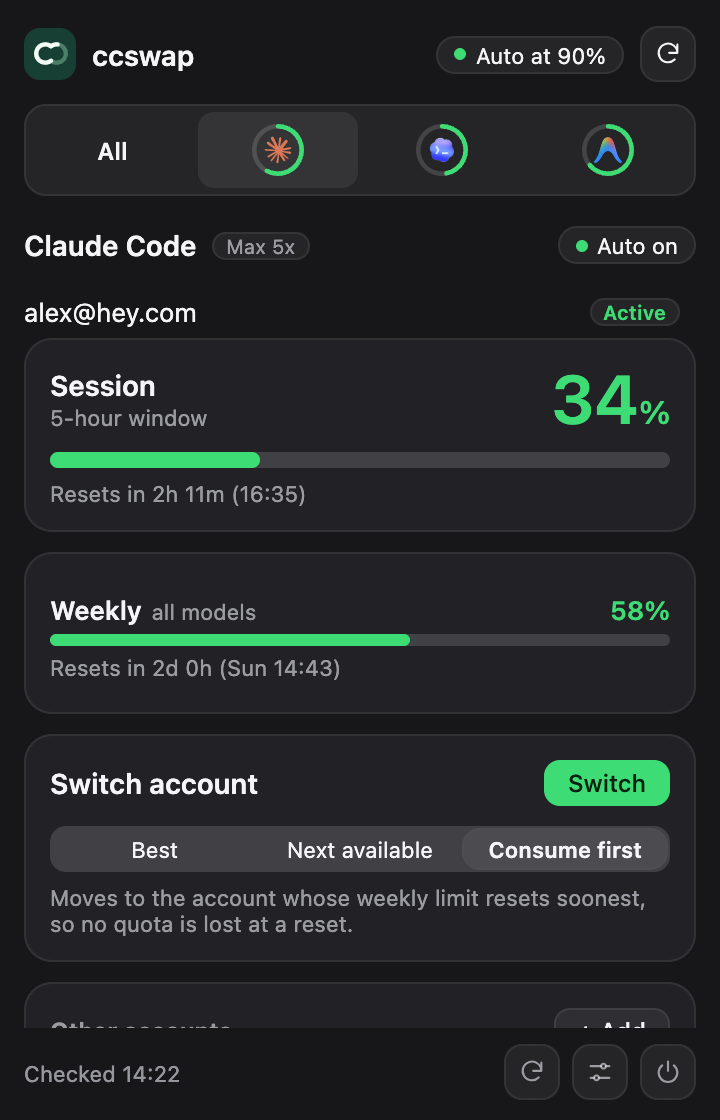
Quota in T3 Code. ccswap hub install runs a small read-only server at login that speaks CLIProxyAPI's management API. In T3 Code, add a CLIProxyAPI hub with the URL http://127.0.0.1:8317 and the key from ccswap hub key, and every ccswap account shows its quota there. No token leaves ccswap. T3 Code hub
Inside Claude Code. An optional statusline and a /ccswap pane, both off until you turn them on. Statusline and mod
Documentation
- Commands: every command, expired tokens, adding a raw token or API key
- Automatic switching
- Session mode
- Codex accounts
- Antigravity accounts
- Dashboard and menu bar
- T3 Code hub: show ccswap quota in T3 Code as a CLIProxyAPI hub
- Statusline and mod
- Configuration, backup and sharing
- JSON output for scripting
- How it works: restarts, credential handling, where data is stored
- Privacy and usage stats: what the opt-in usage stats send, and how to turn them off
Agent skill
skills/ccswap-orchestration/ teaches a coding agent to check account headroom before a big fan-out and to pick a switch strategy under quota pressure:
npx skills add errhythm/ccswap --skill ccswap-orchestration
Raycast extension
The extension in raycast/ adds two commands. Show Accounts lists every Claude Code and Codex account with its 5-hour and 7-day usage. Enter switches to the selected account and ⌘B switches to the one with the most quota left. Switch to Best Account does the same for Claude Code without opening a window.
It runs this CLI, so install ccswap first, then install the extension from the Raycast Store:
Or open Raycast, run Store, and search for ccswap. To run an unreleased build from a clone instead:
git clone https://github.com/errhythm/ccswap && cd ccswap/raycast
npm install && npm run dev   # loads it into Raycast; stop with Ctrl+C, the commands stay
Setup, binary path and restart notes
Updating and uninstalling
ccswap upgrade        # detects uv or pipx and upgrades

ccswap purge          # remove all ccswap data, then:
uv tool uninstall ccswap    # or: pipx uninstall ccswap
To stay on the 0.x series (before the 1.0 redesign): uv tool install --force "ccswap<1" (or pipx install --force "ccswap<1").
From source: git clone https://github.com/errhythm/ccswap.git && cd ccswap && uv sync && uv run ccswap help.
Requirements
- Python 3.12+
- Claude Code, Codex CLI and/or Antigravity
- A file-backed login for managed Codex accounts
Support
If ccswap saved you from a rate limit, a ⭐ on GitHub helps other people find it. Bugs and ideas go in issues.
License and credits
ccswap began as a fork of claude-swap (cswap) by Onur Cetinkol, and still carries the original MIT license and credit for that. Since then it's grown into its own project: no more tracking upstream, no cswap compatibility, its own package and release line, and Codex and Antigravity support. It's MIT-licensed too, so fork it, file issues, send PRs, whatever's useful to you.
LICENSE keeps Onur Cetinkol's original copyright notice next to ccswap's.
The Claude, Codex and Antigravity logos in the menu bar belong to Anthropic, OpenAI and Google. ccswap uses them only to show which provider an account belongs to and isn't affiliated with any of them. Sources are in provider logos.
1 maintainer

Metadata
1 maintainer
Release files for ccswap 1.0.1
For a detailed explanation of source distributions (sdists) and built distributions (wheels), please see the package formats documentation.
Source distribution (sdist)
| File | Size | Uploaded | Provenance | Actions |
|---|---|---|---|---|
| ccswap-1.0.1.tar.gz | 2.8 MB | With provenance | Details for ccswap-1.0.1.tar.gz |
Built distribution (wheel)
| File | Interpreter | ABI | Platform | Actions Reset |
|---|---|---|---|---|
| ccswap-1.0.1-py3-none-any.whl | Python 3 | none | any | Details for ccswap-1.0.1-py3-none-any.whl |
Total release size: 3.6 MB
Release files / ccswap-1.0.1.tar.gz
| Download URL | ccswap-1.0.1.tar.gz |
|---|---|
| Size | 2.8 MB |
| Tags | Source |
|
SHA-256 checksum How to use checksums |
d2ec46c7cd678a55e93479ee02962c92697f2ecf54b5c74a8505972ec006ab47
|
|
BLAKE2b-256 checksum How to use checksums |
51b5b7811bfe4408b68732df00e15b1877777d00034b0f097795245f9256fe4f
|
| Upload date | |
|
Uploaded using Trusted Publishing? What is trusted publishing? |
Yes |
| Uploaded via |
twine/7.0.0 CPython/3.13.16
|
Provenance
Provenance describes where a file came from. On PyPI, provenance is shared via attestations, which provide a verifiable record of the build or publishing details. View details, limitations and caveats.


PyPI Publish Attestation
PyPI verified that this artifact, at this checksum, originated from the publisher listed below.
Signed by GitHub Actions, verified by PyPI on Nov 25, 2026.
Transparency logRelease files / ccswap-1.0.1-py3-none-any.whl
| Download URL | ccswap-1.0.1-py3-none-any.whl |
|---|---|
| Size | 775.6 kB |
| Tags | Python 3 |
|
SHA-256 checksum How to use checksums |
3b47460fdf9c0c86600b0522ccde04b786caa09db70e005913167acdf8b4df60
|
|
BLAKE2b-256 checksum How to use checksums |
a0dd51494e19d614f5f83a28e22b6ef2bed2b90a8b4cfc42889227cac705e545
|
| Upload date | |
|
Uploaded using Trusted Publishing? What is trusted publishing? |
Yes |
| Uploaded via |
twine/7.0.0 CPython/3.13.16
|
Provenance
Provenance describes where a file came from. On PyPI, provenance is shared via attestations, which provide a verifiable record of the build or publishing details. View details, limitations and caveats.
PyPI Publish Attestation
PyPI verified that this artifact, at this checksum, originated from the publisher listed below.
Signed by GitHub Actions, verified by PyPI on Nov 25, 2026.
Transparency logSecurity for ccswap 1.0.1
Provenance
Provenance describes where a file came from. On PyPI, provenance is shared via attestations, which provide a verifiable record of the build or publishing details. View details, limitations and caveats.
Full provenance
Both files in this release have been uploaded with provenance metadata.
Attestation for ccswap-1.0.1.tar.gz
PyPI Publish Attestation
PyPI verified that this artifact, at this checksum, originated from the publisher listed below.
Signed by GitHub Actions, verified by PyPI on Nov 25, 2026.
Transparency logA note on package security
PyPI is a repository for distributing packages, not a service for auditing them. While third-party security researchers and our staff do their best to detect and remove malicious packages, PyPI cannot guarantee the quality, security or suitability of any given package.
To learn more about protecting yourself from malicious actors, visit our package security documentation.














