
cctmux
Launch Claude Code inside tmux with session management, real-time monitoring, and pane awareness.





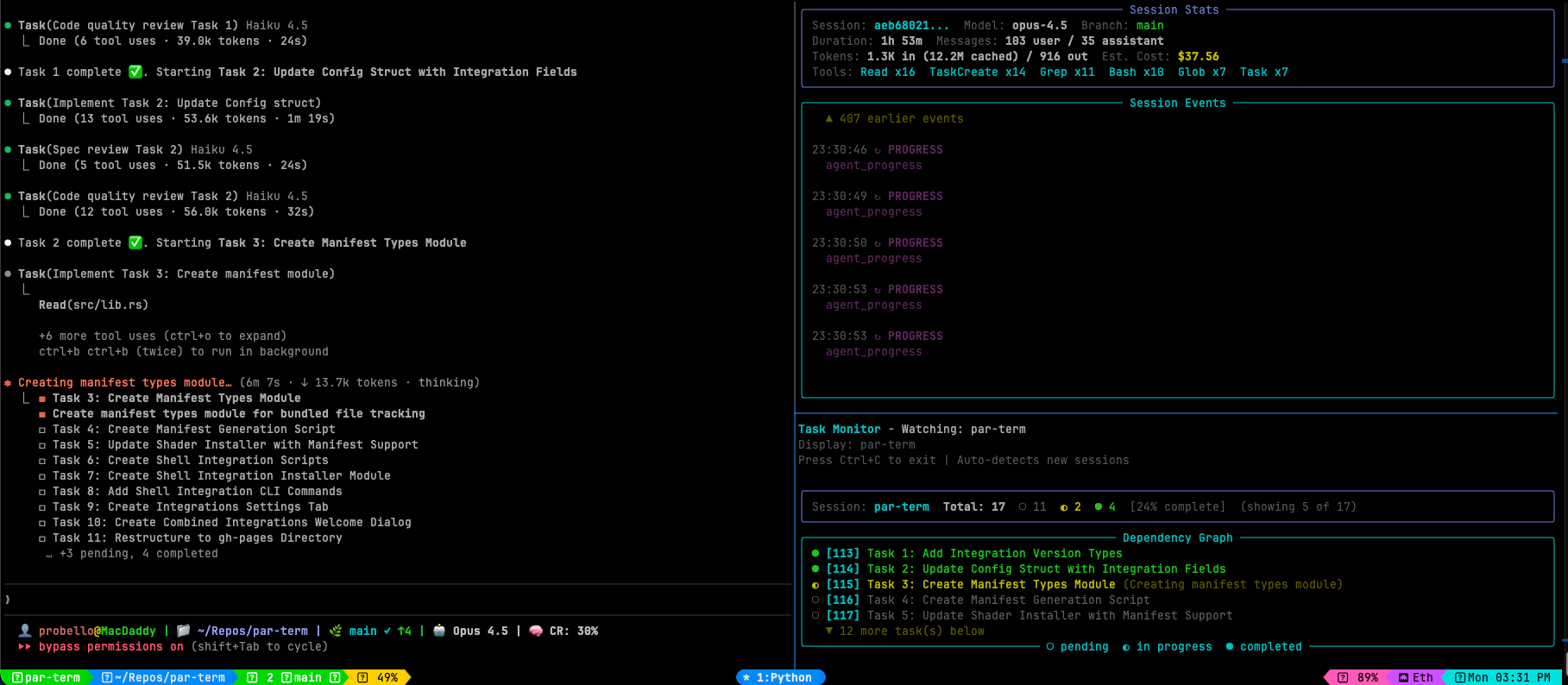
Table of Contents
- Features
- Installation
- Quick Start
- CLI Tools
- Layouts
- Monitoring Tools
- Configuration
- Team Mode
- Claude Skill
- Environment Variables
- Requirements
- Development
- Documentation
- License
Features
- Session Management: Create and attach to tmux sessions named after your project folder
- Predefined Layouts: Choose from 10 layouts including monitoring-focused arrangements
- Real-time Monitors: Track tasks, session events, subagents, usage statistics, and Ralph Loop progress
- Ralph Loop Automation: Automated iterative Claude Code execution with task tracking and cost monitoring
- Claude Awareness: Environment variables (
$CCTMUX_SESSION,$CCTMUX_PROJECT_DIR) for Claude integration - Session History: Track recent sessions with fzf integration for quick switching
- Configuration Presets: Quick access to minimal, verbose, or debug configurations
- Status Bar: Optional tmux status bar showing git branch and project info
- Claude Skill: Enables Claude to manage tmux panes for dev servers, watchers, etc.
- pitmux: Launch the
picoding agent in tmux sessions with the same layout/config support - cdxtmux: Launch the
codexCLI in tmux sessions, with codexresumesubcommand support and yolo mode - gemtmux: Launch the
geminiCLI in tmux sessions, with--resume latestand--yolosupport - Dry Run Mode: Preview tmux commands without executing
graph TB
    subgraph "cctmux CLI Tools"
        Main[cctmux]
        Pitmux[pitmux]
        Cdxtmux[cdxtmux]
        Gemtmux[gemtmux]
        Tasks[cctmux-tasks]
        Session[cctmux-session]
        Agents[cctmux-agents]
        Activity[cctmux-activity]
        GitMon[cctmux-git]
        Ralph[cctmux-ralph]
    end

    subgraph "Tmux Integration"
        TmuxSession[Tmux Session]
        Panes[Layout Panes]
    end

    subgraph "Claude Code"
        Claude[Claude Code CLI]
        TaskFiles[Task Files]
        SessionFiles[Session JSONL]
        StatsCache[Stats Cache]
        RalphState[Ralph State JSON]
    end

    subgraph "External"
        GitRepo[Git Repository]
    end

    Main --> TmuxSession
    Pitmux --> TmuxSession
    TmuxSession --> Panes
    Panes --> Claude

    Tasks --> TaskFiles
    Session --> SessionFiles
    Agents --> SessionFiles
    Activity --> StatsCache
    GitMon --> GitRepo
    Ralph --> RalphState
    Ralph --> Claude

    style Main fill:#e65100,stroke:#ff9800,stroke-width:3px,color:#ffffff
    style Pitmux fill:#e65100,stroke:#ff9800,stroke-width:3px,color:#ffffff
    style Tasks fill:#1b5e20,stroke:#4caf50,stroke-width:2px,color:#ffffff
    style Session fill:#0d47a1,stroke:#2196f3,stroke-width:2px,color:#ffffff
    style Agents fill:#4a148c,stroke:#9c27b0,stroke-width:2px,color:#ffffff
    style Activity fill:#880e4f,stroke:#c2185b,stroke-width:2px,color:#ffffff
    style GitMon fill:#004d40,stroke:#00897b,stroke-width:2px,color:#ffffff
    style Ralph fill:#bf360c,stroke:#ff6d00,stroke-width:2px,color:#ffffff
    style TmuxSession fill:#37474f,stroke:#78909c,stroke-width:2px,color:#ffffff
    style Panes fill:#37474f,stroke:#78909c,stroke-width:2px,color:#ffffff
    style Claude fill:#1a237e,stroke:#3f51b5,stroke-width:2px,color:#ffffff
    style TaskFiles fill:#1a237e,stroke:#3f51b5,stroke-width:2px,color:#ffffff
    style SessionFiles fill:#1a237e,stroke:#3f51b5,stroke-width:2px,color:#ffffff
    style StatsCache fill:#1a237e,stroke:#3f51b5,stroke-width:2px,color:#ffffff
    style RalphState fill:#1a237e,stroke:#3f51b5,stroke-width:2px,color:#ffffff
    style GitRepo fill:#004d40,stroke:#00897b,stroke-width:2px,color:#ffffff
Installation
Using uv (Recommended)
uv tool install cctmux
From GitHub
uv tool install git+https://github.com/paulrobello/cctmux.git
Using pip
pip install cctmux
From Source
git clone https://github.com/paulrobello/cctmux.git
cd cctmux
uv sync
uv run cctmux --help
Quick Start
# Launch Claude Code in tmux for current project
cd ~/my-project
cctmux

# Start with monitoring layout (Claude + session monitor + task monitor)
cctmux -l cc-mon

# Select from recent sessions
cctmux --recent

# Preview commands without executing
cctmux --dry-run

# Start a Ralph Loop with monitoring layout
cctmux -l ralph
CLI Tools
cctmux provides seven CLI commands for Claude Code, plus pitmux for the pi
coding agent, cdxtmux for the codex CLI, and gemtmux for the gemini CLI:
| Command | Purpose |
|---|---|
cctmux |
Launch Claude Code in a tmux session |
pitmux |
Launch the pi coding agent in a tmux session |
cdxtmux |
Launch the codex CLI in a tmux session |
gemtmux |
Launch the gemini CLI in a tmux session |
cctmux-tasks |
Monitor Claude Code tasks in real-time |
cctmux-session |
Monitor session events and statistics |
cctmux-agents |
Monitor subagent activity |
cctmux-activity |
Display usage statistics dashboard |
cctmux-git |
Monitor git repository status in real-time |
cctmux-ralph |
Ralph Loop automation (start, monitor, stop, cancel, status, init) |
cctmux
Main session launcher.
cctmux [OPTIONS]
| Option | Short | Description |
|---|---|---|
--layout |
-l |
Tmux layout (default, editor, monitor, triple, cc-mon, full-monitor, dashboard, ralph, ralph-full, git-mon) |
--resume |
-r |
Append --resume to claude invocation to continue last conversation |
--continue |
-c |
Append --continue to claude invocation to continue most recent conversation |
--yolo |
-y |
Append --dangerously-skip-permissions to claude invocation |
--claude-args |
-a |
Arguments to pass to claude command |
--recent |
-R |
Select from recent sessions using fzf |
--status-bar |
-s |
Enable status bar with git/project info |
--task-list-id |
-T |
Set CLAUDE_CODE_TASK_LIST_ID env var |
--dry-run |
-n |
Preview commands without executing |
--config |
-C |
Custom config file path |
--dump-config |
Output current configuration | |
--debug |
-D |
Enable debug output |
--verbose |
-v |
Increase verbosity (stackable) |
Subcommands:
cctmux init-config    # Create default configuration file
cctmux install-skill  # Install the cc-tmux skill for Claude
pitmux
Launch the pi coding agent in a tmux session. Mirrors cctmux's core flags
(layout, status-bar, dry-run, -c/-r, config) and uses a configurable
session prefix (pi- by default) so both tools can run simultaneously for
the same project.
pitmux                          # Launch pi for the current project
pitmux -c                       # Continue the previous pi session
pitmux -r                       # Resume a pi session (select from list)
pitmux --pi-args "--model x"    # Pass arguments to pi
pitmux -l editor                # Use the editor layout
pitmux --dry-run                # Preview commands
pitmux install-skill            # Install the pi-tmux skill
pitmux init-config              # Create default configuration file
If no pitmux session exists for the project but a sibling cctmux,
cdxtmux, or gemtmux session does (and vice versa for the other tools),
the launcher prompts to attach to the existing session instead of creating
a new one.
See CLI Reference for the full options table.
cdxtmux
Launch the codex CLI in a tmux session. Mirrors cctmux's core flags
(layout, status-bar, dry-run, -c/-r/-y, config) and uses a configurable
session prefix (cdx- by default) so all three launchers can run simultaneously
for the same project. --continue and --resume insert codex's resume
subcommand (codex resume --last or codex resume).
cdxtmux                              # Launch codex for the current project
cdxtmux -c                           # Continue the most recent codex session
cdxtmux -r                           # Pick a codex session to resume
cdxtmux -y                           # Skip approvals + sandbox
cdxtmux --codex-args "--model gpt-5" # Pass arguments to codex
cdxtmux -l editor                    # Use the editor layout
cdxtmux --dry-run                    # Preview commands
cdxtmux init-config                  # Create default configuration file
See CLI Reference for the full options table.
gemtmux
Launch the gemini CLI in a tmux session. Mirrors cctmux's core flags
(layout, status-bar, dry-run, -c/-r/-y, config) and uses a configurable
session prefix (gem- by default) so all four launchers can run simultaneously
for the same project. Both -c and -r map to gemini's --resume latest since
gemini lacks a separate interactive picker.
gemtmux                                  # Launch gemini for the current project
gemtmux -c                               # Continue the most recent gemini session
gemtmux -y                               # Yolo mode (auto-accept all actions)
gemtmux --gemini-args "--model gemini-2.5-pro"  # Pass arguments to gemini
gemtmux --gemini-args "--resume 5"       # Resume a specific indexed session
gemtmux -l editor                        # Use the editor layout
gemtmux --dry-run                        # Preview commands
gemtmux init-config                      # Create default configuration file
See CLI Reference for the full options table.
Layouts
| Layout | Description |
|---|---|
default |
No initial splits (panes created on demand) |
editor |
70/30 horizontal split (main + side pane) |
monitor |
80/20 vertical split (main + bottom bar) |
triple |
Main pane with two side panes (30% right, split vertically) |
cc-mon |
Claude + session monitor + task monitor |
full-monitor |
Claude + session + tasks + activity monitors |
dashboard |
Large activity dashboard with session sidebar |
ralph |
Shell + ralph monitor side-by-side (60/40) |
ralph-full |
Claude + git monitor + ralph monitor + task monitor (2x2 grid) |
git-mon |
Claude (60%) + git status monitor (40%) |
CC-Mon Layout
The recommended layout for monitoring Claude Code activity:
cctmux -l cc-mon
┌──────────────────┬──────────────────┐
│                  │ cctmux-session   │
│                  │      50%         │
│   Claude Code    ├──────────────────┤
│      50%         │ cctmux-tasks -g  │
│                  │      50%         │
│                  │                  │
└──────────────────┴──────────────────┘
Monitoring Tools
Task Monitor (cctmux-tasks)
Watch task progress with ASCII dependency visualization.
cctmux-tasks                    # Auto-detect from current project
cctmux-tasks abc123             # Monitor specific session
cctmux-tasks --list             # List available sessions
cctmux-tasks -g                 # Show only dependency graph
cctmux-tasks --preset verbose   # Use verbose preset
Features:
- ASCII dependency graph with task relationships
- Status indicators:
○pending,◐in progress,●completed - Progress statistics and completion percentage
- Acceptance criteria tracking from metadata
- Windowed virtual scrolling for large task lists
- Supports both
TaskCreatedirectory format andTodoWritetodos format (claude -psessions)
Session Monitor (cctmux-session)
Track session events in real-time.
cctmux-session                  # Auto-detect from current project
cctmux-session abc123           # Monitor specific session
cctmux-session --list           # List available sessions
cctmux-session --no-thinking    # Hide thinking blocks
cctmux-session --preset debug   # Use debug preset
Features:
- Tool calls and results display
- Thinking block visualization
- Token usage and cost estimates
- Tool usage histogram
- Stop reason and turn duration tracking
Subagent Monitor (cctmux-agents)
Monitor subagent activity across parallel tasks.
cctmux-agents                   # Auto-detect from current project
cctmux-agents abc123            # Monitor specific session
cctmux-agents --list            # List available subagents
cctmux-agents --no-activity     # Hide activity panel
cctmux-agents -M 10             # Show at most 10 agents
Features:
- Named agent display — shows assigned names (e.g.,
fix-security) instead of hash IDs - Active and completed subagent tracking
- Token usage per agent
- Current activity display
- Aggregate statistics
Activity Dashboard (cctmux-activity)
View usage statistics from Claude Code.
cctmux-activity                 # Show default dashboard
cctmux-activity --days 7        # Show 7-day heatmap
cctmux-activity --show-hourly   # Include hourly distribution
cctmux-activity --no-cost       # Hide cost estimates
Features:
- Session and message totals
- Model usage breakdown with cost estimates
- Activity heatmap visualization
- Hourly distribution chart
Git Monitor (cctmux-git)
Monitor git repository status in real-time.
cctmux-git                      # Monitor current directory
cctmux-git -p /path/to/repo     # Monitor specific repo
cctmux-git --no-log             # Hide recent commits
cctmux-git --no-diff            # Hide diff stats
cctmux-git -m 20                # Show 20 recent commits
cctmux-git -M 30                # Show at most 30 files (default: 20)
cctmux-git --preset minimal     # Minimal display
cctmux-git --fetch              # Enable periodic remote fetch
cctmux-git --fetch -F 30        # Fetch every 30 seconds (default: 60s)
Features:
- Branch info with upstream tracking and ahead/behind counts
- File status display with staged, unstaged, and untracked indicators
- Recent commits log with author and relative timestamps
- Diff statistics with visual insertion/deletion bars
- Stash count display
- Configurable max display limits for files and commits (prevents panel overflow)
- Periodic remote fetch with remote commits panel (opt-in via
--fetch)
Ralph Monitor (cctmux-ralph)
Automated iterative Claude Code execution with live monitoring.
cctmux-ralph                          # Monitor a running Ralph Loop
cctmux-ralph start ralph-project.md   # Start a Ralph Loop from project file
cctmux-ralph init                     # Create a template project file
cctmux-ralph status                   # Show current Ralph Loop status
cctmux-ralph stop                     # Stop after current iteration finishes
cctmux-ralph cancel                   # Cancel an active Ralph Loop immediately
Features:
- Iteration progress and task completion tracking
- Token usage and cost estimates per iteration
- Timeline visualization of loop progress
- Completion detection via task checks, promise tags, or max iterations
- Graceful stop after current iteration or immediate cancellation
- Per-iteration timeout support (
--timeout) - Yolo mode (
--yolo) to skip all permission checks
Configuration
cctmux supports layered configuration with deep merging:
- User config (
~/.config/cctmux/config.yaml) — base settings - Project config (
.cctmux.yamlin project dir) — shared team overrides (commit to repo) - Project local config (
.cctmux.yaml.localin project dir) — personal overrides (gitignored)
Last value wins. Partial nested overrides (e.g., only git_monitor.fetch_enabled) don't wipe sibling fields. Set ignore_parent_configs: true in a project config to skip user config entirely.
User config file location: ~/.config/cctmux/config.yaml
# Main settings
default_layout: default
status_bar_enabled: false
max_history_entries: 50
default_claude_args: null
task_list_id: false

# Session monitor settings
session_monitor:
  show_thinking: true
  show_results: true
  show_progress: true
  show_cwd: false
  show_threading: false
  max_events: 50

# Task monitor settings
task_monitor:
  show_owner: true
  show_metadata: false
  show_description: true
  show_graph: true
  show_table: true
  max_tasks: 100

# Activity monitor settings
activity_monitor:
  default_days: 7
  show_heatmap: true
  show_cost: true
  show_tool_usage: true
  show_model_usage: true

# Agent monitor settings
agent_monitor:
  inactive_timeout: 300.0

# Git monitor settings
git_monitor:
  show_log: true
  show_diff: true
  show_status: true
  max_commits: 10
  poll_interval: 2.0

# Ralph monitor settings
ralph_monitor:
  show_table: true
  show_timeline: true
  show_prompt: false
  show_task_progress: true
  max_iterations_visible: 20
Configuration Presets
All monitors support --preset for quick configuration:
| Preset | Description |
|---|---|
minimal |
Essential info only, reduced visual noise |
verbose |
All information displayed |
debug |
Maximum detail for troubleshooting |
cctmux-session --preset minimal
cctmux-tasks --preset verbose
cctmux-activity --preset debug
cctmux-git --preset verbose
cctmux-ralph --preset verbose
Create Default Config
cctmux init-config
Team Mode
Launch multiple Claude Code instances as a coordinated team in a single tmux session. Each agent gets its own pane with a role-specific system prompt, and all agents communicate via the cc2cc plugin.
Usage
# From a standalone team config file
cctmux team team.yaml

# From .cctmux.yaml (reads the team: section)
cctmux team

# Preview without executing
cctmux team team.yaml --dry-run
Team Configuration
team:
  name: my-team              # optional; defaults to project name
  shared_task_list: true     # all instances share CLAUDE_CODE_TASK_LIST_ID
  layout: grid               # "grid", "columns", or "rows"
  monitor: true              # add a cctmux-tasks monitor pane
  agents:
    - role: architect
      model: opus
      prompt: |
        You lead the team. Create tasks, review work, coordinate via cc2cc.
    - role: implementer
      model: opus
      prompt: |
        Pick up tasks and implement them.
    - role: tester
      model: sonnet
      prompt: |
        Write and run tests for completed features.
Requirements: cc2cc hub running, cc2cc plugin installed. All agents auto-subscribe to the project's cc2cc topic and share a CLAUDE_CODE_TASK_LIST_ID when shared_task_list is enabled.
Permissions: All team agents are launched with --dangerously-skip-permissions so they can operate autonomously without interactive prompts.
Layout options: grid (default) arranges panes in an N-column grid, columns arranges panes in equal-width columns, rows stacks panes top-to-bottom.
Claude Skills
Install all bundled skills:
cctmux install-skill
Skills are also auto-synced on every cctmux invocation. The pitmux command auto-installs the pi-tmux skill to ~/.pi/agent/skills/.
cc-tmux
Pane management — Claude can:
- Discover Session Context: Access
$CCTMUX_SESSIONand$CCTMUX_PROJECT_DIR - Inspect Panes as JSON:
cctmux panes --jsonreturns stable pane IDs, commands, and geometry — no tmux format-string parsing - Create Panes: Split windows for dev servers, file watchers, test runners
- Manage Processes: Start, stop, and restart background processes
- Navigate Panes: Move focus between panes programmatically
- Drive Another Claude: Orchestrate a second Claude Code instance in another pane —
cctmux wait-idleblocks until the remote agent finishes a turn (idle-or-heartbeat), plus reliable command submission and answering its question menus (seereferences/driving-claude-panes.md)
cc-team-lead
Team coordination workflow for leading a cctmux team session. Invoke with /cc-team-lead. Covers:
- Prerequisites check — verifies cc2cc plugin is installed and hub is reachable
- Task creation — naming conventions, dependency ordering, example tasks
- Team communication — topic broadcasts, direct messages, role-based routing
- Progress monitoring — shared task list, monitor pane, direct check-ins
- Issue handling — stuck agents, merge conflicts, failing checks
Using the Skill
Simply ask Claude to manage your development environment:
Start a dev server in a side pane
Set up panes for frontend server and test watcher
Run pytest in watch mode in a side pane
Restart the dev server - it crashed
Claude will automatically detect the cctmux session and manage panes appropriately.
Skill Pattern
The skill follows a "create then launch" pattern using pane IDs for reliable targeting:
# Create pane and capture its ID
PANE=$(tmux split-window -d -P -F "#{pane_id}" -t "$CCTMUX_SESSION" -h -p 30)

# Launch application using pane ID
tmux send-keys -t "$PANE" "npm run dev" Enter
For detailed usage examples and best practices, see the Skill Guide.
Environment Variables
Inside a cctmux or pitmux session:
| Variable | Description |
|---|---|
CCTMUX_SESSION |
The tmux session name |
CCTMUX_PROJECT_DIR |
The project directory path |
CLAUDE_CODE_TASK_LIST_ID |
Session name (if --task-list-id enabled, cctmux only) |
CLAUDE_CODE_EXPERIMENTAL_AGENT_TEAMS |
Set to 1 (if --agent-teams enabled, cctmux only) |
CC2CC_SESSION_ID |
Unique ID per pane in team mode, so each agent gets its own cc2cc session file (cctmux team only) |
Requirements
- Python: 3.13+
- tmux: Terminal multiplexer, 3.1+
- Claude Code: Claude Code CLI (
claude) - pi: Optional, pi coding agent CLI (
pi) — required forpitmux - fzf: Optional, for
--recentsession selection
Development
# Clone and install
git clone https://github.com/paulrobello/cctmux.git
cd cctmux
uv sync

# Run all checks (format, lint, typecheck, test)
make checkall

# Individual commands
make fmt        # Format code
make lint       # Lint code
make typecheck  # Type check
make test       # Run tests
make upgrade    # Upgrade installed tool and reinstall skill
Documentation
Full documentation is available in the docs/ directory:
- Quick Start Guide - Get started in minutes
- Architecture - System design and data flow
- CLI Reference - Complete reference for all ten entry points
- Layouts Reference - All ten predefined layouts with diagrams
- Skill Guide - Using the cc-tmux skill with Claude
- Configuration - Configuration options and presets
- Team Mode - Multi-agent team coordination via cc2cc
License
This project is licensed under the MIT License - see the LICENSE file for details.
1 maintainer

Metadata
1 maintainer
Release files for cctmux 0.6.1
For a detailed explanation of source distributions (sdists) and built distributions (wheels), please see the package formats documentation.
Source distribution (sdist)
| File | Size | Uploaded | Provenance | Actions |
|---|---|---|---|---|
| cctmux-0.6.1.tar.gz | 131.2 kB | With provenance | Details for cctmux-0.6.1.tar.gz |
Built distribution (wheel)
| File | Interpreter | ABI | Platform | Actions Reset |
|---|---|---|---|---|
| cctmux-0.6.1-py3-none-any.whl | Python 3 | none | any | Details for cctmux-0.6.1-py3-none-any.whl |
Total release size: 275.7 kB
Release files / cctmux-0.6.1.tar.gz
| Download URL | cctmux-0.6.1.tar.gz |
|---|---|
| Size | 131.2 kB |
| Tags | Source |
|
SHA-256 checksum How to use checksums |
8b0cf20f10306d28f2b16ef0b47a59237608989feca05be3db2752689fc197c5
|
|
BLAKE2b-256 checksum How to use checksums |
9590382db93bdb6d9192ef7e09350bc92175705aeb7d3a53ff11bd57c7c9725a
|
| Upload date | |
|
Uploaded using Trusted Publishing? What is trusted publishing? |
Yes |
| Uploaded via |
twine/7.0.0 CPython/3.13.16
|
Provenance
Provenance describes where a file came from. On PyPI, provenance is shared via attestations, which provide a verifiable record of the build or publishing details. View details, limitations and caveats.


PyPI Publish Attestation
PyPI verified that this artifact, at this checksum, originated from the publisher listed below.
Signed by GitHub Actions, verified by PyPI on Nov 17, 2026.
Transparency logRelease files / cctmux-0.6.1-py3-none-any.whl
| Download URL | cctmux-0.6.1-py3-none-any.whl |
|---|---|
| Size | 144.4 kB |
| Tags | Python 3 |
|
SHA-256 checksum How to use checksums |
6b3594641825eeb91c67a3de747ac59611d7fcd7fa94af4814a6e7a056f7bc35
|
|
BLAKE2b-256 checksum How to use checksums |
cc6795dc10b8668677fcca3750088acc89cbd90af66f657d13d7b159f41e6df3
|
| Upload date | |
|
Uploaded using Trusted Publishing? What is trusted publishing? |
Yes |
| Uploaded via |
twine/7.0.0 CPython/3.13.16
|
Provenance
Provenance describes where a file came from. On PyPI, provenance is shared via attestations, which provide a verifiable record of the build or publishing details. View details, limitations and caveats.
PyPI Publish Attestation
PyPI verified that this artifact, at this checksum, originated from the publisher listed below.
Signed by GitHub Actions, verified by PyPI on Nov 17, 2026.
Transparency logSecurity for cctmux 0.6.1
Provenance
Provenance describes where a file came from. On PyPI, provenance is shared via attestations, which provide a verifiable record of the build or publishing details. View details, limitations and caveats.
Full provenance
Both files in this release have been uploaded with provenance metadata.
Attestation for cctmux-0.6.1.tar.gz
PyPI Publish Attestation
PyPI verified that this artifact, at this checksum, originated from the publisher listed below.
Signed by GitHub Actions, verified by PyPI on Nov 17, 2026.
Transparency logA note on package security
PyPI is a repository for distributing packages, not a service for auditing them. While third-party security researchers and our staff do their best to detect and remove malicious packages, PyPI cannot guarantee the quality, security or suitability of any given package.
To learn more about protecting yourself from malicious actors, visit our package security documentation.













