
A live terminal monitor for multiple Claude Code and OpenAI Codex accounts, in the spirit of nvtop/htop.

Project description
cctop




A live terminal monitor for your Claude Code and OpenAI Codex usage, in
the spirit of nvtop/htop. It auto-detects your accounts (your Claude
account and your Codex account both work out of the box, no setup), shows real
usage-limit gauges and every running session, and gives a GitHub-style view of
your activity over time. Running more than one Claude subscription? It picks
those up too.
Everything is read from files the tools already write plus a couple of free, read-only usage reads; nothing here ever spends message quota. cctop touches your credentials only to make those reads, never logs or transmits a token, and is read-only except for two explicit, additive account actions. See SECURITY.md for the full trust statement.
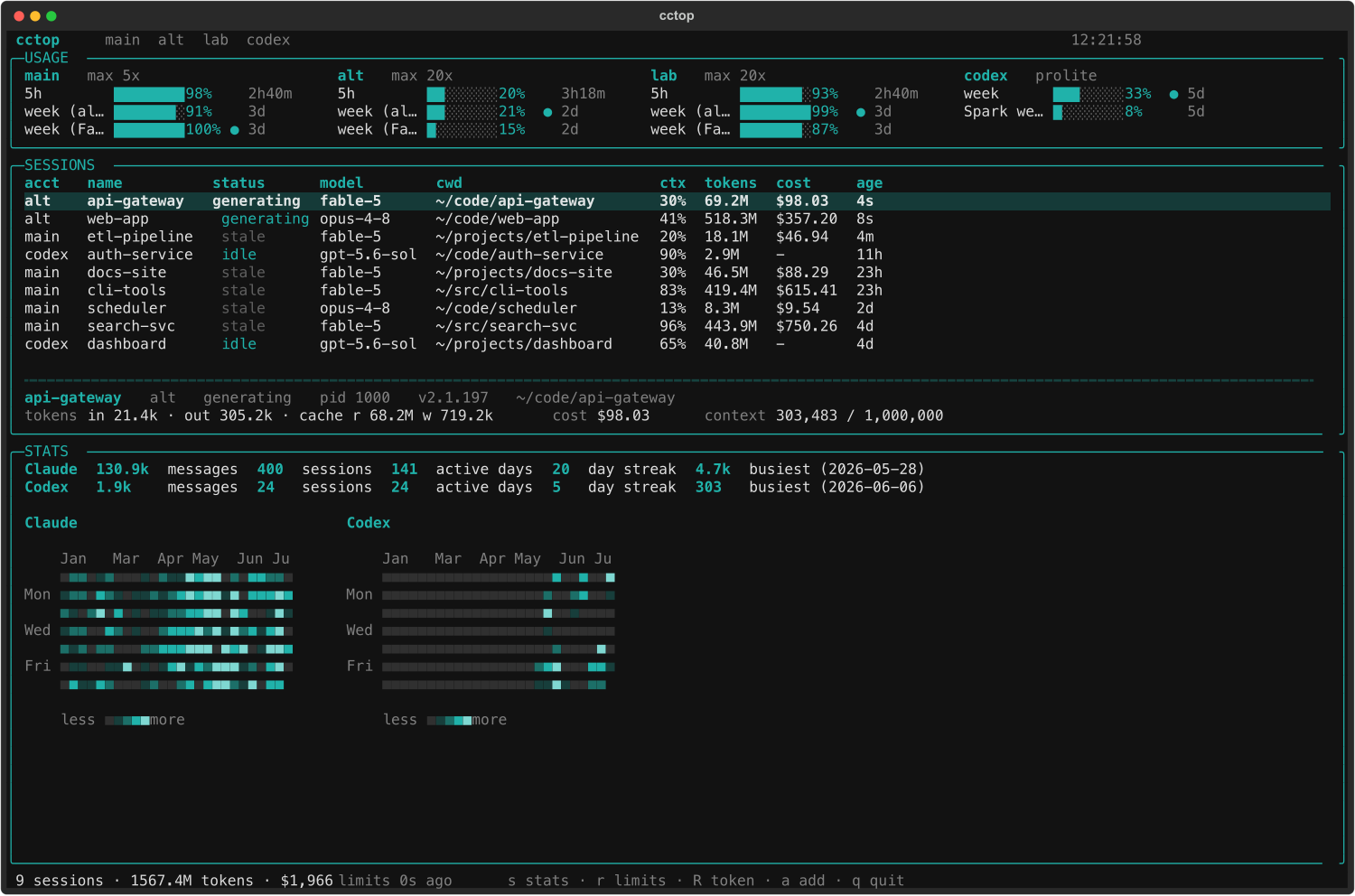
What it shows
- Usage limits (top panel), per account, side by side: the 5-hour, weekly
(all models), and weekly (Fable) windows with utilization, reset countdown,
and the currently-binding window marked. These are the real numbers from
Anthropic's
GET /api/oauth/usageendpoint (the same one/usageuses) — a free read, no tokens consumed. - Sessions (table): every live Claude Code process, tagged by account, with status, model, cwd, context %, cumulative tokens, cost, and age. Selecting a row opens a detail panel (full cwd, pid, version, token/cost/context breakdown).
- Statistics (press
s): a GitHub-style daily-activity heatmap, lifetime totals (messages, sessions, tool calls, active days, longest streak, busiest day), a top-models-by-tokens chart, and a per-account breakdown, all merged from each account'sstats-cache.json.
Install
Requires macOS and Python 3.11+ (Linux support is planned).
Once published to PyPI (distribution name cctop-tui), the one-liners are:
uv tool install cctop-tui     # or: pipx install cctop-tui
uvx cctop-tui                 # run without installing (starts the `cctop` TUI)
From a clone (current default while pre-release):
cd cctop
uv venv --python 3.12
uv pip install -e .           # add ".[dev]" for the test/lint tooling
cctop
Usage
cctop                 # launch the live TUI (default)
cctop --once          # print a one-shot snapshot and exit
cctop --json          # emit the snapshot as JSON (for scripting)
cctop --no-limits     # skip the usage fetch (no network, session table only)

cctop accounts        # list discovered accounts (read-only)
cctop doctor          # read-only self-check (platform, binaries, token/expiry)
cctop add-account     # provision a new account (dry-run; see Accounts below)
TUI keys: s stats · r refresh limits · R refresh token · a add account ·
q quit.
Token refresh (R)
A Claude Code OAuth access token lives only ~12-15h, and the CLI refreshes it
lazily when you use an account, so an account you are merely monitoring drifts
past expiry and the usage read starts failing (token expired). Press R and
cctop asks the tool that owns the credential to renew it: it runs
claude mcp list under each account's config dir (a quota-free command whose
startup renews and rewrites the Keychain record). cctop never writes a
credential itself — it only triggers the owner binary and reads the result —
and it is a no-op on tokens that are still valid. An account whose refresh token
is itself dead reports "needs re-login" (only a fresh /login can fix that).
Accounts
cctop auto-detects your accounts with zero setup: your Claude Code account
(~/.claude) and your Codex account (~/.codex) are picked up automatically.
For most people that is the whole story: install, run cctop, done. Run
cctop accounts to see what it found.
Multiple Claude accounts (optional). If you run more than one Claude
subscription in separate config dirs (via CLAUDE_CONFIG_DIR), cctop shows them
all side by side. To add one without leaving cctop, press a (or run
cctop add-account --login): it creates the config dir, optionally clones your
existing config, and signs you in. It is strictly additive — it never
deletes, overwrites, or modifies existing config, credentials, or sessions, and
only writes a shell alias if you explicitly ask for one.
How it works
| Data | Claude source | Codex source | Cost |
|---|---|---|---|
| Live sessions | ~/.claude*/sessions/<pid>.json |
ps + ~/.codex/sessions/ rollouts |
free (file/ps) |
| Tokens / context | transcript JSONL, tailed | rollout token_count events |
free (file) |
| Usage limits | GET /api/oauth/usage (Keychain token) |
GET chatgpt.com/backend-api/codex/usage (~/.codex/auth.json token) |
free (GET) |
| Statistics | ~/.claude*/stats-cache.json |
aggregated from rollout files | free (file) |
Providers
cctop tracks both Claude Code and OpenAI Codex side by side. Claude
accounts are cc-0/cc-1/…; a Codex account (cx-0, from ~/.codex) is added
automatically when present. Usage windows and stats are read per provider (they
differ in shape: Codex exposes primary/secondary windows plus per-model limits,
and its stats come from rollout files rather than a stats cache). Codex sessions
show token/context but no dollar cost, since Codex is subscription-based.
The credential for the usage read is resolved per account from the macOS
Keychain service Claude Code-credentials-<sha256(config_dir)[:8]>, used only to
authenticate to Anthropic's own API, never logged or persisted. The usage
response's org is verified against the account so one account can never show
another's numbers.
Undocumented, version-internal formats (the sessions registry, transcript
schema, usage JSON) are all read defensively and isolated to the collector core
(registry, transcript, usage, stats, monitor, pricing, status,
codex* for the Codex provider, authctl for delegated token refresh, and
manage for additive account provisioning), with a thin Textual presentation
layer on top.
Notes
- Pricing (
pricing.py) is a small editable table; update it as rates change. - The palette is the house teal (
#20B2AA) on monochrome terminal. Usage bars stay teal even when maxed (fullness is the signal); red is reserved for a blocked or dead session.
Author
Ryan 'RyanIRL' Peters
Release history Release notifications | RSS feed


Download files
Download the file for your platform. If you're not sure which to choose, learn more about installing packages.
Source Distribution
Built Distribution
Filter files by name, interpreter, ABI, and platform.
If you're not sure about the file name format, learn more about wheel file names.
Copy a direct link to the current filters
File details
Details for the file cctop_tui-0.1.0.tar.gz.
File metadata
- Download URL: cctop_tui-0.1.0.tar.gz
- Upload date:
- Size: 347.6 kB
- Tags: Source
- Uploaded using Trusted Publishing? No
- Uploaded via: twine/6.2.0 CPython/3.11.11
File hashes
| Algorithm | Hash digest | |
|---|---|---|
| SHA256 |
1326a797304792df0072e717d3f78f1e77846e70e573c6f27d7974c4e2a49bb6
|
|
| MD5 |
2be2a524ec793b42f1747c97cbabc112
|
|
| BLAKE2b-256 |
b8a93f9948e52e85cbe714b44758edadd13d024be6791b15b9bbcd2079622f19
|
File details
Details for the file cctop_tui-0.1.0-py3-none-any.whl.
File metadata
- Download URL: cctop_tui-0.1.0-py3-none-any.whl
- Upload date:
- Size: 53.7 kB
- Tags: Python 3
- Uploaded using Trusted Publishing? No
- Uploaded via: twine/6.2.0 CPython/3.11.11
File hashes
| Algorithm | Hash digest | |
|---|---|---|
| SHA256 |
9f1e4f4488b7307d9618504e1f778f5bc6aa125ea326a9adf6c4d2982bd70003
|
|
| MD5 |
ec4847f7a4bac91a59c76d65fb21aee5
|
|
| BLAKE2b-256 |
4e8c53f338c2e45dee6e0de959e597231db558665ccdeda8b5102f7ef80145aa
|






