
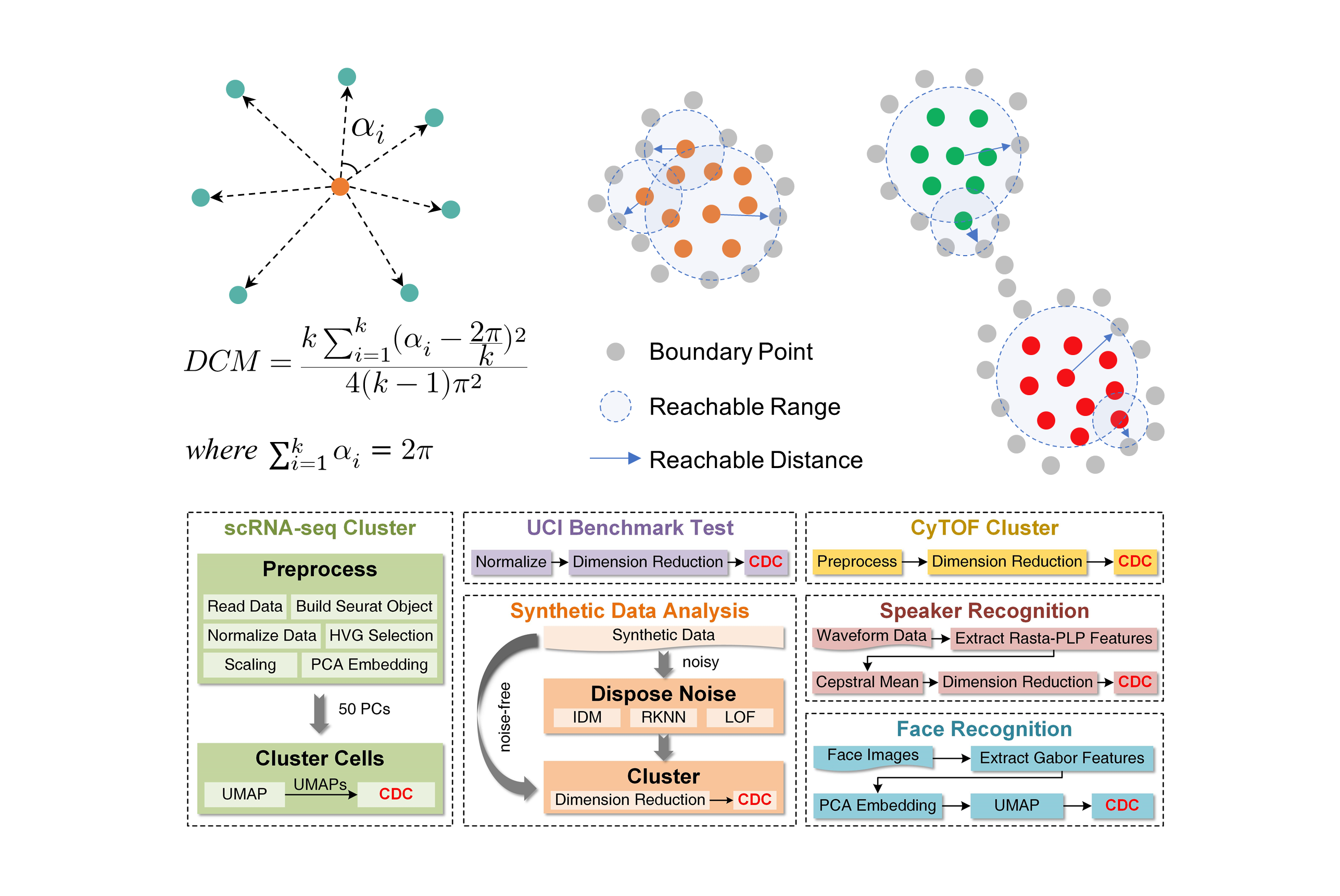
A novel Clustering algorithm by measuring Direction Centrality (CDC) locally. It adopts a density-independent metric based on the distribution of K-nearest neighbors (KNNs) to distinguish between internal and boundary points. The boundary points generate enclosed cages to bind the connections of internal points.

Project description
Clustering by measuring local direction centrality for data with heterogeneous density and weak connectivity (CDC)
We propose a novel Clustering algorithm by measuring Direction Centrality (CDC) locally. It adopts a density-independent metric based on the distribution of K-nearest neighbors (KNNs) to distinguish between internal and boundary points. The boundary points generate enclosed cages to bind the connections of internal points, thereby preventing cross-cluster connections and separating weakly-connected clusters. We present an interactive Demo and a brief introduction to the algorithm at https://zpguigroupwhu.github.io/CDC-Introduction-Website/, and develop a CDC toolkit at https://github.com/ZPGuiGroupWhu/ClusteringDirectionCentrality This paper has been published in Nature Communications, and more details can be seen https://www.nature.com/articles/s41467-022-33136-9.
Installation
Supported python versions are 3.8 and above.
This project has been uploaded to PyPI, supporting direct download and installation from pypi
pip install cdc-cluster
Manual Installation
git clone https://github.com/ZPGuiGroupWhu/CDC-pkg.git
cd CDC-pkg
pip install -e .
How To Run
The CDC algorithm package provides the cdc_cluster function for clustering.
The description of the hyperparameters for user configuration are presented as follows
def cdc_cluster(X: np.ndarray, k_num: int, ratio: float) -> np.ndarray:
    """Clustering by measuring local Direction Centrality (CDC) algorithm.

    This function implements the CDC clustering algorithm, which is a connectivity-based
    clustering method that identifies boundary points using a directional centrality
    metric (DCM) and connects internal points to generate cluster labels. DCM is defined
    as angle variance in 2D space and simplex volume variance in higher dimensions.

    The algorithm works in several steps:
    1. For each point, find k-nearest neighbors
    2. For each point, calculate its DCM
    3. Identify boundary and internal points based on the DCM threshold
    4. Calculate reachable distances of the internal points
    5. Form clusters by connecting nearby internal points
    6. Assign boundary points to nearest clusters

    Args:
        X (np.ndarray): Input data matrix of shape (n_samples, n_features).
            Each row represents a data point and each column represents a feature.
        k_num (int): Number of nearest neighbors to consider. Must be greater than 0.
            This parameter controls the local neighborhood size.
        ratio (float): Ratio for determining the DCM threshold. Must be between 0 and 1.
            Lower values result in fewer internal points and more boundary points.

    Returns:
        np.ndarray: Cluster labels for each data point. Shape (n_samples,).
            Labels are integers starting from 1, where points with the same label
            belong to the same cluster.

    Raises:
        AssertionError: If k_num <= 0 or ratio is not in (0, 1).
        ValueError: If X is not a 2D array or has insufficient data points.

    Note:
        - For 2D data, the algorithm uses angle variance between k-nearest neighbors
        - For higher dimensional data, it uses convex hull simplex volume variance
        - The algorithm automatically handles edge cases and numerical instabilities
    """
After installing the CDC library, you can use this function as follows:
from cdc import cdc_cluster
import numpy as np
import pandas as pd
import matplotlib.pyplot as plt
import time
# DS1.txt link: https://github.com/ZPGuiGroupWhu/ClusteringDirectionCentrality/blob/master/Toolkit/Python/DS1.txt
raw_data = pd.read_table('DS1.txt', header=None)
X = np.array(raw_data)
[n, d] = X.shape
data = X[:, :d-1]
ref = X[:, d-1]
time_start = time.time()
res = cdc_cluster(X=data, k_num=30, ratio=0.72)
time_end = time.time()
print(time_end-time_start)

plt.scatter(data[:, 0], data[:, 1], c=res, s=10, cmap='hsv', marker='o')
plt.show()
Citation Request:
Peng, D., Gui, Z.*, Wang, D. et al. Clustering by measuring local direction centrality for data with heterogeneous density and weak connectivity. Nat. Commun. 13, 5455 (2022). https://www.nature.com/articles/s41467-022-33136-9
License
This project is covered under the MIT License.


Download files
Download the file for your platform. If you're not sure which to choose, learn more about installing packages.
Source Distribution
Built Distribution
Filter files by name, interpreter, ABI, and platform.
If you're not sure about the file name format, learn more about wheel file names.
Copy a direct link to the current filters
File details
Details for the file cdc_cluster-0.1.1.tar.gz.
File metadata
- Download URL: cdc_cluster-0.1.1.tar.gz
- Upload date:
- Size: 5.0 kB
- Tags: Source
- Uploaded using Trusted Publishing? No
- Uploaded via: uv/0.6.4
File hashes
| Algorithm | Hash digest | |
|---|---|---|
| SHA256 |
7550b68cf05cc79f9ef9d2f0044a537a81abc0fce371e0cd906d988e579f339e
|
|
| MD5 |
a91dcaf3d2d36c28eca17af393364a60
|
|
| BLAKE2b-256 |
85d2276d10d13b4241a673ecc334e95320b2a7309774cf9cbbd8f9534ae86ec7
|
File details
Details for the file cdc_cluster-0.1.1-py3-none-any.whl.
File metadata
- Download URL: cdc_cluster-0.1.1-py3-none-any.whl
- Upload date:
- Size: 5.7 kB
- Tags: Python 3
- Uploaded using Trusted Publishing? No
- Uploaded via: uv/0.6.4
File hashes
| Algorithm | Hash digest | |
|---|---|---|
| SHA256 |
99713498ed301eee0c04cdea5c1b5d548510e16269e36a3bf84e54827a6654e9
|
|
| MD5 |
942144f8f1c54da3ac8d17df22144d33
|
|
| BLAKE2b-256 |
d79b954649619609118813670efa0e6c4cac5033cc661d437eb83ce87da8f5ca
|






