
This module allows you to copy docker image assets to a repository you control. This can be necessary if you want to build a Docker image in one CDK app and consume it in a different app or outside the CDK.

Project description
CDK Docker Image Deployment
This module allows you to copy docker image assets to a repository you control. This can be necessary if you want to build a Docker image in one CDK app and consume it in a different app or outside the CDK, or if you want to apply a lifecycle policy to all images of a part of your application.
Getting Started
Below is a basic example for how to use the DockerImageDeployment API:
import * as ecr from 'aws-cdk-lib/aws-ecr';
import * as imagedeploy from 'cdk-docker-image-deployment';

const repo = new ecr.Repository.fromRepositoryName(this, 'MyRepository', 'myrepository');

new imagedeploy.DockerImageDeployment(this, 'ExampleImageDeploymentWithTag', {
  source: imagedeploy.Source.directory('path/to/directory'),
  destination: imagedeploy.Destination.ecr(repo, {
    tag: 'myspecialtag',
  }),
});
Currently Supported Sources
Source.directory(): Supply a path to a local docker image as source.
Don't see a source listed? See if there is an open issue or PR already. If not, please open an issue asking for it or better yet, submit a contribution!
Currently Supported Destinations
Destination.ecr(repo, options): Send your docker image to an ECR repository in your stack's account.
Don't see a destination listed? See if there is an open issue or PR already. If not, please open an issue asking for it or better yet, submit a contribution!
Under the Hood
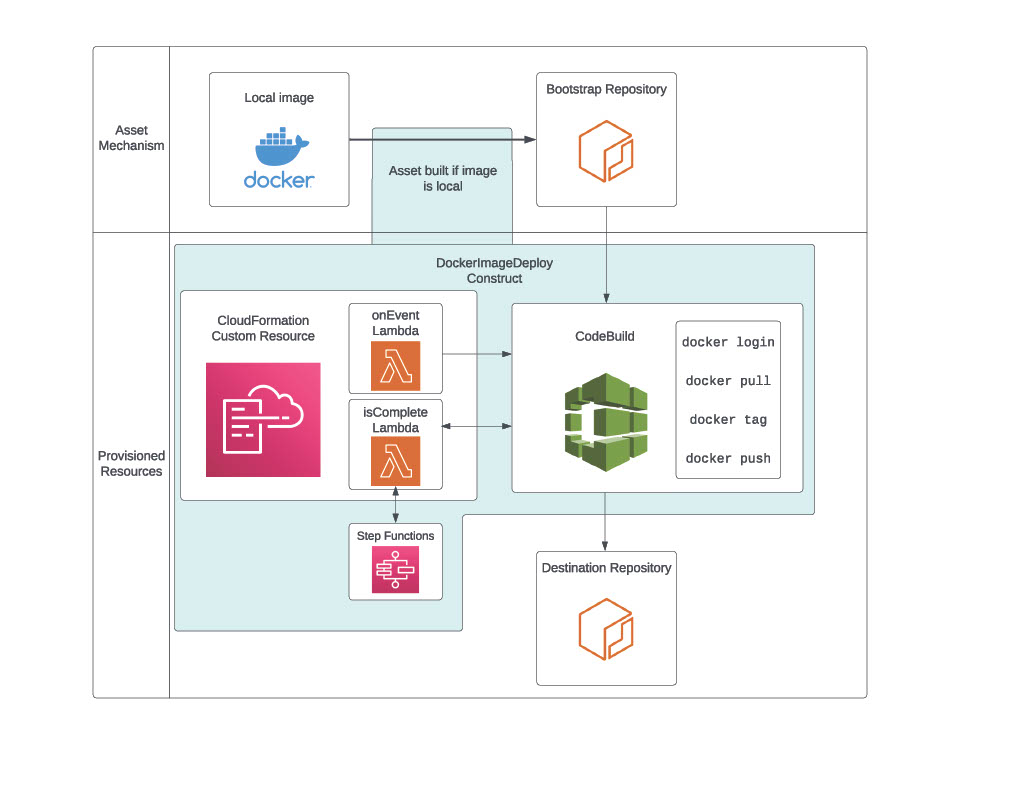
- When this stack is deployed (either via cdk deploy or via CI/CD), the contents of the local Docker image will be archived and uploaded to an intermediary assets ECR Repository using the cdk-assets mechanism.
- The
DockerImageDeploymentconstruct synthesizes a CodeBuild Project which uses docker to pull the image from the intermediary repository, tag the image if a tag is provided, and push the image to the destination repository. - The deployment will wait until the CodeBuild Project completes successfully before finishing.
The architecture of this construct can be seen here:
Security
See CONTRIBUTING for more information.
License
This project is licensed under the Apache-2.0 License.
Release history Release notifications | RSS feed


Download files
Download the file for your platform. If you're not sure which to choose, learn more about installing packages.
Source Distribution
Built Distribution
Filter files by name, interpreter, ABI, and platform.
If you're not sure about the file name format, learn more about wheel file names.
Copy a direct link to the current filters
File details
Details for the file cdk-docker-image-deployment-0.0.479.tar.gz.
File metadata
- Download URL: cdk-docker-image-deployment-0.0.479.tar.gz
- Upload date:
- Size: 11.6 MB
- Tags: Source
- Uploaded using Trusted Publishing? No
- Uploaded via: twine/4.0.2 CPython/3.12.1
File hashes
| Algorithm | Hash digest | |
|---|---|---|
| SHA256 |
220c4cc65fcd7353b80a7deca09ad0ef18701fdc40075eaf9df10b2fd09129c7
|
|
| MD5 |
a3ddd7a6c8383d15c99da9dd7c5a164b
|
|
| BLAKE2b-256 |
f55466e6f31c313bbd9c0bbd4addcdf4d62fb53aa1ea0ed062bde7917b53b04f
|
File details
Details for the file cdk_docker_image_deployment-0.0.479-py3-none-any.whl.
File metadata
- Download URL: cdk_docker_image_deployment-0.0.479-py3-none-any.whl
- Upload date:
- Size: 11.6 MB
- Tags: Python 3
- Uploaded using Trusted Publishing? No
- Uploaded via: twine/4.0.2 CPython/3.12.1
File hashes
| Algorithm | Hash digest | |
|---|---|---|
| SHA256 |
d8ad5f8b3917b452f6cf80ed6983f482542d9a849eb2ac915ef826917ce8a4f1
|
|
| MD5 |
0c14e12ee19936ae25927d9427e23981
|
|
| BLAKE2b-256 |
068f8f1be3ee7d2c4b5beea2f246be710e0d612c4789152d35e1f63faac9c6c9
|






