
A construct for the quick demo of EMR Serverless.

Project description
cdk-emrserverless-with-delta-lake






| npm (JS/TS) | PyPI (Python) | Maven (Java) | Go | NuGet |
|---|---|---|---|---|
| Link | Link | Link | Link | Link |
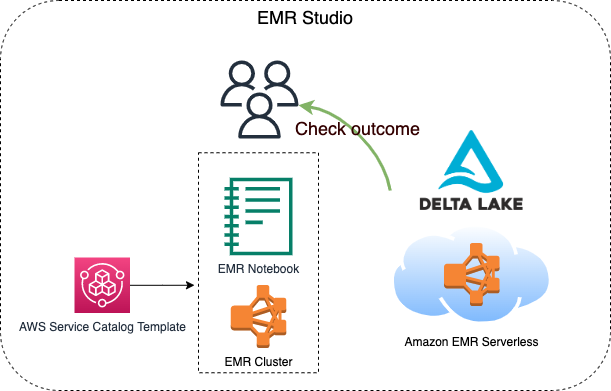
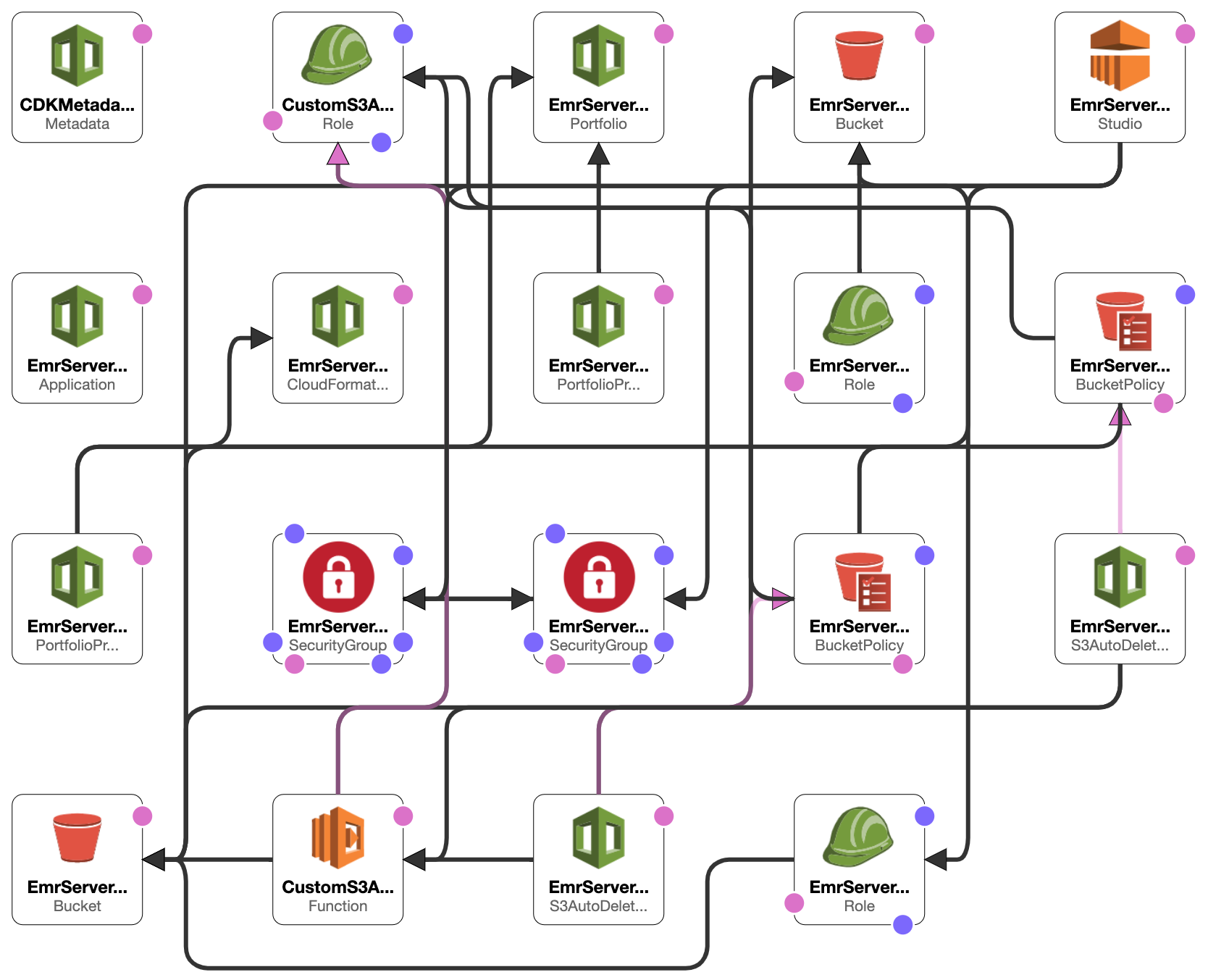
This constrcut builds an EMR studio, a cluster template for the EMR Studio, and an EMR Serverless application. 2 S3 buckets will be created, one is for the EMR Studio workspace and the other one is for EMR Serverless applications. Besides, the VPC and the subnets for the EMR Studio will be tagged {"Key": "for-use-with-amazon-emr-managed-policies", "Value": "true"} via a custom resource. This is necessary for the service role of EMR Studio.
This construct is for analysts, data engineers, and anyone who wants to know how to process Delta Lake data with EMR serverless.
TOC
- Requirements
- Before deployment
- Minimal content for deployment
- After deployment
- Create an EMR Serverless application
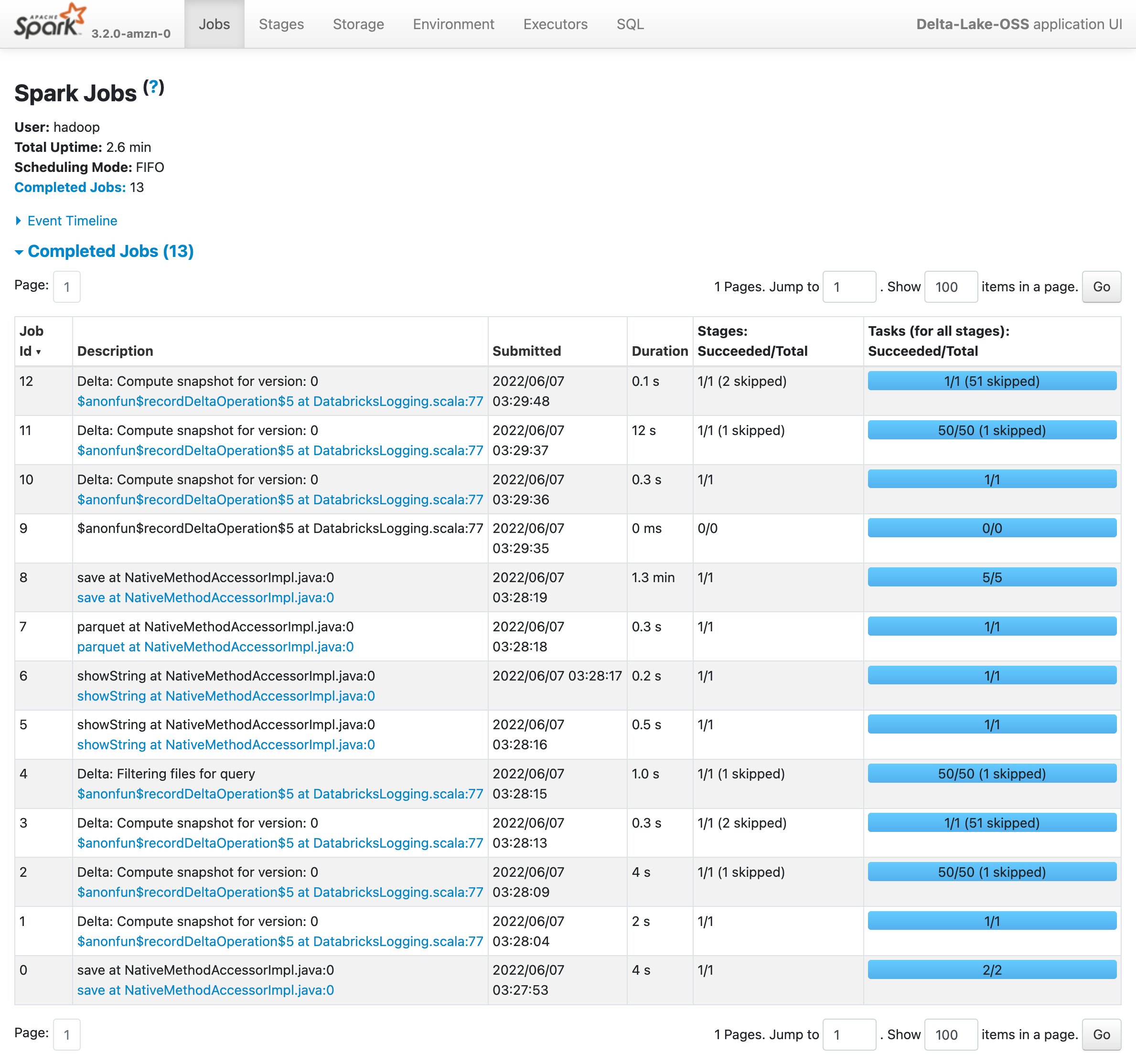
- Check the executing job
- Check results from an EMR notebook via cluster template
- Fun facts
- Future work
Requirements
-
Your current identity has the
AdministratorAccesspower. -
An IAM user named
Administratorwith theAdministratorAccesspower.- This is related to the Portfolio of AWS Service Catalog created by the construct, which is required for EMR cluster tempaltes.
- You can choose whatsoever identity you wish to associate with the Product in the Porfolio for creating an EMR cluster via cluster tempalte. Check
serviceCatalogPropsin theEmrServerlessconstruct for detail, otherwise, the IAM user mentioned above will be chosen to set up with the Product.
Before deployment
You might want to execute the following command.
PROFILE_NAME="scott.hsieh"
# If you only have one credentials on your local machine, just ignore `--profile`, buddy.
cdk bootstrap aws://${AWS_ACCOUNT_ID}/${AWS_REGION} --profile ${PROFILE_NAME}
Minimal content for deployment
#!/usr/bin/env node
import * as cdk from 'aws-cdk-lib';
import { Construct } from 'constructs';
import { EmrServerless } from 'cdk-emrserverless-with-delta-lake';

class TypescriptStack extends cdk.Stack {
  constructor(scope: Construct, id: string, props?: cdk.StackProps) {
    super(scope, id, props);
    new EmrServerless(this, 'EmrServerless');
  }
}

const app = new cdk.App();
new TypescriptStack(app, 'TypescriptStack', {
  stackName: 'emr-studio',
  env: {
    region: process.env.CDK_DEFAULT_REGION,
    account: process.env.CDK_DEFAULT_ACCOUNT,
  },
});
After deployment
Promise me, darling, make advantage on the CloudFormation outputs. All you need is copy-paste, copy-paste, copy-paste, life should be always that easy.
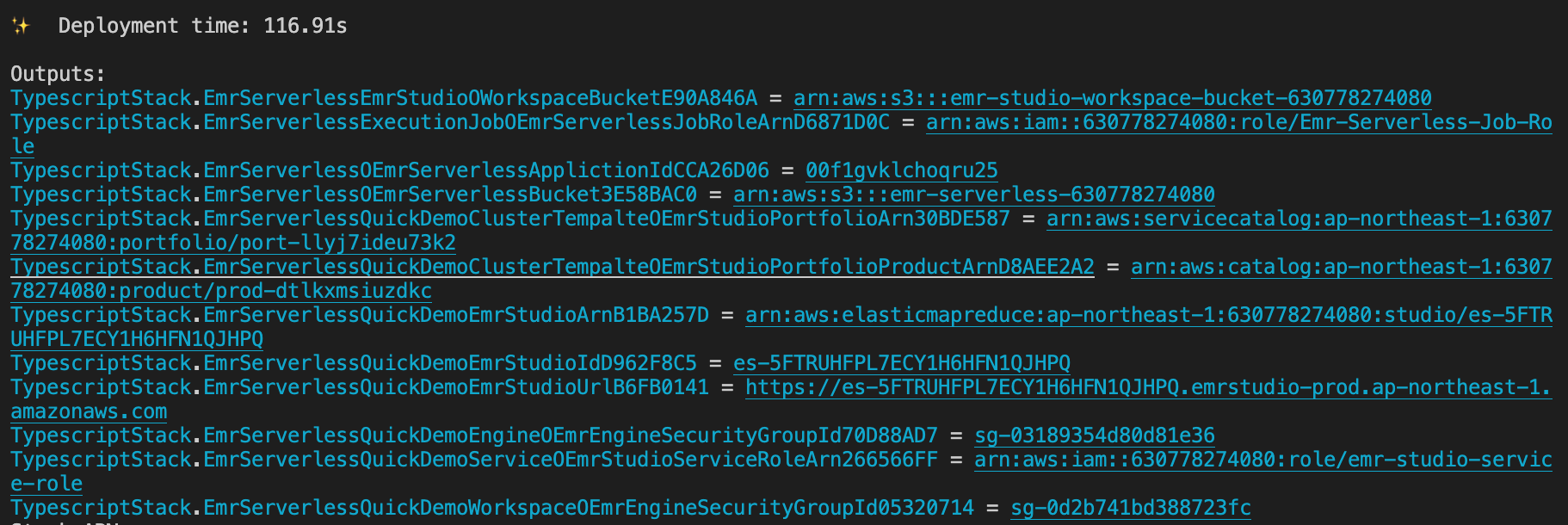
-
Define the following environment variables on your current session.
export PROFILE_NAME="${YOUR_PROFILE_NAME}" export JOB_ROLE_ARN="${copy-paste-thank-you}" export APPLICATION_ID="${copy-paste-thank-you}" export SERVERLESS_BUCKET_NAME="${copy-paste-thank-you}" export DELTA_LAKE_SCRIPT_NAME="delta-lake-demo" -
Copy partial NYC-taxi data into the EMR Serverless bucket.
aws s3 cp s3://nyc-tlc/trip\ data/ s3://${SERVERLESS_BUCKET_NAME}/nyc-taxi/ --exclude "*" --include "yellow_tripdata_2021-*.parquet" --recursive --profile ${PROFILE_NAME}
-
Create a Python script for processing Delta Lake
touch ${DELTA_LAKE_SCRIPT_NAME}.py
cat << EOF > ${DELTA_LAKE_SCRIPT_NAME}.py
from pyspark.sql import SparkSession
import uuid

if __name__ == "__main__":
    """
        Delta Lake with EMR Serverless, take NYC taxi as example.
    """
    spark = SparkSession \\
        .builder \\
        .config("spark.sql.extensions", "io.delta.sql.DeltaSparkSessionExtension") \\
        .config("spark.sql.catalog.spark_catalog", "org.apache.spark.sql.delta.catalog.DeltaCatalog") \\
        .enableHiveSupport() \\
        .appName("Delta-Lake-OSS") \\
        .getOrCreate()

    url = "s3://${SERVERLESS_BUCKET_NAME}/emr-serverless-spark/delta-lake/output/1.2.1/%s/" % str(
        uuid.uuid4())

    # creates a Delta table and outputs to target S3 bucket
    spark.range(5).write.format("delta").save(url)

    # reads a Delta table and outputs to target S3 bucket
    spark.read.format("delta").load(url).show()

    # The source for the second Delta table.
    base = spark.read.parquet(
        "s3://${SERVERLESS_BUCKET_NAME}/nyc-taxi/*.parquet")

    # The sceond Delta table, oh ya.
    base.write.format("delta") \\
        .mode("overwrite") \\
        .save("s3://${SERVERLESS_BUCKET_NAME}/emr-serverless-spark/delta-lake/nyx-tlc-2021")
    spark.stop()
EOF
-
Upload the script and required jars into the serverless bucket
# upload script
aws s3 cp delta-lake-demo.py s3://${SERVERLESS_BUCKET_NAME}/scripts/${DELTA_LAKE_SCRIPT_NAME}.py --profile ${PROFILE_NAME}
# download jars and upload them
DELTA_VERSION="1.2.0"
DELTA_LAKE_CORE="delta-core_2.12-${DELTA_VERSION}.jar"
DELTA_LAKE_STORAGE="delta-storage-${DELTA_VERSION}.jar"
curl https://repo1.maven.org/maven2/io/delta/delta-core_2.12/${DELTA_VERSION}/${DELTA_LAKE_CORE} --output ${DELTA_LAKE_CORE}
curl https://repo1.maven.org/maven2/io/delta/delta-storage/${DELTA_VERSION}/${DELTA_LAKE_STORAGE} --output ${DELTA_LAKE_STORAGE}
aws s3 mv ${DELTA_LAKE_CORE} s3://${SERVERLESS_BUCKET_NAME}/jars/${${DELTA_LAKE_CORE}} --profile ${PROFILE_NAME}
aws s3 mv ${DELTA_LAKE_STORAGE} s3://${SERVERLESS_BUCKET_NAME}/jars/${DELTA_LAKE_STORAGE} --profile ${PROFILE_NAME}
Create an EMR Serverless app
Rememeber, you got so much information to copy and paste from the CloudFormation outputs.
aws emr-serverless start-job-run \
  --application-id ${APPLICATION_ID} \
  --execution-role-arn ${JOB_ROLE_ARN} \
  --name 'shy-shy-first-time' \
  --job-driver '{
        "sparkSubmit": {
            "entryPoint": "s3://'${SERVERLESS_BUCKET_NAME}'/scripts/'${DELTA_LAKE_SCRIPT_NAME}'.py",
            "sparkSubmitParameters": "--conf spark.executor.cores=1 --conf spark.executor.memory=4g --conf spark.driver.cores=1 --conf spark.driver.memory=4g --conf spark.executor.instances=1 --conf spark.jars=s3://'${SERVERLESS_BUCKET_NAME}'/jars/delta-core_2.12-1.2.0.jar,s3://'${SERVERLESS_BUCKET_NAME}'/jars/delta-storage-1.2.0.jar"
        }
    }' \
  --configuration-overrides '{
        "monitoringConfiguration": {
            "s3MonitoringConfiguration": {
                "logUri": "s3://'${SERVERLESS_BUCKET_NAME}'/serverless-log/"
	        }
	    }
	}' \
	--profile ${PROFILE_NAME}
If you execute with success, you should see similar reponse as the following:
{
    "applicationId": "00f1gvklchoqru25",
    "jobRunId": "00f1h0ipd2maem01",
    "arn": "arn:aws:emr-serverless:ap-northeast-1:630778274080:/applications/00f1gvklchoqru25/jobruns/00f1h0ipd2maem01"
}
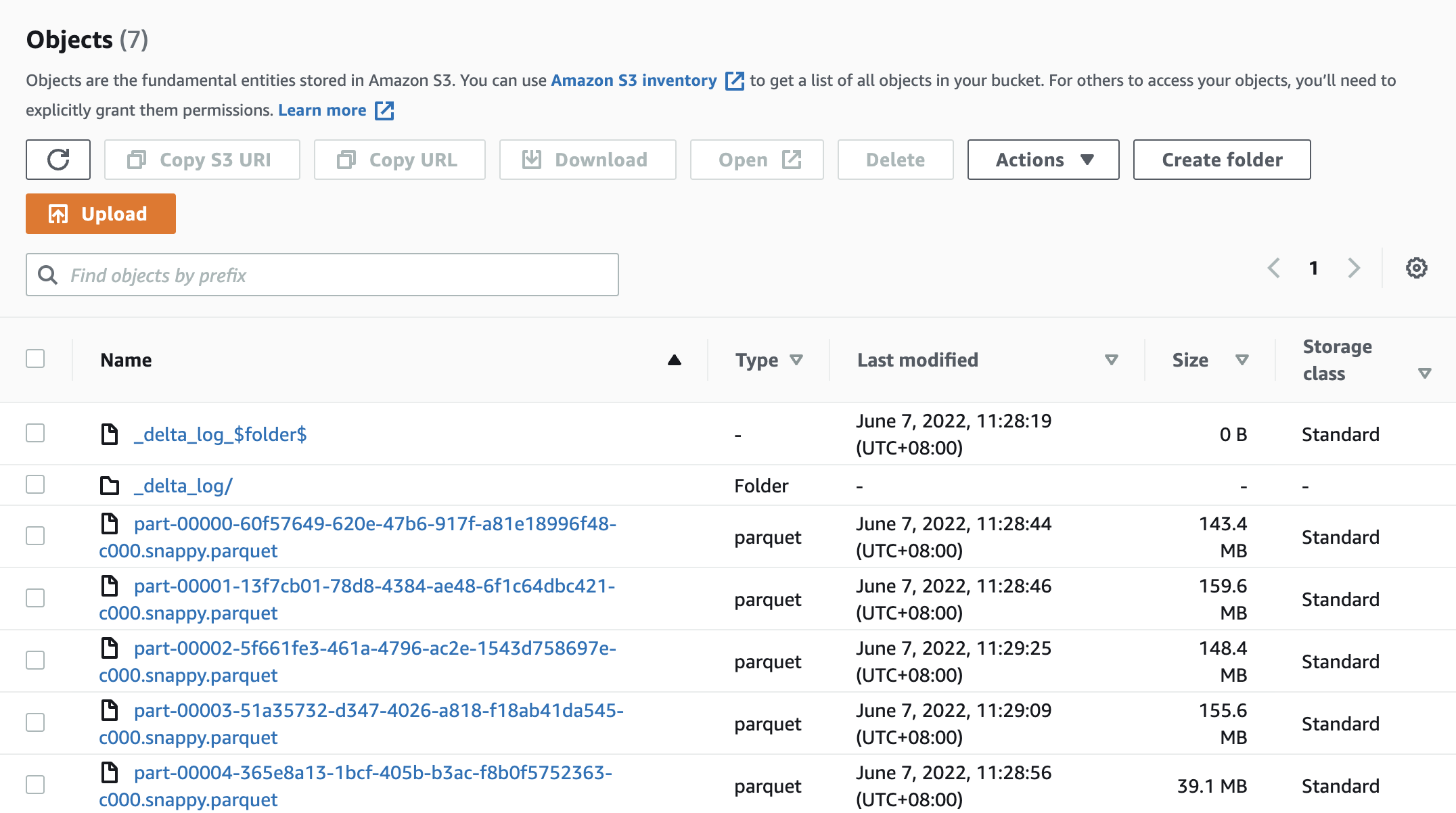
and got a Delta Lake data under s3://${SERVERLESS_BUCKET_NAME}/emr-serverless-spark/delta-lake/nyx-tlc-2021/.
Check the executing job
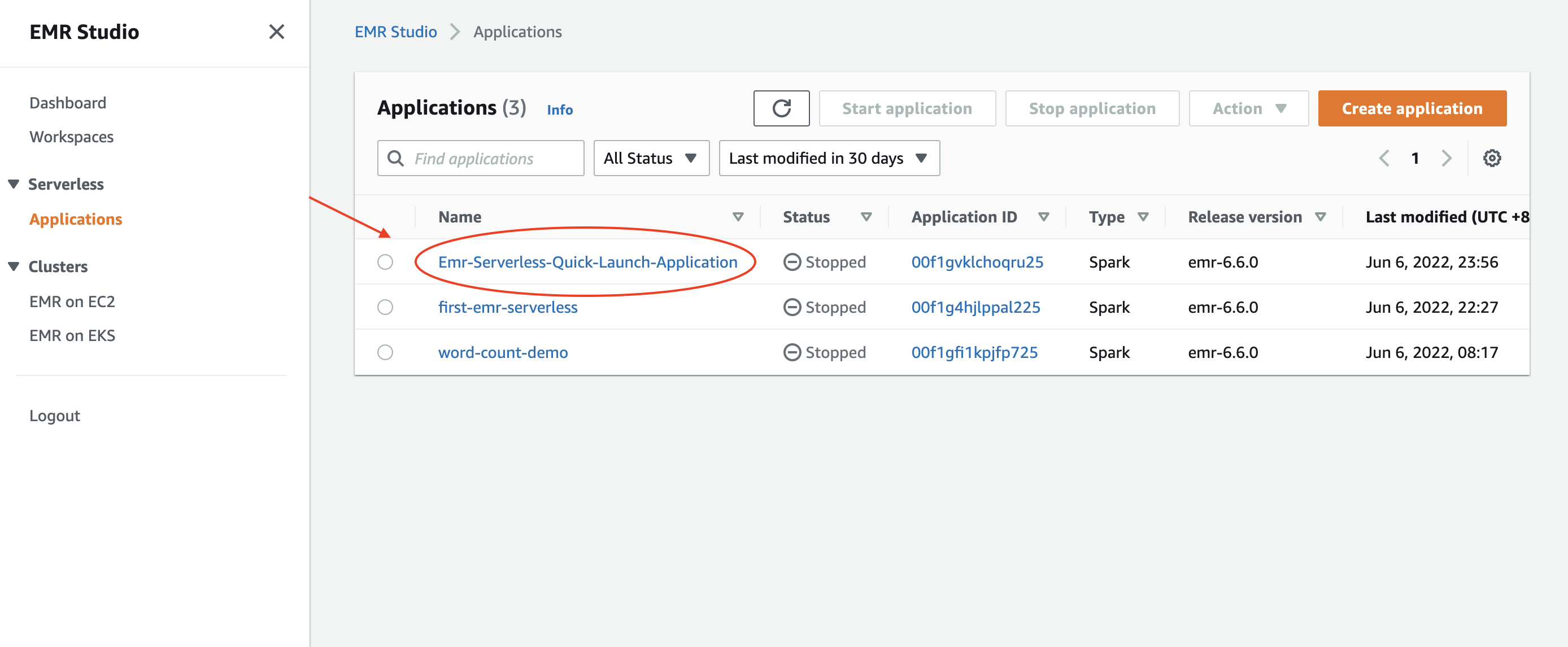
Access the EMR Studio via the URL from the CloudFormation outputs. It should look very similar to the following url: https://es-pilibalapilibala.emrstudio-prod.ap-northeast-1.amazonaws.com, i.e., weird string and region won't be the same as mine.
- Enter into the application
- Enter into the executing job
Check results from an EMR notebook via cluster template
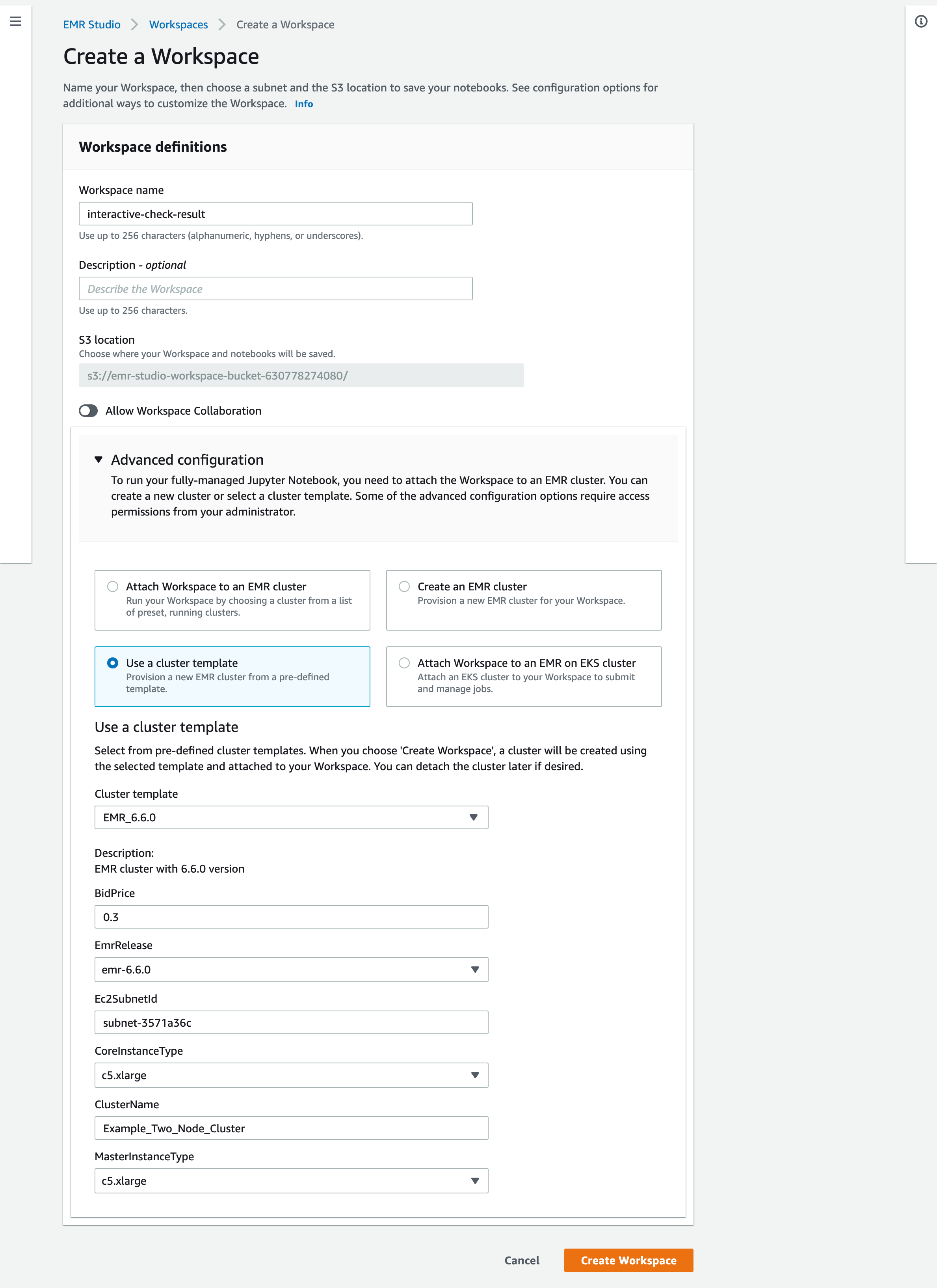
- Create a workspace and an EMR cluster via the cluster template on the AWS Console
- Check the results delivered by the EMR serverless application via an EMR notebook.
Fun facts
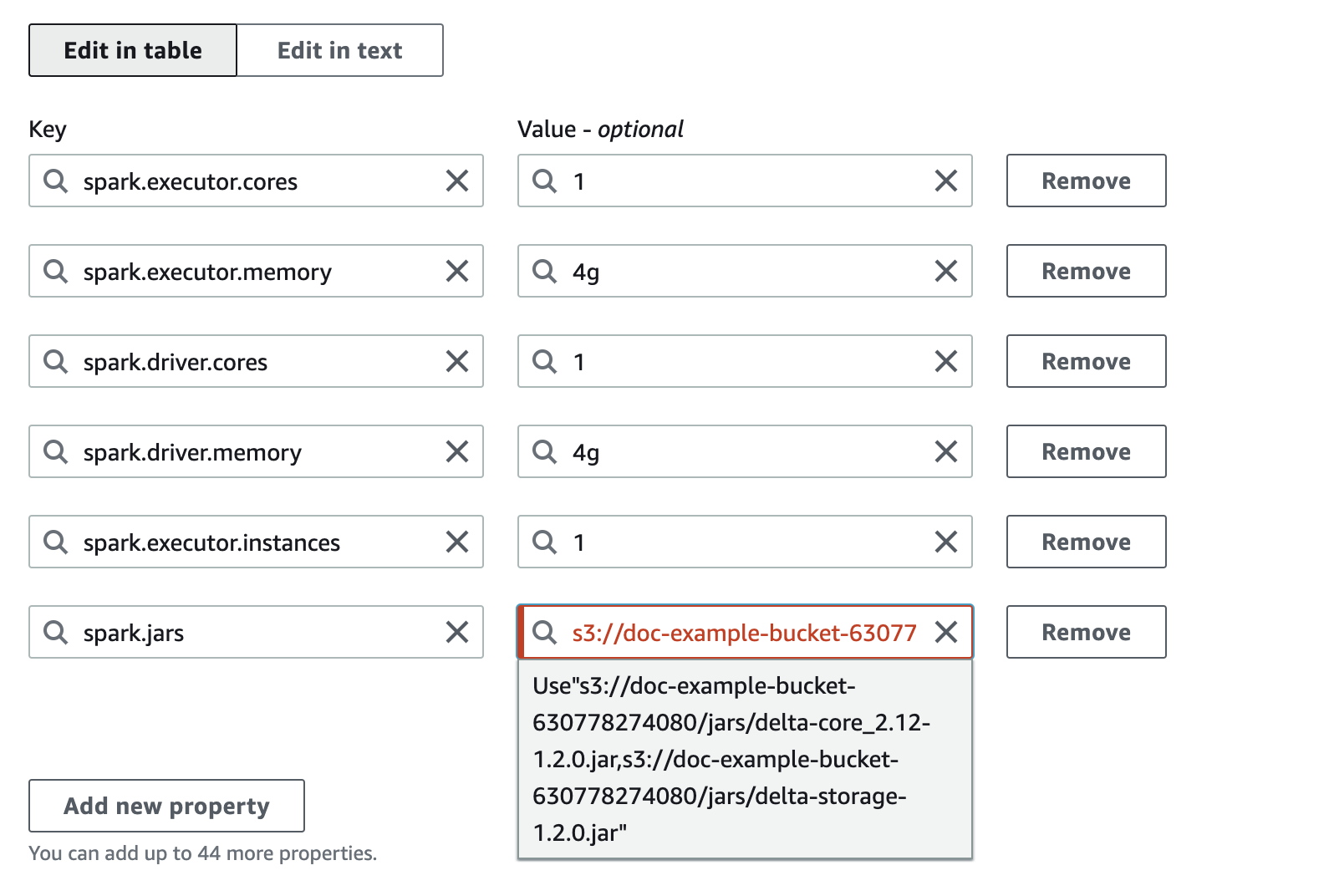
- You can assign multiple jars as a comma-separated list to the
spark.jarsas the Spark page says for your EMR Serverless job. The UI will complain, you still can start the job. Don't be afraid, just click it like when you were child, facing authority fearlessly. - To fully delet a stack with the construct, you need to make sure there is no more workspace within the EMR Studio. Aside from that, you also need to remove the associated identity from the Service Catalog (this is a necessary resource for the cluster template).
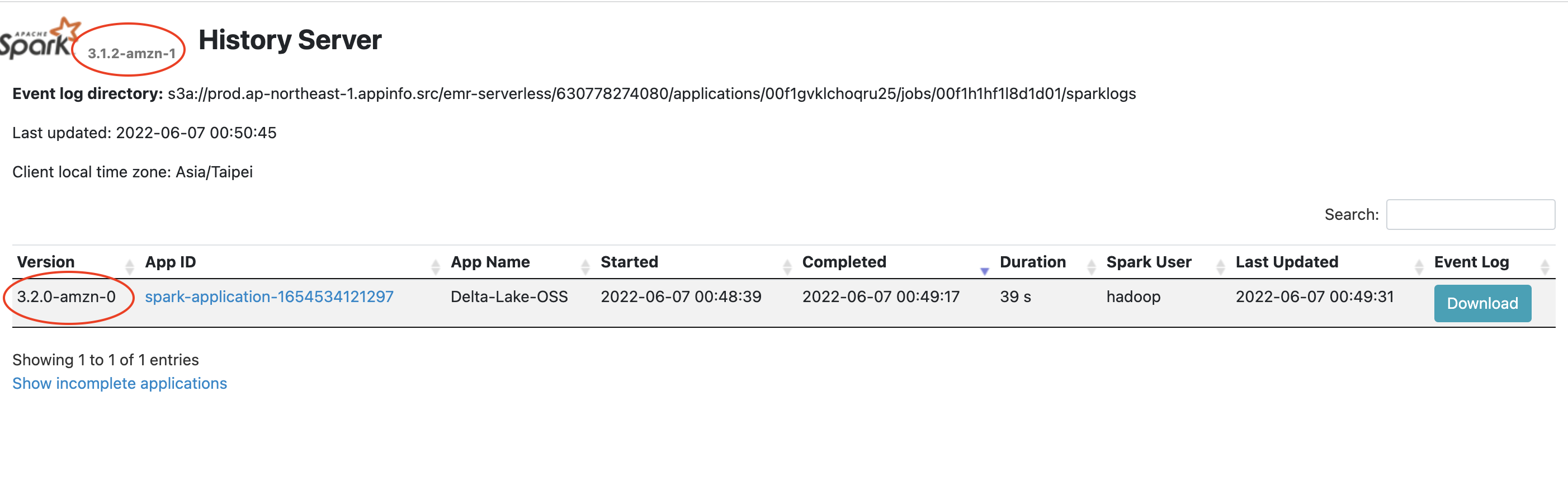
- Version inconsistency on Spark history. Possibly it can be ignored yet still made me wonder why the versions are different.
- So far, I still haven't figured out how to make the s3a URI work. The s3 URI is fine while the serverless app will complain that it couldn't find proper credentials provider to read the s3a URI.
Future work
- Custom resuorce for EMR Serverless
- Make the construct more flexible for users
- Compare Databricks Runtime and EMR Serverless.
Release history Release notifications | RSS feed


Download files
Download the file for your platform. If you're not sure which to choose, learn more about installing packages.
Source Distribution
Built Distribution
Filter files by name, interpreter, ABI, and platform.
If you're not sure about the file name format, learn more about wheel file names.
Copy a direct link to the current filters
File details
Details for the file cdk_emrserverless_with_delta_lake-2.0.35.tar.gz.
File metadata
- Download URL: cdk_emrserverless_with_delta_lake-2.0.35.tar.gz
- Upload date:
- Size: 3.3 MB
- Tags: Source
- Uploaded using Trusted Publishing? No
- Uploaded via: twine/4.0.1 CPython/3.10.5
File hashes
| Algorithm | Hash digest | |
|---|---|---|
| SHA256 |
4e209b5dfa724aee285bbe7bae1e5fd89412909c7b5962118b26e82a5513b6f6
|
|
| MD5 |
8329ca1557e5f6c0faa6b74a95ed3690
|
|
| BLAKE2b-256 |
1f3eadd04e8e9623b63196eacf13311b35a03a3d99a09bc653291da85af01bad
|
File details
Details for the file cdk_emrserverless_with_delta_lake-2.0.35-py3-none-any.whl.
File metadata
- Download URL: cdk_emrserverless_with_delta_lake-2.0.35-py3-none-any.whl
- Upload date:
- Size: 3.3 MB
- Tags: Python 3
- Uploaded using Trusted Publishing? No
- Uploaded via: twine/4.0.1 CPython/3.10.5
File hashes
| Algorithm | Hash digest | |
|---|---|---|
| SHA256 |
2e9cd33d4e19b3bcf9a0980ab2ed18d6db5da8f9de3ca0f6f765a577835a7a8a
|
|
| MD5 |
2bba8739a42d9648f25cbf9657e5f438
|
|
| BLAKE2b-256 |
7a76d0fa10e27c85e5e75fd4076c8ce41bf73baa0bbfee39a96ca21443be2583
|






