
Terminal session manager for Codex and Claude accounts.

Project description
CDX Manager



Run multiple Codex, Claude, Antigravity, and Ollama sessions from one terminal. Switch between accounts instantly.
If you use AI coding tools at scale ; multiple accounts, multiple providers : you know the friction: re-authenticating, losing context, juggling environment variables. cdx removes all of that.
One command to launch any session. Zero auth juggling.
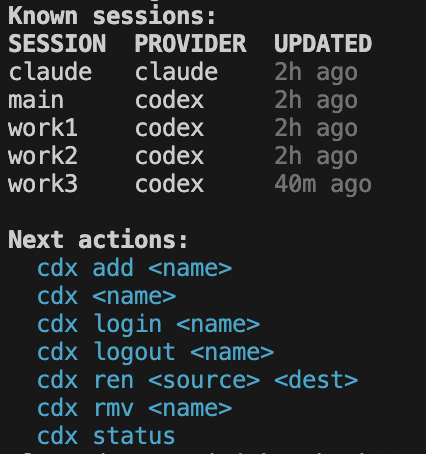
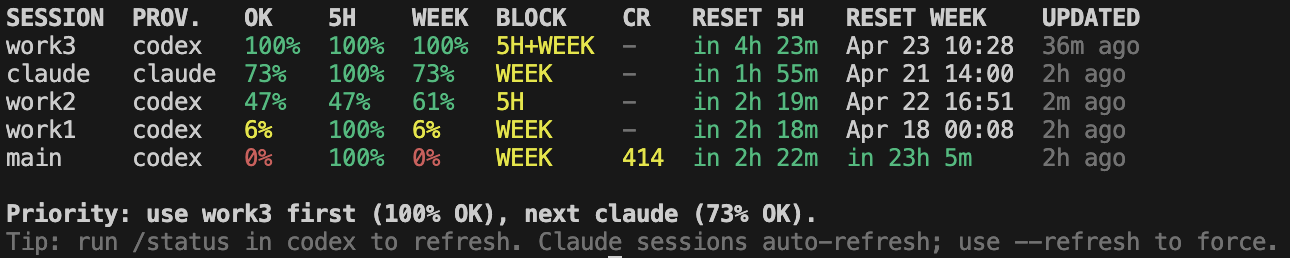
Table of Contents
- What it does
- Technical Overview
- Getting Started
- All Commands
- JSON Output
- Available Scripts
- Windows Support
- Project Structure
- Data Layout
- Troubleshooting
- Contributing
- License
What it does
- Multiple providers, one tool. Register as many Codex, Claude, Antigravity, or Ollama sessions as you need. Codex and Claude get isolated auth environments; Antigravity is launchable through
agywith OS-keyring auth; Ollama runs local models throughollama run. - Instant launch.
cdx workopens your "work" session.cdx personalopens another. No config files to edit mid-flow. - Quick relaunch.
cdx lastreopens the most recently launched assistant profile. - Auth guardrails.
cdxchecks authentication before launching. If a session is not logged in, it tells you exactly what to run — no silent failures. - Usage at a glance.
cdx statusshows token usage, 5-hour window quota, weekly quota, last-updated timestamps, priority guidance, and the last launched session in one aligned table. - Next-ready notification.
cdx readyschedules a native system notification for the next assistant that comes back from cooldown, then returns immediately. - Session control. Disable a session without deleting it when an account is temporarily out of credits; disabled sessions remain visible and sort last.
- Persistent launch settings. Pin per-session power, permission, and fast-mode preferences once;
cdxreapplies them on every launch until you unset them. - Launch history. Inspect recent launches with provider, result, duration, working directory, launch settings, and transcript path.
- Update prompts. Periodic update checks surface
cdx updatedirectly in thecdx,cdx status, and launch output when a newer release is available. Whenlogics-manageris installed,cdxcan also suggestlogics-manager self-update. - Logics viewer shortcut.
cdx viewopens the Logics browser/focus viewer throughlogics-manager viewwhen the companion CLI is installed. All viewer flags are forwarded:--lan,--lan-rw,--focus <ref>,--read,--port,--host,--refresh-interval,--tls,--tls-cert,--tls-key,--open,--no-open.cdx view --jsonreports availability and update diagnostics without opening the viewer. - Shared handoff context. Keep a per-workspace Markdown context, or build one from a source session transcript, and install it into another assistant session before switching providers or accounts.
- Passive status resolution. Codex status is read from the local Codex app-server rate-limit API when available, with legacy transcript/history parsing kept as a fallback.
- Session transcript capture. Every launch is recorded to a local log file via
script, giving you a full terminal transcript for each session. - Clean removal.
cdx rmvwipes a session and its entire auth directory. No orphaned files, no stale credentials.
Technical Overview
- Python 3.9+.
- Environment isolation per session:
- Codex sessions override
CODEX_HOMEto a dedicated profile directory. - Claude sessions override
HOMEto a dedicated profile directory and disable Claude Code commit co-author attribution by default. - Antigravity sessions launch
agywith a dedicatedHOMEfor file-based settings; Google account credentials may still be stored in the OS keyring by Antigravity itself. - Ollama sessions use the local Ollama server and launch
ollama run <model>; set a model withcdx set <name> --model <model>. - New Codex sessions seed their auth home from your existing global
~/.codex/auth.jsonwhen available, so an already logged-in Codex CLI can be reused without giving up per-session isolation afterward.
- Codex sessions override
- Persistence:
- Session registry at
~/.cdx/sessions.json(versioned JSON store). - Per-session state at
~/.cdx/state/<name>.json. - Per-workspace shared context at
~/.cdx/contexts/<workspace-hash>/context.md. - Auth and provider data under
~/.cdx/profiles/<name>/. - All paths are URL-encoded to support arbitrary session names.
- Session registry at
- Status resolution pipeline:
- Primary source: recorded status fields on the session record.
- Codex live source:
codex app-serverJSON-RPCaccount/rateLimits/read, normalized into 5-hour, weekly, reset, credit, and plan fields. - Fallback:
status-sourcescans provider JSONL history files and terminal log transcripts, strips ANSI/OSC sequences, and extractsusage%,5h remaining%, andweek remaining%via pattern matching.
- Status latency controls: use
cdx status --cachedto skip live probes,cdx status --timeout SECONDSfor one command, orCDX_STATUS_TIMEOUT_SECONDSto lower the default Codex live-probe timeout. - Claude status refreshes are cached briefly by default; pass
--refreshto force a live rate-limit probe. - On Linux, transcript capture uses the
util-linuxscript -ccommand form. - If
scriptis unavailable, Codex launch falls back to running without transcript capture. - On Windows, transcript capture is optional. If no compatible
scriptwrapper is installed, Codex still launches normally without transcript capture. - Auth probe: synchronous subprocess call to
codex login statusorclaude auth statusbefore any interactive launch. - Signal forwarding:
SIGINT,SIGTERM, andSIGHUPare forwarded to the child process and produce clean exit codes. - Test stack: Python built-in
unittestrunner with no test framework dependency.
Getting Started
Prerequisites
- Node.js 18+ with npm
- Python 3.9+
codex,claude,agy, and/orollamaCLI installed and available in your PATH
On Windows, the npm launcher looks for Python in this order: py -3, python, then python3. Make sure at least one of those commands resolves to Python 3.
Install
From npm:
npm install -g cdx-manager
With pipx:
pipx install cdx-manager
With uv:
uv tool install cdx-manager
On Windows with PowerShell:
npm install -g cdx-manager
With the standalone PowerShell installer:
Invoke-WebRequest https://raw.githubusercontent.com/AlexAgo83/cdx-manager/main/install.ps1 -OutFile install.ps1
# Optional: set CDX_SHA256 before running if you have a trusted checksum.
# Set CDX_ALLOW_UNVERIFIED=1 only if you intentionally accept an unverified archive.
powershell -ExecutionPolicy Bypass -File .\install.ps1
With the standalone GitHub installer:
curl -fsSL https://raw.githubusercontent.com/AlexAgo83/cdx-manager/main/install.sh -o install.sh
# Optional: set CDX_SHA256 before running if you have a trusted checksum.
# Set CDX_ALLOW_UNVERIFIED=1 only if you intentionally accept an unverified archive.
sh install.sh
For a specific version:
curl -fsSL https://raw.githubusercontent.com/AlexAgo83/cdx-manager/main/install.sh -o install.sh
CDX_VERSION=v0.8.0 sh install.sh
From source:
git clone <repo>
cd cdx-manager
make install
From source on Windows:
git clone <repo>
cd cdx-manager
npm install -g .
cdx is now available globally. Changes to the source take effect immediately — no reinstall needed.
To update an installed copy later:
cdx update
To uninstall:
make uninstall
To uninstall on Windows after npm install -g:
npm uninstall -g cdx-manager
Alternatively, for a non-symlinked global source install:
npm install -g .
Security note:
- The standalone installers try to resolve official release checksums from
checksums/release-archives.json. - You can still override verification explicitly through
CDX_SHA256. - If no checksum is available, standalone installers fail closed unless
CDX_ALLOW_UNVERIFIED=1is set. - Prefer
npm,pipx, oruvwhen you want registry-backed install flows. - If you use the standalone script, download it first, inspect it, and prefer a release with an official checksum entry.
Release maintainer note:
- Before publishing npm or PyPI packages, run
npm run release:validate. - The release tag must match
package.json,pyproject.toml,src/cli.py, andVERSION. checksums/release-archives.jsonmust include the matchingvX.Y.Zentry with bothgithub_tarball_sha256andgithub_zip_sha256.- Use
python3 scripts/update_release_checksums.py --tag vX.Y.Zafter the GitHub tag archives exist, commit the checksum update tomain, then publish the GitHub release only afternpm run release:validate,npm run lint, andnpm testpass.
Environment
By default, cdx stores all data under ~/.cdx/. Override with:
export CDX_HOME=/path/to/custom/dir
Optional runtime knobs:
export CDX_CLAUDE_STATUS_MODEL=claude-haiku-4-5-20251001
export CDX_SCRIPT_BIN=script
export CDX_SCRIPT_ARGS='-q -F {transcript}'
PowerShell equivalents:
$env:CDX_HOME = "C:\cdx-data"
$env:CDX_CLAUDE_STATUS_MODEL = "claude-haiku-4-5-20251001"
$env:CDX_SCRIPT_BIN = "script"
$env:CDX_SCRIPT_ARGS = "-q -F {transcript}"
Command Prompt equivalents:
set CDX_HOME=C:\cdx-data
set CDX_CLAUDE_STATUS_MODEL=claude-haiku-4-5-20251001
set CDX_SCRIPT_BIN=script
set CDX_SCRIPT_ARGS=-q -F {transcript}
Quick Start
# Register a Codex session
cdx add work

# Register a Claude session
cdx add claude personal

# Register an Ollama session
cdx add ollama local --model llama3.2

# List all sessions
cdx

# Launch a session
cdx work

# Check usage across all sessions
cdx status

# Pick the best session using the same priority logic as status
cdx next

# Notify when the next cooling-down assistant is ready
cdx ready
Next-Ready Notifications
Use cdx ready when every useful assistant is cooling down and you want your terminal back. It is shorthand for cdx notify --schedule --next-ready: cdx picks the next known reset, registers a native OS notification, and exits immediately.
cdx ready
cdx ready --refresh
Persistent Launch Settings
New sessions start with power=medium and fast=off, so launches are predictable without enabling fast mode. Set or override only the values you want to pin:
cdx set work --power medium --permission full --fast off
cdx set personal --power low --permission review
cdx set --sessions all --permission auto
cdx set --provider ollama --model llama3.2
cdx set work --priority 80
cdx set work --rtk on
cdx set work --logics off
cdx power all low
cdx perm provider:claude review
cdx model provider:ollama llama3.2
cdx config work
cdx configs
Those values are stored on the session and reapplied every time you run cdx work. Remove overrides to return to provider-native defaults:
cdx unset work --power
cdx unset --sessions work,personal --fast
cdx unset --provider claude --permission
cdx unset work --priority
cdx unset work --rtk
cdx unset work --logics
cdx unset work --all
cdx power all default
cdx model provider:ollama default
--model maps to Codex --model, Claude --model, and Ollama ollama run <model>. --power maps to Codex model_reasoning_effort and Claude --effort; supported values are minimal, low, medium, high, and xhigh. --permission maps to provider-native permission flags. Codex Fast mode is separate from reasoning effort: --fast on opts a Codex session into the Codex Fast service tier, while new sessions, --fast off, and default launches force the non-Fast flex tier. Use --power low when you want low reasoning effort without enabling Codex Fast credits. Existing legacy sessions that stored fast=on before this split continue to behave as low effort unless the user explicitly sets --fast on again. --priority is a 0..100 selector preference used as a tie-breaker after readiness and availability. --rtk on injects a launch instruction that encourages assistants to use RTK (rtk <command>) for noisy terminal commands when RTK is available, while keeping raw commands for exact output. Logics guidance is auto-enabled when logics-manager is available; use --logics off to disable that guidance for a session, or --logics on to pin it explicitly.
Launch History
Every interactive cdx <name> launch is recorded under CDX_HOME, including success/failure, duration, cwd, launch settings, and transcript path.
cdx history
cdx history work
cdx history work --limit 5
cdx history work --json
cdx history --summary
cdx history --summary --since 7d
cdx history --summary --from 2026-05-01 --to 2026-05-28
cdx history --summary aggregates total time per assistant. Add --since, --from, or --to to focus on a period.
All Commands
| Command | Description |
|---|---|
cdx |
List all sessions with last-updated timestamps |
cdx --json |
List all sessions as a machine-readable JSON payload |
cdx <name> |
Launch a session (checks auth first) |
cdx <name> [--json] |
Launch a session; --json returns a structured success payload after the interactive run ends |
cdx <name> -r / cdx <name> --resume |
Resume the provider-native conversation for a session when supported |
cdx add [provider] <name> [--model MODEL] [--json] |
Register a new session (provider: codex, claude, antigravity, or ollama; Ollama requires --model) |
cdx cp <source> <dest> [--json] |
Copy a session into another session name, overwriting the destination if it exists |
cdx ren <source> <dest> [--json] |
Rename a session and move its auth data |
cdx login <name> [--json] |
Re-authenticate a session (logout + login) |
cdx logout <name> [--json] |
Log out of a session |
cdx disable <name> [--json] |
Disable a session without deleting it; disabled sessions stay visible and cannot launch |
cdx enable <name> [--json] |
Re-enable a disabled session |
cdx config <name> [--json] |
Show persistent launch settings for a session |
cdx configs [--json] |
Show persistent launch settings for all sessions in one table |
cdx power|perm|fast|model <name|all|provider:PROVIDER|a,b> <value|default> [--json] |
Shortcut commands for setting or clearing one launch setting |
cdx set <name>|--sessions all|a,b|--provider PROVIDER [--power minimal|low|medium|high|xhigh] [--permission review|default|auto|full] [--fast on|off] [--rtk on|off] [--logics on|off] [--model MODEL] [--priority 0..100] [--json] |
Persist launch settings for one or more sessions |
cdx unset <name>|--sessions all|a,b|--provider PROVIDER (--power|--permission|--fast|--rtk|--logics|--model|--priority|--all) [--json] |
Remove persisted launch settings and fall back to provider defaults |
cdx history [name] [--limit N] [--summary] [--since 7d|today|DATE] [--from DATE] [--to DATE] [--json] |
Show recent launch history or aggregate total launch time per assistant, optionally filtered by period |
cdx last [--json] |
Launch the most recent existing session from launch history |
cdx resume <name> [--json] |
Resume the provider-native conversation for a session using the named command form |
cdx can-resume <name> [--json] |
Check whether a session supports native resume without launching the provider |
cdx context show|path|init|edit|clear|set [text...] [--json] |
Manage the shared Markdown context for the current workspace |
cdx handoff <name> [--json] |
Install the current workspace context into a target session and launch it unless --json is used |
cdx handoff <source> <target> [--json] |
Build shared context from the source session's latest launch transcript, install it into the target session, and launch the target unless --json is used; supports cross-provider handoff |
cdx rmv <name> [--force] [--json] |
Remove a session and its auth data (prompts for confirmation unless --force) |
cdx clean [name] [--json] |
Clear launch transcript logs for one session or all sessions |
cdx export <file> [--include-auth] [--sessions a,b] [--passphrase-env VAR] [--force] [--json] |
Export sessions to a portable bundle; --include-auth encrypts auth data with a passphrase |
cdx import <file> [--sessions a,b] [--passphrase-env VAR] [--force] [--json] |
Import sessions from a bundle into the current CDX_HOME |
cdx doctor [--json] |
Inspect CLI dependencies, CDX_HOME permissions, missing state, orphan profiles, and pending quarantines |
cdx repair [--dry-run] [--force] [--json] |
Plan or apply safe repairs for missing state files, quarantines, and orphan profiles |
cdx view [--json] [--lan] [--lan-rw] [--focus <ref>] [--read] [--port <port>] [--host <host>] [--refresh-interval <s>] [--tls] [--tls-cert <path>] [--tls-key <path>] [--open] [--no-open] |
Open the Logics browser/focus viewer by delegating to logics-manager view; all viewer flags are forwarded; JSON mode reports diagnostics without launching it |
cdx update [--check] [--yes] [--json] [--version TAG] |
Update cdx-manager using the installer that matches how it was installed |
cdx ready [--refresh] [--json] |
Schedule an OS notification for the next cooling-down assistant that becomes ready, then return immediately |
cdx notify <name> --at-reset [--poll seconds] [--once] [--schedule] [--refresh] [--json] |
Wait for a session reset time or schedule an OS wake-up notification when due |
cdx notify --next-ready [--poll seconds] [--once] [--schedule] [--refresh] [--json] |
Wait until the recommended session is usable, or schedule the next known reset notification |
cdx next [--json] [--refresh] |
Select the best next assistant using the same priority logic as cdx status |
cdx select --provider PROVIDER [--min-reasoning-effort minimal|low|medium|high|xhigh] [--min-power minimal|low|medium|high|xhigh] [--require-ready] [--refresh] --json |
Select a suitable session for headless automation |
cdx run [session] --cwd PATH (--prompt-file PATH|--prompt TEXT) [--provider PROVIDER] [--model MODEL] [--reasoning-effort minimal|low|medium|high|xhigh] [--power minimal|low|medium|high|xhigh] [--permission MODE] [--timeout-seconds N] --json |
Run one headless task and return a stable JSON result |
cdx stats [name] [--since 7d|today|DATE] [--from DATE] [--to DATE] [--json] |
Aggregate launch counts, duration, and known headless token usage by session |
cdx status [--json] [--refresh|--cached] [--timeout SECONDS] |
Show token usage table for all sessions; --cached skips live provider probes and returns only stored status |
cdx status --small [--refresh|--cached] [--timeout SECONDS] / cdx status -s [--refresh|--cached] [--timeout SECONDS] |
Show compact token usage table without provider, blocking quota, credits, and updated columns |
cdx status <name> [--json] [--refresh|--cached] [--timeout SECONDS] |
Show detailed usage breakdown for one session; --cached avoids live provider refreshes |
cdx --help |
Show usage |
cdx --version |
Show version |
JSON Output
cdx-manager can be consumed by other apps through its CLI JSON contract.
Commands with machine-readable output:
cdx --jsoncdx status --jsoncdx status <name> --jsoncdx add ... --jsoncdx cp ... --jsoncdx ren ... --jsoncdx rmv ... --jsoncdx clean ... --jsoncdx export ... --jsoncdx import ... --jsoncdx login ... --jsoncdx logout ... --jsoncdx disable ... --jsoncdx enable ... --jsoncdx context ... --jsoncdx handoff ... --jsoncdx history ... --jsoncdx stats ... --jsoncdx last --jsoncdx doctor --jsoncdx repair --jsoncdx view --jsoncdx update --jsoncdx ready --jsoncdx notify ... --jsoncdx select ... --jsoncdx run ... --json
Success payloads follow a shared envelope:
{
  "schema_version": 1,
  "ok": true,
  "action": "add",
  "message": "Created session work (codex)",
  "warnings": [],
  "session": {
    "name": "work"
  }
}
Most commands use a shared stderr JSON envelope for errors whenever --json is present:
{
  "schema_version": 1,
  "ok": false,
  "error": {
    "code": "invalid_usage",
    "message": "Usage: cdx status [--json] [--refresh|--cached] [--timeout SECONDS] | ...",
    "exit_code": 1
  }
}
status --json and similar commands also use the same envelope and place non-fatal issues in warnings instead of mixing plain-text diagnostics into stderr. cdx run --json is the exception: it always writes one final JSON payload to stdout, including cdx-side and provider-start errors, so supervisors can parse a single result stream while provider stdout and stderr are captured to files.
This makes cdx-manager usable from editor plugins, scripts, and desktop apps without scraping human-readable terminal output.
Headless Runs
cdx run is designed for supervisors such as Orchestia. In --json mode, stdout contains only the final JSON payload; provider stdout and stderr are captured to files.
cdx run codex-work \
  --cwd /path/to/workspace \
  --prompt-file task_prompt.md \
  --model gpt-5.3-codex \
  --reasoning-effort low \
  --permission workspace-write \
  --timeout-seconds 1800 \
  --json
Use provider-based auto-selection when the caller wants cdx-manager to pick the account:
cdx run \
  --provider codex \
  --cwd /path/to/workspace \
  --prompt "Summarize the repo status." \
  --reasoning-effort low \
  --json
The result includes launcher: "cdx", run_id, selected session, provider, exit_code, duration_seconds, absolute transcript_path, stdout_path, stderr_path, and normalized usage token fields. Codex headless runs use codex exec --json; Claude headless runs use claude --print --output-format json. Token counts are null when the provider does not expose a supported JSON or JSONL usage shape.
Known headless token usage is persisted in launch history and can be aggregated later:
cdx stats --since 7d --json
cdx stats work
cdx select exposes the same session selection logic directly:
cdx select --provider codex --min-reasoning-effort low --require-ready --json
Backup And Restore
You can move sessions between machines with portable bundles:
cdx export backup.cdx
cdx import backup.cdx
To migrate auth and avoid logging in again, include auth data in an encrypted bundle:
export CDX_BUNDLE_PASSPHRASE='choose-a-strong-passphrase'
cdx export backup-auth.cdx --include-auth --passphrase-env CDX_BUNDLE_PASSPHRASE
cdx import backup-auth.cdx --passphrase-env CDX_BUNDLE_PASSPHRASE
Notes:
--include-authis encrypted, requires a passphrase, and exports only provider credential files rather than full profile caches or logs.- Without
--passphrase-env,cdxprompts in an interactive terminal. --sessions work,persoexports or imports only a subset.--forceallows overwriting existing destination sessions during import or replacing an existing bundle file during export.- Auth bundles contain credentials. Treat them like secrets and delete them after transfer.
Available Scripts
npm test: run the Python test suitenpm run test:py: run the Python unit tests through the portable launchernpm run lint: check project guidance, the Node launcher, and byte-compile the Python sources, scripts, and testsnpm run release:validate: verify version alignment and required GitHub release archive checksum metadata before publicationnpm run link: linkcdxglobally for local development (npm link)npm run unlink: remove the global link
Windows Support
- Supported install paths on Windows:
npm install -g cdx-managerpipx install cdx-manageruv tool install cdx-managerinstall.ps1
- The npm launcher resolves Python via
py -3,python, thenpython3, so a global npm install works even whenpython3.exeis missing. install.shis Unix-only.make installandmake uninstallare Unix-oriented convenience commands, not the default Windows path.cdxisolates Claude sessions on Windows by settingHOME,USERPROFILE,HOMEDRIVE, andHOMEPATH.- Desktop notifications use PowerShell on Windows.
- Codex transcript capture is optional on Windows:
- if a compatible
scriptcommand is available and exposed viaCDX_SCRIPT_BIN,cdxuses it - otherwise Codex launches without transcript capture and the session still works normally
- if a compatible
cdx doctorreports the transcript-capture fallback explicitly so missingscripton Windows is visible without being treated as a hard failure.
Project Structure
bin/
  cdx.js                # Node launcher used by npm
  python-runner.js      # Shared Python resolver and process wrapper
  cdx                   # Python entrypoint invoked by the launcher

src/
  cli.py                # Top-level command router
  cli_commands.py       # Command handlers and argument handling
  cli_render.py         # Terminal formatting, tables, colors, and errors
  backup_bundle.py      # Portable session bundle encoding/decoding + auth encryption
  status_view.py        # Status table/detail rendering and priority ranking
  provider_runtime.py   # Provider launch/auth commands, transcripts, signals
  claude_refresh.py     # Claude usage refresh orchestration
  session_service.py    # Session lifecycle: create, copy, rename, launch, remove, status
                        # resolution, auth state management
  session_store.py      # JSON persistence layer: sessions.json + per-session
                        # state files
  status_source.py      # Status artifact discovery: scans JSONL history files
                        # and terminal log transcripts, strips ANSI sequences,
                        # extracts usage metrics via pattern matching
  config.py             # CDX_HOME resolution (env override or ~/.cdx)
  errors.py             # CdxError with optional exit code
  __init__.py           # Public Python exports

test/
  test_cli_py.py            # CLI command dispatch tests
  test_session_service_py.py  # Session service unit tests
Data Layout
All session data lives under CDX_HOME (default: ~/.cdx/):
~/.cdx/
  sessions.json             # Session registry (versioned, all sessions)
  state/
    <encoded-name>.json     # Per-session rehydration state
    launch_history.jsonl    # Append-only launch history
  profiles/
    <encoded-name>/         # Codex session: CODEX_HOME points here
      log/
        cdx-session.log     # Terminal transcript (written by script(1))
    <encoded-name>/
      claude-home/          # Claude session: HOME points here
        log/
          cdx-session.log
Session names are URL-encoded when used as directory or file names. CLI command names such as add, status, and login are reserved and cannot be used as session names.
Troubleshooting
cdx <name>fails with "not authenticated" — runcdx login <name>first.- One of two Codex accounts keeps asking for login — run
cdx doctor --jsonand inspect each Codex session'scodex_auth_fileandcodex_live_authchecks. Codex sessions use isolatedCODEX_HOMEdirectories, but newly created sessions seed from the current global~/.codex/auth.jsonwhen one exists. For two separate Codex accounts, create or repair each session by runningcdx login <name>for that session;cdx logindoes not log out first, so usecdx logout <name>explicitly only when you want to clear that isolated profile. cdxsays no compatible Python 3 interpreter was found — install Python 3 and makepy -3,python, orpython3available on PATH.cdx addsucceeds but the session does not appear — check thatCDX_HOMEis consistent between calls; a mismatch creates two separate registries.- Status shows
n/afor all fields — the Codex app-server rate-limit probe may be unavailable, the session may not be authenticated, and no legacy transcript/history status has been captured yet. cdx rmvsays "Removal requires confirmation in an interactive terminal" — pass--forceto bypass the prompt in non-interactive environments (scripts, CI).cdx loginhangs — the provider's login flow requires a browser or device code. Follow the on-screen instructions in the terminal that opened.make installsaysnpm linkis not found — ensure Node.js and npm are installed and in your PATH.- On Windows,
doctorwarns thatscriptis missing — this is expected on many setups. Codex still launches, but transcript capture stays disabled unless you pointCDX_SCRIPT_BINto a compatible wrapper.
Contributing
Contribution guidelines are available in CONTRIBUTING.md.
License
This project is licensed under the MIT License. See LICENSE.
Release history Release notifications | RSS feed


Download files
Download the file for your platform. If you're not sure which to choose, learn more about installing packages.
Source Distribution
Built Distribution
Filter files by name, interpreter, ABI, and platform.
If you're not sure about the file name format, learn more about wheel file names.
Copy a direct link to the current filters
File details
Details for the file cdx_manager-0.9.7.tar.gz.
File metadata
- Download URL: cdx_manager-0.9.7.tar.gz
- Upload date:
- Size: 150.1 kB
- Tags: Source
- Uploaded using Trusted Publishing? No
- Uploaded via: twine/6.2.0 CPython/3.11.15
File hashes
| Algorithm | Hash digest | |
|---|---|---|
| SHA256 |
8e73bb08511b2e2695b24b0934435b62f269e90abe7be39588f7aa7b68436419
|
|
| MD5 |
aaa547ad0a15521bd75de7fbee7d7aaf
|
|
| BLAKE2b-256 |
2bf5689923dfce5f5f93270146ed839f5c598eba4e7670735179d793b21d3fa7
|
File details
Details for the file cdx_manager-0.9.7-py3-none-any.whl.
File metadata
- Download URL: cdx_manager-0.9.7-py3-none-any.whl
- Upload date:
- Size: 103.9 kB
- Tags: Python 3
- Uploaded using Trusted Publishing? No
- Uploaded via: twine/6.2.0 CPython/3.11.15
File hashes
| Algorithm | Hash digest | |
|---|---|---|
| SHA256 |
6f4dab43b8f15dd3affc6afc930718e7fe84be53bfd72749dc858310992ad10b
|
|
| MD5 |
f43de010a35d219593154116b2844bbc
|
|
| BLAKE2b-256 |
d90be00e64e6505f75cf09727507e0a2e186d693d290fe6eaeab15ad1c1a3f70
|






