
Conceptual Edits as Counterfactual Explanations (CECE)
CECE: a powerful Python library for generating semantic counterfactual explanations for any machine learning algorithm.

More information about the framework and the algorithm that the library uses can be found in the paper: Choose your Data Wisely: A Framework for Semantic Counterfactuals .
Citation
@article{dervakos2023choose,
  title={Choose your Data Wisely: A Framework for Semantic Counterfactuals},
  author={Dervakos, Edmund and Thomas, Konstantinos and Filandrianos, Giorgos and Stamou, Giorgos},
  journal={arXiv preprint arXiv:2305.17667},
  year={2023}
}
How to install the library
# Install cece
pip install cece
- or -
git clone https://github.com/geofila/Semantic-Counterfactuals.git
cd Semantic-Counterfactuals
git install .
How to use the library
Use Case 1: Calculate the semantic distance between 2 queries
from cece.queries import *
from cece.refine import *


q1 = Query(np.array([set(["car", "vehicle"]), set(["tree"])]))
q2 = Query(np.array([set(["car"]), set(["tree"]), set(["person"])]))

r = refine (q1, q2,verbose= True, return_edits = True)

print (r)
Remains the same: {'tree'}
-------------------------------------
Tranform {'car'} from {'vehicle'} -> set()
Add: {'person'}
--------------------------------------
(2, {'additions': [{'person'}], 'removals': [], 'transf': [({'car', 'vehicle'}, {'car'})]})
from cece.wordnet import *

q1 = Query(np.array([set(connect_term_to_wordnet("car")),
                     set(connect_term_to_wordnet("man")),]))

q2 = Query(np.array([set(connect_term_to_wordnet("woman")),
                     set(connect_term_to_wordnet("truck"),)]))

r = refine (q1, q2,verbose= True, return_edits = True)
print ("Cost: ", r[0])
-------------------------------------
Tranform {'motor_vehicle.n.01', 'artifact.n.01', 'instrumentality.n.03', 'whole.n.02', 'object.n.01', 'conveyance.n.03', 'wheeled_vehicle.n.01', 'vehicle.n.01', 'self-propelled_vehicle.n.01', 'physical_entity.n.01', 'entity.n.01'} from {'car.n.01'} -> {'truck.n.01'}
Tranform {'living_thing.n.01', 'adult.n.01', 'whole.n.02', 'organism.n.01', 'person.n.01', 'object.n.01', 'physical_entity.n.01', 'entity.n.01'} from {'man.n.01'} -> {'woman.n.01'}
--------------------------------------
Cost:  4
q1 = Query(np.array([connect_term_to_wordnet("tree"),
                     connect_term_to_wordnet("man"),]))

q2 = Query(np.array([connect_term_to_wordnet("man"),
                     connect_term_to_wordnet("truck"),]))

r = refine (q1, q2,verbose= True, return_edits = True)
print ("Cost: ", r[0])
Remains the same: {'man.n.01', 'living_thing.n.01', 'adult.n.01', 'whole.n.02', 'organism.n.01', 'person.n.01', 'object.n.01', 'physical_entity.n.01', 'entity.n.01'}
-------------------------------------
Tranform {'entity.n.01', 'whole.n.02', 'physical_entity.n.01', 'object.n.01'} from {'living_thing.n.01', 'organism.n.01', 'vascular_plant.n.01', 'tree.n.01', 'woody_plant.n.01', 'plant.n.02'} -> {'motor_vehicle.n.01', 'instrumentality.n.03', 'truck.n.01', 'conveyance.n.03', 'wheeled_vehicle.n.01', 'vehicle.n.01', 'self-propelled_vehicle.n.01', 'artifact.n.01'}
--------------------------------------
Cost:  14
or even simpler
q1 = Query(np.array(connect_list_to_wordnet(["tree", "man"])))
q2 = Query(np.array(connect_list_to_wordnet(["man", "truck"])))
r = refine (q1, q2,verbose= True, return_edits = True)
print ("Cost: ", r[0])
Remains the same: {'man.n.01', 'living_thing.n.01', 'adult.n.01', 'whole.n.02', 'organism.n.01', 'person.n.01', 'object.n.01', 'physical_entity.n.01', 'entity.n.01'}
-------------------------------------
Tranform {'entity.n.01', 'whole.n.02', 'physical_entity.n.01', 'object.n.01'} from {'living_thing.n.01', 'organism.n.01', 'vascular_plant.n.01', 'tree.n.01', 'woody_plant.n.01', 'plant.n.02'} -> {'motor_vehicle.n.01', 'instrumentality.n.03', 'truck.n.01', 'conveyance.n.03', 'wheeled_vehicle.n.01', 'vehicle.n.01', 'self-propelled_vehicle.n.01', 'artifact.n.01'}
--------------------------------------
Cost:  14
or even simpler
from cece.xDataset import createMSQ

q1 = createMSQ(["tree", "man"], connect_to_wordnet = True)
q2 = createMSQ(["man", "truck"], connect_to_wordnet = True)
r = refine (q1, q2,verbose= True, return_edits = True)
print ("Cost: ", r[0])
Remains the same: {'man.n.01', 'living_thing.n.01', 'adult.n.01', 'whole.n.02', 'organism.n.01', 'person.n.01', 'object.n.01', 'physical_entity.n.01', 'entity.n.01'}
-------------------------------------
Tranform {'entity.n.01', 'whole.n.02', 'physical_entity.n.01', 'object.n.01'} from {'living_thing.n.01', 'organism.n.01', 'vascular_plant.n.01', 'tree.n.01', 'woody_plant.n.01', 'plant.n.02'} -> {'motor_vehicle.n.01', 'instrumentality.n.03', 'truck.n.01', 'conveyance.n.03', 'wheeled_vehicle.n.01', 'vehicle.n.01', 'self-propelled_vehicle.n.01', 'artifact.n.01'}
--------------------------------------
Cost:  14
Use Case 2: Use it for a Datatset
from cece.xDataset import *


# initialize an instance of the Dataset
ds = xDataset(dataset = [["tree", "man"],
                         ["man", "truck"],
                         ["kitchen", "oven", "refrigerator"],
                         ["bed", "pillow", "blanket", "woman"],
                         ["sofa", "cushion", "pillow"],],

              labels = ["outdoor", "outdoor", "indoor", "indoor", "indoor"],
              connect_to_wordnet = True)


ds.retrieve(ds.dataset[1])
{1: 0, 0: 14, 4: 28, 3: 29, 2: 36}
for idx, cost in ds.retrieve(ds.dataset[1]).items():
    print (f"Cost: {cost} for '{ds.labels[idx]}' with id: {idx}")
Cost: 0 for 'outdoor' with id: 1
Cost: 14 for 'outdoor' with id: 0
Cost: 28 for 'indoor' with id: 4
Cost: 29 for 'indoor' with id: 3
Cost: 36 for 'indoor' with id: 2
results = ds.retrieve([ "car", "woman"])

for idx, cost in results.items():
    print (f"Cost: {cost} for '{ds.labels[idx]}' with id: {idx}")
Cost: 4 for 'outdoor' with id: 1
Cost: 16 for 'outdoor' with id: 0
Cost: 27 for 'indoor' with id: 3
Cost: 28 for 'indoor' with id: 4
Cost: 36 for 'indoor' with id: 2
Explain Method - Get a Semantic Counterfatual
results = ds.explain([ "car", "woman"], "outdoor")

print (f"Cost: {results[1]} for '{ds.labels[results[0]]}' with id: {results[0]}")
Cost: 27 for 'indoor' with id: 3
from cece.xDataset import *
ds.find_edits(["car", "man"], ["woman", "truck"])
(4,
 {'additions': [],
  'removals': [],
  'transf': [({'artifact.n.01',
     'car.n.01',
     'conveyance.n.03',
     'entity.n.01',
     'instrumentality.n.03',
     'motor_vehicle.n.01',
     'object.n.01',
     'physical_entity.n.01',
     'self-propelled_vehicle.n.01',
     'vehicle.n.01',
     'wheeled_vehicle.n.01',
     'whole.n.02'},
    {'artifact.n.01',
     'conveyance.n.03',
     'entity.n.01',
     'instrumentality.n.03',
     'motor_vehicle.n.01',
     'object.n.01',
     'physical_entity.n.01',
     'self-propelled_vehicle.n.01',
     'truck.n.01',
     'vehicle.n.01',
     'wheeled_vehicle.n.01',
     'whole.n.02'}),
   ({'adult.n.01',
     'entity.n.01',
     'living_thing.n.01',
     'man.n.01',
     'object.n.01',
     'organism.n.01',
     'person.n.01',
     'physical_entity.n.01',
     'whole.n.02'},
    {'adult.n.01',
     'entity.n.01',
     'living_thing.n.01',
     'object.n.01',
     'organism.n.01',
     'person.n.01',
     'physical_entity.n.01',
     'whole.n.02',
     'woman.n.01'})]})
Global Explanations
from cece.xDataset import *

# initialize an instance of the Dataset
ds = xDataset(dataset = [["tree", "man"],
                         ["man", "truck"],
                         ["kitchen", "oven", "refrigerator", "man"],
                         ["bed", "blanket", "woman"],
                         ["sofa", "pillow", "man"],],

              labels = ["outdoor", "outdoor", "indoor", "indoor", "indoor"],
              connect_to_wordnet = True)

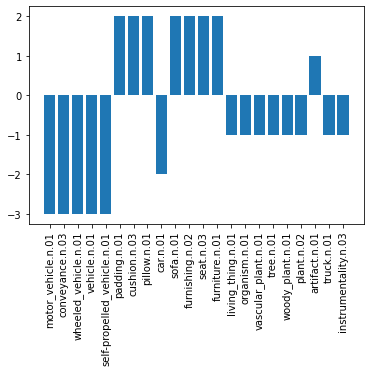
ds.global_explanation([["tree", "man", "car"], ["man", "truck", "car"]], ["outdoor", "outdoor"])
{'motor_vehicle.n.01': -3,
 'conveyance.n.03': -3,
 'wheeled_vehicle.n.01': -3,
 'vehicle.n.01': -3,
 'self-propelled_vehicle.n.01': -3,
 'padding.n.01': 2,
 'cushion.n.03': 2,
 'pillow.n.01': 2,
 'car.n.01': -2,
 'sofa.n.01': 2,
 'furnishing.n.02': 2,
 'seat.n.03': 2,
 'furniture.n.01': 2,
 'living_thing.n.01': -1,
 'organism.n.01': -1,
 'vascular_plant.n.01': -1,
 'tree.n.01': -1,
 'woody_plant.n.01': -1,
 'plant.n.02': -1,
 'artifact.n.01': 1,
 'truck.n.01': -1,
 'instrumentality.n.03': -1}
# plot the global explanation in abar plot
import matplotlib.pyplot as plt

explanations = ds.global_explanation([["tree", "man", "car"], ["man", "truck", "car"]], ["outdoor", "outdoor"])

plt.bar(explanations.keys(), explanations.values())
plt.xticks(rotation=90)
plt.show()
How to use the library with Graphs
# Create an instance of a graph
# The graph bellow contains the triples:
# (car, in, garage)
# (person, in, car)
# (person, in, garage)

instance1 = [
    connect_list_to_wordnet(["car", "in^garage"]),
    connect_list_to_wordnet(["person", "in^car"]),
    connect_list_to_wordnet(["person", "in^garage"]),
]

# and also we create two additional instances in order to create an Explanation Dataset
instance2 = [
    connect_list_to_wordnet(["car", "in^garage"]),
    connect_list_to_wordnet(["cat", "in^car"]),
    connect_list_to_wordnet(["person", "in^garage"]),
]


instance3 = [
    connect_list_to_wordnet(["car", "in^garage"]),
    connect_list_to_wordnet(["dog", "in^car"]),
    connect_list_to_wordnet(["person", "in^garage"]),
]


from cece.graph import *

# we transform the instances to a graph through the Graph class
# this class gives us additional functionality
g1 = Graph (instance1, connect_to_wordnet = False)
g2 = Graph (instance2, connect_to_wordnet = False)
g3 = Graph (instance3, connect_to_wordnet = False)


# calculate the set edit cost from graph g1 to graph g2, along with the set edit path
g1.cost(g2, return_edits = True)
(9,
 {'additions': [],
  'removals': [],
  'transf': [([{'physical_entity.n.01', 'whole.n.02', 'person.n.01', 'entity.n.01', 'living_thing.n.01', 'object.n.01', 'organism.n.01'}
     {'abstraction.n.06', 'definite_quantity.n.01', 'whole.n.02', 'measure.n.02', 'unit_of_measurement.n.01', 'instrumentality.n.03', 'motor_vehicle.n.01', 'conveyance.n.03', 'car.n.01', 'vehicle.n.01', 'artifact.n.01', 'physical_entity.n.01', 'self-propelled_vehicle.n.01', 'linear_unit.n.01', 'entity.n.01', 'object.n.01', 'inch.n.01', 'wheeled_vehicle.n.01'}]
    {},
    [{'physical_entity.n.01', 'whole.n.02', 'placental.n.01', 'cat.n.01', 'animal.n.01', 'entity.n.01', 'living_thing.n.01', 'object.n.01', 'chordate.n.01', 'mammal.n.01', 'feline.n.01', 'organism.n.01', 'vertebrate.n.01', 'carnivore.n.01'}
     {'abstraction.n.06', 'definite_quantity.n.01', 'whole.n.02', 'measure.n.02', 'unit_of_measurement.n.01', 'instrumentality.n.03', 'motor_vehicle.n.01', 'conveyance.n.03', 'car.n.01', 'vehicle.n.01', 'artifact.n.01', 'physical_entity.n.01', 'self-propelled_vehicle.n.01', 'linear_unit.n.01', 'entity.n.01', 'object.n.01', 'inch.n.01', 'wheeled_vehicle.n.01'}]
    {})]})
Simpler way to create a graph
# simpler way to create graphs using connect_to_wordnet = True parameter
instance1 = [["car", "in^garage"], ["person", "in^car"], ["person", "in^garage"]]
instance2 = [["car", "in^garage"], ["cat", "in^car"], ["person", "in^garage"]]
instance3 = [["car", "in^garage"], ["dog", "in^car"], ["person", "in^garage"]]

from cece.graph import *

g1 = Graph (instance1, connect_to_wordnet = True)
g2 = Graph (instance2, connect_to_wordnet = True)
g3 = Graph (instance3, connect_to_wordnet = True)

g1.cost(g2, return_edits = True)
(9,
 {'additions': [],
  'removals': [],
  'transf': [([{'physical_entity.n.01', 'whole.n.02', 'person.n.01', 'entity.n.01', 'living_thing.n.01', 'object.n.01', 'organism.n.01'}
     {'abstraction.n.06', 'definite_quantity.n.01', 'whole.n.02', 'measure.n.02', 'unit_of_measurement.n.01', 'instrumentality.n.03', 'motor_vehicle.n.01', 'conveyance.n.03', 'car.n.01', 'vehicle.n.01', 'artifact.n.01', 'physical_entity.n.01', 'self-propelled_vehicle.n.01', 'linear_unit.n.01', 'entity.n.01', 'object.n.01', 'inch.n.01', 'wheeled_vehicle.n.01'}]
    {},
    [{'physical_entity.n.01', 'whole.n.02', 'placental.n.01', 'cat.n.01', 'animal.n.01', 'entity.n.01', 'living_thing.n.01', 'object.n.01', 'chordate.n.01', 'mammal.n.01', 'feline.n.01', 'organism.n.01', 'vertebrate.n.01', 'carnivore.n.01'}
     {'abstraction.n.06', 'definite_quantity.n.01', 'whole.n.02', 'measure.n.02', 'unit_of_measurement.n.01', 'instrumentality.n.03', 'motor_vehicle.n.01', 'conveyance.n.03', 'car.n.01', 'vehicle.n.01', 'artifact.n.01', 'physical_entity.n.01', 'self-propelled_vehicle.n.01', 'linear_unit.n.01', 'entity.n.01', 'object.n.01', 'inch.n.01', 'wheeled_vehicle.n.01'}]
    {})]})
instance1 = [["car", "in^garage"], ["person", "in^car"], ["person", "in^garage"]]
instance2 = [["car", "in^garage"], ["cat", "in^car"], ["person", "in^garage"]]
instance3 = [["car", "in^garage"], ["dog", "in^car"], ["person", "in^garage"]]

dataset = [instance1, instance2, instance3]
gd = xDataset(dataset, ["outdoor", "indoor", "indoor"], connect_to_wordnet =True, is_graph = True)
Retrieve the Closest Sample using Graphs
gd.retrieve([["car", "in^car"], ["person", "in^car"], ["person", "in^garage"]])
{0: 11, 1: 20, 2: 20}
Explain a Sample using Graphs
gd.explain([["car", "in^car"], ["person", "in^car"], ["person", "in^garage"]], "indoor")
(0, 11)
1 maintainer

Metadata
1 maintainer
Release files for cece 0.1.1
For a detailed explanation of source distributions (sdists) and built distributions (wheels), please see the package formats documentation.
Source distribution (sdist)
| File | Size | Uploaded | |
|---|---|---|---|
| cece-0.1.1.tar.gz | 13.4 kB | Details |
Built distribution (wheel)
| File | Interpreter | ABI | Platform | Reset |
|---|---|---|---|---|
| cece-0.1.1-py3-none-any.whl | Python 3 | none | any | Details |
Total release size: 25.1 kB
Release files / cece-0.1.1.tar.gz
| Download URL | cece-0.1.1.tar.gz |
|---|---|
| Size | 13.4 kB |
| Tags | Source |
|
SHA-256 checksum How to use checksums |
97d81646c18d10943b58fd7b3158e9e77badc4b590fb4a46f2292536d434a284
|
|
BLAKE2b-256 checksum How to use checksums |
728aaed4f9fa61b739e41238b4a8359843e789a91af6bc73f2494b45670aa61e
|
| Upload date | |
|
Uploaded using Trusted Publishing? What is trusted publishing? |
No |
| Uploaded via |
twine/4.0.2 CPython/3.8.8
|
Release files / cece-0.1.1-py3-none-any.whl
| Download URL | cece-0.1.1-py3-none-any.whl |
|---|---|
| Size | 11.7 kB |
| Tags | Python 3 |
|
SHA-256 checksum How to use checksums |
27ddc5211b6d66e8384075b301227918a7211e4a7cba0a9b7efd9ad3cd112e47
|
|
BLAKE2b-256 checksum How to use checksums |
2f8e142bea9f112f678d743dec974dd5c4f40d28f4d9ef95a2bbb3ba8c7424cf
|
| Upload date | |
|
Uploaded using Trusted Publishing? What is trusted publishing? |
No |
| Uploaded via |
twine/4.0.2 CPython/3.8.8
|














