
CEHR-BERT





CEHR-BERT is a large language model developed for the structured EHR data, the work has been published at https://proceedings.mlr.press/v158/pang21a.html. CEHR-BERT currently only supports the structured EHR data in the OMOP format, which is a common data model used to support observational studies and managed by the Observational Health Data Science and Informatics (OHDSI) open-science community. There are three major components in CEHR-BERT, data generation, model pre-training, and model evaluation with fine-tuning, those components work in conjunction to provide an end-to-end model evaluation framework. The CEHR-BERT framework is designed to be extensible, users could write their own pretraining models, evaluation procedures, and downstream prediction tasks by extending the abstract classes, see click on the links for more details. For a quick start, navigate to the Get Started section.
Patient Representation
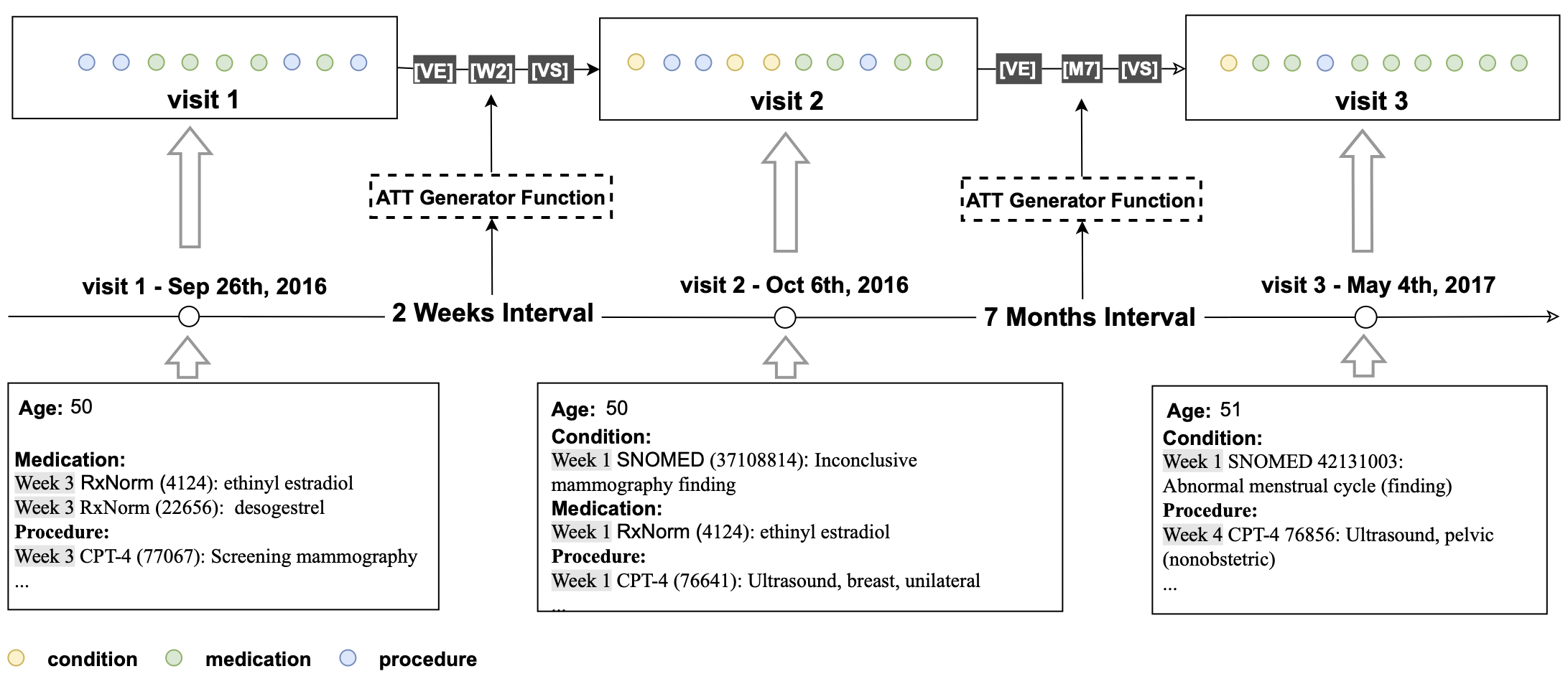
For each patient, all medical codes were aggregated and constructed into a sequence chronologically. In order to incorporate temporal information, we inserted an artificial time token (ATT) between two neighboring visits based on their time interval. The following logic was used for creating ATTs based on the following time intervals between visits, if less than 28 days, ATTs take on the form of $W_n$ where n represents the week number ranging from 0-3 (e.g. $W_1$); 2) if between 28 days and 365 days, ATTs are in the form of $M_n$ where n represents the month number ranging from 1-11 e.g $M_{11}$;
- beyond 365 days then a LT (Long Term) token is inserted. In addition, we added two more special tokens — VS and VE to represent the start and the end of a visit to explicitly define the visit segment, where all the concepts associated with the visit are subsumed by VS and VE.
Model Architecture
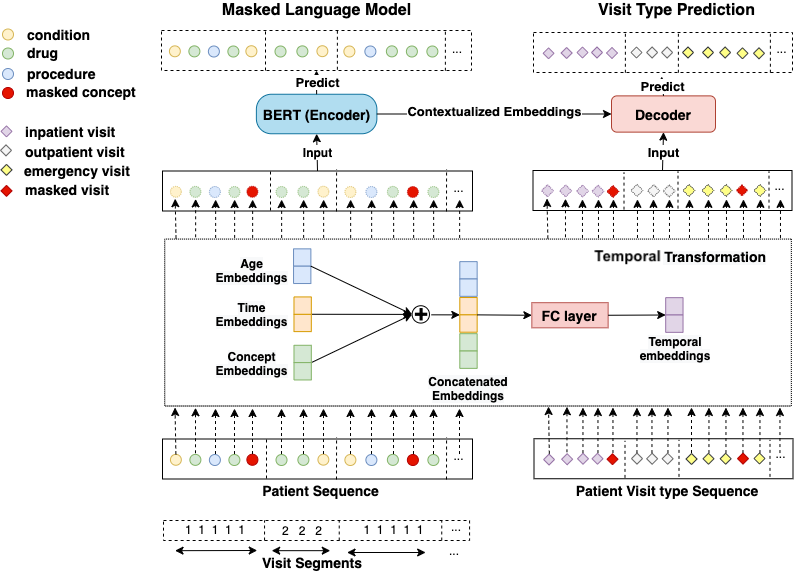
Overview of our BERT architecture on structured EHR data. To distinguish visit boundaries, visit segment embeddings are added to concept embeddings. Next, both visit embeddings and concept embeddings go through a temporal transformation, where concept, age and time embeddings are concatenated together. The concatenated embeddings are then fed into a fully connected layer. This temporal concept embedding becomes the input to BERT. We used the BERT learning objective Masked Language Model as the primary learning objective and introduced an EHR specific secondary learning objective visit type prediction.
Pre-requisite
The project is built in python 3.10, and project dependency needs to be installed
Create a new Python virtual environment
python3.10 -m venv .venv;
source .venv/bin/activate;
Build the project
pip install -e .[dev]
OMOP vs. MEDS Format Considerations
CEHR-BERT can be trained using either the OMOP or MEDS data formats; however, models trained on one format are not compatible with those trained on the other. This incompatibility arises because CEHR-BERT uses different concept identifiers depending on the format: standard concept IDs (e.g., SNOMED for conditions) in OMOP, and source concept IDs (e.g., ICD-9/10) in MEDS. The mappings between these terminologies are many-to-many, making direct alignment between formats unreliable. It is therefore crucial to use a consistent data format across pretraining, fine-tuning, and downstream tasks such as linear probing.
Instructions for Use with MEDS
Step 1. Convert MEDS to the meds_reader database
If you don't have the MEDS dataset, you could convert the OMOP dataset to the MEDS using meds_etl. We have prepared a synthea dataset with 1M patients for you to test, you could download it at omop_synthea.tar.gz
tar -xvf omop_synthea.tar .
Convert the OMOP dataset to the MEDS format
pip install meds_etl==0.3.6;
meds_etl_omop omop_synthea synthea_meds;
Add subject_splits.parquet to the MEDS metadata
import os.path
import numpy as np
import polars as pl

person = pl.read_parquet("omop_synthea/person/*.parquet")
# Set random seed for reproducibility
np.random.seed(42)

# Generate random indices
n = len(person)
indices = np.random.permutation(n)

# Calculate split points
train_end = int(n * 0.7)
tuning_end = train_end + int(n * 0.15)

# Create boolean masks
train_mask = indices < train_end
tuning_mask = (indices >= train_end) & (indices < tuning_end)
held_out_mask = indices >= tuning_end

# Split the DataFrame
train_df = person.filter(pl.Series(train_mask))
tuning_df = person.filter(pl.Series(tuning_mask))
held_out_df = person.filter(pl.Series(held_out_mask))

data_split = []
for split, df in zip(
    ("train", "tuning", "held_out"), (train_df, tuning_df, held_out_df)
):
    df_split = df.select(pl.col("person_id").alias("subject_id")).with_columns(
        pl.lit(split).alias("split")
    )
    data_split.append(df_split)
split_df = pl.concat(data_split)
split_df.write_parquet(
    os.path.join("synthea_meds", "metadata", "subject_splits.parquet")
)
Convert MEDS to the meds_reader database to get the patient level data
meds_reader_convert synthea_meds synthea_meds_reader --num_threads 4
Step 2. Pretrain CEHR-BERT using the meds_reader database
mkdir test_dataset_prepared;
mkdir test_synthea_results;
python -m cehrbert.runners.hf_cehrbert_pretrain_runner \
   sample_configs/hf_cehrbert_pretrain_runner_meds_config.yaml
Instructions for Use with OMOP
Step 1. Download OMOP tables as parquet files
We created a spark app to download OMOP tables from SQL Server as parquet files. You need adjust the properties
in db_properties.ini to match with your database setup. Download jtds-1.3.1.jar into the spark jars folder in the python environment.
cp jtds-1.3.1.jar .venv/lib/python3.10/site-packages/pyspark/jars/
We use spark as the data processing engine to generate the pretraining data. For that, we need to set up the relevant SPARK environment variables.
# the omop derived tables need to be built using pyspark
export SPARK_WORKER_INSTANCES="1"
export SPARK_WORKER_CORES="16"
export SPARK_EXECUTOR_CORES="2"
export SPARK_DRIVER_MEMORY="12g"
export SPARK_EXECUTOR_MEMORY="12g"
Download the OMOP tables as parquet files
python -u -m cehrbert.tools.download_omop_tables -c db_properties.ini \
   -tc person visit_occurrence condition_occurrence procedure_occurrence \
   drug_exposure measurement observation_period \
   concept concept_relationship concept_ancestor \
   -o ~/Documents/omop_test/
We have prepared a synthea dataset with 1M patients for you to test, you could download it at omop_synthea.tar.gz
tar -xvf omop_synthea.tar ~/Document/omop_test/
Step 2. Generate training data for CEHR-BERT using cehrbert_data
We order the patient events in chronological order and put all data points in a sequence. We insert artificial tokens VS (visit start) and VE (visit end) to the start and the end of the visit. In addition, we insert artificial time tokens (ATT) between visits to indicate the time interval between visits. This approach allows us to apply BERT to structured EHR as-is. The sequence can be seen conceptually as [VS] [V1] [VE] [ATT] [VS] [V2] [VE], where [V1] and [V2] represent a list of concepts associated with those visits.
Set up the pyspark environment variables if you haven't done so.
# the omop derived tables need to be built using pyspark
export SPARK_WORKER_INSTANCES="1"
export SPARK_WORKER_CORES="16"
export SPARK_EXECUTOR_CORES="2"
export SPARK_DRIVER_MEMORY="12g"
export SPARK_EXECUTOR_MEMORY="12g"
Generate the pretraining data using the following command
sh src/cehrbert/scripts/create_cehrbert_pretraining_data.sh \
  --input_folder $OMOP_DIR \
  --output_folde $CEHR_BERT_DATA_DIR \
  --start_date "1985-01-01"
Step 3. Pre-train CEHR-BERT
If you don't have your own OMOP instance, we have provided a sample of patient sequence data generated using Synthea
at sample/patient_sequence in the repo. CEHR-BERT expects the data folder to be named as patient_sequence
mkdir test_dataset_prepared;
mkdir test_results;
python -m cehrbert.runners.hf_cehrbert_pretrain_runner \
   sample_configs/hf_cehrbert_pretrain_runner_config.yaml
If your dataset is large, you could add --use_dask in the command above
Step 4. Generate hf readmission prediction task
If you don't have your own OMOP instance, we have provided a sample of patient sequence data generated using Synthea
at sample/hf_readmissioon in the repo. Set up the pyspark environment variables if you haven't done so.
# the omop derived tables need to be built using pyspark
export SPARK_WORKER_INSTANCES="1"
export SPARK_WORKER_CORES="16"
export SPARK_EXECUTOR_CORES="2"
export SPARK_DRIVER_MEMORY="12g"
export SPARK_EXECUTOR_MEMORY="12g"
Generate the HF readmission prediction task
python -u -m cehrbert_data.prediction_cohorts.hf_readmission \
   -c hf_readmission -i ~/Documents/omop_test/ -o ~/Documents/omop_test/cehr-bert \
   -dl 1985-01-01 -du 2020-12-31 \
   -l 18 -u 100 -ow 360 -ps 0 -pw 30 \
   --is_new_patient_representation
Step 5. Fine-tune CEHR-BERT
mkdir test_finetune_results;
python -m cehrbert.runners.hf_cehrbert_finetune_runner \
   sample_configs/hf_cehrbert_finetuning_runner_config.yaml
Contact us
If you have any questions, feel free to contact us at CEHR-BERT@lists.cumc.columbia.edu
Citation
Please acknowledge the following work in papers
Chao Pang, Xinzhuo Jiang, Krishna S. Kalluri, Matthew Spotnitz, RuiJun Chen, Adler Perotte, and Karthik Natarajan. "Cehr-bert: Incorporating temporal information from structured ehr data to improve prediction tasks." In Proceedings of Machine Learning for Health, volume 158 of Proceedings of Machine Learning Research, pages 239–260. PMLR, 04 Dec 2021.
1 maintainer

Metadata
1 maintainer
Release files for cehrbert 1.5.0
For a detailed explanation of source distributions (sdists) and built distributions (wheels), please see the package formats documentation.
Source distribution (sdist)
| File | Size | Uploaded | |
|---|---|---|---|
| cehrbert-1.5.0.tar.gz | 22.2 MB | Details |
Built distribution (wheel)
| File | Interpreter | ABI | Platform | Reset |
|---|---|---|---|---|
| cehrbert-1.5.0-py3-none-any.whl | Python 3 | none | any | Details |
Total release size: 22.3 MB
Release files / cehrbert-1.5.0.tar.gz
| Download URL | cehrbert-1.5.0.tar.gz |
|---|---|
| Size | 22.2 MB |
| Tags | Source |
|
SHA-256 checksum How to use checksums |
ed7feec4c5151f442e818d99bdd18d5dfbe43d2782262c138053dbe7c5ed39e9
|
|
BLAKE2b-256 checksum How to use checksums |
4ecc8484861430080b42f08470d572824b17bcfa4cc2da13c845886f12aa2d23
|
| Upload date | |
|
Uploaded using Trusted Publishing? What is trusted publishing? |
Yes |
| Uploaded via |
twine/6.1.0 CPython/3.13.7
|
Provenance
Provenance describes where a file came from. On PyPI, provenance is shared via attestations, which provide a verifiable record of the build or publishing details. View details, limitations and caveats.


PyPI Publish Attestation
PyPI verified that this artifact, at this checksum, originated from the publisher listed below.
Signed by GitHub Actions, verified by PyPI on Dec 9, 2025.
Transparency logRelease files / cehrbert-1.5.0-py3-none-any.whl
| Download URL | cehrbert-1.5.0-py3-none-any.whl |
|---|---|
| Size | 109.5 kB |
| Tags | Python 3 |
|
SHA-256 checksum How to use checksums |
50f6c90546210ad67a5c7e23802e83e1dae7abb27e7abe951fc3fb4e168af0a9
|
|
BLAKE2b-256 checksum How to use checksums |
3b06e4dde56f307fef21595298d108e45d96ba4c64cd63f7e1b4cf55589d2bab
|
| Upload date | |
|
Uploaded using Trusted Publishing? What is trusted publishing? |
Yes |
| Uploaded via |
twine/6.1.0 CPython/3.13.7
|
Provenance
Provenance describes where a file came from. On PyPI, provenance is shared via attestations, which provide a verifiable record of the build or publishing details. View details, limitations and caveats.
PyPI Publish Attestation
PyPI verified that this artifact, at this checksum, originated from the publisher listed below.
Signed by GitHub Actions, verified by PyPI on Dec 9, 2025.
Transparency log













