

Introduction
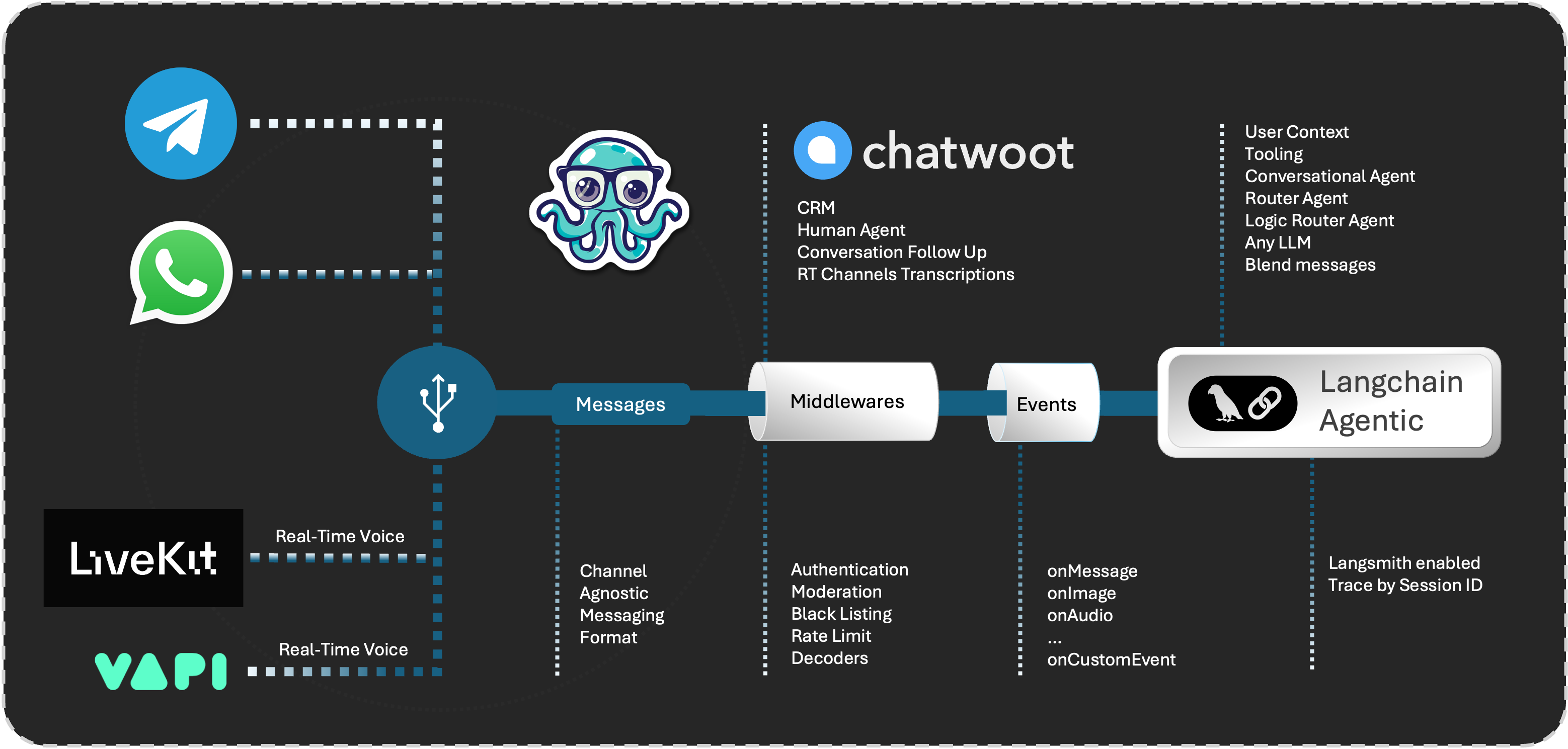
Cel.ai is a AI Driven Communication Platform. Designed to accelerate the development of omnichannel virtual assistants. Whether you need to integrate with messaging platforms like WhatsApp, Telegram, or VoIP services such as VAPI.com, Cel.ai provides the tools and flexibility to get your assistant up and running quickly.
Don't waste time building on top of hosted platforms that limit your control and flexibility. Cel.ai is designed to be self-hosted, giving you the freedom to customize and extend the platform to meet your needs.
Supported Connectors:
- Telegram
- VAPI.ai
- Chatwoot
Off the shelf, Cel.ai provides a powerful tools such as:
- Multi Asssitant Router
- Logic Router based on state variables
- Agentic Router based on user itent and context
- Semantic Router (coming soon)
- Tooling
- Events:
message,image,new_conversation, and more - Powered by Langchain
- Langsmith user tracing
- Moderation Middlewares
- Blacklist Middlewares
- Invitations
- Ngrok native integration
- User Sequential Message Processing
Multi-Assistant Router
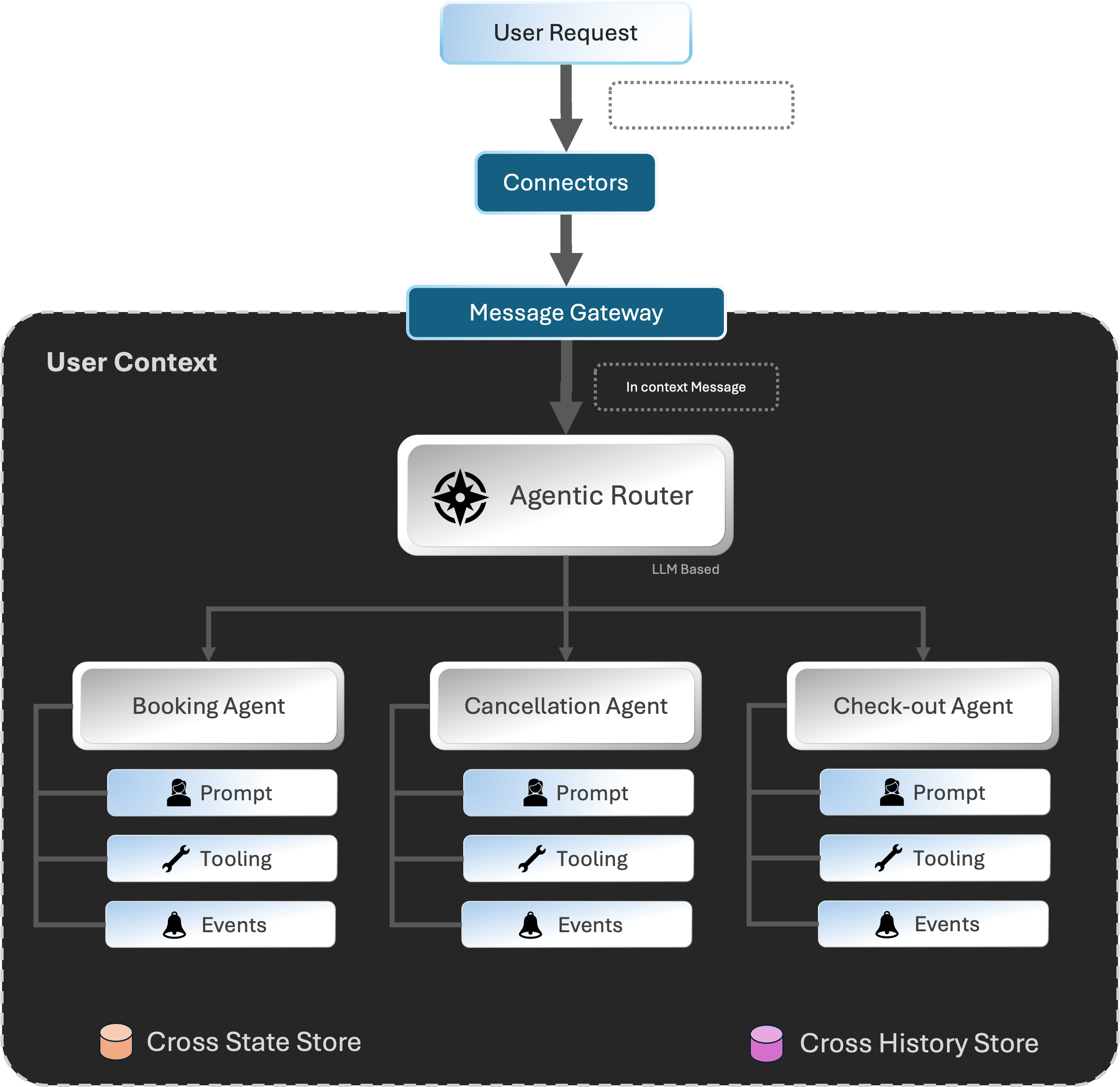
Cel.ai provides a powerful multi-assistant router that allows you to create complex conversational assistants easily. This architecture allows you to scale in a modular way, adding new assistants as needed. The routing can be done based on state variables, user intent, or context.
Agentic Router is the most powerful router in Cel.ai. It allows you to triage messages to different assistants based on user intent and context. It keeps prompts small and focused, allowing for more accurate responses.
Keep prompts at mininal length and focused on a single task will ensure that the user experience is optimal and the response cost are kept low.
For example, if you are building a virtual assistant for a hotel, you can have different assistants for booking/reservation, cancellation, room service, and check-out. The Agentic Router will automatically route messages to the correct assistant based on the user's intent.
In Context Routing
Cel.ai provides a powerful in-context routing system. Messages are routed to the correct assistant based on the user's intent and context.
Assistant can have its own set of prompts and responses, but share the same context.
State and History stores are shared between all assistants, allowing for a seamless user experience. Ensuring all assistants are in sync with the user's context.
Install
pip install from github:
pip install celai
Getting Started
Let's create a simple assistant that can be accessed via Telegram. First, you'll need to create a new Telegram bot and get the API token. You can do this by following the instructions in the Telegram documentation.
This example uses OpenAI's GPT-4o model to create a simple assistant that can help users buy Bitcoins. To use the OpenAI API, you'll need to sign up for an API key on the OpenAI website.
Configure Environment Variables
OpenAI API Key
Make sure to set the OPENAI_API_KEY environment variable with your OpenAI API key:
export OPENAI_API_KEY=<YOUR_OPENAI_API_KEY>
Ngrok Authtoken
The easy way to get a public HTTPS URL for your assistant is to use ngrok. Cel.ai has built-in support for ngrok, so you can easily delegate the public URL creation to Cel.ai. To use ngrok, you'll need a Ngrok authtoken. You can get one by signing up on the ngrok website. Then set the NGROK_AUTHTOKEN environment variable:
export NGROK_AUTHTOKEN=<YOUR_NGROK_AUTHTOKEN>
Then you can create a new Python script with the following code, don't forget to
replace <YOUR_TELEGRAM_TOKEN> with the token you received from Telegram:
# Import Cel.ai modules
import os
from cel.connectors.telegram import TelegramConnector
from cel.gateway.message_gateway import MessageGateway
from cel.assistants.macaw.macaw_assistant import MacawAssistant
from cel.prompt.prompt_template import PromptTemplate


# Setup prompt
prompt = """You are an AI assistant. Called Celia. You can help a user to buy Bitcoins."""
prompt_template = PromptTemplate(prompt)

# Create the assistant based on the Macaw Assistant
# Macaw is a Langchain-based assistant that can be
# used to create a wide variety of assistants
ast = MacawAssistant(prompt=prompt_template)

gateway = MessageGateway(
    assistant=ast,
    host="127.0.0.1", port=5004,
)

# For this example, we will use the Telegram connector
conn = TelegramConnector(
    token="<YOUR_TELEGRAM_TOKEN>"
)

# Register the connector with the gateway
gateway.register_connector(conn)

# Then start the gateway and begin processing messages
# with ngrok enabled Cel.ai will automatically create a
# public URL for the assistant.
gateway.run(enable_ngrok=True)
.
1 maintainer

Download files
Download the file for your platform. If you're not sure which to choose, learn more about installing packages.
Source Distribution
Built Distribution
Filter files by name, interpreter, ABI, and platform.
If you're not sure about the file name format, learn more about wheel file names.
Copy a direct link to the current filters
File details
Details for the file celai-0.7.5.tar.gz.
File metadata
- Download URL: celai-0.7.5.tar.gz
- Upload date:
- Size: 2.4 MB
- Tags: Source
- Uploaded using Trusted Publishing? Yes
- Uploaded via:
twine/6.1.0 CPython/3.13.7
File hashes
| Algorithm | Hash digest | |
|---|---|---|
| SHA256 |
8afcf3c7cc883861ba09dbc6f453ccf4ebcc93b67bc826914f6f23a93d41fb82
|
|
| MD5 |
0da88b9e39502926b370fd9e64115a5b
|
|
| BLAKE2b-256 |
54d30ad199ccbfd690bd16d926de38e55114f0836e38a96558e27a0c46fd9cc8
|
Provenance
The following attestation bundles were made for celai-0.7.5.tar.gz:
Publisher:
release-please.yml on cel-ai/celai
-
Statement:
-
Statement type:
https://in-toto.io/Statement/v1 -
Predicate type:
https://docs.pypi.org/attestations/publish/v1 -
Subject name:
celai-0.7.5.tar.gz -
Subject digest:
8afcf3c7cc883861ba09dbc6f453ccf4ebcc93b67bc826914f6f23a93d41fb82 - Sigstore transparency entry: 2501008489
- Sigstore integration time:
-
Permalink:
cel-ai/celai@348fdd50d43ca3dbd34213e52089d26fc1643e4f -
Branch / Tag:
refs/heads/main - Owner: https://github.com/cel-ai
-
Access:
public
-
Token Issuer:
https://token.actions.githubusercontent.com -
Runner Environment:
github-hosted -
Publication workflow:
release-please.yml@348fdd50d43ca3dbd34213e52089d26fc1643e4f -
Trigger Event:
push
-
Statement type:
File details
Details for the file celai-0.7.5-py3-none-any.whl.
File metadata
- Download URL: celai-0.7.5-py3-none-any.whl
- Upload date:
- Size: 2.4 MB
- Tags: Python 3
- Uploaded using Trusted Publishing? Yes
- Uploaded via:
twine/6.1.0 CPython/3.13.7
File hashes
| Algorithm | Hash digest | |
|---|---|---|
| SHA256 |
d11616d528496c083b9755201e43400def8326a47db937634ec0406c7b639b5e
|
|
| MD5 |
eb6c3199bc6f73aaeeff8472d294bdc5
|
|
| BLAKE2b-256 |
8e88c6873a2c2995218b0dbfc88c6056abfd30b5274abf0a0f713f5fa9aaed5f
|
Provenance
The following attestation bundles were made for celai-0.7.5-py3-none-any.whl:
Publisher:
release-please.yml on cel-ai/celai
-
Statement:
-
Statement type:
https://in-toto.io/Statement/v1 -
Predicate type:
https://docs.pypi.org/attestations/publish/v1 -
Subject name:
celai-0.7.5-py3-none-any.whl -
Subject digest:
d11616d528496c083b9755201e43400def8326a47db937634ec0406c7b639b5e - Sigstore transparency entry: 2501008511
- Sigstore integration time:
-
Permalink:
cel-ai/celai@348fdd50d43ca3dbd34213e52089d26fc1643e4f -
Branch / Tag:
refs/heads/main - Owner: https://github.com/cel-ai
-
Access:
public
-
Token Issuer:
https://token.actions.githubusercontent.com -
Runner Environment:
github-hosted -
Publication workflow:
release-please.yml@348fdd50d43ca3dbd34213e52089d26fc1643e4f -
Trigger Event:
push
-
Statement type:







